Building Idempotent Data Pipelines with DuckDB SQL

Alright using the term “idempotent” was just a clickbait 🙂 it simply means avoiding the processing of the same file multiple times ( ok for a formal definition wikipedia has a nice article). in this case the script will process only new files added to the source system, assuming the filenames are unique.

Although this is easily accomplished using Python API , achieving the same result using DuckDB SQL was a bit tricky until the introduction of SQL variables in the developpement branch a couple of weeks ago, particularly Variables can now be referenced within read files operation.

in summary this is what the SQL script is doing.

  1. Creation of a Hive table in the file section of onelake, it is very important step, if you query an empty folder you will get an error, , as DuckDB does not support external table, we will just add a dummy parquet file with empty rows, it is filtered out in the next step.
  COPY (
  SELECT
    '' AS filename,
    NULL AS year ) TO "/lakehouse/default/Files/scada" (FORMAT PARQUET,
    PARTITION_BY (year),
    OVERWRITE_OR_IGNORE ) ;
  1. Listing of CSV files for ingestion from the source system.
  2. Removal of already ingested files
SET
  VARIABLE list_of_files = (
  SELECT
    list(file)
  FROM
    glob("/lakehouse/default/Files/Daily_Reports/*.CSV")
  WHERE
    parse_filename(file) NOT IN (
    SELECT
      filename
    FROM
      read_parquet("/lakehouse/default/Files/scada/*/*.parquet")))
  1. Generate list of new files and pass it to DuckDB for processing.

just a preview of the query plan for this step

  1. Saving as partitioned Hive parquet folders

Note : I am using Fabric notebook as an example, but obviously you can run it anywhere, actually I did it run in my laptop and as far as I can tell, Onelake throughput is competitive with my ssd disk 🙂

  COPY (
  SELECT
    '' AS filename,
    NULL AS year ) TO "/lakehouse/default/Files/scada" (FORMAT PARQUET,
    PARTITION_BY (year),
    OVERWRITE_OR_IGNORE ) ;
SET
  VARIABLE list_of_files = (
  SELECT
    list(file)
  FROM
    glob("/lakehouse/default/Files/Daily_Reports/*.CSV")
  WHERE
    parse_filename(file) NOT IN (
    SELECT
      filename
    FROM
      read_parquet("/lakehouse/default/Files/scada/*/*.parquet"))) ;
CREATE OR REPLACE VIEW
  raw AS (
  SELECT
    *
  FROM
    read_csv(getvariable('list_of_files'),
      Skip=1,
      header =0,
      all_varchar=1,
      COLUMNS={ 'I': 'VARCHAR',
      'UNIT': 'VARCHAR',
      'XX': 'VARCHAR',
      'VERSION': 'VARCHAR',
      'SETTLEMENTDATE': 'VARCHAR',
      'RUNNO': 'VARCHAR',
      'DUID': 'VARCHAR',
      'INTERVENTION': 'VARCHAR',
      'DISPATCHMODE': 'VARCHAR',
      'AGCSTATUS': 'VARCHAR',
      'INITIALMW': 'VARCHAR',
      'TOTALCLEARED': 'VARCHAR',
      'RAMPDOWNRATE': 'VARCHAR',
      'RAMPUPRATE': 'VARCHAR',
      'LOWER5MIN': 'VARCHAR',
      'LOWER60SEC': 'VARCHAR',
      'LOWER6SEC': 'VARCHAR',
      'RAISE5MIN': 'VARCHAR',
      'RAISE60SEC': 'VARCHAR',
      'RAISE6SEC': 'VARCHAR',
      'MARGINAL5MINVALUE': 'VARCHAR',
      'MARGINAL60SECVALUE': 'VARCHAR',
      'MARGINAL6SECVALUE': 'VARCHAR',
      'MARGINALVALUE': 'VARCHAR',
      'VIOLATION5MINDEGREE': 'VARCHAR',
      'VIOLATION60SECDEGREE': 'VARCHAR',
      'VIOLATION6SECDEGREE': 'VARCHAR',
      'VIOLATIONDEGREE': 'VARCHAR',
      'LOWERREG': 'VARCHAR',
      'RAISEREG': 'VARCHAR',
      'AVAILABILITY': 'VARCHAR',
      'RAISE6SECFLAGS': 'VARCHAR',
      'RAISE60SECFLAGS': 'VARCHAR',
      'RAISE5MINFLAGS': 'VARCHAR',
      'RAISEREGFLAGS': 'VARCHAR',
      'LOWER6SECFLAGS': 'VARCHAR',
      'LOWER60SECFLAGS': 'VARCHAR',
      'LOWER5MINFLAGS': 'VARCHAR',
      'LOWERREGFLAGS': 'VARCHAR',
      'RAISEREGAVAILABILITY': 'VARCHAR',
      'RAISEREGENABLEMENTMAX': 'VARCHAR',
      'RAISEREGENABLEMENTMIN': 'VARCHAR',
      'LOWERREGAVAILABILITY': 'VARCHAR',
      'LOWERREGENABLEMENTMAX': 'VARCHAR',
      'LOWERREGENABLEMENTMIN': 'VARCHAR',
      'RAISE6SECACTUALAVAILABILITY': 'VARCHAR',
      'RAISE60SECACTUALAVAILABILITY': 'VARCHAR',
      'RAISE5MINACTUALAVAILABILITY': 'VARCHAR',
      'RAISEREGACTUALAVAILABILITY': 'VARCHAR',
      'LOWER6SECACTUALAVAILABILITY': 'VARCHAR',
      'LOWER60SECACTUALAVAILABILITY': 'VARCHAR',
      'LOWER5MINACTUALAVAILABILITY': 'VARCHAR',
      'LOWERREGACTUALAVAILABILITY': 'VARCHAR' },
      filename =1,
      null_padding = TRUE,
      ignore_errors=1,
      auto_detect=FALSE)
  WHERE
    I='D'
    AND UNIT ='DUNIT'
    AND VERSION = '3' ) ; COPY (
  SELECT
    UNIT,
    DUID,
    parse_filename(filename) AS filename,
    CAST(COLUMNS(*EXCLUDE(DUID,
          UNIT,
          SETTLEMENTDATE,
          I,
          XX,
          filename)) AS double),
    CAST (SETTLEMENTDATE AS TIMESTAMPTZ) AS SETTLEMENTDATE,
    isoyear (CAST (SETTLEMENTDATE AS timestamp)) AS year
  FROM
    raw) TO "/lakehouse/default/Files/scada" (FORMAT PARQUET,
    PARTITION_BY (year),
    APPEND ) ;

While the Python API in a notebook is IMHO  the easiest approach for data transformation, it is nice to see that Pure SQL can support it. 

However, the real game-changer will be when DuckDB introduces support for Delta write. for now, you need another step to load those Parquet files to Delta either using Deltalake Python package or Spark Delta writer.

Benchmarking Synapse Serverless using TPC-H-SF10

Edit : February 2023 , Synapse serverless has substantially improved the Query performance for TPCH-SF10, first run which include calculating the statistics take around 2 minutes, but the second run is around 62 second.

In a previous blog, I did a benchmark for a couple of Database Engine, although it was not a rigorous test, pretty much the results were in the expected range, except for Synapse serverless, I got some weird results, and not sure if it is by design or I am doing something very wrong, so I thought it worth showing the steps I took hoping to find what’s exactly going on. The test was done in January 2022.

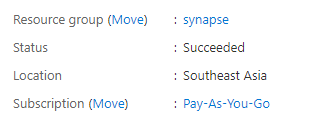
First Check : Same region

I am using an azure storage in Southeast Asia

My synapse Instance is in the same region

Ok both are in the same region, first best practice.

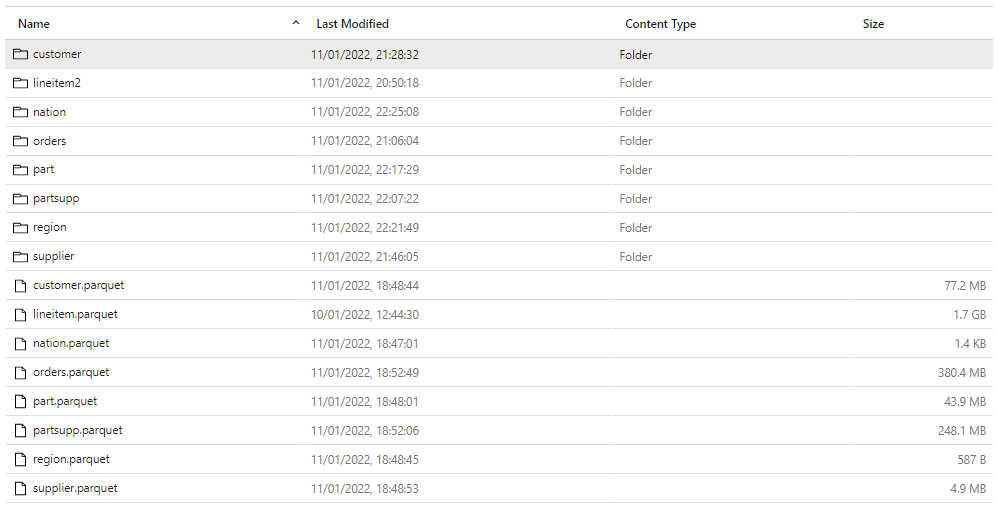
Loading Data into Azure Data Store

The 8 parquet files are saved in this Google drive, so anyone can download it,

Define Schema

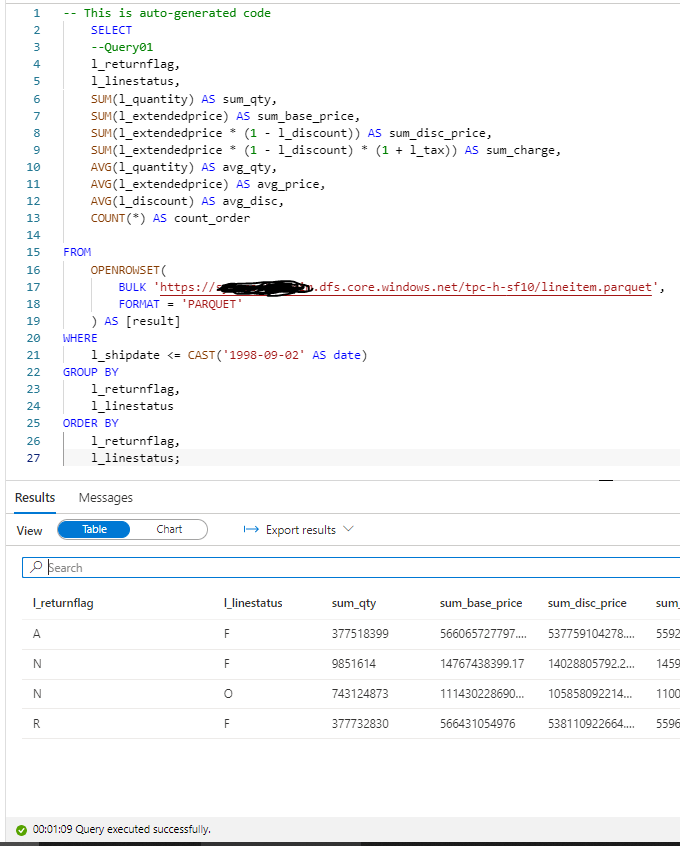
In Synapse, you can directly start querying a file without defining anything, using Openrowset, I thought I can test TPC-H Query 1 as it uses only 1 table, which did not work , some kind of case sensitive issue, when writing this blog I run the same Query and it worked just fine, ( no idea what changed)

1 minute on a second run, hmm not good, let’s try a proper external table , the data_source and File_format were already defined, so need to recreate it again.

CREATE EXTERNAL TABLE lineitem_temp (
	[L_ORDERKEY] bigint,
	[L_PARTKEY] bigint,
	[L_SUPPKEY] bigint,
	[L_LINENUMBER] bigint,
	[L_QUANTITY] float,
	[L_EXTENDEDPRICE] float,
	[L_DISCOUNT] float,
	[L_TAX] float,
	[L_RETURNFLAG] nvarchar(1),
	[L_LINESTATUS] nvarchar(1),
	[L_SHIPINSTRUCT] nvarchar(25),
	[L_SHIPMODE] nvarchar(10),
	[L_COMMENT] nvarchar(44),
	[l_shipdate] datetime2(7),
	[l_commitdate] datetime2(7),
	[l_receiptdate] datetime2(7)
	)
	WITH (
	LOCATION = 'lineitem.parquet',
	DATA_SOURCE = [xxx_core_windows_net],
	FILE_FORMAT = [SynapseParquetFormat]
	)
GO


SELECT count (*) FROM dbo.lineitem_temp
GO

A Proper Table with Data type and all

let’s try again the same Query 1

ok 2 minute for the first run, let’s try another run which will use statistics, it should be faster, 56 second ( btw, you pay for those statistics too)

Not happy with the results I asked Andy ( Our Synapse expert) and he was kind enough to download and test it, he suggested splitting the file give better performance , he got 16 second.

CETAS to the rescue

Create External Table as Select is a very powerful functionality in Serverless, The code is straightforward

CREATE EXTERNAL TABLE lineitem 
	WITH (
	LOCATION = '/lineitem',
	DATA_SOURCE = [xxxx_core_windows_net],
	FILE_FORMAT = [SynapseParquetFormat]
	)
as
SELECT * FROM dbo.lineitem_temp

Synapse will create a new table Lineitem with the same data type and a folder that contain multiple parquet files.

That’s all what you can do, you can’t partition the table, you can’t sort the table, but what’s really annoying you can’t delete the table, you have first to delete the table from the database then delete the folder

but at least it is well documented

Anyway, let’s see the result now

Not bad at all, 10 second and only 587 MB scanned compared to 50 second and 1.2 GB.

Now that I know that CETAS has better performance, I have done the same for remaning 7 tables.

Define all the tables

First Create an external Table to define the type then a CETAS, Synapse has done a great job guessing the type, I know it is parquet after all, but varchart is annoying by default it is 4000, you have to manually adjust the correct length.

TPC-H document contains the exact schema

Running the Test

The 22 Queries are saved here, I had to do some change to the SQL, changing limit to Top and extract year from x to Year (x), Query 15 did not run, I asked the Question on Stackoverflow and Wbob kindly answer it very quickly

The first run, I find some unexpected results

I thought I was doing something terribly wrong, the Query duration seems to increase substantially, after that I start messing around, what I found is, if you run just one Query at the time, or even 4, the results are fine, more than that, and the performance deteriorate quickly.

A Microsoft employee was very helpful and provided this script to Query the Database History

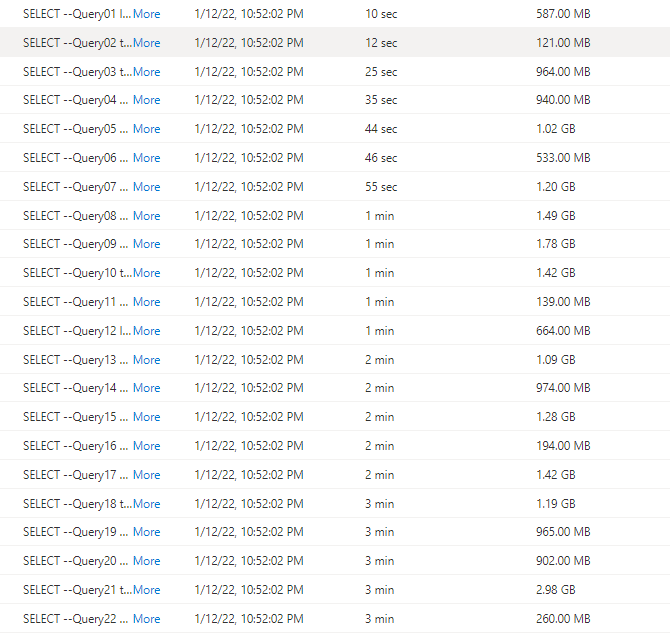
I imported the Query History to PowerBI and here is the results

There is no clear indication in the documentation that there is a very strict concurrency limitation, I tried to run the Script in SSMS and it is the same behavior, that seems to me the Engine is adding the Queries to a queue, there is a bottleneck somewhere.

Synapse serverless show the duration between when the Job was submitted until it is completed, there is no way to know the actual Duration of each Query, so basically the Overall Duration is the duration of the Last Query, in our Case Q22, which is around 3 Minutes.

Takeway

The Good news, the product team made it very clear, Synapse Serverless is not an Interactive Query Engine

Realistically speaking, reading from Azure storage will always be slower compared to a local SSD Storage, so no I am not comparing it to other DWH offering, having said that even for exploring files on azure storage, the performance is very problematic.

First Impression of Databricks SQL

Edit : 23 Dec 2021, Shant Hovsepian from Databricks was kind enough and gave me some suggestion, Blog Updated.

Edit : 25 Dec 2021, added a note regarding Delta Lake open storage format.

This is another short blog on a series of my first impression of using different Data warehouse Engine and how they behave when used for a BI Workload, I am particular interested in small dataset and Mainly looking at concurrency and latency.

How to conduct a simple Test

The approach is the same, Build a simple PowerBI report using Direct Query , you can use Tableau with Live connection too or you favorite BI tool.

I run one instance of the report, I like to use play slicer to simulate user interaction, then a second instance etc, and see how the Engine behave

Setup Databricks SQL

Databricks has made an amazing job, The Workspace is very neat and intuitive, there is no Mention of the word Spark at all, they hided all the complexity, as far as I am concerned, it act like any Cloud Data warehouse, I had some hiccups though, Azure did complain about some Cpu Quota, it was easy to fix, but very annoying, Google Cloud setup was easier, but as of this writing, there is no SQL interface yet and you have to pay a 100-200 $ cost for Kubernetes, I end up Using Azure

when you explore a new SQL Database, the first thing you check is the sample Data, Strangely, it will ask for a Compute to be running to even have a look at the metadata.

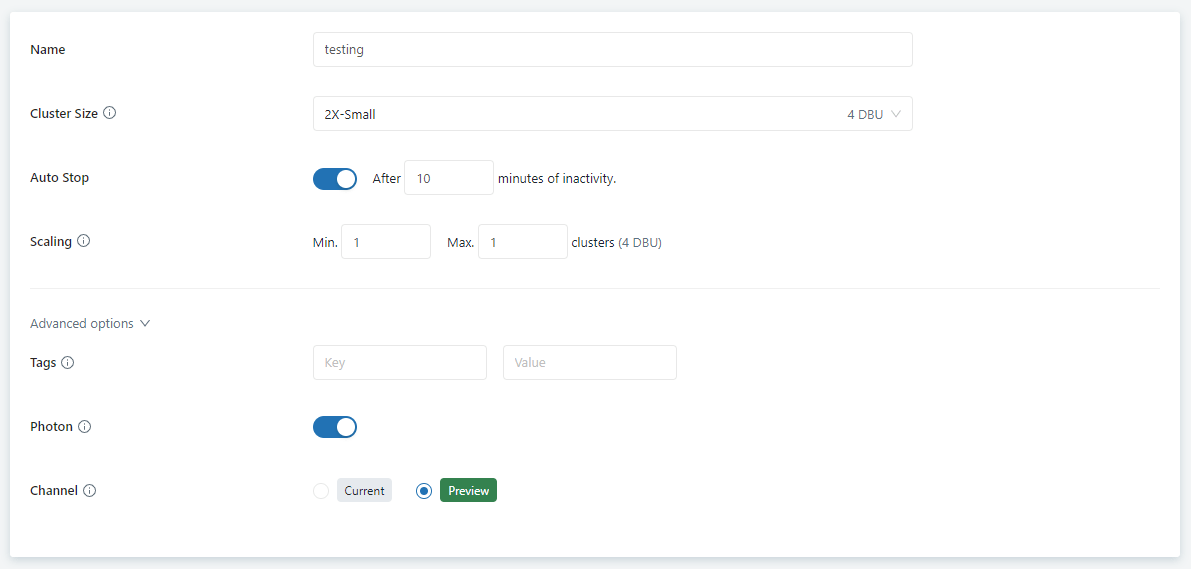
Creating a new Compute is very simple, I really like that you can select which version of the engine you want to run, Current or Preview, Auto Stop works as expected, but

it is really slow to start a Cluster ( around 4 minute)

The Minimum duration for Auto Stop is 10 minutes ( in practise, you should increase it to 1 Hour, a user waiting 5 minutes for his report to Start is not fun)

Databricks at least in Azure is a platform as a service, when you create a new cluster it will use your own resources to Provision a new VM (CPU, Disk etc), no surprise it take so long to start a new Cluster.

I notice when you resize a Cluster, the Engine became offline, it make sense maybe to use Auto Scaling instead.

For the Pricing, you pay in Databricks Unit (DBU) 1 DBU = 0.22 $/Hour and the resources generated, I can’t find the reference, but it seems an 2X-Small require 2 CPU with a cost of 0.64 $/Hour.

so the Total for my test Cluster is 0.22 * 4 + 0.64 * 2 = 2.16 $/Hour

Testing PowerBI

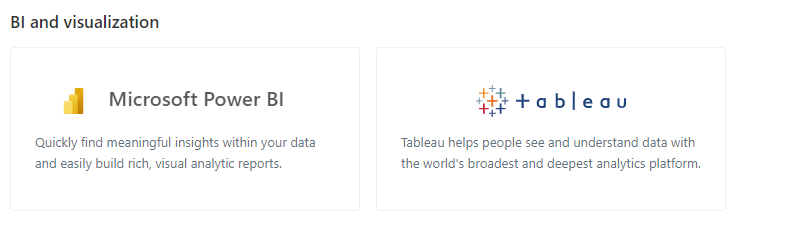
Connecting to PowerBI and Tableau was literally a 2 clicks away, In PowerBI you click on a link and it will generate a PowerBI report file, fantastic

Image

I used some sample Data provided by Databricks, the main fact Table is 1 GB and has 30 Million records

here is my PowerBI Data Model

And here is the PowerBI report, Basically Looping on Customer Key and generate some simple aggregate, the report generate 3 SQL Queries every 5 Second

When I run Only 1 Instance of the report, it works rather well, added second Instance, still behaved well, but when I added a third Instance, it became unusable, and Queries start to get added to a Queue, the Cluster did not keep up with the Workload, I am surprise by the results

I notice something interesting, it seems, Databricks does not support result cache, what’s currently supported is SSD cache, it seems the Engine cache the raw data in the Local SSD, but the Engine will run the same Query even when the table did not change and it is the same SQL expression.

Using Performance analyser in PowerBI, the Query return in around 1.5 to 3 second, definitely it is not a sub second territory here.

Second try

Turn out the sample data Provided by Databricks is located in Washington state, in my defence, I thought when you create a new account, they copy the data in your account, that’s not the case.

I copy the same data into my local storage

redone the same test using 4 instance of PowerBI instead of 3, and Databricks behaved way better !!!!

Result Cache

The result cache implementation in Databricks is a bit unusual , Take this Query as an example

select
  `o_custkey`,
  sum(`l_quantity`) as `C1`,
  count(1) as `C2`
from
  (
    select
      `OTBL`.`l_quantity`,
      `ITBL`.`o_custkey`
    from
      `hive_metastore`.`default`.`lineitem` as `OTBL`
      inner join (
        select
          `o_orderkey`,
          `o_custkey`,
          `o_orderstatus`,
          `o_totalprice`,
          `o_orderdate`,
          `o_orderpriority`,
          `o_clerk`,
          `o_shippriority`,
          `o_comment`
        from
          `hive_metastore`.`default`.`orders`
        where
          `o_custkey` in (5, 11, 140, 4)
      ) as `ITBL` on (`OTBL`.`l_orderkey` = `ITBL`.`o_orderkey`)
  ) as `ITBL`
group by
  `o_custkey`
limit
  1000001

the First run took 2.75 second

The Second Run, which should be cached as I did not change the tables

1.19 second, is not a great result, I know Snowflake result cache return around 50 ms, and BigQuery around 100- 200 ms, if I understood correctly Because Databricks use an Open Storage Format, it has always to go back to Azure storage and check if something has changed, which introduce and extra latency.

Random Thoughts

Databricks SQL is a Data-Warehouse, in my opinion all this talk about lake House is just a distraction, as far as I can see, it is a Solid DWH with an open storage format ( it is a good thing), it is multi cloud which is a big advantages and the team is investing a lot in new functionalities.

I am aware that the biggest competitive advantage of Databricks compare to Snowflake is Delta Lake, its open table format, basically you can read your data for free see example here with PowerBI or you can use literally another Compute engine, but in this first look, I was only interested in Query performance not the overall architecture. (BigQuery has an open Storage API but it is not free)

Engine Startup time is really slow, 5 minute is too much, specially when other vendors offer 5 second startup ( Looking forward for the serverless preview in Azure).

I am not sure what’s going on exactly with concurrency, it seems Databricks is really good at aggregating massive data, but I am not sure, if is suited for High concurrency , low latency needed for Interactive BI Workload.

Databricks Got me interested in their engine, I need further testing, but it seems we have another interesting Azure DWH offering (Beside Snowflake).

After I quickly tested Azure Synapse ( Both Serverless and Dedicated) and Snowflake, I think for high Concurrency, Low latency , small dataset workload, Snowflake has an advantage, Databricks is a second, Synapse does not support this workload at all.

Some readers thought I was a bit unfair to databricks but that was not the intention as far as I am concerned, in the last 10 years, we saw some serious innovation in Data warehouse space.

BigQuery separating Storage from Compute.

Snowflake introducing the 60 second pricing Model, and being Multi Cloud

Databricks going even further and making the Storage open, so your data is not tied to one Engine.

First look at Apache Superset from a PowerBI user perspective

Apache Superset is a very well known open source BI tool, I knew about it for the last couple of years, but was not thrilled by the idea of running a docker image on my laptop, recently though a new company Preset created by original author of the software start offering a cloud hosted service, basically they maintain the service and the consumer just use the software.

The pricing is very competitive, a free starter Plan with up to 5 users, then a pro plan for 20 $/Month/user ( the same as PowerBI PPU) and an Enterprise plan with custom pricing, kudos for the vendor for providing a free limited plan for users to learn and test.

The selling Point of Preset is very simple , it is open source software, so there is zero risk of vendor lock-in, if you are not happy with their service, you can always move your assets to another Provider or hosted yourself on-premise or in any cloud provider, this arguments is very attractive and make sense for a lot of customers , and companies like Red Hat have a good success using this business Model.

User interface

The user interface is simple and predictable which is a good thing, if you have used PowerBI or Data Studio you will feel at home.

Generally speaking there are two type of BI tools

  • Integrated : The BI tools provide, ETL, Storage, Modeling and the viz layer , as an example : PowerBI, Tableau, Qlik , Data Studio
  • Light : The BI tool scope is only Modeling and the viz layer, they need an External Database to host the data and run the SQL Query, Example Looker, Bipp etc ( I reference only the tool I personally used)

I guess the big assumption here, is that you have already a mature Data infrastructure which can be Queried from the same Data Base , Superset like Looker can not Query two DB in the same Dataset, The sweet spot for Superset is when all your data is hosted in a Cloud Data warehouse

Connecting to the Database

As usual I used BigQuery as my Data Source, the connection was pretty trivial to setup, although I could not figure out how to activate CSV upload

Building a Dataset

Dataset is the Data model it is the same concept as PowerBI with dimensions and Metrics (Measure), but it does not support relationships , you have to manually build a Query that join multiple tables or leverage a View in the Database , The metrics and dimension use SQL as calculation language.

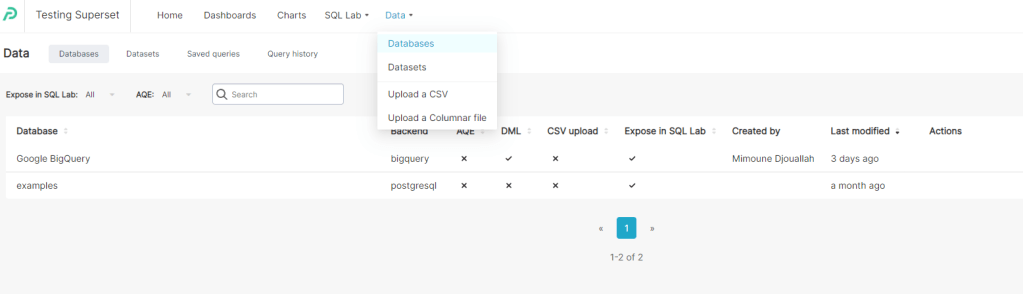
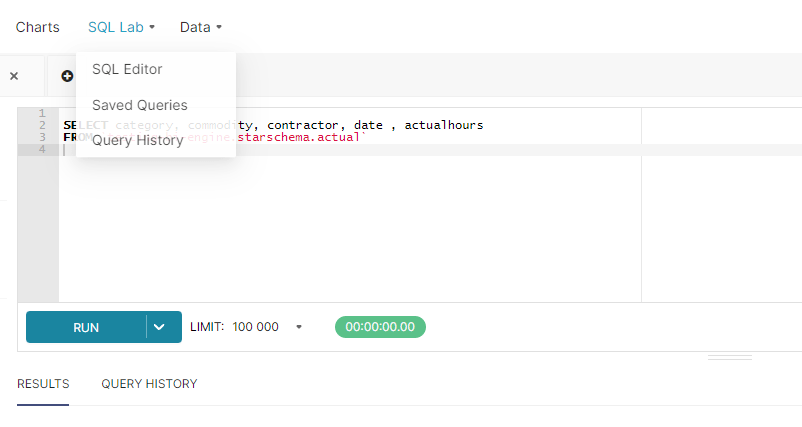
One confusing aspect of the User interface; if you want to build a Dataset based on one table, you just click Data, Dataset then add Dataset, simple, but if you want to build it based on a SQL Query, you need to click on SQL Lab, then SQL Editor , you write the Query then save it as a dataset.

Example : Dataset based on A SQL Query and Parameter

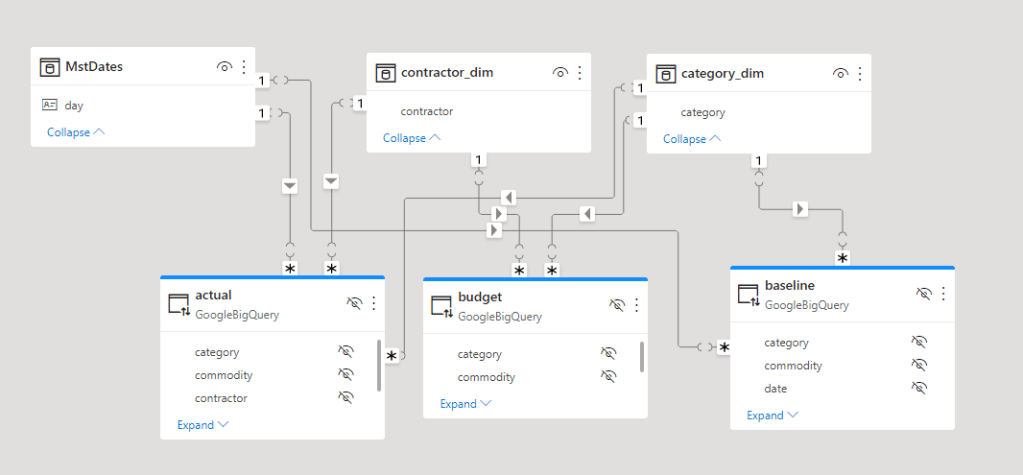
I have a simple multi Fact semantic model in PowerBI, and usually used it as test case, 3 Facts with different grains and 3 dimension

I add this SQL Query to generate the Dataset, Parameter is used to pass date as a filter, yes I am biased, I used PowerBI for so long, that writing SQL Query to return Dataset seems strange.

{% set param_Date = filter_values('day')[0]  %}
SELECT category, commodity,  actualhours ,  budgethours ,  forecast
FROM (
  SELECT category, commodity , SUM(actualhours) AS actualhours
  FROM `testing-bi-engine.starschema.actual`
   WHERE date <= date(TIMESTAMP_MILLIS({{cache_key_wrapper(param_Date)}}))
  GROUP BY category, commodity
) t2
FULL OUTER JOIN (
  SELECT category, commodity , SUM(budgethours) AS budgethours
  FROM `testing-bi-engine.starschema.budget`
  GROUP BY category, commodity
) t3 USING(category, commodity)
FULL OUTER JOIN (
  SELECT category, commodity , SUM(forecast) AS forecast
  FROM `testing-bi-engine.starschema.baseline`
  WHERE date <= date(TIMESTAMP_MILLIS({{cache_key_wrapper(param_Date)}}))
  GROUP BY category, commodity
) t4 USING(category, commodity)

The metrics

The Columns

I am using BigQuery BI engine, one fact is 43 Million rows and another is 1 Million, and although Preset Cloud is hosted in AWS even with network transfer the experience is very smooth, as of this writing Publish to web is not supported yet, so all I can show is this GIF

Chart library

Apache Superset has a very decent visual library, the first I checked is Pivot table and it is not bad at all , my understanding cross filtering will be supported only on E Charts Viz

Take Away

Superset is a mature open source data consumption layer with an enterprise support provided by Preset Cloud, if you have a mature data infrastructure and you know SQL very well, then it is worth a shot, I suspect it will be very popular with tech savvy companies and startups.

Edit : added a new post about Superset SQL Metrics