As a data analyst, I have been following the progress of LLMs in analytics, and although there has been some progress in accuracy and in the kinds of questions you can ask, overall, it hasn’t had the impact I was hoping for. That’s a totally different story for coding and data engineering, where AI is already changing daily workflows. The core idea is simple: if something is falsifiable, AI can be useful.
In the last couple of months, I keep hearing about some new terms which I never really understood: knowledge graphs, ontology (Andre, who is someone I respect a lot calls it the Enterprise brain), and so on. But I think there may be something genuinely interesting here for analytics.
There is so much data in an enterprise, and so much of it is still underused. Talking about a context layer is not new, and there is plenty of literature on it, but it is rare to see it from the end user perspective.
There are mainly two approaches. One requires modelling, which instinctively bothers me because it expects me to do more work upfront. Maybe it is an age thing, but I am not particularly excited about learning a new mental model. I have been doing semantic modelling for nearly a decade and I am quite happy with it.
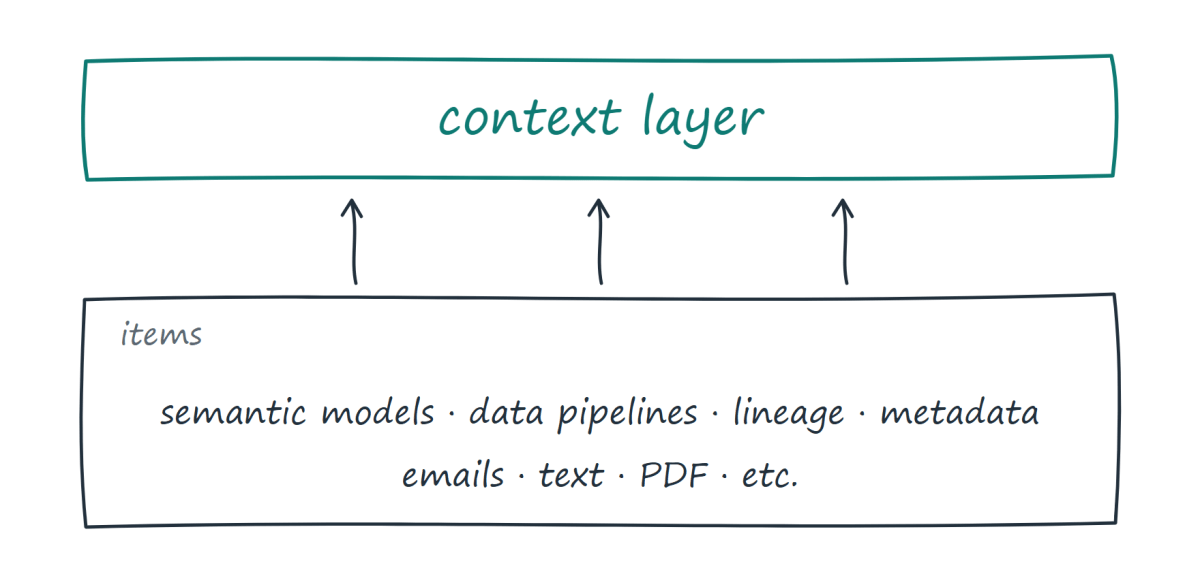
The other approach is more interesting to me because it doesn’t ask users to create something new. It works with what they already have: semantic models, data pipelines, the data itself, unstructured data, PDFs, folders, and so on. It figures out what already exists and how the pieces relate to each other. When you ask a question, it helps route you to the right place.
There is no magic here. To get a correct answer, you still need the hard work that has already been done: good semantic modelling, good metadata, good data, and so on.
For me, a system that can simply pick the right dashboard to use is already extremely useful. In a data platform, sometimes we don’t even know where to ask a question or which dashboard is more useful than another, unless we ask an analyst or a colleague. In a sense, this is just formalising what already happens in real life.
Even if the system says, “This is the question people are asking, and I don’t know of a good answer,” that’s already very useful feedback for analysts.
And one may argue, what if two semantic models authored by different departments don’t have the same definition? A naive answer would be to create one giant semantic model that unifies everything, which will never happen because this is fundamentally a human and organisational problem, not a technical one.
Maybe the better approach is simply to formalise what we already do today. Whatever the CEO, manager, or wider organisation is actually using probably makes more sense to prioritise, regardless of whether it is objectively the truth. We can imagine the system using signals: a certified dataset might carry more weight, or perhaps the author of a dataset has more credibility.
This is not a problem specific to analytics. Ask two news channels to describe the same event and you will often get different interpretations.
But to be super clear, the numbers themselves should never be non-deterministic. The measures are authored in exisitng semantic models, not made up on the fly
The bigger idea is that the context could improve with usage. Data platforms already have an enormous amount of telemetry. They know who uses what, which reports are popular, which datasets are trusted, and which questions people keep asking. There is nothing particularly new about this data. What is new is the possibility of using it to help both agents and humans find answers based on what the organisation actually uses and trusts.
In other words, the context isn’t something you build once and then leave alone. It could continuously evolve based on how the organisation actually works.
Users, I think, will not care how those signals are calculated. Users are selfish (speaking for myself here) and care only whether it is useful or not. Companies may want a say in what gets prioritised and how it works, or they may want to export that knowledge somewhere else. But I suspect they will mostly be happy if it just works.
I think the reason this may work now is that AI is becoming good enough for a lot of things. What it needs is not necessarily more intelligence, but better grounding in the knowledge that already exists inside an organisation.
I came from the construction industry, and we had this thing called delay analysis. It is basically an attempt to prove that a project delay is not the contractor’s fault. Maybe the client kept changing requirements, failed to approve drawings on time, or introduced other changes that affected the schedule.
Companies spend a lot of money on consultants who come in, read thousands of documents and pieces of correspondence, and try to rebuild a simplified model of what happened.
I know this is a very specific example, but I think AI should be able to solve this surprisingly well.
I can imagine a data platform where a supervisor asks, “What’s going on? Why are we late?” and gets an answer based on the actual project data, with references to the relevant dashboard, emails, RFIs, documents, and other evidence.
That is the kind of thing I would pay money for.
Maybe that’s what an enterprise context layer really is: not another model people have to maintain, but a way of making the knowledge an organisation already has actually useful. I am not saying this is a solved problem, or even that it will work in practice, but I think it is something worth building.
duckrun is a package I built using AI exclusively, to solve pain points I hit when using Fabric Python notebooks. I like DuckDB very much, but I was tired of manually discovering table names every time and writing long Python deltalake code just to write a Delta table, so I combined those two packages under one helper package to make my workflow smoother. Recently I discovered how awesome dbt is, so why not add a dbt adapter too. Then someone trolled me about the lack of snapshot isolation when doing read-modify-write on the same table. Luckily DuckDB now exposes the read version in delta_scan (before, you had to do the weird attach thing), so I have something that might actually be useful. The rest of the blog is written by AI. It wrote my code, so I don’t see the issue; it’ll even write my blog.
I also added a web page with some projects I built: dbt projects I ported, and some non-trivial SQL statements with proper snapshot isolation.
So yes, it’s a hack, until Iceberg matures or we get a better Delta write story in DuckDB.
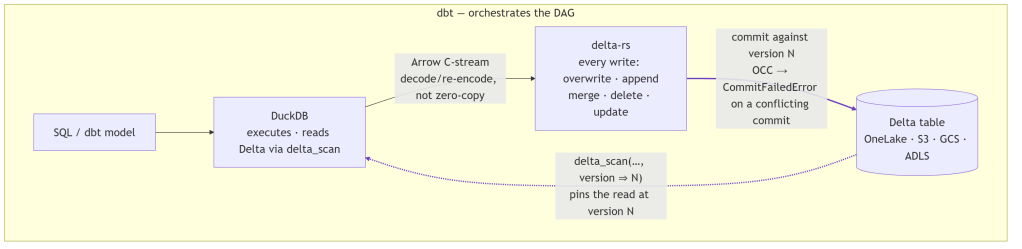
At its core, duckrun is a four-part split: DuckDB executes the SQL, Arrow streams the result, delta-rs commits it to Delta, and dbt (optionally) orchestrates the whole DAG.
It’s storage-agnostic, running anywhere DuckDB and delta-rs can reach: local filesystem, S3, GCS, ADLS, OneLake. In practice I test it on the local filesystem and Microsoft Fabric OneLake. S3 and GCS use the same code path, but I barely touch them, so treat them as untested.
The gap it fills
DuckDB reads Delta well (delta_scan). It does not write it well: its Delta support is blind INSERT only (no UPDATE, DELETE, or MERGE), and its trajectory points at writing through Unity Catalog, which defeats the point of filesystem-native Delta. So if you want DuckDB’s engine but need upserts on Delta tables, there is no single tool that does both today.
Approach
Reads Delta
Writes Delta (merge/update/delete)
DuckDB SQL engine
DuckDB alone
✅
❌ (blind INSERT only)
✅
delta-rs alone
✅
✅
❌
duckrun
✅
✅
✅
duckrun’s answer is a split:
DuckDB runs all SQL and model logic, and reads Delta through delta_scan views.
delta-rs handles every write: overwrite, append, merge, delete, update.
Arrow bridges the two: a DuckDB relation is streamed to delta-rs over the C-stream interface.
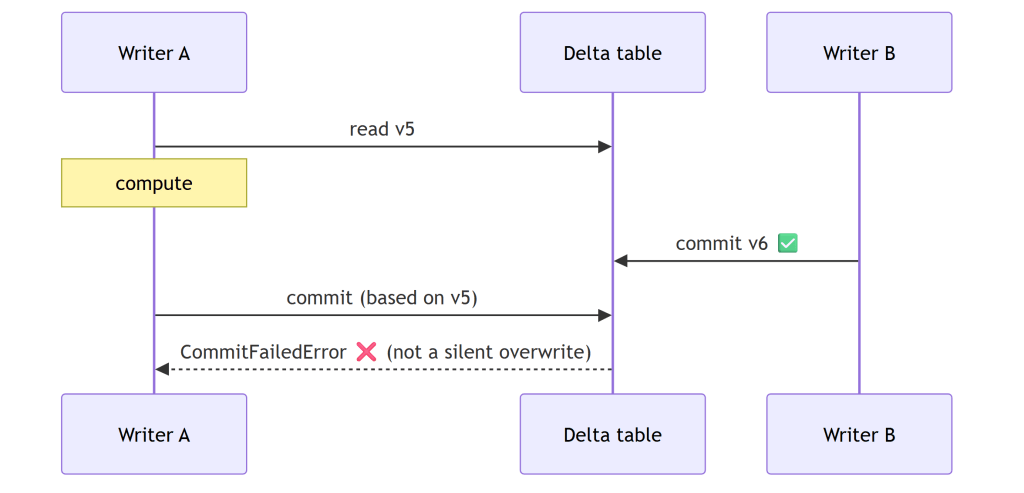
Snapshot isolation ties it together: each read pins a Delta version, and each read-modify-write commits against the version it read, so a concurrent commit errors instead of silently clobbering.
That’s the whole architecture. The README calls it glue, and that’s accurate: each layer does only the one thing it’s set up to do.
Two costs come with this. Two engines split one RAM budget with no shared allocator, and the Arrow handoff isn’t zero-copy: DuckDB’s native vector format isn’t Arrow, so each batch is decoded and re-encoded as it streams across the Arrow C Data Interface (a batch-at-a-time ArrowArrayStream, so even a large write never fully materializes in memory). duckrun manages this with a cgroup-aware memory split, sampled per job so it doesn’t get OOM-killed on Fabric/k8s, where DuckDB otherwise sees the whole node. The fractions are of the effective limit: on a merge, 0.3 to DuckDB and 0.6 to delta-rs spill, leaving 0.1 slack; on a plain write, 0.85 to DuckDB. The split leans toward delta-rs because that’s where the memory goes: profiling a merge attributes ~99% of resident memory to delta-rs and only ~15 MB to DuckDB. Keeping every write behind delta-rs also means the bridge (and the memory juggling) can be deleted the day DuckDB ships a real Delta writer, without touching the read or state model.
connect: read first
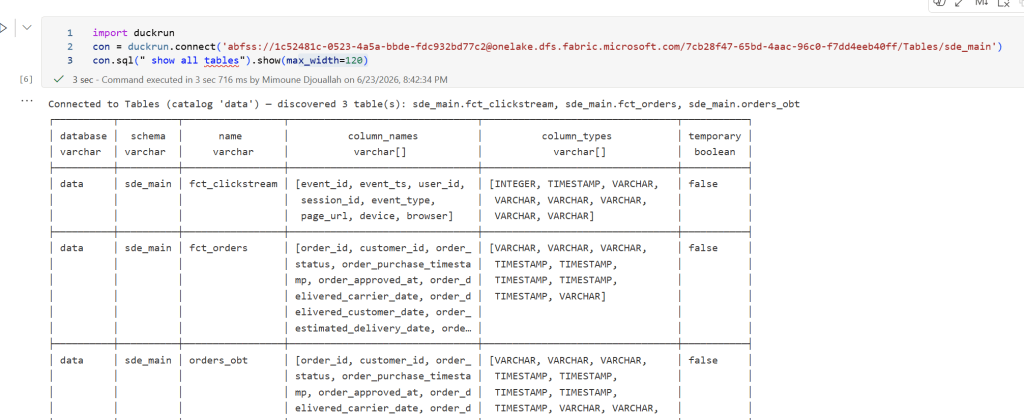
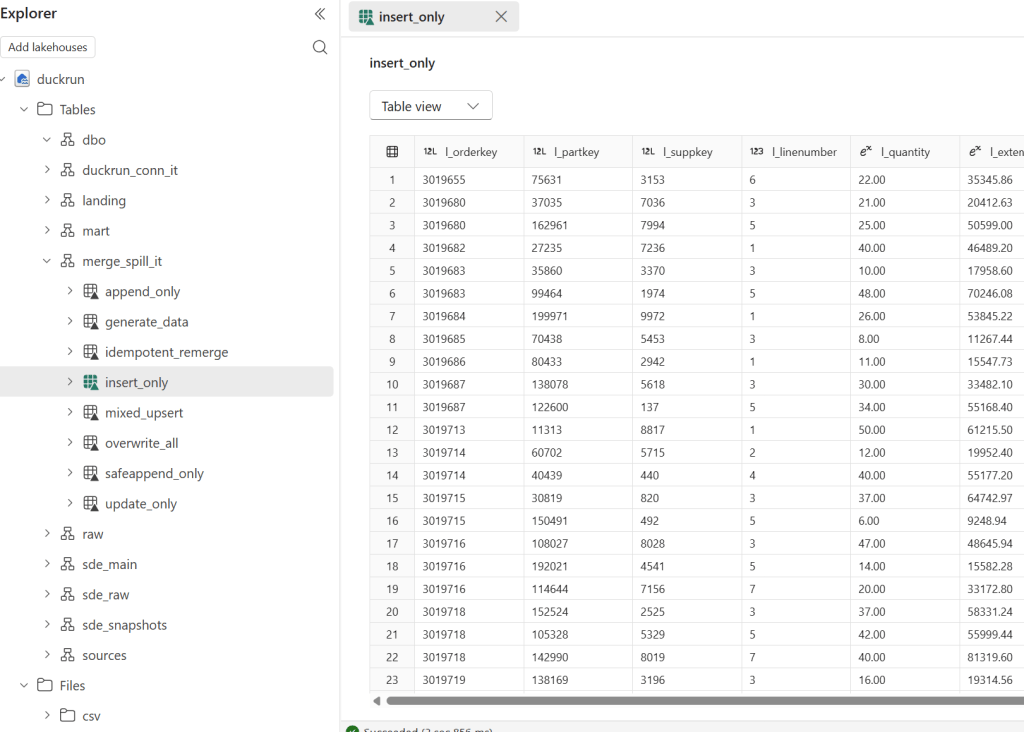
connect() is read-only by default, so you can point it at a lakehouse and explore with no chance of an accidental write. Tables are discovered for you, with no manual name bookkeeping:
Attach more lakehouses and query across them by three-part name. This is where the data warehouse case shows up: in Fabric a Warehouse is just a write-locked Lakehouse, so you attach it read_only=True next to a writable Lakehouse and join the two:
conn.sql accepts CREATE [OR REPLACE] TABLE AS, INSERT, UPDATE, DELETE, ALTER … ADD COLUMN, MERGE, and DROP (a soft tombstone: delta-rs has no drop, so data files persist until you purge them). CREATE TEMP TABLE and CREATE VIEW stay native DuckDB. Things that can’t be honored cleanly, like multi-statement strings or UPDATE … FROM, are rejected rather than silently mishandled.
The surface is small. It mirrors the Delta/DeltaTable API so notebook code reads familiarly, but there is no fluent transform builder and no second SQL engine. Transforms are SQL, run by DuckDB.
Snapshot isolation
This started as someone trolling the project over read-modify-write on the same table, and it turned into the guarantee I rely on most. Honestly, I come from a Dataflow Gen1 background (basically a single writer), so all this concurrency stuff never made much sense to me. In a Lakehouse, where anyone can write to a table, even accidentally, it suddenly becomes a real factor. (Thanks Raki for the harsh feedback, lol.) A lakehouse has no transaction manager and no single-writer guarantee: two pipelines, a double-fired job, or a notebook racing a scheduled run can all commit to the same table. The dangerous shape is read → compute → write: if someone commits in between, a naïve write at HEAD silently overwrites them, a lost update with no error. duckrun’s job is to turn that into a CommitFailedError.
What’s fenced, and what isn’t.delete, update, and merge are read-modify-writes (they read the current rows, compute a change, then commit), so duckrun pins each to the version it read and delta-rs’s OCC validates the commit over (read, HEAD]. A conflicting concurrent commit makes them fail. Plain append and overwrite are not fenced, by design: they match Spark’s SaveMode. An append rebases onto HEAD (appends don’t conflict), and an overwrite is last-writer-wins. So the fence is automatic exactly where a lost update is possible, and absent where it isn’t.
How the OCC works. There’s no lock manager anywhere. A Delta commit is the atomic creation of the next log entry, _delta_log/…{N+1}.json, so if a racing writer already wrote it, your put-if-absent loses and delta-rs raises CommitFailedError. Optimistic, filesystem-native, no coordinator. The gap OCC alone leaves: it only checks the commit instant, not the version you read.
Pinning the version you read, the same whether you write SQL or a DataFrame. A DeltaTable handle captures the version at forName() (call it vB), and every merge() / delete() / update() through it commits against vB, so OCC validates the whole (vB, HEAD] window, not just the instant of the commit. conn.sql("delete …" / "update …" / "merge …") funnels into the exact same engine path, pinned the same way: there is no second code path for SQL. And DuckDB exposing the read version in delta_scan(…, version => vB) (the reason for the duckdb >= 1.5.4 floor) lets the read sit on vB too, so a read-modify-write split across statements still lands on one snapshot. Spark/Delta fences only the commit instant; this fences the version you actually read.
append_if_unchanged / overwrite_if_unchanged are the fenced siblings of plain append/overwrite. I had to coin the terms, because Delta/Spark has no built-in fenced append (you’d hand-write a MERGE for it). They’re a version compare-and-swap: load the table at the version you read and pass max_commit_retries=0 so delta-rs won’t rebase. If anything committed since, the target version is already taken and the commit fails. For the watermark/idempotent-append case this is cheaper than a merge, with no target scan and no key join. (safeappend is the deprecated alias.)
The dbt adapter
A thin wrapper over dbt-duckdb that adds Delta-backed table and incremental materializations; everything else (views, seeds, sources, tests, plugins) is inherited. Point a profile at a lakehouse and dbt run:
dbt with no catalog. Normally dbt leans on a metastore to know what exists and to resolve {{ this }}, ref(), and is_incremental(); duckrun has none, and state still survives across separate dbt build processes. At run start the adapter discovers Delta tables on disk (glob for local/az/s3/gs; the OneLake DFS REST API for abfss, since DuckDB can’t glob it reliably) and registers each as a delta_scan view named to match dbt’s database.schema.identifier. That view is what makes those references resolve against real Delta tables. Each materialization pre-registers its own {{ this }} view before running, then recreates the view after the delta-rs write, since that write lands a new Delta version and the old view would otherwise point at stale files. The namespace is rebuilt from storage on every run instead of read from a catalog.
Incremental strategies:
Strategy
Behavior
merge (default with unique_key)
upsert
insert
insert new keys only
append (default without unique_key)
blind append
append_if_unchanged / safeappend
append, commit only if version unchanged: cheap, no target scan, errors on conflict
microbatch
delete+insert per event_time window
Compaction and 7-day vacuum run automatically (every run for overwrites; past a file-count threshold for incrementals).
Two limits worth knowing up front. First, writes are single-threaded within a run (in-process delta-rs isn’t thread-safe; cross-process concurrency is fully supported). Second, constraints are enforced at the write boundary, not stored in the table: a contract with not_null columns is checked by a guard query before the write, so a null fails with NOT NULL constraint failed and the prior Delta version is left untouched. Two caveats there: delta-rs can’t persist column constraints into Delta metadata, and timestampNtz columns can’t be written yet.
On versions, duckrun is deliberately conservative because the underlying libraries move fast and break: duckdb >= 1.5.4 (first stable with delta_scan(version => N)) and deltalake == 1.5.0, the first release with MERGE max_spill_size. On Microsoft Fabric, pip install --upgrade and restart the kernel, since the bundled DuckDB is older than the floor.
Testing: the only way to trust AI code
If the AI writes the code, what makes it trustworthy? Not that it compiles, and not that the unit tests are green: an AI will happily write a test that passes for the wrong reason. The only signal I actually trust is integration testing: run a real dbt project end to end and check the tables it lands on real storage.
So that’s where most of the test weight sits. duckrun runs a few hundred tests across 26 files, but the ones that matter most are the 8 integration projects that build for real, most against live Microsoft Fabric OneLake (abfss://), not a mock. To keep them honest, with real models rather than toys I wrote to flatter the adapter, I ported existing dbt projects from the web: other people’s models kept as close to original as I could, with attribution:
sde_dbt_tutorial, a port of josephmachado/simple_dbt_project: raw tables → bronze typing → a Delta-backed SCD2 customer snapshot → a merge-incremental clickstream fact → an orders_obt gold mart.
coffee, ported from JosueBogran/coffeeshopdatageneratorv2: CSV ingest over https, a deduped SCD2 product dim, a region-partitioned fact, a revenue mart.
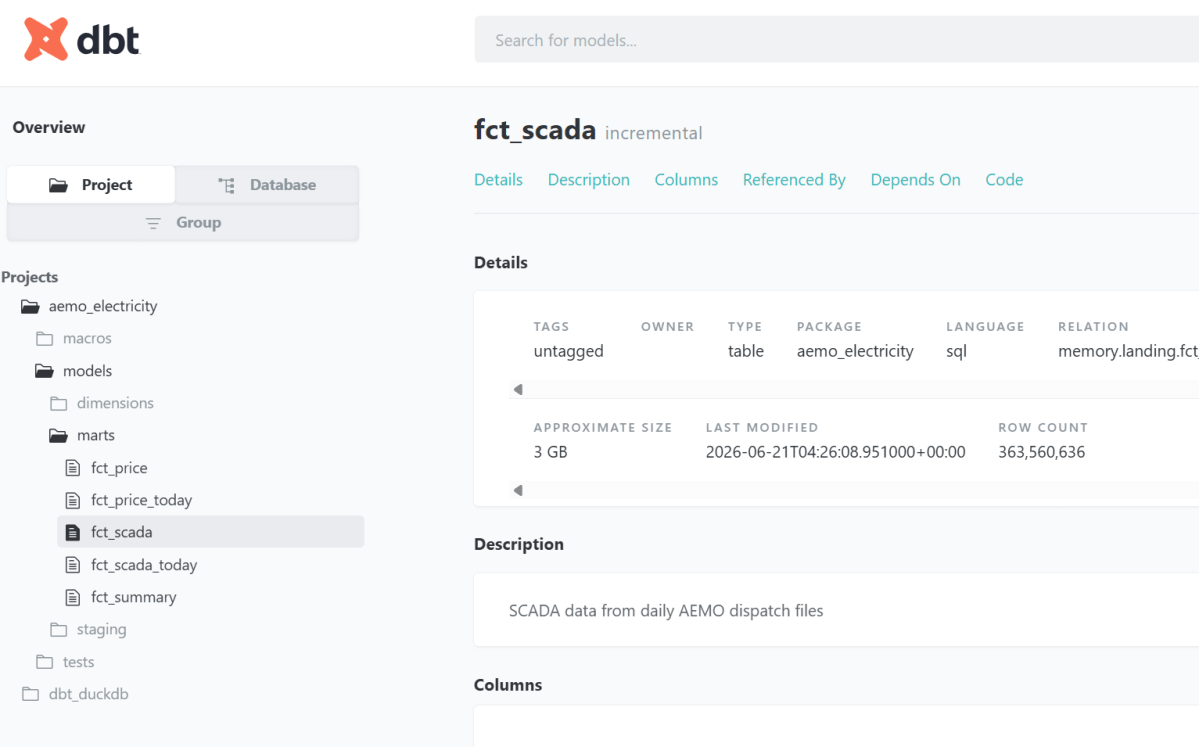
aemo, my own dbt_fabric_python_delta, built against live OneLake. The full run is published as browsable dbt docs: fct_scada is a 360M-row Delta table you can inspect yourself, not a screenshot.
snapshot_pin — a concurrent-writer test that asserts the guarantee above end to end: one writer reads a version, a second commits underneath it, and the first writer’s stale commit is rejected on real storage rather than silently overwriting.
plus a TPCH merge/append/overwrite spill benchmark, a connection-API demo on live NYC TLC taxi data, and a multi-catalog lakehouse + warehouse + local join.
The rendered catalogs for these (real Delta stats, row counts, last-modified) are on the project page.
On top of the projects, the adapter runs the official dbt adapter test suite (dbt-tests-adapter, the same conformance suite every dbt adapter is measured against) at 126/135 passing (93%), regenerated on every push to main. The documented failures are deliberate choices: no persistent views in open Delta, and rejecting merge configs that would silently diverge.
The evidence that matters is tables on real storage, hit the same way a user would, not a passing test count and not “the AI said it works.”
What does it mean to build a package you don’t understand?
I should be honest: I don’t understand the code in detail. But that was always true. duckrun is glue over DuckDB and delta-rs (written in C++ and Rust), and I don’t have the slightest idea how those work internally either. Almost nobody who builds on a library understands its guts. So what does “writing a package” actually mean?
For me, two things. Expressing the problem, knowing the pain well enough to say exactly what should happen, and making the design decisions that follow: delta-rs for every write, delta_scan views for reads, snapshot isolation as the contract. The AI writes the code; I own the problem and the shape of the solution.
The third thing is what makes it real: tests, and a lot of them. duckrun runs an extensive unit and integration suite, but I only actually trust it when I see tables land in OneLake. Code that passes locally and code that materializes correctly on real storage are not the same claim.
One trick I’ve learned: use a second agent to verify the first one’s work, not the agent that wrote it. The catch is that AI still cheats to make a test pass: it’ll weaken or game the check even when it plainly knows that isn’t the right thing. I hope that improves. Until it does: don’t trust anything it produces. Verify it against reality.
TL;DR : The high-end version of this problem is mostly solved. GPT-4 or Claude Opus paired with a mature proprietary semantic layer like Microsoft Power BI’s will handle natural language queries reliably in production, This blog is a much narrower use case: how do small language models (4B parameters, 4GB VRAM) perform when paired with open-source semantic layers? not great, not terrible as of April 2026 😦
Running a 4B model through an immature open-source semantic layer on a laptop GPU is not a production architecture — but it turns out to be a surprisingly useful lens for measuring fundamental SLM progress. How much reasoning capability fits in 4GB? How well do small models follow explicit constraints? Where do they break down under complexity?
Curiosity is a valid reason to run a benchmark. even for fun
The hardware constraint is real. An NVIDIA RTX A2000 Laptop has 4GB VRAM. Models above ~4GB Q4_K_M overflow into Windows virtual memory and run painfully slow. The practical ceiling is a 4B parameter model at Q4_K_M quantization.
The bet: give a small model a semantic model as its system prompt, and it should close the gap. Encode the domain knowledge — measure definitions, join rules, anti-patterns — so the model doesn’t have to infer them from a raw schema. Reduce the cognitive load, reduce the capability requirements, get closer to fast and correct.
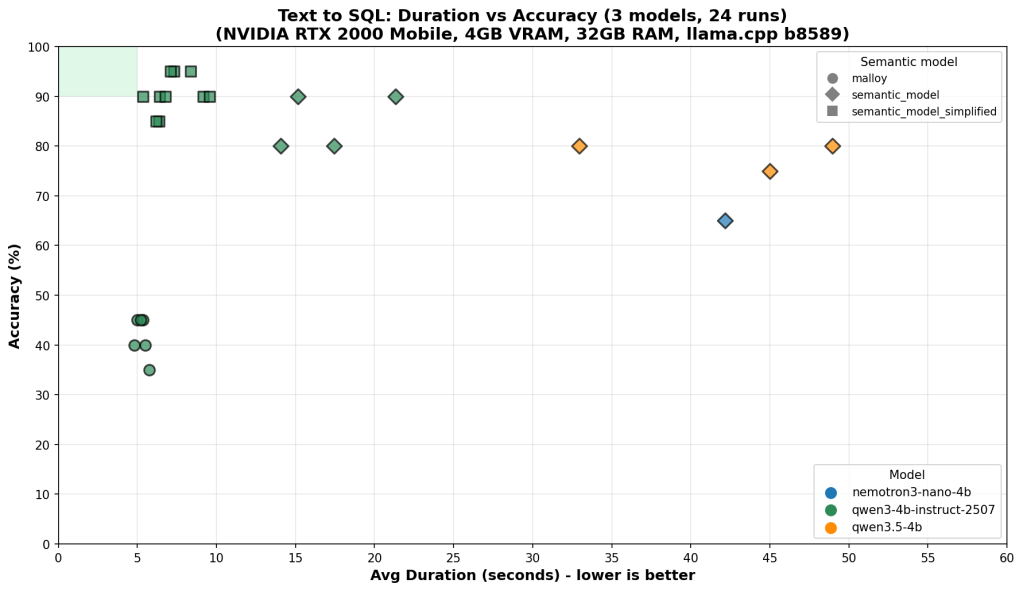
On the benchmark chart, that target lives in a small green rectangle in the top-left corner: high accuracy, low latency. This post is about what it takes to reach it — and why we’re still not reliably there.
What the Tests Measure
20 questions, graded from trivial to genuinely hard. Every answer is judged by exact result matching: every row must be correct, column order ignored, 0.5% numeric tolerance for floating point aggregations. Partial credit doesn’t exist.
The easy end (Q1–Q5): total revenue, total quantity sold, list of store names. Any model that can read a schema gets these right.
The hard end (Q18–Q20):
Return rate broken down by customer age group × weekend/weekday flag, joined through two fact tables
Brand-level year-over-year return rate change filtered by store state
Average net sales per transaction by item class and customer preferred flag
These require correctly combining multiple joins, conditional aggregations, and derived measures — and producing results that exactly match the reference answer.
Each run is plotted as accuracy vs. average duration per question. Speed matters because on 4GB VRAM, model size and inference cost are real constraints, not theoretical ones.
Results
One experiment: strip the full YAML semantic model (31KB, two explicit fact tables, extensive field metadata) down to a simplified version (23KB, single logical model, reduced noise). Less token budget spent on metadata, more focus on the patterns that matter.
Results across 3 models × 3 semantic model variants, 24 total runs:
                         Accuracy     Speed      Consistency
qwen3-4b + full model    ~90%         ~10s       scattered
qwen3-4b + simplified    ~90–95%      ~5–8s      tight → green box
nemotron + either        40–85%       ~5–12s     high variance regardless
qwen3.5-4b               ~75–80%      ~45–55s    slow regardless
A capable LLM writing raw SQL can score well on individual runs — 90%+ accuracy on the best models. That sounds promising until you look at the consistency column. The same question, asked twice, can produce correct SQL one run and wrong SQL the next. That variance doesn’t go away with better prompting — it’s a fundamental property of using a probabilistic model for a deterministic task.
Simplifying the semantic model helped the strongest model converge into the green box — higher accuracy, faster, more consistent. For weaker models, variance stayed high regardless of which semantic model they received. The bottleneck had shifted from context quality to model capability.
You cannot simplify your way past a capability ceiling.
Why Raw LLM Breaks
The failure patterns are specific and instructive.
The CTE + FULL OUTER JOIN pattern. The semantic model is explicit: never join the two fact tables (store_sales and store_returns) directly. Always aggregate each separately in a CTE, then combine with FULL OUTER JOIN. Direct joins cause row multiplication. When a model gets this wrong, the result looks plausible — same columns, similar numbers — but every figure is wrong. Models violate this more than you’d expect, especially when the question doesn’t obviously signal that two fact tables are involved.
-- Wrong: direct join multiplies rows
SELECT s.s_store_name, SUM(ss_sales_price * ss_quantity) as total_sales,
SUM(sr_return_amt) as total_returns
FROM store_sales ss
JOIN store_returns sr ON ss.ss_item_sk = sr.sr_item_sk
JOIN store s ON ss.ss_store_sk = s.s_store_sk
GROUP BY s.s_store_name;
-- Right: aggregate each fact separately, then join the summaries
WITH sales AS (
SELECT ss_store_sk, SUM(ss_sales_price * ss_quantity) as total_sales
FROM store_sales GROUP BY ss_store_sk
),
returns AS (
SELECT sr_store_sk, SUM(sr_return_amt) as total_returns
FROM store_returns GROUP BY sr_store_sk
)
SELECT s.s_store_name,
COALESCE(sales.total_sales, 0),
COALESCE(returns.total_returns, 0)
FROM store s
LEFT JOIN sales ON s.s_store_sk = sales.ss_store_sk
LEFT JOIN returns ON s.s_store_sk = returns.sr_store_sk;
Literal instructions ignored. Q9 requires the raw flag values as group labels: 'Y' and 'N', not 'Preferred' and 'Non-Preferred'. The semantic model says this explicitly. LLMs substitute human-readable labels anyway — not because they misread the instruction, but because “Preferred / Non-Preferred” is the more natural output. The model understood what you wrote. It decided it knew better.
These failures share a structure: the semantic model content is correct, but LLM use of it is unreliable. The context is a hint, not a guarantee. You cannot build a production analytics system on a component whose failure modes are unpredictable. Reliability requires a deterministic layer — a compiler that enforces the patterns, not a model that may or may not follow them.
The Right Architecture: LLM Intent + Deterministic Compilation
The right split between LLM and algorithm is this: use the LLM for what only an LLM can do, and use deterministic code for everything else.
Natural language understanding is irreducibly fuzzy — only the LLM can map “show me underperforming stores last quarter” to the right intent. But once that intent is expressed as a structured query, everything downstream is deterministic. The join logic, the measure definitions, the SQL generation — these are mechanical translations that a compiler does perfectly, every time, for free. Running them through an LLM instead wastes token budget on a task that doesn’t need intelligence, while leaving less capacity for the task that does.
The ideal split: the LLM translates natural language into a compact domain-specific query expression. The compiler translates that into SQL. The LLM never touches raw schema column names; the compiler never sees ambiguous natural language.
A query compiler is the right architecture for this problem. It’s deterministic: the same query gives the same answer every time. It enforces join logic and measure definitions by construction, not by suggestion. You can build systems around deterministic limitations. You cannot build systems around random failures.
The DSL the LLM targets doesn’t need to be as simple as SELECT measure FROM model GROUP BY dimension. Users ask for year-over-year comparisons, cohort breakdowns, conditional aggregations — the DSL has to be expressive enough to capture these. But “expressive enough for analytics” is still a far smaller language than SQL. The LLM has a much easier job expressing intent in a constrained, familiar DSL than generating arbitrarily complex raw SQL correctly every time.
Why Open-Source Compilers Aren’t There Yet
The current open-source implementations just aren’t there yet.
Fact-first structural limitations. Most open-source semantic layers are fact-first by design: all queries anchor to the fact table. “List all stores” should return 8 stores. Running through boring-semantic-layer, it returns 6 — stores with no sales are excluded because they have no fact rows. This is not an edge case; it breaks a whole category of queries that any real analytics system must handle. (see example here: boring-semantic-layer #224) Dimension-first routing — queries that go directly to dimension tables when no fact aggregation is needed — is a fundamental capability gap.
Niche query languages. Malloy compiles high-level queries to SQL — the LLM writes Malloy, the compiler handles join logic. In theory this is exactly right: offload SQL generation to a trusted compiler, let the LLM express what to compute. In practice, LLMs have seen enormous amounts of SQL during training and almost no Malloy. Syntax errors were common, measure references wrong. The compiler generated correct SQL from correct Malloy — but getting correct Malloy out of the LLM was harder than getting correct SQL directly.
The proprietary proof that this architecture is buildable: Microsoft Power BI’s query planner handles multi-fact joins, period-over-period comparisons, and dimension-first routing reliably, backed by years of engineering investment. The open-source ecosystem isn’t there yet — and there’s no guarantee it gets there. The commercial incentive that drove Power BI and Looker to solve these problems doesn’t exist for open-source projects in the same way.
The Ceiling Is Implementation Quality
The semantic model doesn’t need to pre-declare every possible query pattern — that’s the point of having an LLM in the loop. “Sales performance in 2020 vs 2021” should be composable: the SLM reads the base measures (total_sales, date_dim keys, grain definitions) and constructs the year-over-year logic itself. Multi-period comparisons, cohort filters, conditional aggregations — these should emerge from creative composition of well-defined primitives, not from an ever-growing library of pre-baked templates. The semantic model’s job is to define what things mean; the SLM’s job is to figure out how to combine them. When that division holds, the system is genuinely expressive. When it breaks down — when the SLM can’t compose reliably from primitives.
Query planner quality degrades fast once you move beyond simple aggregations. The moment you introduce measures that ignore filter context — MAX(date) computed across the full table regardless of what the user filtered — the planner has to reason about predicate pushdown, materialization order, and query cost. A naive planner gets this wrong silently: it scans everything, computes the max, then filters afterward. A recent semi-proprietary semantic layer ( which should remain nameless), supposedly mature, did exactly this on a simple max date ignore filter measure , a sub-second query became a 30-second full table scan.
Where This Goes
There are two truths that can coexist here.
On one side, models are clearly improving. Techniques like aggressive quantization are delivering more reasoning capability within tight resource constraints, making smaller deployments increasingly viable. At the same time, the architectural pattern of separating LLM intent from deterministic compilation is sound. It reflects how the most reliable production systems are built today. In that sense, the open source ecosystem is moving in the right direction, even if current implementations are still maturing.
On the other side, there is a meaningful gap between something being buildable and being built correctly. That gap is easy to underestimate. What looks like a working system often breaks down under real-world conditions: edge cases, ambiguous semantics, inconsistent schemas, and the need for cost-aware execution planning.
Bridging that gap is not just a matter of better ideas. It requires depth. Years of iteration, careful handling of corner cases, and continuous refinement of query planning and semantic layers. Systems like Power BI or Looker did not arrive there by accident. They reflect sustained, focused investment in exactly these problems.
Whether the open source ecosystem will reach that same level of depth remains an open question. It is not a question of capability or intent, but of coordination, time, and sustained effort across a fragmented landscape.
So the current state is this: the architecture is directionally correct, but the hardest parts are still unresolved, and progress on those parts is inherently slow.
Edit: There is also a credible alternative trajectory. If smaller language models continue to improve, direct SQL generation may become reliable enough for a large class of use cases. In that world, the need for a semantic query compiler does not disappear, but it becomes less central, reserved for cases where correctness, governance, or performance guarantees truly matter.
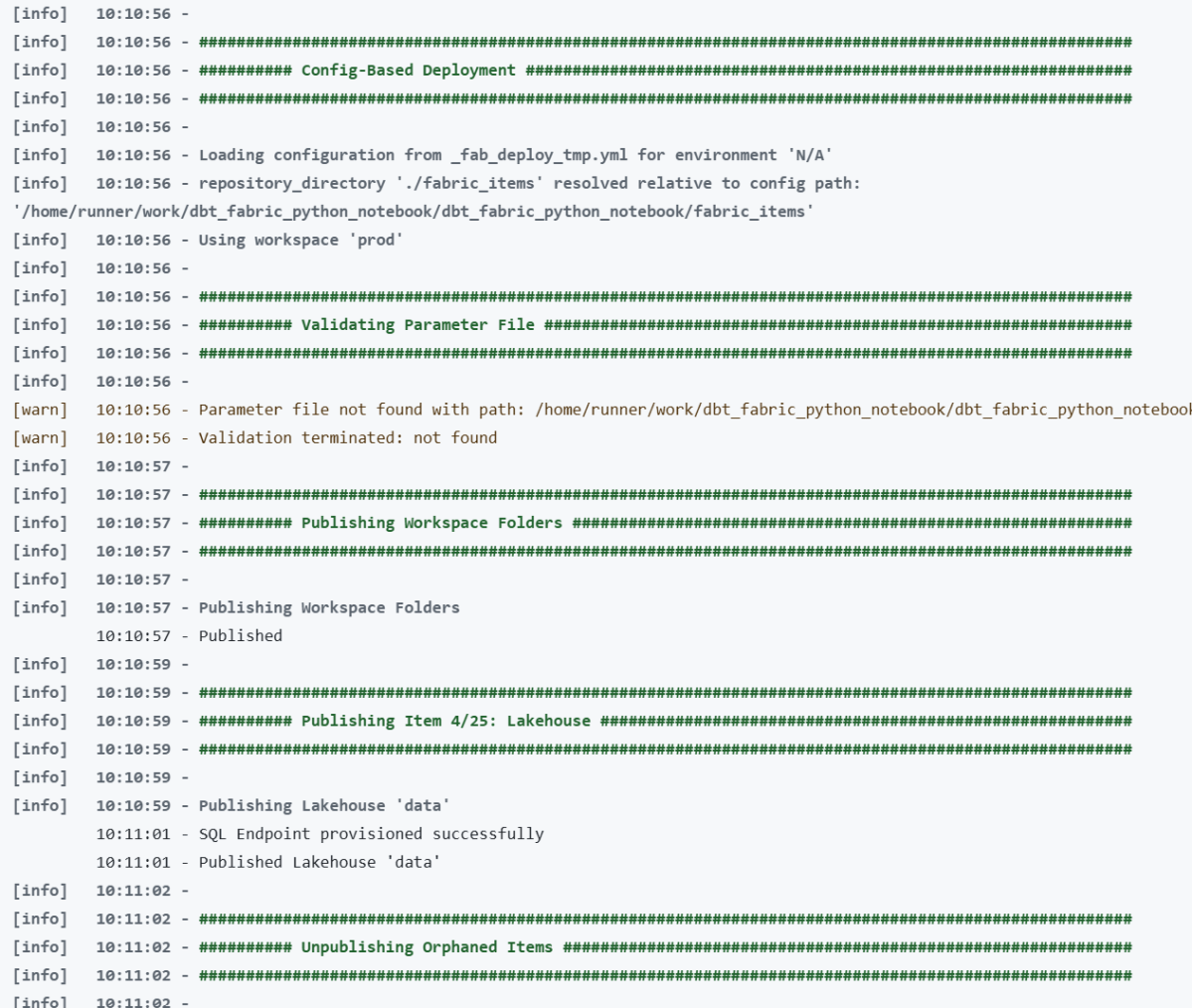
Microsoft Fabric now has a proper CLI deploy, and it works. I built a fully automated CI/CD pipeline that deploys a Python notebook, Lakehouse, Semantic Model, and Data Pipeline to Fabric using nothing but the fab CLI and GitHub Actions. Here’s what I learned along the way , what works great, what to watch out for, and where a few small additions could make the experience even better.
The Blog and the code was written by AI, to be clear, Fabric had always excellent API. and I perosnally used adhoc pythion script to deploy, but this time, it feels more natural
maybe the main take away when working with Agent and writing python code, logs everything including API response specially at the begining, AI is very good at autocorrecting !!!
The Goal
Push to main or production, and everything deploys automatically:
A Lakehouse gets created (with schemas enabled)
A Python Notebook gets deployed and attached to the Lakehouse (dbt need local path)
The notebook’s supporting files get copied to OneLake
The notebook runs — transforming data and creating Delta tables
A Direct Lake Semantic Model gets deployed (pointing at those Delta tables)
A Data Pipeline gets deployed and scheduled on a cron
Each Fabric item lives in a folder named {displayName}.{ItemType} under fabric_items/. The deploy script discovers them dynamically — no hardcoded item names.
What Works Well
The fab deploy command is brand new — v1.5.0, March 12, 2026. For a tool that just shipped, two things stood out.
Native .ipynb Support for Notebooks
Fabric’s default Git format for notebooks is notebook-content.py — a custom FabricGitSource format that flattens your notebook into a single .py file with metadata comments. It’s fine for Git diffs, but you lose the cell structure, can’t preview outputs, and can’t use standard Jupyter tooling to edit it.
As of Fabric CLI v1.4.0 (February 2026), you can now deploy notebooks as standard .ipynb files. Before v1.4.0, the CLI only supported the .py format.
With .ipynb support, what you see in VS Code or Jupyter is exactly what gets deployed:
fabric_items/
run.Notebook/
.platform
notebook-content.ipynb # standard Jupyter format, deployed as-is
You can edit notebooks locally with proper cell boundaries, use Jupyter tooling, and the deploy just works. Notebooks are finally first-class citizens in the deployment story.
model.bim Is Beautifully Simple
Fabric supports two formats for Semantic Models: TMDL (a folder of .tmdl files, one per table — the default) and TMSL (a single model.bim JSON file). TMDL is better for Git diffs on large models. But for my use case, model.bim is perfect.
One file. Everything in it — tables, columns, measures, relationships, and the Direct Lake connection. The entire environment-specific configuration boils down to a single OneLake URL:
Two GUIDs. That’s it. Swapping environments is a two-line string replacement:
bim_path.write_text(
bim_text.replace(source_ws_id, WS_ID)
.replace(source_lh_id, target_lh_id)
)
Compare this to the pipeline, where you’re hunting through deeply nested JSON paths with fab set. The BIM format is refreshingly straightforward.
The deploy works perfectly with just Python string replacement — three lines of code and a git checkout to restore.
TMSL (model.bim) vs TMDL: Which Format for CI/CD?
Fabric supports two formats for Semantic Models, and this choice matters more than it might seem.
TMDL is the default. It splits your model into a folder of .tmdl files — one per table, plus separate files for relationships, the model definition, and the database config:
definition/
├── tables/
│ ├── dim_calendar.tmdl
│ ├── dim_duid.tmdl
│ └── fct_summary.tmdl
├── relationships.tmdl
├── model.tmdl
└── database.tmdl
TMSL is a single model.bim JSON file with everything in it.
For CI/CD pipelines, TMSL wins hands down. Here’s why:
One file to manage. Your deploy script reads one file, replaces two GUIDs, deploys, and runs git checkout to restore. With TMDL, you’d need to find which .tmdl file contains the OneLake URL and handle multiple files.
Two .replace() calls. The entire environment swap is two string replacements on one file. With TMDL, the connection expression lives in model.tmdl, but table definitions reference it indirectly — more files to reason about during deployment.
Easier to grep and debug. When something goes wrong with your Direct Lake connection, you open one file, search for the OneLake URL, and see everything. No jumping between files.
When TMDL makes more sense:
Large models with dozens of tables where multiple people edit measures and columns — per-file Git diffs are cleaner and merge conflicts are smaller
Teams using Tabular Editor who need reviewable PRs on individual table changes
Models that change frequently at the table level
But if your semantic model is authored once and deployed across environments — which is the typical CI/CD pattern — you’re not reviewing table-level diffs. You’re swapping two GUIDs and pushing. TMSL keeps it simple.
I chose model.bim and haven’t looked back.
Things to Know Before You Start
Lesson 1: Deploy Order Matters — A Lot
This was my biggest source of failed deployments. Fabric items have implicit dependencies, and deploying them out of order causes cryptic failures.
The correct sequence:
Lakehouse → Notebook → (run notebook) → Semantic Model → Data Pipeline
Why this specific order:
The Notebook needs a Lakehouse to attach to. If the Lakehouse doesn’t exist yet, the attachment step fails.
The Semantic Model uses Direct Lake mode, which validates that the Delta tables it references actually exist. If you deploy the model before running the notebook that creates those tables, validation fails.
The Data Pipeline references the Notebook by ID. You need the Notebook deployed first to get its target workspace ID.
# 5. Deploy Semantic Model (Delta tables now exist)
# 6. Refresh Semantic Model via Power BI API
# 7. Deploy + schedule Data Pipeline
Lesson 2: fab job run Does Nothing for Notebooks Without -i '{}'
This one cost me hours of debugging. Running a notebook via the CLI:
# Does NOTHING — silently succeeds but notebook never executes
fab job run prod.Workspace/run.Notebook
# Actually runs the notebook
fab job run prod.Workspace/run.Notebook -i '{}'
Notebooks require the -i '{}' flag (empty JSON input). Without it, the command returns success but the notebook never fires. There’s no error, no warning — it just silently does nothing.
Lesson 3: parameter.yml Token Replacement Is Surprisingly Limited
Fabric CLI has a parameter.yml mechanism for replacing GUIDs across environments. The idea is great — use tokens like $workspace.id and $items.Lakehouse.data.$id that get resolved at deploy time.
In practice, the rules are strict and poorly documented:
Tokens only resolve if the entire value starts with $
# WRONG — token is embedded in a URL, never resolves
The pattern: modify → deploy → git restore. No token resolution needed.
Lesson 4: item_types_in_scope Must Be Plural
The deploy config YAML key is item_types_in_scope (plural). Use the singular item_type_in_scope and Fabric CLI silently ignores it — deploying everything in your repository directory instead of just the types you specified.
# CORRECT
item_types_in_scope:
- Notebook
- Lakehouse
# WRONG — silently deploys ALL item types
item_type_in_scope:
- Notebook
This is the kind of bug that only shows up in production when your Semantic Model gets deployed before your Delta tables exist.
Lesson 5: New Lakehouses Need a Provisioning Wait
Creating a Lakehouse returns immediately, but the underlying infrastructure isn’t ready yet:
result = subprocess.run(["fab", "create", LAKEHOUSE, "-P", "enableSchemas=true"])
if result.returncode == 0:
# Brand new lakehouse — need to wait for provisioning
print("Waiting 60s for provisioning...")
time.sleep(60)
On first deploy to a new workspace, this 60-second wait is essential. Without it, subsequent operations (deploying items, copying files) fail with opaque errors.
Lesson 6: Attaching a Lakehouse to a Notebook Requires fab set
Deploying a notebook doesn’t automatically connect it to a Lakehouse. You need a separate fab set call:
The JSON path is deeply nested and not well documented. I had to inspect the API responses to find the correct path: definition.parts[0].payload.metadata.dependencies.lakehouse.
Lesson 7: Semantic Model Refresh Uses the Power BI API, Not the Fabric API
After deploying a Direct Lake semantic model, you need to trigger a refresh. But this isn’t a Fabric API call — it’s a Power BI API call:
# Note the -A powerbi flag — this targets the Power BI API endpoint
fab api -A powerbi -X post "groups/{workspace_id}/datasets/{model_id}/refreshes"
Without the -A powerbi flag, you’ll get 404s because the Fabric API doesn’t have a refresh endpoint for semantic models.
Lesson 8: Pipeline References Are Hardcoded GUIDs
A Data Pipeline that runs a notebook stores the notebook’s ID and workspace ID as hardcoded GUIDs in its definition:
fab auth login -t ${{ secrets.AZURE_TENANT_ID }} \
-u ${{ secrets.AZURE_CLIENT_ID }} \
--federated-token "$FED_TOKEN"
This means no client secrets to rotate — just configure the Azure AD app registration to trust your GitHub repo’s OIDC issuer. It works well, but you still need to set up an Azure AD app registration, configure federated credentials, and grant it Fabric permissions. It would be nice if Fabric supported direct service-to-service authentication — something like a Fabric API key or a native GitHub integration — without needing Azure as the intermediary.
Lesson 10: Use Variable Libraries for Runtime Config
Instead of baking config values into your notebook or using parameter.yml, Fabric has Variable Libraries:
This makes your notebook fully portable — the same code runs everywhere:
Local dev: swap to a local path or Azurite connection
Deployed to staging: notebookutils resolves to the staging workspace/lakehouse IDs
Deployed to production: same code, different IDs at runtime
The alternative — hardcoding workspace names or using /lakehouse/default/ mount paths — ties your notebook to a specific workspace. With abfss://, the notebook doesn’t care where it’s running. The IDs come from the runtime context, and the deploy script handles attaching the right Lakehouse. Zero code changes between environments.
Lesson 12: Copying Files to OneLake Is Parallel but Slow
The notebook needs supporting files (SQL models, configs) available in OneLake. The fab cp command handles this, but it’s one file at a time. I parallelized with 8 workers:
with ThreadPoolExecutor(max_workers=8) as executor:
executor.map(copy_file, files)
Before copying files, you need to create the directory structure with fab mkdir. OneLake doesn’t auto-create parent directories.
Lesson 13: Schedule Idempotently
Don’t recreate the pipeline schedule every deploy — check first:
result = subprocess.run(["fab", "job", "run-list", PIPELINE, "--schedule"],
capture_output=True, text=True)
if "True" not in result.stdout:
fab(["job", "run-sch", PIPELINE,
"--type", "cron",
"--interval", cfg["schedule_interval"],
"--start", cfg["schedule_start"],
"--end", cfg["schedule_end"],
"--enable"])
This prevents duplicate schedules stacking up across deploys.
The Big Picture
Here’s the overall architecture in one diagram:
GitHub Push
│
▼
GitHub Actions (OIDC → fab auth login)
│
▼
deploy.py
├── fab create → Lakehouse (with schemas)
├── fab deploy → Notebook
├── fab set → Attach Lakehouse to Notebook
├── fab cp → Copy data files to OneLake (8 parallel workers)
├── fab job run → Execute Notebook (creates Delta tables)
├── fab deploy → Semantic Model (with GUID replacement + git restore)
├── fab api → Refresh Semantic Model (Power BI API)
├── fab deploy → Data Pipeline
├── fab set → Update Pipeline notebook/workspace refs
└── fab job run-sch → Schedule Pipeline (if not already scheduled)
Everything is driven by a single deploy_config.yml that maps branch names to workspace IDs:
defaults:
schedule_interval: "30"
schedule_start: "2025-01-01T00:00:00"
schedule_end: "2030-12-31T23:59:59"
main:
ws_id: "e446a5e7-..."
schedule_interval: "720" # 12 hours (staging)
production:
ws_id: "be079b0f-..."
download_limit: "60" # full data
Push to main → deploy to staging workspace. Push to production → deploy to production workspace.
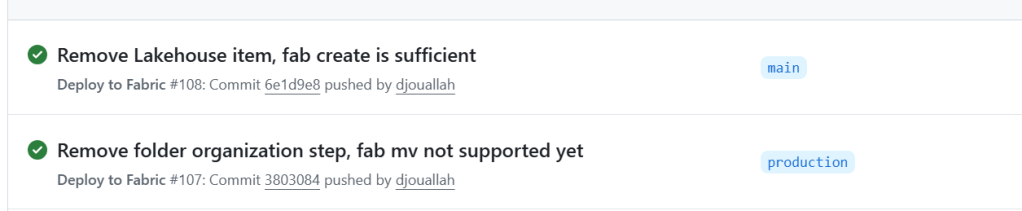
Lesson 14: Don’t Deploy the Lakehouse Item — Let the Data Define the Schema
I had a data.Lakehouse/ folder in fabric_items/ with a .platform file and a lakehouse.metadata.json that just set defaultSchema: dbo. I was running fab deploy for it. Then I realized: I was already creating the Lakehouse with fab create before the deploy step:
fab create "prod.Workspace/data.Lakehouse" -P enableSchemas=true
The fab create handles everything. The fab deploy of the Lakehouse item was redundant.
But there’s a deeper point here: the Lakehouse schema should be driven by your data, not by CI/CD. Your notebook creates the tables, your data transformation defines the schemas. The Lakehouse is just the container — it doesn’t need a deployment definition. Trying to manage Lakehouse schema through fab deploy is fighting the natural flow. Create the container, let the data populate it.
I deleted the entire data.Lakehouse/ folder from my repo. One less item to deploy, one less thing to break.
What I’d Tell My Past Self
Read every fab CLI error message carefully. Many failures are silent (wrong key name, missing -i flag). Add verbose logging.
Deploy in phases, not all at once. Item dependencies are real and the error messages when you get the order wrong are unhelpful.
Skip parameter.yml for anything non-trivial. Direct GUID replacement in Python with git restore is simpler and fully transparent.
fab set is the power tool. Most post-deploy configuration — attaching lakehouses, updating pipeline references — goes through deeply nested JSON paths in fab set.
Test in a separate workspace mapped to a non-production branch. The deploy_config.yml pattern of mapping branches to workspaces makes this trivial.
The Power BI API and Fabric API are different surfaces. Some operations (like semantic model refresh) only exist on the Power BI side. Use fab api -A powerbi.
Don’t deploy what you don’t need to. If fab create handles it, drop the item definition. Let your data drive the schema.
The Fabric CLI is new — fab deploy landed in v1.5.0 just this month — and it already handles a full end-to-end deployment pipeline. The foundation is solid. Everything you need is already there — it just takes knowing where to look. Hopefully this saves you some of that discovery time.
Acknowledgements
Special thanks to Kevin Chant — Data Platform MVP and Lead BI & Analytics Architect — whose blog has been an invaluable resource on Fabric CI/CD and DevOps practices for the data platform. If you’re working with Fabric deployments, his posts are well worth following.