Text-to-SQL using Local LLMs

TL;DR : The high-end version of this problem is mostly solved. GPT-4 or Claude Opus paired with a mature proprietary semantic layer like Microsoft Power BI’s will handle natural language queries reliably in production, This blog is a much narrower use case: how do small language models (4B parameters, 4GB VRAM) perform when paired with open-source semantic layers? not great, not terrible as of April 2026 ๐Ÿ˜ฆ

Running a 4B model through an immature open-source semantic layer on a laptop GPU is not a production architecture โ€” but it turns out to be a surprisingly useful lens for measuring fundamental SLM progress. How much reasoning capability fits in 4GB? How well do small models follow explicit constraints? Where do they break down under complexity?

Curiosity is a valid reason to run a benchmark. even for fun

The hardware constraint is real. An NVIDIA RTX A2000 Laptop has 4GB VRAM. Models above ~4GB Q4_K_M overflow into Windows virtual memory and run painfully slow. The practical ceiling is a 4B parameter model at Q4_K_M quantization.

The architecture looks like this:

 Natural language question
          โ”‚
          โ–ผ
   โ”Œโ”€โ”€โ”€โ”€โ”€โ”€โ”€โ”€โ”€โ”€โ”€โ”€โ”€โ”
   โ”‚     SLM     โ”‚  (4B params, 4GB VRAM)
   โ””โ”€โ”€โ”€โ”€โ”€โ”€โ”ฌโ”€โ”€โ”€โ”€โ”€โ”€โ”˜
          โ”‚ reads                    โ”Œโ”€โ”€โ”€โ”€โ”€โ”€โ”€โ”€โ”€โ”€โ”€โ”€โ”€โ”€โ”€โ”€โ”€โ”€โ”€โ”€โ”€โ”€โ”
          โ”œโ”€โ”€โ”€โ”€โ”€โ”€โ”€โ”€โ”€โ”€โ”€โ”€โ”€โ”€โ”€โ”€โ”€โ”€โ”€โ”€โ”€โ”€โ”€โ”€โ”€โ–บโ”‚  Semantic Model YAML โ”‚
          โ”‚                          โ”‚  measures, joins,    โ”‚
          โ”‚                          โ”‚  anti-patterns       โ”‚
          โ”‚                          โ””โ”€โ”€โ”€โ”€โ”€โ”€โ”€โ”€โ”€โ”€โ”€โ”€โ”€โ”€โ”€โ”€โ”€โ”€โ”€โ”€โ”€โ”€โ”˜
          โ”‚ writes semantic query
          โ–ผ
   โ”Œโ”€โ”€โ”€โ”€โ”€โ”€โ”€โ”€โ”€โ”€โ”€โ”€โ”€โ”€โ”€โ”€โ”€โ”€โ”
   โ”‚  Query Compiler  โ”‚  (Malloy / boring-semantic-layer / none)
   โ””โ”€โ”€โ”€โ”€โ”€โ”€โ”ฌโ”€โ”€โ”€โ”€โ”€โ”€โ”€โ”€โ”€โ”€โ”€โ”˜
          โ”‚ generates SQL
          โ–ผ
   โ”Œโ”€โ”€โ”€โ”€โ”€โ”€โ”€โ”€โ”€โ”€โ”€โ”€โ”€โ”
   โ”‚   Engine    โ”‚  (DuckDB)
   โ””โ”€โ”€โ”€โ”€โ”€โ”€โ”ฌโ”€โ”€โ”€โ”€โ”€โ”€โ”˜
          โ”‚ reads
          โ–ผ
   โ”Œโ”€โ”€โ”€โ”€โ”€โ”€โ”€โ”€โ”€โ”€โ”€โ”€โ”€โ”
   โ”‚    Data     โ”‚  (star schema)
   โ””โ”€โ”€โ”€โ”€โ”€โ”€โ”€โ”€โ”€โ”€โ”€โ”€โ”€โ”˜


The bet: give a small model a semantic model as its system prompt, and it should close the gap. Encode the domain knowledge โ€” measure definitions, join rules, anti-patterns โ€” so the model doesn’t have to infer them from a raw schema. Reduce the cognitive load, reduce the capability requirements, get closer to fast and correct.

On the benchmark chart, that target lives in a small green rectangle in the top-left corner: high accuracy, low latency. This post is about what it takes to reach it โ€” and why we’re still not reliably there.


What the Tests Measure

20 questions, graded from trivial to genuinely hard. Every answer is judged by exact result matching: every row must be correct, column order ignored, 0.5% numeric tolerance for floating point aggregations. Partial credit doesn’t exist.

The easy end (Q1โ€“Q5): total revenue, total quantity sold, list of store names. Any model that can read a schema gets these right.

The hard end (Q18โ€“Q20):

  • Return rate broken down by customer age group ร— weekend/weekday flag, joined through two fact tables
  • Brand-level year-over-year return rate change filtered by store state
  • Average net sales per transaction by item class and customer preferred flag

These require correctly combining multiple joins, conditional aggregations, and derived measures โ€” and producing results that exactly match the reference answer.

Each run is plotted as accuracy vs. average duration per question. Speed matters because on 4GB VRAM, model size and inference cost are real constraints, not theoretical ones.


Results

One experiment: strip the full YAML semantic model (31KB, two explicit fact tables, extensive field metadata) down to a simplified version (23KB, single logical model, reduced noise). Less token budget spent on metadata, more focus on the patterns that matter.

Results across 3 models ร— 3 semantic model variants, 24 total runs:

                         Accuracy     Speed      Consistency
qwen3-4b + full model    ~90%         ~10s       scattered
qwen3-4b + simplified    ~90โ€“95%      ~5โ€“8s      tight โ†’ green box
nemotron + either        40โ€“85%       ~5โ€“12s     high variance regardless
qwen3.5-4b               ~75โ€“80%      ~45โ€“55s    slow regardless


A capable LLM writing raw SQL can score well on individual runs โ€” 90%+ accuracy on the best models. That sounds promising until you look at the consistency column. The same question, asked twice, can produce correct SQL one run and wrong SQL the next. That variance doesn’t go away with better prompting โ€” it’s a fundamental property of using a probabilistic model for a deterministic task.

Simplifying the semantic model helped the strongest model converge into the green box โ€” higher accuracy, faster, more consistent. For weaker models, variance stayed high regardless of which semantic model they received. The bottleneck had shifted from context quality to model capability.

You cannot simplify your way past a capability ceiling.


Why Raw LLM Breaks

The failure patterns are specific and instructive.

The CTE + FULL OUTER JOIN pattern. The semantic model is explicit: never join the two fact tables (store_sales and store_returns) directly. Always aggregate each separately in a CTE, then combine with FULL OUTER JOIN. Direct joins cause row multiplication. When a model gets this wrong, the result looks plausible โ€” same columns, similar numbers โ€” but every figure is wrong. Models violate this more than you’d expect, especially when the question doesn’t obviously signal that two fact tables are involved.

-- Wrong: direct join multiplies rows
SELECT s.s_store_name, SUM(ss_sales_price * ss_quantity) as total_sales,
SUM(sr_return_amt) as total_returns
FROM store_sales ss
JOIN store_returns sr ON ss.ss_item_sk = sr.sr_item_sk
JOIN store s ON ss.ss_store_sk = s.s_store_sk
GROUP BY s.s_store_name;
-- Right: aggregate each fact separately, then join the summaries
WITH sales AS (
SELECT ss_store_sk, SUM(ss_sales_price * ss_quantity) as total_sales
FROM store_sales GROUP BY ss_store_sk
),
returns AS (
SELECT sr_store_sk, SUM(sr_return_amt) as total_returns
FROM store_returns GROUP BY sr_store_sk
)
SELECT s.s_store_name,
COALESCE(sales.total_sales, 0),
COALESCE(returns.total_returns, 0)
FROM store s
LEFT JOIN sales ON s.s_store_sk = sales.ss_store_sk
LEFT JOIN returns ON s.s_store_sk = returns.sr_store_sk;

Literal instructions ignored. Q9 requires the raw flag values as group labels: 'Y' and 'N', not 'Preferred' and 'Non-Preferred'. The semantic model says this explicitly. LLMs substitute human-readable labels anyway โ€” not because they misread the instruction, but because “Preferred / Non-Preferred” is the more natural output. The model understood what you wrote. It decided it knew better.

These failures share a structure: the semantic model content is correct, but LLM use of it is unreliable. The context is a hint, not a guarantee. You cannot build a production analytics system on a component whose failure modes are unpredictable. Reliability requires a deterministic layer โ€” a compiler that enforces the patterns, not a model that may or may not follow them.


The Right Architecture: LLM Intent + Deterministic Compilation

The right split between LLM and algorithm is this: use the LLM for what only an LLM can do, and use deterministic code for everything else.

Natural language understanding is irreducibly fuzzy โ€” only the LLM can map “show me underperforming stores last quarter” to the right intent. But once that intent is expressed as a structured query, everything downstream is deterministic. The join logic, the measure definitions, the SQL generation โ€” these are mechanical translations that a compiler does perfectly, every time, for free. Running them through an LLM instead wastes token budget on a task that doesn’t need intelligence, while leaving less capacity for the task that does.

The ideal split: the LLM translates natural language into a compact domain-specific query expression. The compiler translates that into SQL. The LLM never touches raw schema column names; the compiler never sees ambiguous natural language.

A query compiler is the right architecture for this problem. It’s deterministic: the same query gives the same answer every time. It enforces join logic and measure definitions by construction, not by suggestion. You can build systems around deterministic limitations. You cannot build systems around random failures.

The DSL the LLM targets doesn’t need to be as simple as SELECT measure FROM model GROUP BY dimension. Users ask for year-over-year comparisons, cohort breakdowns, conditional aggregations โ€” the DSL has to be expressive enough to capture these. But “expressive enough for analytics” is still a far smaller language than SQL. The LLM has a much easier job expressing intent in a constrained, familiar DSL than generating arbitrarily complex raw SQL correctly every time.


Why Open-Source Compilers Aren’t There Yet

The current open-source implementations just aren’t there yet.

Fact-first structural limitations. Most open-source semantic layers are fact-first by design: all queries anchor to the fact table. “List all stores” should return 8 stores. Running through boring-semantic-layer, it returns 6 โ€” stores with no sales are excluded because they have no fact rows. This is not an edge case; it breaks a whole category of queries that any real analytics system must handle. (see example here: boring-semantic-layer #224) Dimension-first routing โ€” queries that go directly to dimension tables when no fact aggregation is needed โ€” is a fundamental capability gap.

Niche query languages. Malloy compiles high-level queries to SQL โ€” the LLM writes Malloy, the compiler handles join logic. In theory this is exactly right: offload SQL generation to a trusted compiler, let the LLM express what to compute. In practice, LLMs have seen enormous amounts of SQL during training and almost no Malloy. Syntax errors were common, measure references wrong. The compiler generated correct SQL from correct Malloy โ€” but getting correct Malloy out of the LLM was harder than getting correct SQL directly.

The proprietary proof that this architecture is buildable: Microsoft Power BI’s query planner handles multi-fact joins, period-over-period comparisons, and dimension-first routing reliably, backed by years of engineering investment. The open-source ecosystem isn’t there yet โ€” and there’s no guarantee it gets there. The commercial incentive that drove Power BI and Looker to solve these problems doesn’t exist for open-source projects in the same way.


The Ceiling Is Implementation Quality

The semantic model doesn’t need to pre-declare every possible query pattern โ€” that’s the point of having an LLM in the loop. “Sales performance in 2020 vs 2021” should be composable: the SLM reads the base measures (total_salesdate_dim keys, grain definitions) and constructs the year-over-year logic itself. Multi-period comparisons, cohort filters, conditional aggregations โ€” these should emerge from creative composition of well-defined primitives, not from an ever-growing library of pre-baked templates. The semantic model’s job is to define what things mean; the SLM’s job is to figure out how to combine them. When that division holds, the system is genuinely expressive. When it breaks down โ€” when the SLM can’t compose reliably from primitives.

Query planner quality degrades fast once you move beyond simple aggregations. The moment you introduce measures that ignore filter context โ€” MAX(date) computed across the full table regardless of what the user filtered โ€” the planner has to reason about predicate pushdown, materialization order, and query cost. A naive planner gets this wrong silently: it scans everything, computes the max, then filters afterward. A recent semi-proprietary semantic layer ( which should remain nameless), supposedly mature, did exactly this on a simple max date ignore filter measure , a sub-second query became a 30-second full table scan.


Where This Goes

There are two truths that can coexist here.

On one side, models are clearly improving. Techniques like aggressive quantization are delivering more reasoning capability within tight resource constraints, making smaller deployments increasingly viable. At the same time, the architectural pattern of separating LLM intent from deterministic compilation is sound. It reflects how the most reliable production systems are built today. In that sense, the open source ecosystem is moving in the right direction, even if current implementations are still maturing.

On the other side, there is a meaningful gap between something being buildable and being built correctly. That gap is easy to underestimate. What looks like a working system often breaks down under real-world conditions: edge cases, ambiguous semantics, inconsistent schemas, and the need for cost-aware execution planning.

Bridging that gap is not just a matter of better ideas. It requires depth. Years of iteration, careful handling of corner cases, and continuous refinement of query planning and semantic layers. Systems like Power BI or Looker did not arrive there by accident. They reflect sustained, focused investment in exactly these problems.

Whether the open source ecosystem will reach that same level of depth remains an open question. It is not a question of capability or intent, but of coordination, time, and sustained effort across a fragmented landscape.

So the current state is this: the architecture is directionally correct, but the hardest parts are still unresolved, and progress on those parts is inherently slow.

Edit: There is also a credible alternative trajectory. If smaller language models continue to improve, direct SQL generation may become reliable enough for a large class of use cases. In that world, the need for a semantic query compiler does not disappear, but it becomes less central, reserved for cases where correctness, governance, or performance guarantees truly matter.

Thanks to Stefan Suwelack for the push back ๐Ÿ™‚

Python Engines current Onelake Catalog integration

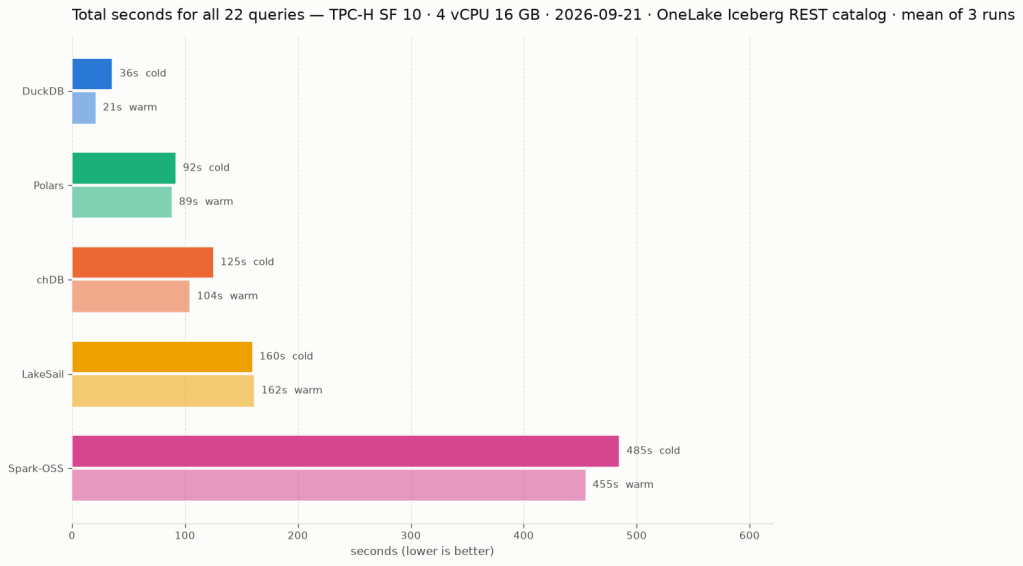
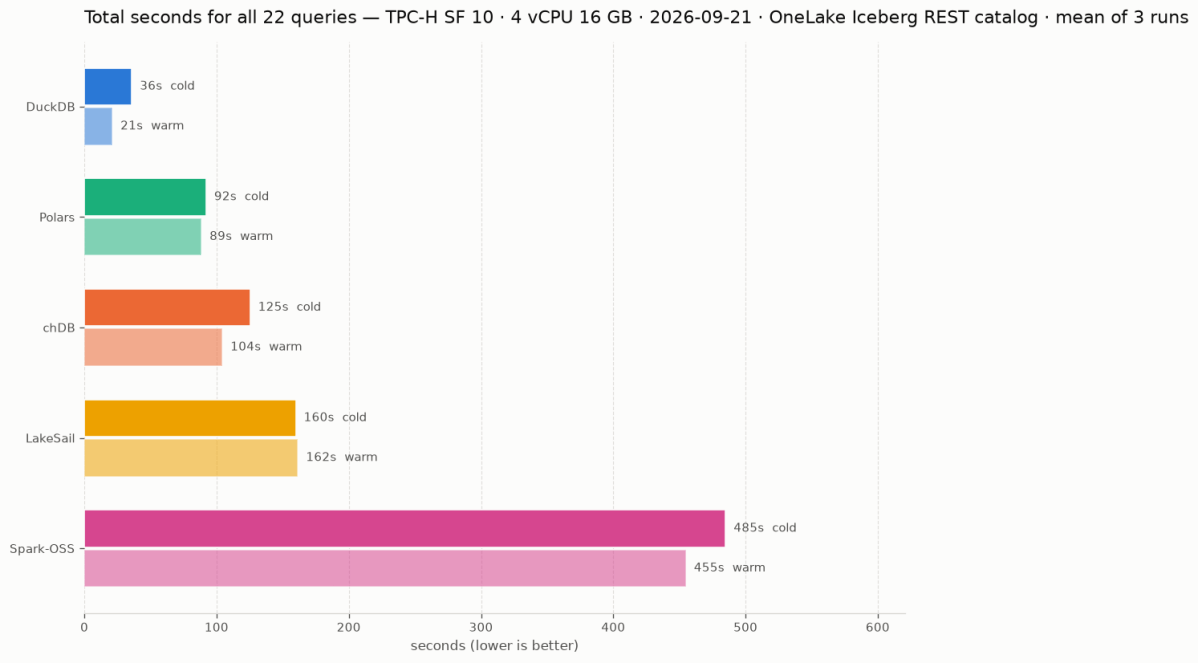
Same 22 TPC-H queries. Same Delta Lake data on OneLake (SF10). Same single Fabric node. Five Python SQL engines: DuckDB (Delta Classic), DuckDB (Iceberg REST), LakeSail, Polars, DataFusion , you can download the notebook here

unfortunately both daft and chdb did not support reading from Onelake abfss

DuckDB iceberg read support is not new, but it is very slow, but the next version 1.5 made a massive improvements and now it is slightly faster than Delta

They all run the same SQL now

All five engines executed the exact same SQL. No dialect tweaks, no rewrites. The one exception: Polars failed on Query 11 with

`SQLSyntaxError: subquery comparisons with '>' are not supported`

Everything else just worked,SQL compatibility across Python engines is basically solved in 2026. The differentiators are elsewhere.

Freshness vs. performance is a trade-off you should be making

import duckdb
conn = duckdb.connect()
conn.sql(f""" install delta_classic FROM community ;
attach 'abfss://{ws}@onelake.dfs.fabric.microsoft.com/{lh}.Lakehouse/Tables/{schema}'
AS db (TYPE delta_classic, PIN_SNAPSHOT); USE db
""")

`MAX_TABLE_STALENESS ‘5 minutes’` means the engine caches the catalog metadata and skips the round-trip for 5 minutes.

DuckDB’s Delta Classic does the same with `PIN_SNAPSHOT`.

import duckdb
conn = duckdb.connect()
conn.sql(f""" install delta_classic FROM community ;
attach 'abfss://{ws}@onelake.dfs.fabric.microsoft.com/{lh}.Lakehouse/Tables/{schema}'
AS db (TYPE delta_classic, PIN_SNAPSHOT); USE db
""")

Your dashboard doesn’t need sub-second freshness. Your reporting query doesn’t care about the last 30 seconds of ingestion. Declaring a staleness budget upfront – predictable, explicit – is not a compromise. It’s the right default for analytics.

Object store calls are the real bottleneck

Every engine reads from OneLake over ABFSS. Every Parquet file is a network call. It doesn’t matter how fast your engine scans columnar data in memory if it makes hundreds of HTTP calls to list files and read metadata before it starts.

DuckDB Delta Classic (PIN_SNAPSHOT): caches the Delta log and file list at attach time. Subsequent queries skip the metadata round-trips.

DuckDB Iceberg (MAX_TABLE_STALENESS): caches the Iceberg snapshot from the catalog API. Within the staleness window, no catalog calls.

LakeSail: has native OneLake catalog integration (SAIL_CATALOG__LIST). You point it at the lakehouse, it discovers tables and schemas through the catalog. Metadata resolution is handled by the catalog layer, not by scanning storage paths, but it has no concept of cache, every query will call Onelake Catalog API

Polars, DataFusion: resolve the Delta log on every query. Every query pays the metadata tax.

An engine that caches metadata will beat a “faster” engine that doesn’t. Every time, especially at scale.

How about writes?

You can write to OneLake today using Python deltalake or pyiceberg – that works fine. But native SQL writes (CREATE TABLE AS INSERT INTO ) through the engine catalog integration itself? That’s still the gap, lakesail can write delta just fine but using a path.

LakeSail and DuckDB Iceberg both depend on OneLake’s catalog adding write support. The read path works through the catalog API, but there’s no write path yet. When it lands, both engines get writes for free.

DuckDB Delta Classic has a different bottleneck: DuckDB’s Delta extension itself. Write support exists but is experimental and not usable for production workloads yet.

The bottom line

Raw execution speed will converge. These are all open source projects, developers read each other’s code, there’s no magical trick one has that others can’t adopt. The gap narrows with every release.

Catalog Integration and cache are the real differentiator. And I’d argue that even *reading* from OneLake is nearly solved now.

Full disclosure: I authored the DuckDB Delta Classic extension and the LakeSail OneLake integration (both with the help of AI), so take my enthusiasm for catalog integration with a grain of bias

First Look at Geometry Types in Parquet

Getting different parties in the software industry to agree on a common standard is rare. Most of the time, a dominant player sets the rules. Occasionally, however, collaboration happens organically and multiple teams align on a shared approach. Geometry types in Parquet are a good example of that.

In short: there is now a defined way to store GIS data in Parquet. Both Delta Lake and Apache Iceberg have adopted the standard ( at least the spec). The challenge is that actual implementation across engines and libraries is uneven.

  • Iceberg: no geometry support yet in Java nor Python, see spec
  • Delta:  itโ€™s unclear if it’s supported in the  open source implementation (I need to try sedona and report back), nothing in the spec though ?
  • DuckDB: recently added support ( you need nightly build or wait for 1.4)
  • PyArrow: has included support for a few months, just use the latest release
  • Arrow rust : no support, it means, no delta python support ๐Ÿ˜ฆ

The important point is that agreeing on a specification does not guarantee broad implementation. and even if there is a standard spec, that does not means the initial implementation will be open source, it is hard to believe we still have this situation in 2025 !!!

Letโ€™s run it in Python Notebook

To test things out, I built a Python notebook that downloads public geospatial data, merges it with population data, writes it to Parquet, and renders a map using GeoPandas, male sure to install the latest version of duckdb, pyarrow and geopandas

!pip install -q duckdb  --pre --upgrade
!pip install -q pyarrow --upgrade
!pip install geopandas  --upgrade
import sys
sys.exit(0)

At first glance, that may not seem groundbreaking. After all, the same visualization could be done with GeoJSON. The real advantage comes from how geometry types in Parquet store bounding box coordinates. With this metadata, spatial filters can be applied directly during reads, avoiding the need to scan entire datasets.

That capability is what makes the feature truly valuable: efficient filtering and querying at scale, note that currently duckdb does not support pushing those filters, probably you need to wait to early 2026 ( it is hard to believe 2025 is nearly gone)

๐Ÿ‘‰Workaround if your favorite Engine donโ€™t support it .

 A practical workaround is to read the Parquet file with DuckDB (or any library that supports geometry types) and export the geometry column back as WKT text. This allows Fabric to handle the data, albeit without the benefits of native geometry support, For example PowerBI can read WKT just fine

duckdb.sql("select geom, ST_AsText(geom) as wkt  from '/lakehouse/default/Files/countries.parquet' ")

For PowerBI support to wkt, I have written some blogs before, some people may argue that you need a specialized tool for Spatial, Personally I think BI tools are the natural place to display maps data ๐Ÿ™‚

Using gpt-oss 20B for Text to SQLย 

TL;DR : 

As a quick first impression, I testedย  Generating SQL Queries based on a YAML Based Semantic model, all the files are stored here , considering i have only 4 GB of VRAM, it is not bad at all !!!

to be clear, this is not a very rigorous benchmark, I just used the result of the last runs, differents runs will give you slightly different results, it is just to get a feeling about the Model, but it is a workload I do care about, which is the only thing that matter really.

The Experimental Setup

The experiment uses a SQL generation test based on the TPC-DS dataset (scale factor 0.1), featuring a star schema with two fact tables (store_sales, store_returns) and multiple dimension tables (date_dim, store, customer, item). The models were challenged with 20 questions ranging from simple aggregations to complex analytical queries requiring proper dimensional modeling techniques.

The Models Under Test

  1. O3-Mini (Reference Model): Cloud-based Azure model serving as the “ground truth”
  2. Qwen3-30B-A3B-2507: Local model via LM Studio
  3. GPT-OSS-20B : Local model via LM Studio

Usually I use Ollama, but moved to LM studio because of MCP tools support, for Qwen 3, strangely code did not perform well at all, and the thinking mode is simply too slow

Key Technical Constraints

  • Memory Limit: Both local models run on 4GB VRAM, my laptop has 32 GB of RAM
  • Timeout: 180 seconds per query
  • Retry Logic: Up to 1 attempt for syntax error correction
  • Validation: Results compared using value-based matching (exact, superset, subset)

The Testing Framework

The experiment employs a robust testing framework with several features:

Semantic Model Enforcement

The models were provided with a detailed semantic model that explicitly defines:

  • Proper dimensional modeling principles
  • Forbidden patterns (direct fact-to-fact joins)
  • Required CTE patterns for combining fact tables
  • Specific measure definitions and business rules

Multi-Level Result Validation

Results are categorized into five match types:

  • Exact Match: Identical results including order
  • Superset: Model returns additional valid data
  • Subset: Model returns partial but correct data
  • Mismatch: Different results
  • Error: Execution or generation failures

The Results: Not bad at all

Overall Performance Summary

Both local models achieved 75-85% accuracy, which is remarkable considering they’re running on consumer-grade hardware with just 4GB VRAM. The GPT-OSS-20B model slightly outperformed Qwen3  with 85% accuracy versus 75%. Although it is way slower

I guess we are not there yet for interactive use case, it is simply too slow for a local setup, specially for complex queries.

Tool calling

a more practical use case is tools calling, you can basically use it to interact with a DB or PowerBI using an mcp server and because it is totally local, you can go forward and read the data and do whatever you want as it is total isolated to your own computer.

The Future is bright

I don’t want to sounds negative, just 6 months ago, i could not make it to works at all, and now I have the choice between multiple vendors and it is all open source, I am very confident that those Models will get even more efficient with time.