For a long time, whenever I tried to use Iceberg outside the JVM ecosystem, something I needed seemed to be waiting for the next release. It took longer than I hoped, but lately I have been able to get much further with the engines I use.
chDB can authenticate to OneLake with a token, Polars now runs all 22 queries in this benchmark, and DuckDB’s cache feels like absolute magic on the second pass. I still ran into bugs, but I could run both reads and writes across several engines against the same Iceberg catalog.
I took two of my notebooks and port them to GitHub Actions as python script across DuckDB, Polars, chDB, LakeSail, Spark and Daft. One runs analytical queries; the other reads CSVs and writes Iceberg tables. I wanted to see how each handled the workloads on a small 4-core runner.
The data lives in OneLake. Reading through its Iceberg REST catalog is already available; the write support I used is still in private preview.
Both benchmarks run on a public 4 vCPU / 16 GB runner. The engines connect to the catalog either directly or through pyiceberg. OIDC federation provides a token per job, so there is no client secret to store. The same approach should work with other Iceberg REST catalogs, provided the engine supports their storage and authentication.
The code, the raw JSON of every run and the charts are in djouallah/lakehouse_benchmark.
Reading: TPC-H-like queries at SF10
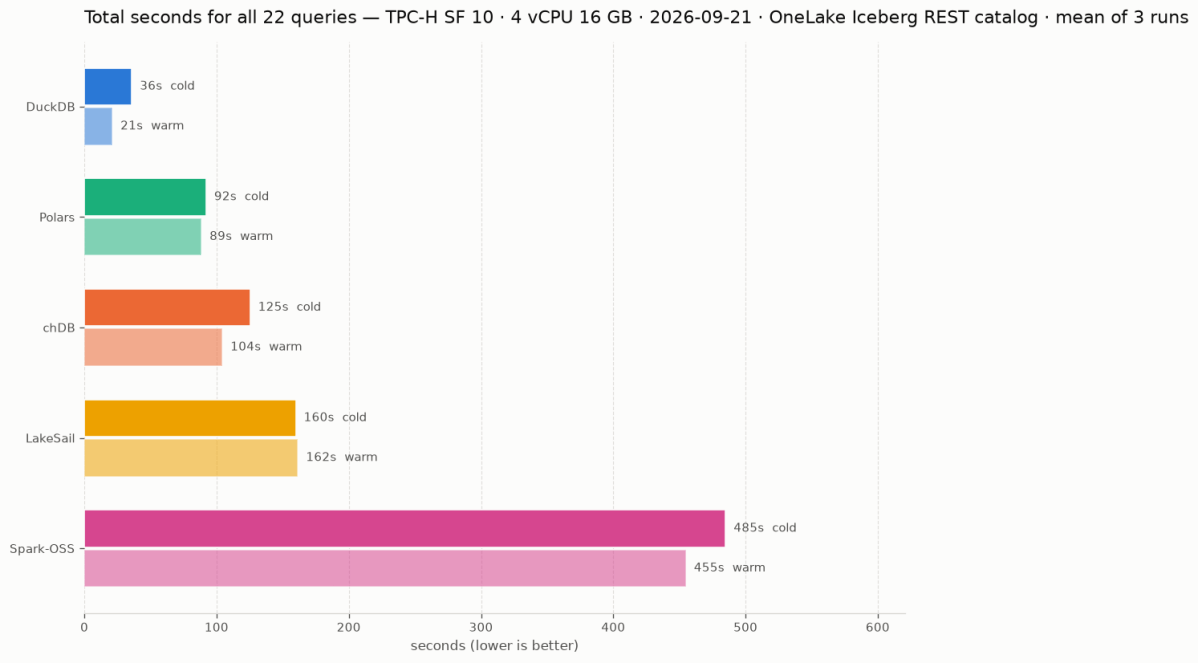
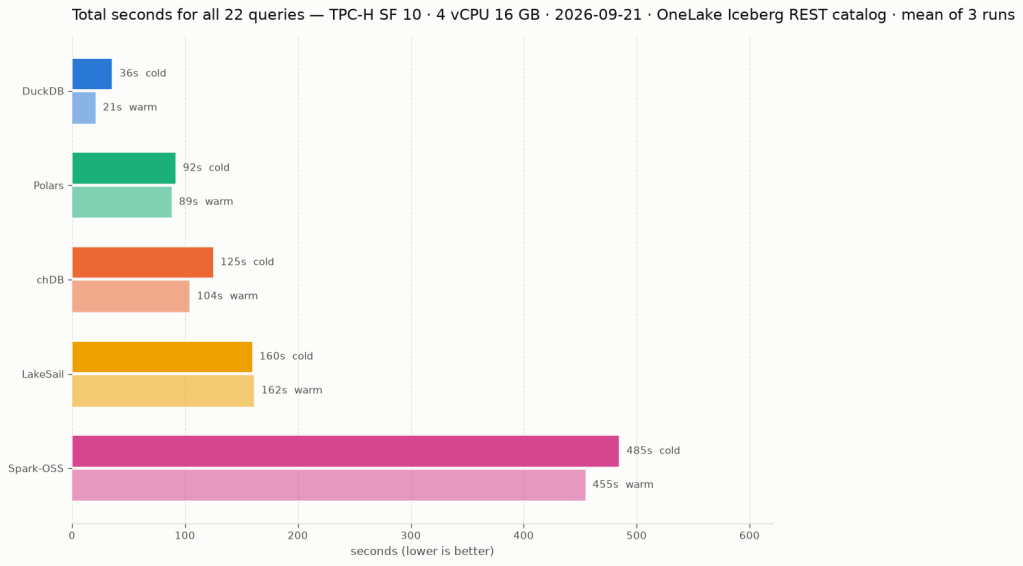
The tables are generated with tpchgen, uploaded as Parquet and registered with pyiceberg’s add_files. DuckDB and LakeSail could have written them just fine, but I wanted to stay neutral. Each engine attaches the catalog, runs the 22 queries, then runs the same 22 again immediately. Those are the cold and warm passes below; catalog attach time is excluded. The chart and the table are the mean of three runs on 20 and 21 September 2026. This is a small single-node comparison, not an official TPC-H benchmark.
| Engine | Version | Cold | Warm |
|---|---|---|---|
| DuckDB | 2.0.0 dev | 35.9s | 21.3s |
| Polars | 2.0.0-rc.2 | 92.1s | 88.6s |
| chDB | 4.4.0 | 125.4s | 104.5s |
| LakeSail | 0.7.1 | 159.9s | 161.6s |
| Spark-OSS | 4.1.3 | 484.9s | 454.9s |
Spark open source, not to be confused with Fabric Spark, is a single-node JVM on 4 cores here. Thanks to AI, running Spark locally is no longer a scary experience. Unfortunately Daft is missing: at 0.7.25 it runs 16 of the 22 queries, because l_extendedprice * (1 - l_discount) overflows its decimal precision ceiling of 38 (Daft#7532). I like Daft and would love to include it in the full query comparison once this is fixed. It does complete the ETL workload below.
Writing: Light ETL
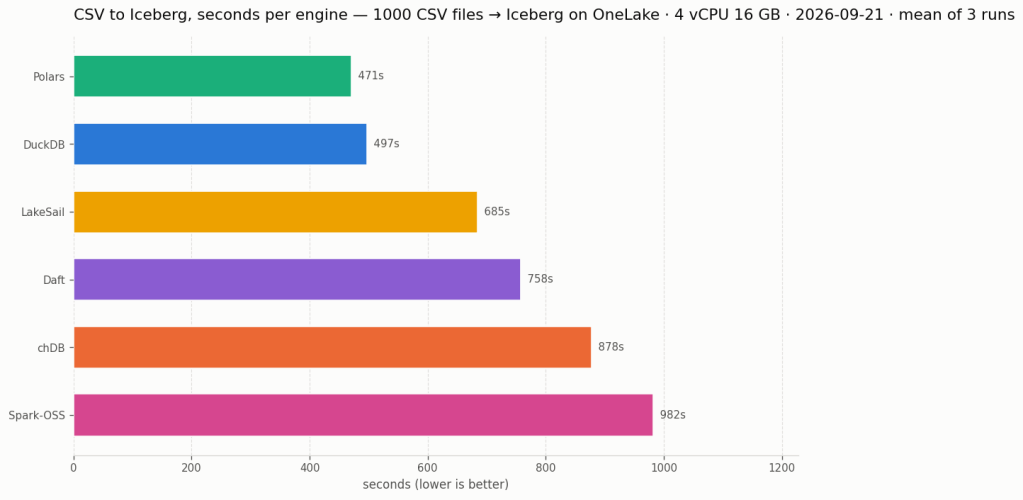
1000 daily AEMO CSV files, 52 GB, are landed once in the lakehouse Files/ section. Each engine reads all of them, filters, casts and writes one Iceberg table of 149,146,763 rows through the same catalog. DuckDB, LakeSail and Spark have their own Iceberg writer. chDB and Polars stream Arrow batches into pyiceberg. Daft has its own writer over a pyiceberg table.
| Engine | Load |
|---|---|
| Polars | 470.8s |
| DuckDB | 497.4s |
| LakeSail | 684.5s |
| Daft | 757.9s |
| chDB | 878.1s |
| Spark-OSS | 982.2s |
Every engine ends with the same row count. Load time includes recreating the table, reading the CSVs, transforming, writing and committing; session setup and catalog attach are timed separately. There is one load pass per engine, and the chart and the table are the mean of three runs. Snapshot isolation and concurrent writes will have to wait for another blog. The Iceberg write path used here is in private preview.
Random learnings, in no particular order
- DuckDB needed
AZURE_TRANSPORT_OPTION_TYPE=curlon this Linux runner. Without it the Iceberg attach succeeds and every data-file read fails with a message that looks exactly like a missing credential. Setting the transport fixed it. I had not seen this in the Fabric notebook. - chDB returned 41 rows for Q13, everybody else 42. ClickHouse defaults
join_use_nulls=0and fills unmatched outer-join cells with default values instead of NULL. The row-count smoke test caught this, and the benchmark now setsjoin_use_nulls=1. - The catalog cache settings do not all mean the same thing. I configured a 15-minute lifetime, but LakeSail’s “table cache” caches the table listing, not the loaded table. It still loads table metadata on every statement, adding REST requests even on the warm pass (sail#2629).
- Daft’s six query failures come from decimal arithmetic. CTEs, EXISTS and correlated subqueries all work. It also rejects backticks outright, which looked like a total dialect failure until I read the error. Separately, its Azure URI parser drops the container on OneLake hosts; the bench works around it with
az://paths. The proposed fix is Daft#7533. - Nothing is partitioned, on purpose. The pyiceberg streaming append used here only supports unpartitioned tables. A first version that materialised batches to partition by year took the 16 GB runner down at 100 files. So every engine writes the same unpartitioned shape and
yearstays a plain column.
Spark, and why it has no native accelerator here
Spark-OSS is 4.1.3 with Iceberg 1.11 and hadoop-azure 3.4.2. I also looked at Comet and Gluten/Velox, but could not use either for this benchmark.
- Comet supports Spark 4.1 and ships a native Iceberg reader, but its readable schemes are
file, s3, s3a, gs, oss. Anabfsstable is declined at planning time and runs on the JVM as if the plugin were not there. I left Comet out because it could not accelerate these scans. Filed as datafusion-comet#6058. - Gluten/Velox has a Velox ABFS connector, but I could not find a published package for Spark 4.x to test (This basically what Fabric NEE uses)
Conclusion
All six engines completed the CSV-to-Iceberg load. Five completed all 22 read queries; Daft completed 16. Being able to try this many engines against one catalog, with the data staying in OneLake, is what I find exciting. chDB’s token support and Polars running all 22 SQL queries give me more options for the notebooks I already use.
DuckDB was fastest on the reads, and on the load it traded first place with Polars from run to run. DuckDB’s read total fell from 36s to 21s on the second pass, about 40%. The other engines improved less, and LakeSail’s warm pass came out slightly slower than its cold one. That makes repeated reads worth testing separately from a one-pass load. It does not tell us exactly what each engine cached or how many bytes it fetched; chDB also has a filesystem cache configured here.
For my ETL workload, the cache does not matter: read the new files, transform them and write the table.
If you want to see how much things have changed, have a look at these TPC-H SF10 results from four years ago.
Note: The write benchmark requires access to the private preview used here coming soon.