Four years ago I wrote a blog about using DuckDB with Power BI in DirectQuery. It got a fair number of likes on LinkedIn 🙂 along with the one comment I didn’t want to hear: how does this work in production? (Craig, if you’re reading this, you were right.)
Back then I thought the technology was the hard part and the rest would sort itself out. It didn’t.
The ODBC driver never really worked in any non-trivial setup. Filters didn’t push down, decimal precision was buggy. It has gotten better since, but two show stoppers remained:
- DuckDB is in-process, so the driver is the database. There’s no warm, long-running session. Every query starts from scratch.
- I don’t think those drivers can realistically be certified (personal opinion). And Power BI Service, or any hosted BI service for that matter, is not going to host an in-process engine for free. An on-prem data gateway is not really a good option either.
In 2026 things are way better. MotherDuck (DuckDB’s SaaS) shipped a PostgreSQL endpoint. Problem solved: Power BI speaks Postgres, and it works out of the box.
Then last week DuckDB released Quack. For my own sanity I’ll just call it “DuckDB Server.” It is just an extension; a single function call and you have a server !!
My first reaction was annoyance. Four years of waiting, and they shipped a proprietary wire protocol. I was hoping for pg wire. I want my driver to work. I don’t really care about a 2x improvement if nothing interoperates.
Luckily I was partially wrong. Within two days there was an ADBC driver from gizmodata/adbc-driver-quack, and, to my surprise, a Power BI custom connector from Curt Hagenlocher (think of him as the Linus of Power Query). my understanding it is a side project, not official Microsoft.
And somehow, the whole thing worked. It was beautiful.
But lesson learned from last time: this is experimental, with no guarantee the connector will ever be certified.
The main change from the 2022 post is that instead of pointing at parquet files, I’m pointing at a catalog and getting tables back, like an actual database instead of a pile of files and duckdb got way better.
High level architecture
- OneLake Iceberg Catalog — OneLake exposes data as tables. You need three things:
- Endpoint:
https://onelake.table.fabric.microsoft.com/iceberg - An Entra ID auth token
- Path to the Lakehouse/Warehouse:
workspace_name/Lakehouse_name.Lakehouse
- Endpoint:
- DuckDB +
icebergextension — reads the catalog and the underlying parquet over HTTPS.
- Entra ID —
az account get-access-token --resource https://storage.azure.com/mints a short-lived bearer token. No service principal, no app registration. I have a script that grabs the token, and I opened duckdb-azure#170 hoping to make this much simpler.
- DuckDB Endpoint — turns the engine into a TCP server on
127.0.0.1:9494, speaking DuckDB’s native wire protocol (whatever that means).
- The ADBC Driver — Python client and Power BI share the same DLL, you need to manually install it from curt github page
You can download all the files here
Power BI
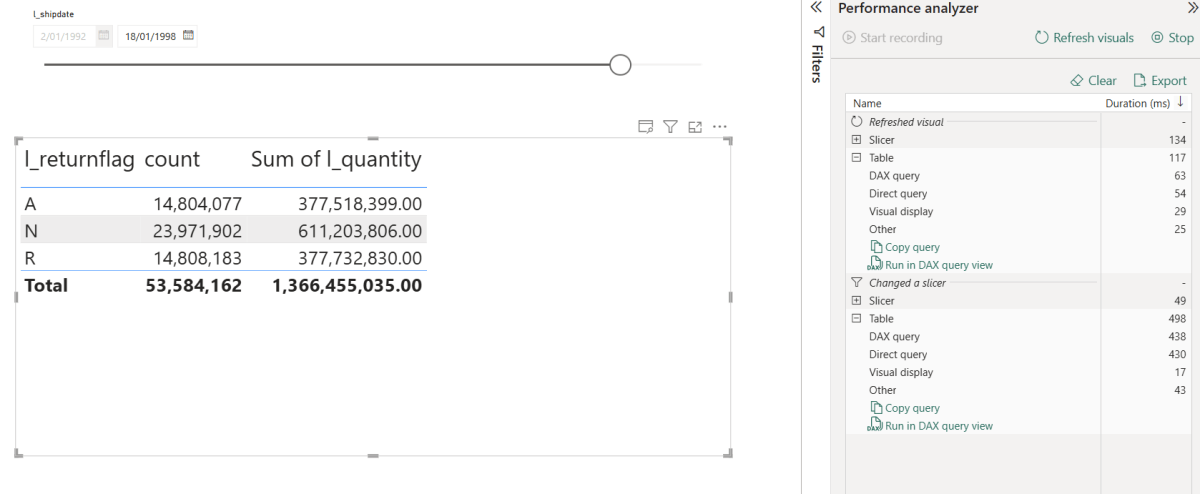
Let’s just share a video. Yes, 600M rows, warm run in my laptop
Python Notebook
TPC-H SF=10 (10 GB), 22 queries, run twice in the same session via client.ipynb. Numbers are seconds, copied straight from the notebook output.
| Cold | Warm | |
|---|---|---|
| Total | ~5 min 29 s | ~30 s |
Cold time is dominated by parquet I/O over HTTPS from OneLake. Bandwidth and seek count, not CPU. Warm runs hit DuckDB’s in-process buffer cache, Onelake endpoint is in another continent and my internet provider is horrible 🙂
Optimization on this stack should target bytes read and seeks (codec, row-group size, predicate pushdown, range prefetch), not query plans.
This is exactly why server mode make sense, as the warm cache is shared by all client (notebook, Power BI, AI Agent)
Not production ready
- The Entra token has a ~1h TTL. As far as I can tell, DuckDB has no way to auto-refresh tokens.
- The driver is not certified, so it can’t be used in the service, if you want it added to PowerBI, create an idea in Fabric forum and vote
- DuckDB Server is new. Don’t expect SQL Server maturity yet 🙂
- DuckDB’s remote file cache is RAM only. When you restart DuckDB, you lose it and have to deal with the cold-run pain again and egress fees 😦
- The DuckDB Azure extension is still pretty rough in places. To be fair, they’ve openly said they don’t have the bandwidth.
Hopefully it won’t take another four years to make this production ready.
Still, seeing DuckDB as a single binary serving a 600M row table to Power BI was genuinely fun. and The Iceberg catalog is awesome !!!

