Microsoft Fabric lets you dynamically configure the number of vCores for a Python notebook session at runtime — but only when the notebook is triggered from a pipeline. If you run it interactively, the parameter is simply ignored and the default kicks in.
This is genuinely useful: you can right-size compute on a job-by-job basis without maintaining separate notebooks. A heavy backfill pipeline can request 32 cores; a lightweight daily refresh can get by with 2.
How It Works
Place a %%configure magic cell at the very top of your notebook (before any other code runs):
%%configure{ "vCores": { "parameterName": "pipelinecore", "defaultValue": 2 }}
The parameterName field ("pipelinecore" here) is the name of the parameter you’ll pass in from the pipeline’s Notebook activity. The defaultValue is the fallback used when no parameter is provided — or when you run the notebook interactively.
Fabric supports vCore counts of 4, 8, 16, 32, and 64. Memory is allocated automatically to match.
Wiring It Up in the Pipeline
In your pipeline, add a Notebook activity and open the Base parameters tab. Create a parameter named pipelinecore of type Int and set the value to @item().
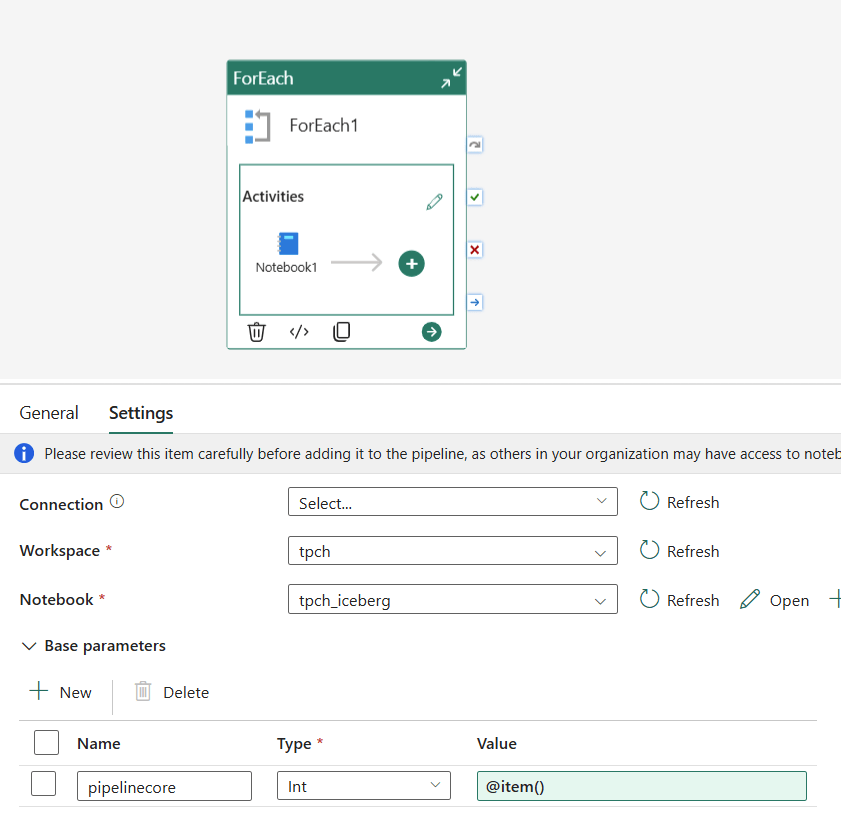
When the pipeline runs, Fabric injects the value into %%configure before the session starts.
A Neat Trick: Finding the Right Compute Size
Because the vCore value is just a pipeline parameter, you can use a ForEach activity to run the same notebook across multiple core counts in sequence — great for benchmarking or profiling how your workload scales.
Set up a pipeline variable cores of type Array with a default value of [64,32,16,8,4,2]:
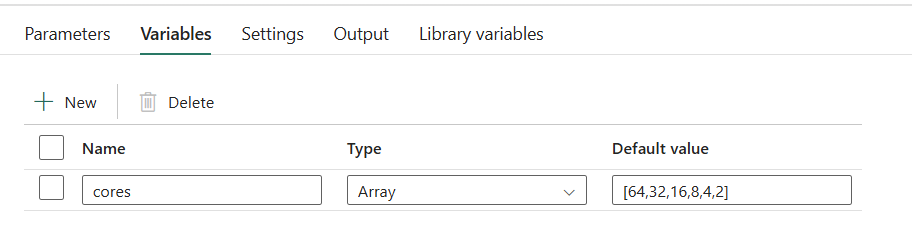
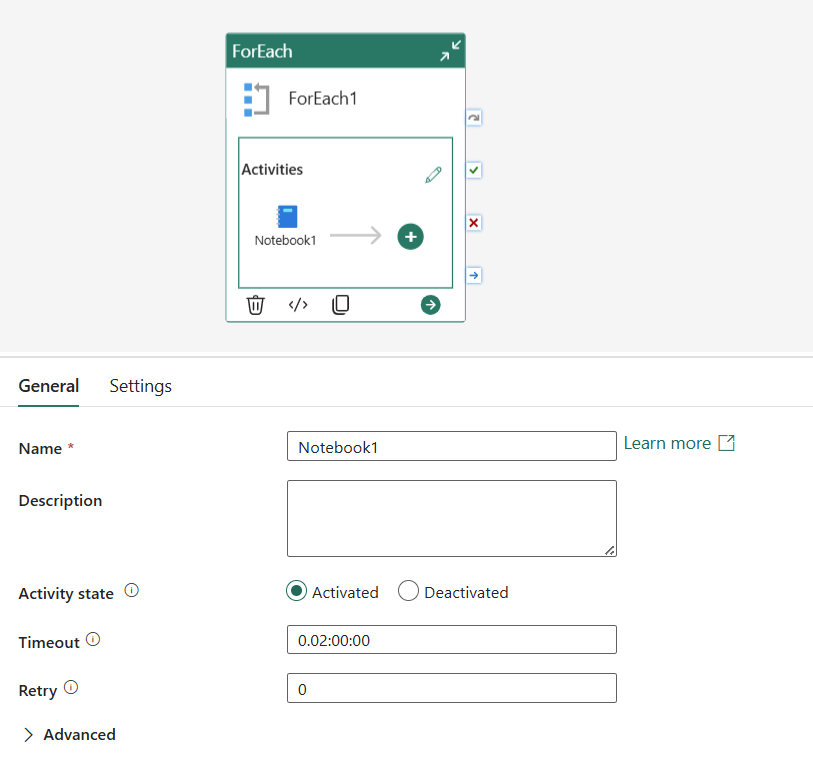
Then configure the ForEach activity with:
- Items:
@variables('cores') - Sequential: ✅ checked (so runs don’t overlap)
- Concurrency: 1
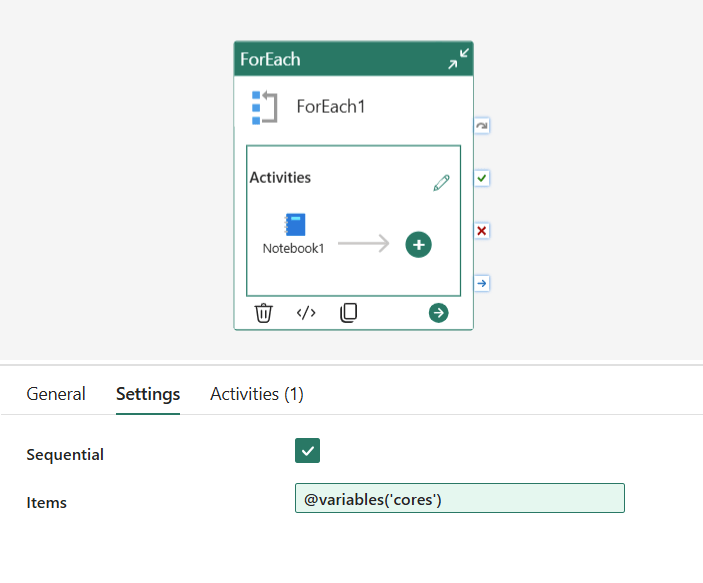

Inside the ForEach, add a Notebook activity and set the pipelinecore base parameter to @item(). Each iteration picks the next value from the array and passes it to the notebook, so you get a clean sequential run at 64, 32, 16, 8, 4, and 2 cores.
and of course the time, always change it to a more sensible value
What the Numbers Say
Running the previous workload across all supported core counts produced these results:
| Cores | Duration |
|---|---|
| 64 | 8m 24s |
| 32 | 8m 46s |
| 16 | 9m 18s |
| 8 | 11m 17s |
| 4 | Failed |
| 2 | Canceled |
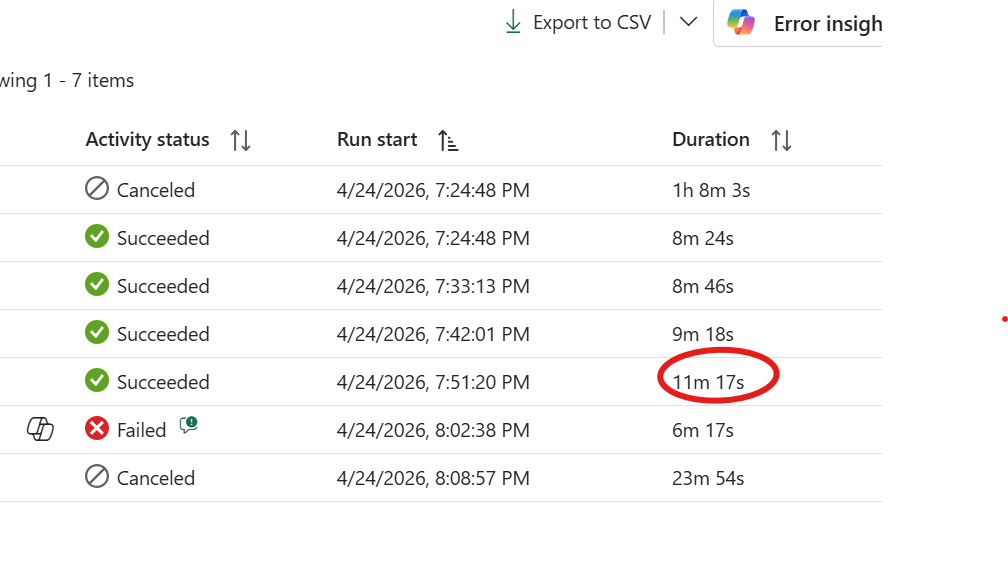
The answer here is 8 cores. Yes, it’s about 2 minutes slower than 16 , but it’s half the compute. Going from 64 down to 8 cores costs you less than 3 minutes of runtime, which is a reasonable trade. Below 8 the workload simply falls apart. The sweet spot is not always the fastest run; it’s the point where adding more cores stops meaningfully improving the result.
btw for the CU consumption, the formula is very simple
nb of cores X 0.5 X active duration
Notice you will not be charged for startup duration.
Another Workload: 158 GB of CSV with DuckDB
To make this concrete, here’s a second run — an ETL notebook processing 158 GB of CSV files using DuckDB 1.4.4, the default version available in the Fabric Python runtime.
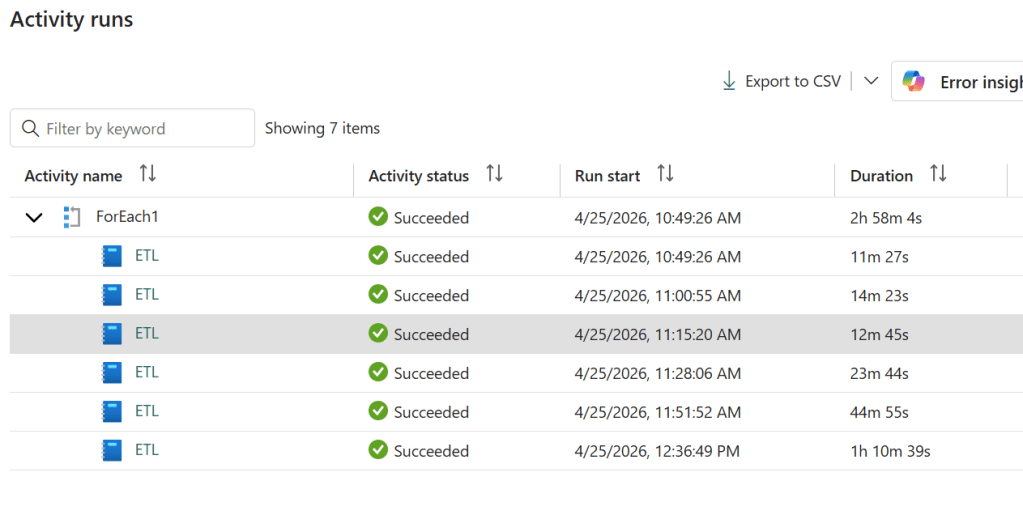
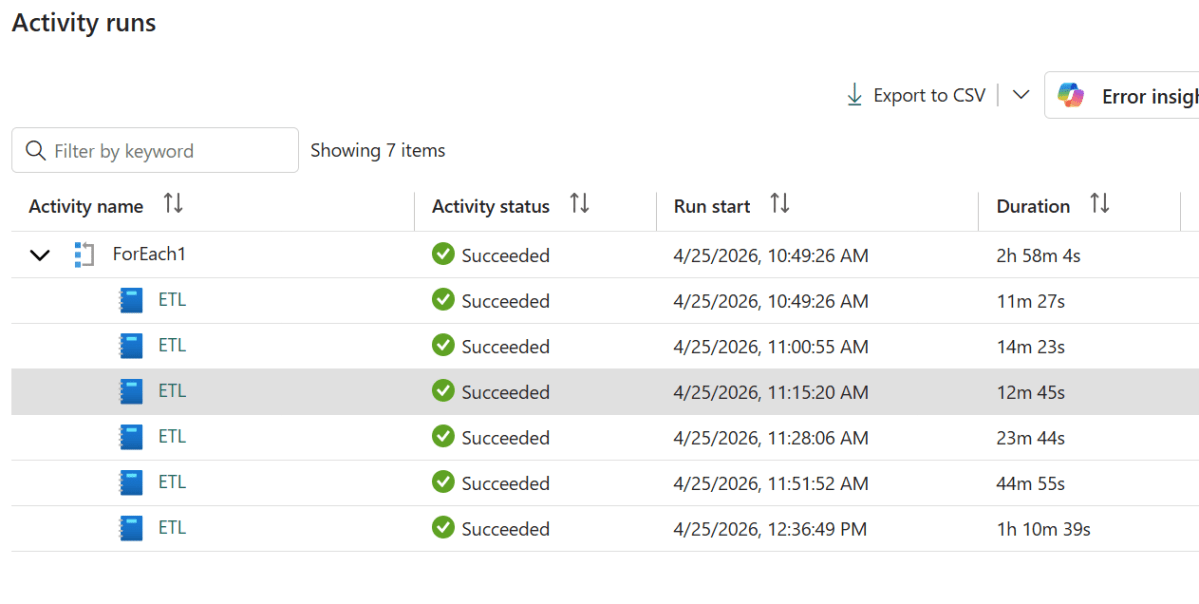
I’d pick 16 cores here. The jump from 16 to 64 saves you barely a minute and a half — well within the noise, as 16 actually outran 32 in this test. Below 8 cores the runtime climbs steeply, roughly doubling at each step. The reason is that 158 GB of CSV is largely an I/O-bound workload: DuckDB parallelises reads aggressively, but at some point you’re just waiting on storage, not on CPU. More cores stop helping.
Two things worth noting. First, 2 cores completed the job — which is remarkable given that 2 cores comes with only 16 GB of RAM for a 158 GB dataset. DuckDB’s out-of-core execution handled it, but at 1h 10m it pushed close to the limit. And that brings up the second point: OneLake storage tokens have a lifetime of around one hour. A run that creeps past that boundary risks losing access mid-execution. For a workload this size, anything below 8 cores is probably not worth the gamble.
A Word of Caution: Startup Overhead
Before you start bumping up core counts, there’s an important trade-off to keep in mind: anything above 2 cores adds several minutes of python runtime just to provision the session — and that startup time is included in your total duration. For large, long-running workloads it barely registers. For small ones it can easily dominate the total run time.
And most real-world workloads are small. A daily incremental load, a lookup refresh, a small aggregation — these often complete in under a minute of actual computation. If the session startup costs you 3 minutes and the work itself costs 30 seconds, more cores aren’t helping.
The default of 2 cores starts fast and is the right choice for the majority of jobs. Reach for more only when you’ve measured that the workload actually benefits from it.
Beyond Benchmarking: Dynamic Resource Allocation
The benchmarking pattern is useful, but the more powerful idea is using this in production. Because the vCore count is just a number passed through the pipeline, nothing stops a first stage of your pipeline from deciding what that number should be.
Imagine a pipeline that starts by scanning a data lake to count the number of files or estimate the volume of data to process. Based on that output, it computes an appropriate core count and passes it to the notebook that does the actual work — 4 cores for a small daily increment, 32 for a full month’s backfill, 64 for a one-off historical load. The notebook itself doesn’t change; the compute scales to the workload automatically.
This kind of adaptive orchestration is normally something you’d build a lot of custom logic around. Here it’s just a parameter.
The Catch: Interactive Runs Use the Default
This only works end-to-end when triggered from a pipeline. Running the notebook manually in the Fabric UI will silently use the defaultValue — there’s no error, the parameter just won’t be overridden. Keep that in mind when testing.
Tested on Microsoft Fabric as of April 2026. Official reference: Develop, execute, and manage notebooks and Python experience on Notebook.
Special thanks to a colleague from Engineering for sharing this technique. Written with the help of Claude.

