Yes, it’s clickbait. Of course you need more, but it’s hard to get anyone to read a blog these days 🙂
A lot of unrelated developments have happened recently:
- Python engines are becoming boring. They all write Iceberg, understand SQL and spill to disk more or less reasonably well. Polars 2.1 is the perfect example. I’m not saying it’s a bad thing, but in a sense they are becoming the new normal.
- OneLake catalog added Iceberg write support, which means there are way more options to write, besides Delta of course.
- On-demand billing and Fabric apps arrived in Australia Southeast. I know it’s silly, but somehow I feel something is only real when it lands in my tenant.
- Microsoft made a real commitment to the Apache Ossie project.
- AI is becoming frighteningly good. Some ideas that sounded crazy just a couple of months ago are now perfectly feasible, and will become even more so in the future.
Look at the first half of that list: getting data in is basically done, and honestly, I’m losing interest in the ETL side of the house. The second half is about what happens after the data lands, and that’s where things suddenly look wide open.
So I wanted to see how far a Fabric app can go with nothing but the OneLake catalog, and I built OneLake Studio, a free VS Code extension, to find out. It reads a semantic model (a Power BI .bim or an Apache Ossie .yaml), lets you explore it, and publishes it as a very basic Fabric app. The theory: if you like the app, your coding agent can turn it into a full-blown one.
Why VS Code? It handles sign-in for me (you use the account VS Code already has), and it’s where I spend all my time anyway. Authentication is still harder than it should be. I dream of a world where I never have to deal with it.
Here’s the tour: browse OneLake, look at a table, open a semantic model, explore it, see how its DAX becomes SQL, then publish it as a Fabric app your colleagues open in their browser. That last step is the point of the whole exercise. At the end is a short look under the hood.
A word of warning. This is a fun personal project, not an official Microsoft one. It computes a model’s numbers with its own engine, and matching Power BI 100% of the time is not a goal: by design it already differs, for example in case sensitivity and in how text is trimmed. The DAX compiler, dax-sql, was contributed by N.S. Devaraj.
1. Install and sign in
In VS Code, open Extensions (Ctrl+Shift+X), search for OneLake Studio and click Install. Click its icon in the activity bar, then Sign in to OneLake.
2. Browse OneLake
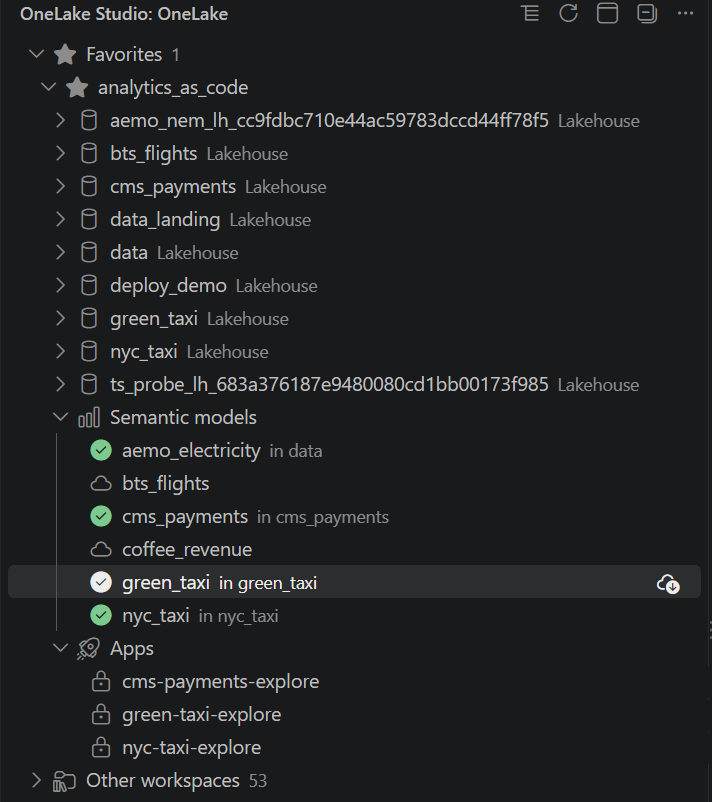
All your workspaces show up in one tree. Pin the ones you use most so they stay at the top. Each workspace lists its lakehouses, its Semantic models and its Apps. Mirrored databases show up too.
3. Look at a table
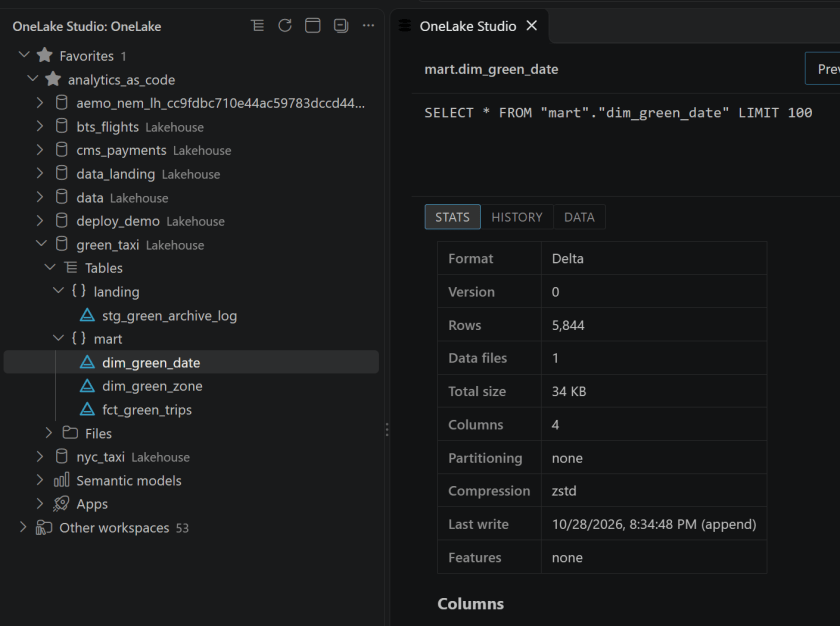
Click a table. Its icon tells you whether it was written as Delta or Iceberg, and it opens on three tabs.
Stats comes straight from the table’s metadata, before any data is read. For a Delta table, that’s its Delta log: version, rows, files, size, compression, last write, and features.
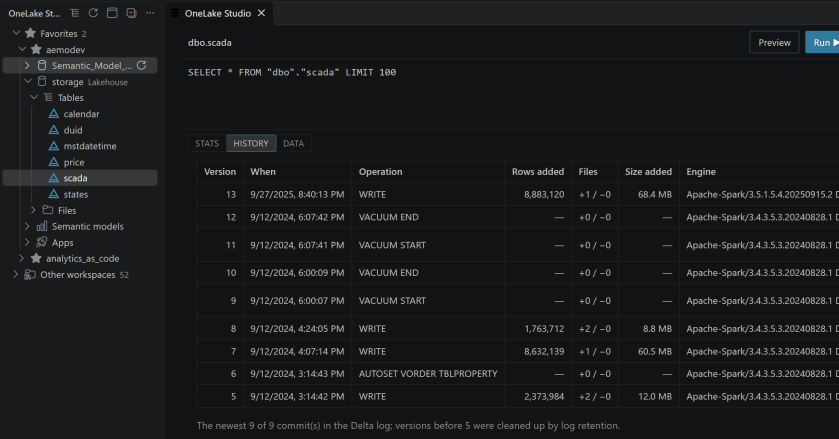
History lists what happened to the table, newest first: each commit, its operation, the rows and files it added, and which engine wrote it. Nothing is read until you open the tab.
Data shows the first rows. The query is right there to edit if you want more.
Every table, Delta or Iceberg, is read through Iceberg metadata. OneLake translates Delta to Iceberg v2 by default, as a background service, and you don’t need to do anything. When a table has no Iceberg metadata, OneLake Studio quotes Fabric’s conversion log so you can see why.
4. Open a semantic model
Under Semantic models, click one. In the background, OneLake Studio saves it into its lakehouse, and a check mark shows next to it in the tree. From then on it opens at once.
The Model page shows its tables and how they relate.
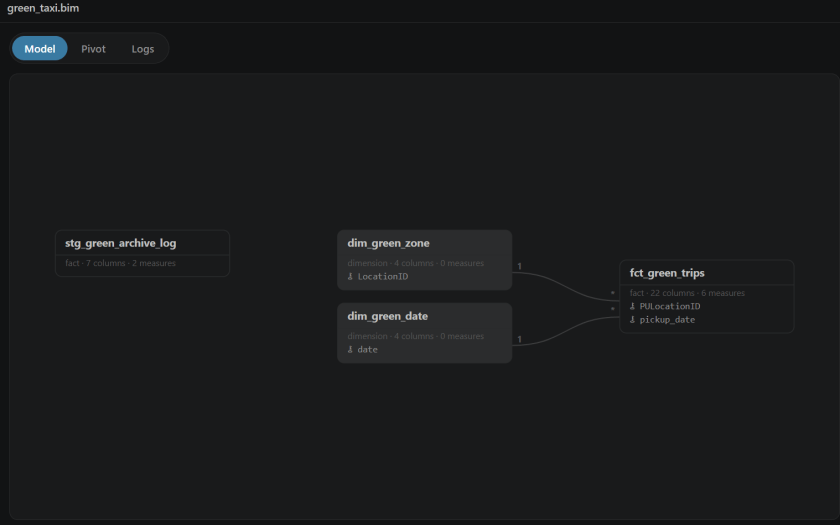
An Apache Ossie .yaml in a lakehouse’s Files opens the same way.
5. Explore it
Switch to Pivot. Drag fields onto Rows, Columns, Values and Filters, then pick a view: table, bar, line, area, heatmap and more.
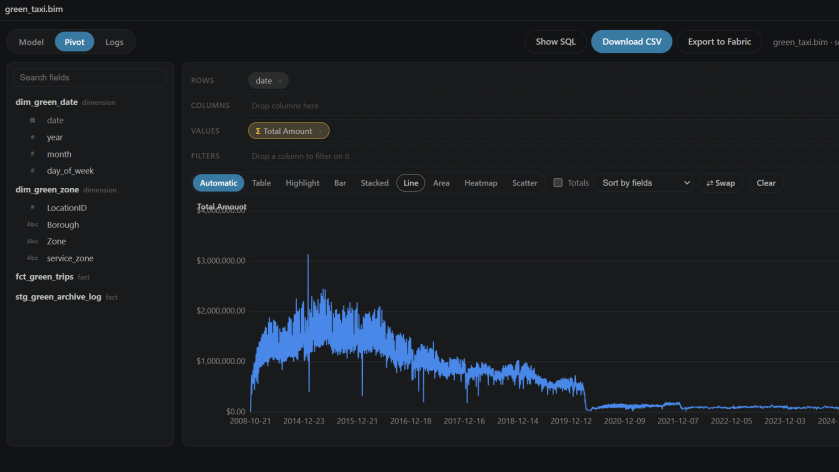
Show SQL turns the pivot into a query you can edit and run. You ask the model with plain SQL. Pick your columns, wrap a measure in AGG(), and select FROM model. For example, on the NYC taxi model:
SELECT "dim_date"."year", "dim_zone"."Borough", AGG("Total Amount")FROM modelGROUP BY ALL
AGG("Total Amount") is the measure exactly as it was defined in the model, in DAX. It’s computed in the context of each row (that year and that borough, plus any WHERE you add), just like a visual in Power BI. There’s no new syntax to change a measure on the fly, to add a filter or remove one, and I’m not interested in inventing one. If you need a different calculation, define it in the model.
Show SQL also shows where the time went.
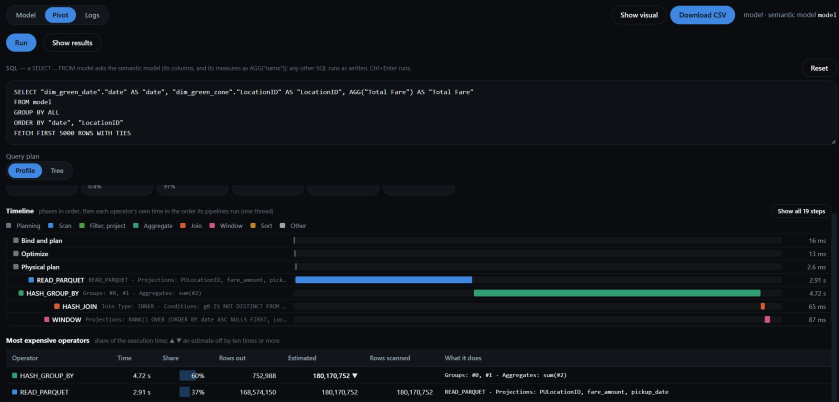
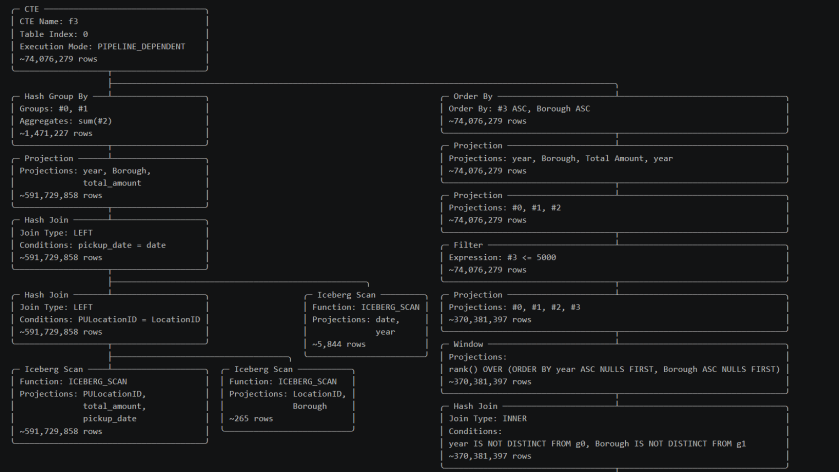
Click Tree to see what actually ran. You never wrote a join, but the model knows how its tables relate, so the trips are joined to the zones on the location and to the calendar on the date. Only the columns the query needs are read.
6. DAX to SQL
Every measure goes through dax-sql, a compiler that turns DAX into plain SQL, which DuckDB then runs. Here it is on something less trivial than a SUM: each borough’s share of the year’s total.
DEFINE MEASURE fct_trips[Share of Borough] = DIVIDE([Total Amount], CALCULATE([Total Amount], ALL(dim_zone[Borough])))EVALUATE SUMMARIZECOLUMNS(dim_date[year], dim_zone[Borough], "Share", [Share of Borough])
That compiles to this (only the line breaks are mine):
WITH f3 AS MATERIALIZED ( SELECT j4."year" AS "g0", j5."Borough" AS "g1", SUM(t2."total_amount") AS "a0" FROM "mart"."fct_trips" AS t2 LEFT JOIN "mart"."dim_date" AS j4 ON j4."date" = t2."pickup_date" LEFT JOIN "mart"."dim_zone" AS j5 ON j5."LocationID" = t2."PULocationID" GROUP BY j4."year", j5."Borough"),f7 AS (SELECT f3.g0 AS g0, SUM(f3.a0) AS a0 FROM f3 GROUP BY f3.g0)SELECT CAST(q10."year" AS BIGINT) AS "year", q10."Borough" AS "Borough", CAST(q10."Share" AS DOUBLE) AS "Share"FROM (SELECT s9."year", s9."Borough", s9."Share" FROM (SELECT * FROM (SELECT k1."year" AS "year", k1."Borough" AS "Borough", (f3.a0 / NULLIF(f7.a0, 0)) AS "Share" FROM (SELECT f3.g0 AS "year", f3.g1 AS "Borough" FROM f3) AS k1 LEFT JOIN f3 ON f3.g0 IS NOT DISTINCT FROM k1."year" AND f3.g1 IS NOT DISTINCT FROM k1."Borough" LEFT JOIN f7 ON f7.g0 IS NOT DISTINCT FROM k1."year") AS z8 WHERE z8."Share" IS NOT NULL) AS s9) AS q10
A few things to notice:
ALL(dim_zone[Borough])doesn’t scan the trips again.f3is the total by year and borough, andf7adds the boroughs up for each year. The fact table is read once.DIVIDEdivides byNULLIF(…, 0), so a zero total gives a blank, not an error.- Blank rows are dropped, as
SUMMARIZECOLUMNSdoes.
7. Publish it as a Fabric app
Click Export to Fabric. Confirm where the local copy goes and click Export.
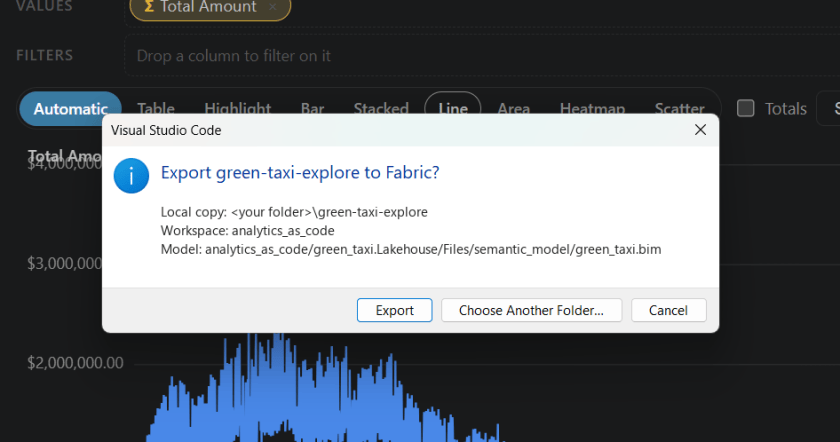
Once it’s published, your colleagues get the same pages in their browser, without VS Code.
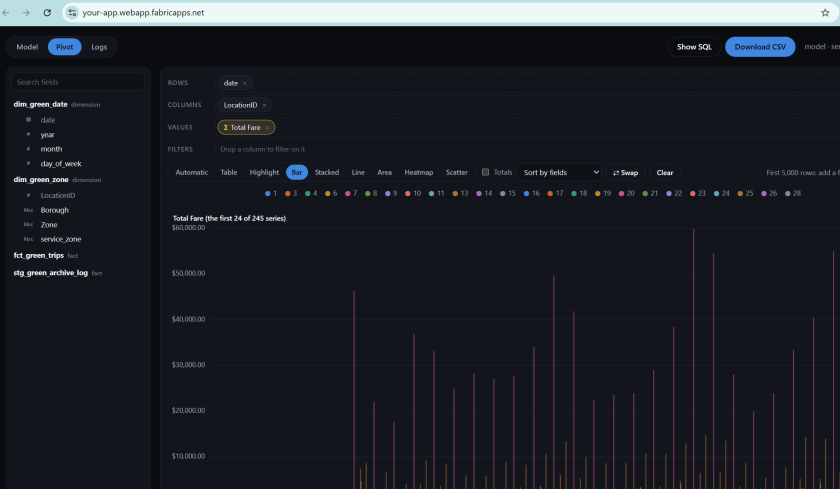
The app lives in your workspace, protected like any other Fabric item, so only people with access can open it (it shows under Apps in the tree, with a lock). It reads the model where it lives, so nothing is copied and the data is current. And a copy of the app stays in your folder, so you can treat it as a starting point: change it, then export again.
How it works
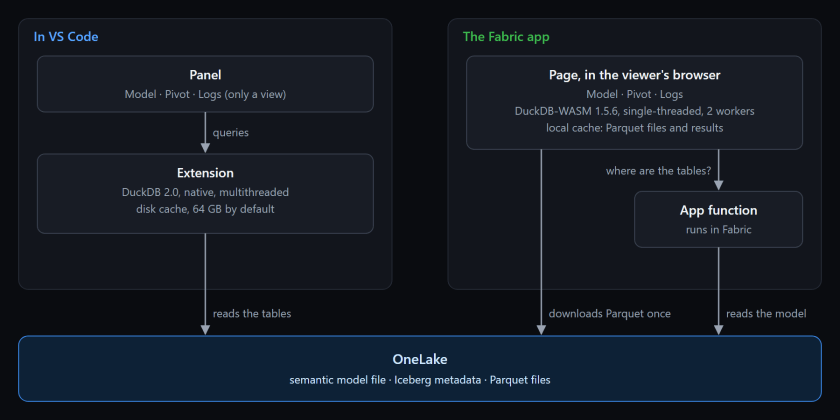
The same pages (Model, Pivot, Logs) run in two places, on DuckDB both times.
- In VS Code, the extension runs a native DuckDB 2.0 inside VS Code itself. It’s multithreaded and reads OneLake directly, with the token from your VS Code sign-in. The panel you see is only a view.
- In the Fabric app, there’s no VS Code, so the engine is DuckDB-WASM 1.5.6, running in the viewer’s browser. The app is a static page plus one small function. The function runs in Fabric: it reads the model from the lakehouse and tells the page where each table is. The page downloads the Parquet files it needs, and DuckDB reads them from the browser’s local storage. SQL typed in the app only sees those Parquet files and can’t read anything else.
DuckDB in the browser: single-threaded
DuckDB-WASM runs single-threaded here, so one query always runs on one core. A big scan is noticeably slower than the same query in VS Code. To keep the page responsive, the app runs a pool of two engines, each in its own web worker, fed by one queue. When a page draws several visuals, two queries run side by side, and a slow one holds up only its own engine. (I tried three. It wasn’t faster.)
I also tried a multithreaded build. It turned out to be more complex than it looks, so for now it stays single-threaded, and the pool of two does the job.
The cache
Iceberg files never change once they’re written, so almost everything can be kept.
- In VS Code, listings, table metadata and first rows are kept on disk. They’re shown at once and refreshed in the background. Table data goes into DuckDB’s disk cache (64 GB by default, per account), so a table you’ve read before comes from your machine, even after a restart. Clear Cached OneLake Data empties it.
- In the browser, there are four layers:
- The function’s answer (where the tables are), kept for about an hour. A viewer calls the function about once an hour, not on every load.
- The Iceberg manifests, so a new snapshot reads only the manifests it added.
- The Parquet files, in the browser’s private file system (OPFS), up to 64 GB, shared by both engines and every tab. This is why the app needs Chrome or Edge 121 or later.
- Query results, stored as Arrow and keyed by the SQL and the tables’ current snapshot. A reload answers every query it has already seen without running the engine. New data means a new key, so you never see a stale result.
Each app has its own cache, in each browser. The first visit pays for the download. Later visits are fast.
Limitations, by design
Everything runs on the client: the engine on your machine (or in your colleague’s browser, for the Fabric app) reads the data straight from OneLake.
- Egress fees can become a problem. Every query pulls data out of OneLake to wherever the client is, and with big tables or users far from the data, that can cost money.
- Row- and column-level security (RLS/CLS) aren’t supported. OneLake now has a table read API (in preview) that returns Apache Arrow with RLS and CLS applied. I’ve tested it with Python and it works as expected, but I haven’t tried it with WebAssembly yet.
- It’s for small data. Don’t use it to download 10 GB tables.
- Correct SQL is not the same as a good plan. Even when the generated SQL is right in theory, getting a well-optimized plan out of it is not obvious at all. A measure becomes CTEs, re-aggregations and joins that nobody would write by hand, and the engine has to see through them. Some queries will be slower than they should be.
- DAX to SQL comes with no guarantee. dax-sql, contributed by N.S. Devaraj, compiles DAX as faithfully as it can, but there’s no guarantee that a result is correct, or that a given function or piece of syntax is supported. Some DAX isn’t supported at all.
So it’s not meant for production or any serious setup. But it’s an interesting experiment in what a Fabric app can do on its own, IMHO.
Funny enough, I wrote about this back in 2021: BI tools need a SQL generator that composes measures the way Power BI does, including the ones that ignore your filters. I had the idea, but obviously I couldn’t build it. Five years later, with AI, I could. If anything, this project is a testament to how far AI has come.
Try it
Install OneLake Studio from the VS Code Marketplace. It runs on Windows, macOS and Linux.

