Some Observations on Running TPCH 1 TB on Microsoft Fabric

This is not an official Microsoft benchmark, just my personal experience.

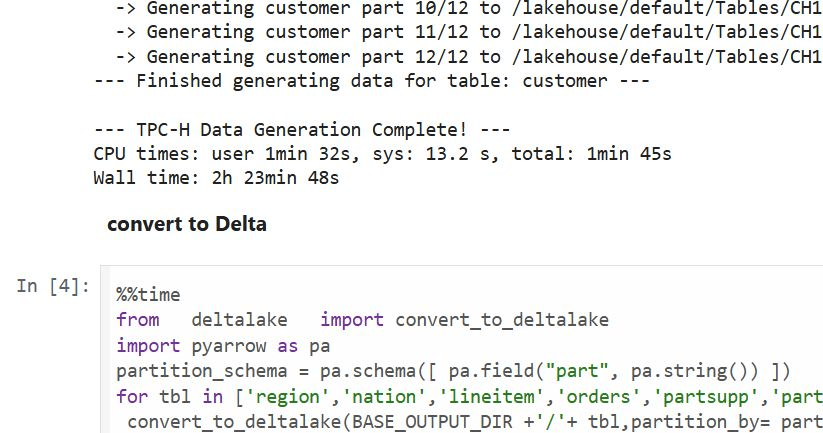
Last week, I came across a new TPCH generator written in Rust. Luckily, someone ported it to Python, which makes generating large datasets possible even with a small amount of RAM. For example, it took 2 hours and 30 minutes to generate a 1 TB scale dataset using the smallest Fabric Python notebook (2 cores and 16 GB of RAM).
Having the data handy, I tested Fabric DWH and SQL Endpoint. I also tested DuckDB as a sanity check. To be honest, I wasn’t sure what to expect.

I shared all the notebooks used and results here

I ran the test 30 times over three days, I think I have enough data to say something useful,In this blog, I will focus only on the results for the cold and warm runs, along with some observations.

For readers unfamiliar with Fabric, DWH and SQL Endpoint refer to the same distributed SQL engine. With DWH, you ingest data that is stored as a Delta table (which can be read by any Delta reader). With SQL Endpoint, you query external Delta tables written by Spark and other writers (this is called a Lakehouse table). Both use Delta tables.

Notes:

  • All the runs are using a Python notebook
  • to send queries to DWH/SQL Endpoint, all you need is
    conn = notebookutils.data.connect_to_artifact("data")
    conn.query("select 42")
  • I did not include the cost of ingestion for the DWH
  • The cost include compute and storage transaction and assume pay as you go rate of 0.18 $/Cu(hour)
  • For extracting Capacity usage, I used this excellent blog

Cold Run

  • The first-ever run on SQL Endpoint incurs an overhead, apparently the system build statistics. This overhead happened only once across all tests.
  • Point 2 is an outlier but an interesting one 🙂
  • The number of dots displayed is less than the number of tests runs as some tests perfectly match, which is a good sign that the system is predictable !!!
  • vorder improves performance for both SQL Endpoint and DuckDB. The data was generated by Rust and rewritten using Spark; it seems to be worth the effort.
  • Costs are roughly the same for DWH and SQL Endpoint when the Delta is optimized by vorder, but DWH is still faster.
  • DuckDB, running in a Python notebook with 64 cores, is the cheapest (but the slowest). Query 17 did not run , so that result is moot. ,Still, it’s a testament to the OneLake architecture: third-party engines can perform well without any additional Microsoft integration. Lakehouse for the win.

Warm Run

  • vorder is better than vanilla Parquet.
  • DWH is faster and a bit cheaper than SQL Endpoint.
  • DuckDB behavior is a bit surprising, was expecting better performance , considering the data is already loaded into RAM.

Impact on the Parquet Writer

I added a chat showing the impact of using different writers on the read performance, I use only warm run to remove the impact of the first run ever as it does not happen in the DWH ( as the data was ingested)
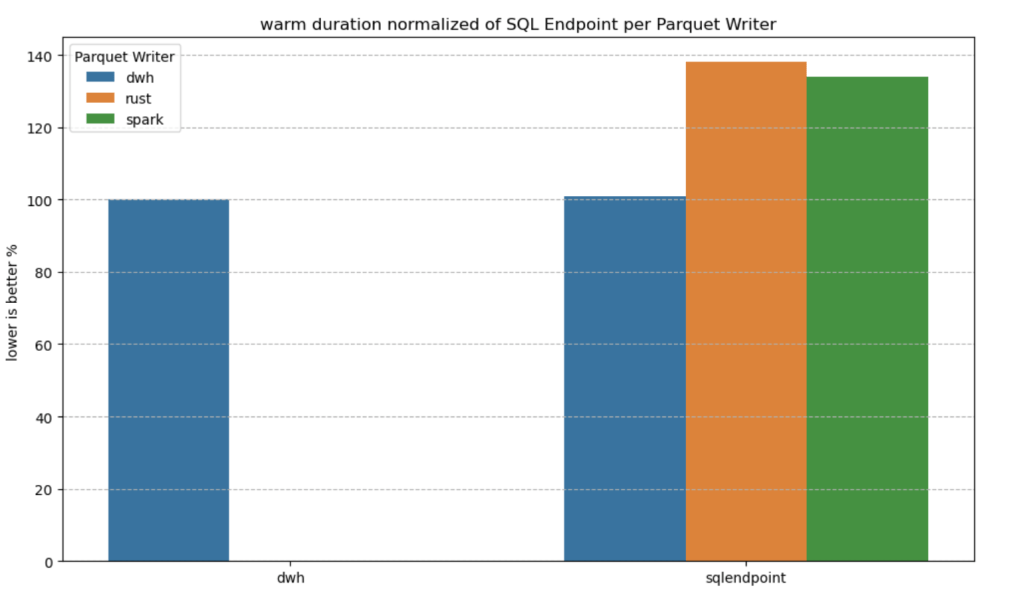
  • given the same table layout, DWH and SQL Endpoint perform the same, it is expected as it is the same engine
  • surprisingly using the initial raw delta table vs spark optimize write gave more or less the same performance at least for this particular workload.

Final Thoughts

Running the test was a very enjoyable experience, and for me, that’s the most important thing. I particularly enjoyed using Python notebooks to interact with Fabric DWH. It makes a lot of sense to combine a client-server distributed system with a lightweight client that costs very little.

There are new features coming that will make the experience working with DWH even more streamlined.

Edit :

  • update the figures for Dcukdb as Query 17 runs but you need to limit the memory manually set memory_limit='500GB'
  • added a graph on the impact of the parquet layout.
An Excel User’s Perspective on Lakehouse Architecture

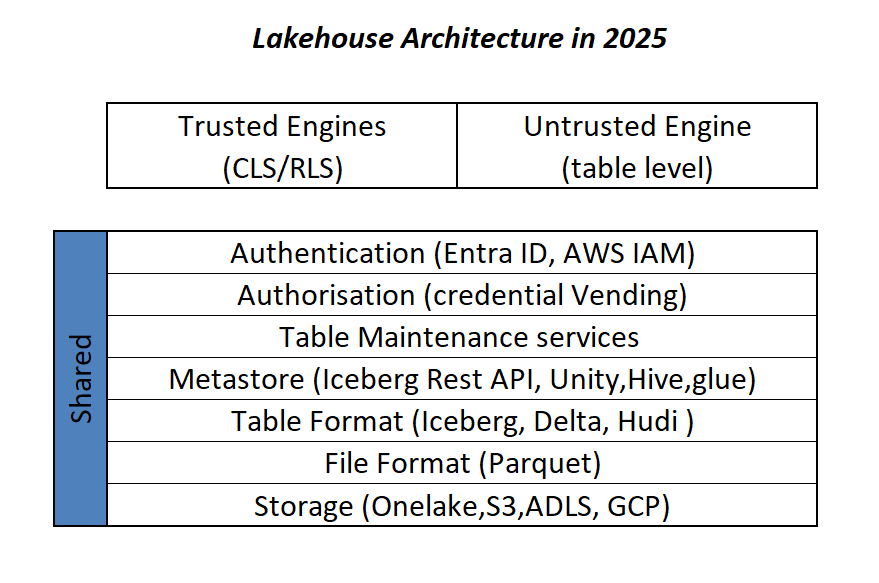
This is more or less the industry consensus on how a Lakehouse architecture should look in 2025.

By now, it’s become clear that Parquet is the de facto standard for storing data, and using an object store to separate storage from compute makes a lot of sense.

Another interesting development is how vendors want to package this offering. Storage vendors saw an opportunity to do more—after all, there’s no law that says the metastore belongs to the data warehouse! So you get things like S3 Table and Cloudflare R2, which I think is a good thing, especially if you’re a smaller analytics vendor. Life becomes much easier when table maintenance is done upstream, allowing you to focus solely on making the query engine faster.

Encouraging things are also happening in the table format space. I know a bit about Iceberg and Delta, but not much about the others. One very interesting development is Iceberg adopting deletion vectors from Delta in the V3 spec, while Delta will requires a catalog for read and write (at least for catalog managed table). I like to call it the “Icebergification” of Delta.

Another trend is the Delta Java writer making it easier to auto-generate Iceberg metadata. and Xtable is doing the same regardless of the delta writer, At this stage, one could argue: why do we need two table formats that are becoming virtually identical?

Data Analyst—How About Me?

These improvements mostly impact the write path, which is primarily managed by data engineers. But what about data analysts and end users?

if you have Fabric OneLake, you can use Direct Lake in OneLake mode. Marco has a great article about it. It’s a fantastic improvement compared to the initial version of Direct Lake. However, it doesn’t solve the problem if your data is hosted in an S3 table or BigQuery Iceberg table. Yes, you can create a shortcut to OneLake and read it from there, but that still depends on a data engineer setting it up.

Now imagine a world where an Excel, Tableau, or Power BI Desktop user (or any arbitrary client tool) can just point to a Lakehouse using a standard API, discover tables, read data, and build reports. Honestly, this isn’t a big ask , we already have this when connecting to databases using ODBC, and I don’t see any technical reason why we can’t have the same experience with Lakehouses.

We Already Have This API

For me, the most promising development in the Lakehouse ecosystem is the Iceberg Catalog REST API, and I genuinely hope it becomes a standard—just like ODBC is today (and hopefully ADBC in the future, but that’s another topic).

Again, speaking as a data analyst, I want my tools to support the read part of the API—just the ability to list tables and scan a table. That’s all. I have zero interest in how the data is stored or which table format is used. The catalog should be smart enough to generate metadata on the fly.

The Good News

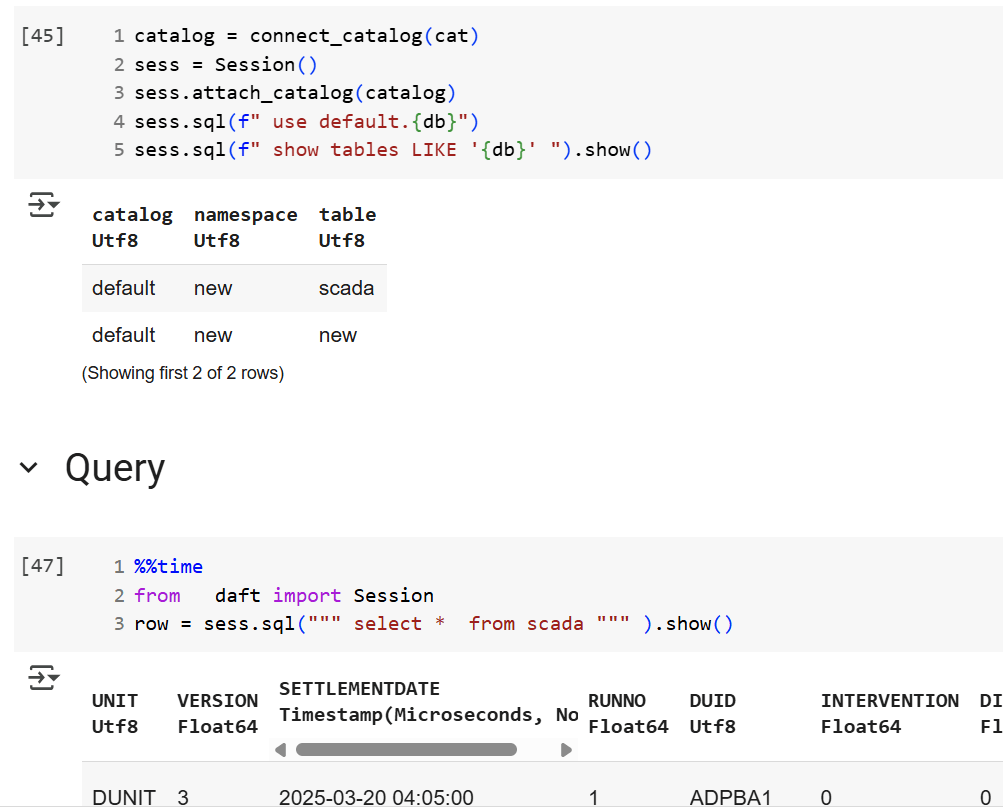
We’re getting there—at least if you’re using a Python notebook. Here’s an example where I use the same Iceberg REST API to query a table from four different Lakehouse implementations using Daft.

def connect_catalog(cat):
  match cat:
    case 'polaris':
      catalog = load_catalog(
              'default',
              uri= polaris_endpoint,
              warehouse='dwh',
              scope = 'PRINCIPAL_ROLE:data_engineer' ,
              credential= polaris_key
            )
    case 's3':
      catalog = load_catalog(
              'default',
              **{
                "type": "rest",
                "warehouse": s3_warehouse ,
                "uri": "https://s3tables.us-east-2.amazonaws.com/iceberg",
                "rest.sigv4-enabled": "true",
                "rest.signing-name": "s3tables",
                "rest.signing-region": "us-east-2"
              }
            )
    case 'uc':
      catalog = load_catalog(
               'default',
              token = token ,
              uri = endpoint,
              warehouse = 'ne'
              )
    case 'r2':
      catalog = RestCatalog(
              name = 'default',
              token = token_r2 ,
              uri = endpoint_r2,
              warehouse = r2_warehouse
              )
  return catalog

Then, I run a standard SQL query using Daft SQL.

Final Thoughts

It took Parquet a decade to become a standard. We may or may not have a single standard table format—and maybe we don’t need one. But if we want this Lakehouse vision to become mainstream, then everyone should support the Iceberg Catalog REST API, at least for read operations.

How to Read a Delta Table with Deletion Vectors and Column Mapping in Python

When attempting to read a Delta table using Python with the deltalake library (Delta_rs, not Spark), you may encounter the following error:

import deltalake

DeltaTable('/lakehouse/default/Tables/xxx').to_pyarrow_dataset()

DeltaProtocolError: The table has set these reader features: {'deletionVectors'} but these are not yet supported by the deltalake reader.

Alternative: Using DuckDB

A simple alternative is to use DuckDB:

import duckdb

duckdb.sql("SELECT COUNT(*) FROM delta_scan('/lakehouse/default/Tables/xxx')")

Tested with a file that contains Deletion vectors

Column Mapping

The same approach applies to column mapping as well.

Upgrading DuckDB

Currently, Fabric Notebook comes preinstalled with DuckDB version 1.1.3. To use the latest features, you need to upgrade to the latest stable release (1.2.1) :

!pip install duckdb --upgrade
import sys
sys.exit(0)

Note: Installing packages using %pip install does not restart the kernel when you run the notebook , you need to use sys.exit(0) to apply the changes, as some packages may already be loaded into memory.

import duckdb
duckdb.sql(" force install delta from core_nightly ")
duckdb.sql(" from delta_scan('/lakehouse/default/Tables/dbo/evolution_column_change') ")

The Future of Delta Rust .

Currently, there are two Rust-based implementations of Delta:

  1. Delta_rs: The first and more mature implementation, developed by the community. It is an independent implementation of the Delta protocol and utilizes DataFusion and PyArrow (which will soon be deprecated) as its engine. However, Delta_rs does not support deletion vectors or column mapping, though it does support writing Delta tables.
  2. Delta Kernel_rs: The newer, “official” implementation of Delta, providing a low-level API for query engines. It is currently being adopted by DuckDB ( and Clickhouse apparently) with more engines likely to follow. However, it is still a work in progress and does not yet support writing.

There are ongoing efforts to merge Delta_rs with Delta Kernel_rs to streamline development and reduce duplication of work.

Note : although they are written in Rust, we mainly care about the Python API 🙂

Conclusion

At least for now, in my personal opinion, the best approach is to:

  • Use DuckDB for reading Delta tables
  • Use Python Deltalake (Delta_rs) for writing

Fabric for Small Enterprises

While experimenting with different access modes in Power BI, I thought it is maybe worth sharing as a  short blog to show  why the Lakehouse architecture offers versatile options for Power BI developers. Even when they use Only Import Mode. 

And Instead of sharing a conceptual piece, perhaps focus on presenting some dollar figures 🙂

Scenario: A Small Consultancy

According to local regulations, a small enterprise is defined as having fewer than 15 employees. Let’s consider this setup:

  • Data Storage: The data resides in Microsoft OneLake, utilizing an F2 SKU.
  • Number of Users: 15 employees.
  • Data Size: Approximately 94 million rows.
  • Pricing Model: For simplicity, assume the F2 SKU uses a reserved pricing model.

Monthly Costs:

  • Power BI Licensing: 15 users × 15 AUD = 225 AUD.
  • F2 SKU Reserved Pricing: 293 AUD.
  • Total Cost: 518 AUD per month.

ETL Workload

Currently, the ETL workload consumes approximately 50% of the available capacity.

 For comparison, I ran the same workload on another Lakehouse vendor. To minimize costs, the schedule was adjusted to operate only from 8 AM to 6 PM. Despite this adjustment, the cost amounted to:

  • Daily Cost: 40 AUD.
  • Monthly Cost: 1,200 AUD.

In contrast, the F2 SKU’s reserved price of 293 AUD per month is significantly more economical. Even the pay-as-you-go model, which costs 500 AUD per month, remains competitive.

Key Insight:

While serverless billing is attractive, what matter is how much you end up paying per month.

For smaller workloads (less than 100 GB of data), data transformation becomes commoditized, and charging a premium for it is increasingly challenging.

Analytics in Power BI

I prefer to separate Power BI reports from the workspace used for data transformation. End users care primarily about clean, well-structured tables—not the underlying complexities.

With OneLake, there are multiple ways to access the stored data:

  1. Import Mode: Directly import data from OneLake.
  2. DirectQuery: Use the Fabric SQL Endpoint for querying.
  3. Direct Lake Model: Access data with minimal latency.
  4. Composite Models: All the above ( this is me trying to be funny) 

All the Semantic Models and reports are hosted in the Pro license workspace, Notice that an import model works even when the capacity is suspended ( if you are using pay as you go pricing)

The Trade-Off Triangle

In analytical databases, including Power BI, there is always a trade-off between cost, freshness, and query latency. Here’s a breakdown:

  • Import Mode: Ideal if eight refreshes per day suffice and the model size is small. Reports won’t consume Fabric capacity (Onelake Transactions cost are insignificant for small data import)
  • Direct Lake Model: Provides excellent freshness and latency but will probably impacts F2 capacity, in other words, it will cost more.
  • DirectQuery: Balances freshness and latency (seconds rather than milliseconds) while consuming less capacity. This approach is particularly efficient as Fabric treats those Queries as background operations, with low consumption rates in many cases. Looking forward to the release of Fabric DWH result cache. 

Key Takeaways

  1. Cost-Effectiveness: Reserved pricing for smaller Fabric F SKUs combined with Power BI Pro license offers a compelling value proposition for small enterprises.
  2. Versatility: OneLake provides flexible options for ETL workflows, even when using import mode exclusively.

The Lakehouse architecture and Power BI’s diverse access modes make it possible to efficiently handle analytics, even for smaller enterprises with limited budgets.