Create Delta Table in Azure Storage using Python and serve it with Direct Lake Mode in Fabric.

TL;DR ; Although the optimal file size and the row group size specย  is not published by Microsoft, PowerBI Direct Lake mode works just fine with Delta table generated by non-Microsoft tools and thatโ€™s the whole point of a Lakehouse.

Edit : added example on how to write directly to Onelake

Quick How to 

You can download the Python script here, it is using the open source Delta lake writer written in Rust with a Python Binding.(does not require Spark)

Currently Writing Directly to OneLake using the Python writer is not supported, there is an open bug , you can upvote it, if it is something useful to you

The interesting part of the code is this line

You can append or overwrite a Delta table, delete a specific partition is supported too, merge and delete rows is planned

The Magic of OneLake Shortcut

The idea is very simple, run a python script which create a delta table in Azure storage then make it visible to Fabric using a shortcut, which is like an external table, no data is copied
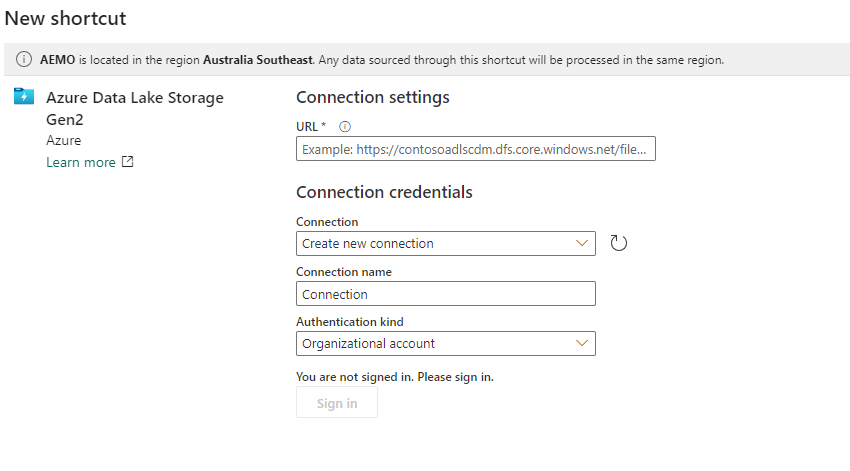
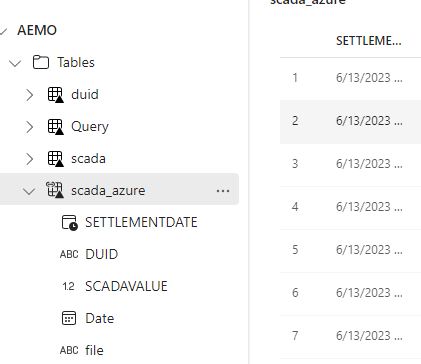
The whole experience was really joyful ๐Ÿ™‚ lakehouse discovered the table and showed a preview

Just nitpicking, it would be really nice if the tables from the shortcut have different colors, the icon is not very obvious.

If you prefer SQL, then it is just there
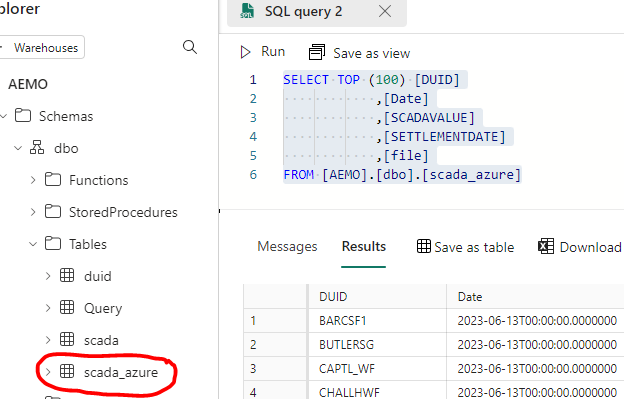
Once it is in the lake, it is visible to PowerBI automatically. I just had to add a relationship , I did not use the default dataset as for some reason, it did not refresh correctly, it is a missed opportunity as this is a case where default dataset just makes perfect sense.

But Why ?

Probably you are asking why,in Fabric  we have already Spark and dataflow Gen2 for this kind of scenarios ? which I did already ๐Ÿ™‚ you can download the PowerQuery and PySpark Script here
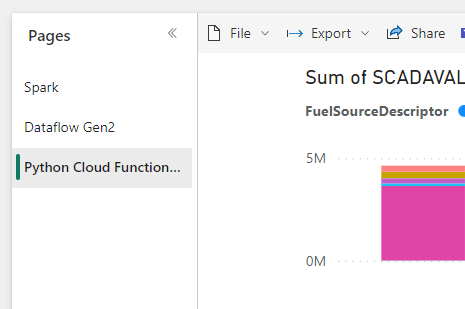
So whatโ€™s the best tool ? I think how much compute every solution will consume from your capacity will be a good factor to decide which solution is more appropriate, today we canโ€™t see the usage for Data Flow Gen2 so we canโ€™t tell.

Actually , I was just messing around, what people will use is the simplest solution with less friction, a good candidate is Dataflow Gen2, and thatโ€™s the whole point of Fabric, you pay for convenience, still I would love to have a fully managed single node python experience.
Apache Spark Benchmark for TPCH-SF10

TL;DR : a notebook to compare TPCH-SF10 results for Spark and DuckDB on a single Node.

Apache Spark is a system design for Big Data workload using distributed computing, it scale out very well just by adding more compute nodes, in real life though, it is used a lot with smaller data, people use whatever they have access to.

I don’t have a lot of experience with Pyspark, but I know enough to run some SQL Queries, and what a better way to test that than TPCH benchmark, in this case, I used a scale factor of 10 with the main table lineitem has 60 million records.

The test is run in Google Colab using the free compute ( 2 vCPU), I did try it with a paid VM ( 8 CPU) but strangely, Pyspark had a memory error ( although it did work fine with low memory, go figure)

I tried too to install in my laptop, but it did complain about some java compatibility, I have no time for this kind of shenanigans , I use to love it when I was much younger but now, I want just stuff to work.

The Data is first download to the local Disk, so all Queries are pretty much CPU bound, I used DuckDB as a reference as it has an excellent Single Node performance.

The Beauty of SQL

Pyspark has an excellent support for SQL, actually the same SQL is run both for Spark and DuckDB, we are talking 22 Queries with nearly 900 line of code, that impressive that it just works without modification for both Engine.

The Results

I used a Python Function to run every Query, and show duration and results

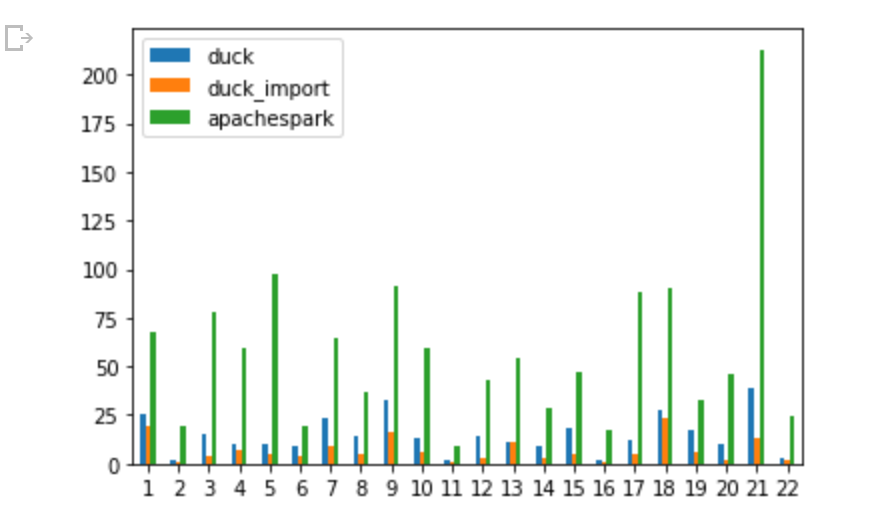
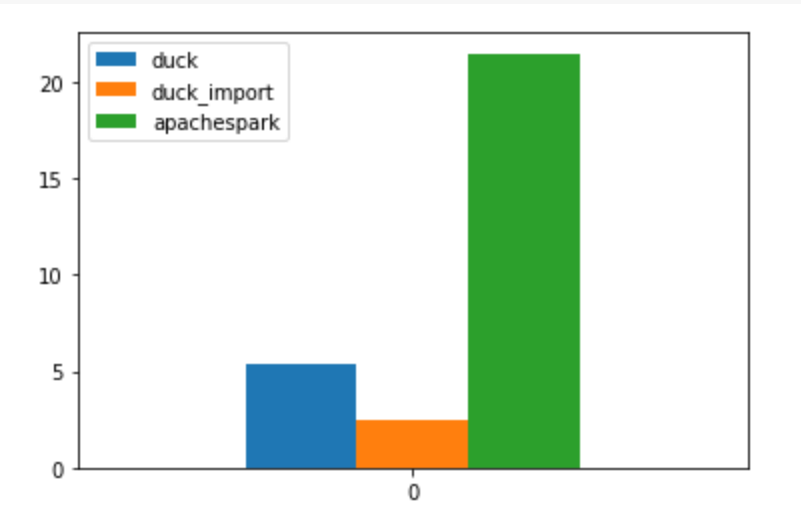
And here is the results, Using PySpark, DuckDB running Queries Directly from Parquet and just for reference DuckDB running from a DuckDB file

DuckDB around 5 minutes

Spark around 21 minutes

DuckDB using Duckdb file format : 2 minutes ( it take 3 minutes to import)

Take away

For Smaller Dataset that don’t fit in Memory which is a problem for Pandas, it is useful to look around for alternative before jumping to a distributed system, you don’t want to be paying for expensive computer overhead, tools like DuckDB and Polars can do wonder these days, there is a lot to like about Spark, but performance in a single node is not one of them.

Having said that, those new Engines have a lot of work to reach feature parity with Spark when doing Data Engineering jobs, for example support for Table Format like Iceberg and Delta is still experimental.

Running a Serverless DuckDB on Google Cloud

TL;DR : it easy to setup and works relatively well, but there is a catch, watch out for Cloud Storage throughput. I shared a notebook here

in previous blog, I showed a POC how to run Queries from a Colab notebook against a delta lake table, but what if you want to run the same Query from other tools, or if you want to run a Query in a different region and avoid egress fees, turn out it is extremely easy to setup.

And here is an Overall View of the architecture. the most important decision is to make sure Cloud Storage and Cloud function are in the same region, in my case “us-central1”, you can call the function from anywhere.

Google Cloud Functions

As I said before the code is very simple, I spent some time googling to convert the results from a byte to json to dataframe, I think beside BigQuery, Google Cloud function is the easiest service to setup, just write your code and Google Cloud handle the rest , just for fun, I used a machine with 8 CPU and 32 GB of RAM.

import pyarrow.dataset as ds
import duckdb
import json
lineitem = ds.dataset("gs://xxxxx/lineitem",format="parquet", partitioning="hive")
con = duckdb.connect()
def Query(request):
    SQL = request.get_json().get('name')
    df = con.execute(SQL).df()
    return json.dumps(df.to_json(orient="records")), 200, {'Content-Type': 'application/json'}

How to Call web API

a lot of tool can send a web api call as long as it has the correct authentication, I started with a python script for a simple reason as it was the easiest to get the code from the internet.

Here is the interesting part, you write any arbitrary SQL code, Then you send an API call, in return you get a json with the results, a user don’t need to know anything about the cloud function, all he needs is the web address and write a correct SQL Query.

Performance considerations

This is where it get very interesting, I have no clue where is the bottleneck, but we can ask some Questions

Cold Start

  • The First example was 334 ms, that’s impressive, but I was cheating, I showed the best case scenario, Google Cloud function or more precisely Cloud Run was already running so no cold start and DuckDB was running a local Query which did not require a call to Cloud storage
  • Currently Cold Start for Cloud run Gen2 is around 10 second, notice it is still in preview.

Transfer from Google Cloud Storage

let’s try this simple Query, we get the result in 29 second

The Same Query using my Laptop, 600 ms, btw table lineitem contains 60 Million rows !!!

I don’t know why the massive difference, I presume network speed is limited, but when I look at the the bucket stats, it is actually very good, nearly 500 MB/S

I am no expert in network, but that number don’t seems right !!, when I check how much Data the cloud function is receiving then the whole discrepancy start making more sense, in average I am getting around 30 MB/s, the maximum was 50 MB/s , I have to say this is really slow !!!

File Pruning

Arrow dataset is smart enough to prune columns that are not used for partitions, in this Query, I made a filter on L_shipdate , notice the parquet file was sorted on that field, and as expected the performance is very good 1.7 second, DuckDB scan only the row groups that contains the date ‘1998-09-02’

Dataset Catalog

I am defining a very rudimentary catalog, the user can just call ” Show Tables”

You can even check the table schema

Cloud Storage throughput is the bottleneck.

having a speed of 30 MB/S make the whole setup just good for POC or doing a Query on a small dataset , I don’t know the reason why such a poor performance from Cloud Run, I suspect Apache arrow implementation is not optimized for GCP although it works very well in a local file system.

Another missing piece is the lack of cache, it would have being good if somehow DuckDB cache the data already Queried, but cache is very hard to implement specially if you want cache invalidation, and you risk reinventing a full Data warehouse. I genuinely hope it is a bug and cloud run can provide a better network performance.

Aggregate 100 GB using PowerQuery and DuckDB

Maybe not known enough, but you can run a python script inside PowerQuery in the desktop, and deploy it to PowerBI service using a personal gateway.

it is just a POC that showcase you can do a lot; just using a decent laptop and python.

let’s say, you have a folder with 100 GB of parquet files, and you want to aggregate some results for further analysis in PowerBI, Obviously importing 100 GB maybe not be a great idea, in this scenario, from what I can see, people recommend stuff Like PySpark or Dask , which I guess are great option, but if you want a lightweight option with a simple pip install then DuckDB is amazing !!

For testing, first write your SQL Query using only 1 parquet file, when you are happy with the results, change the path from “folder/x.parquet” to “folder/*.parquet”

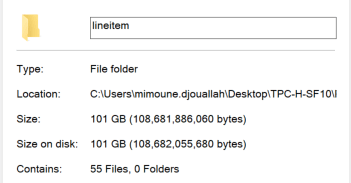
In this example I have a folder of 100 GB of Parquet files.

in PowerQuery you need just to insert a python script, you don’t need to know anything about python, it is just a standard SQL Query, PowerQuery is smart enough to know that df is a dataframe, and it will show the result in the next step.

import duckdb 
con = duckdb.connect()
df =con.execute('''
select  L_RETURNFLAG,L_LINESTATUS,count(*) from
 'C:/xxxxx/parquet/lineitem/*.parquet' 
        group by 1,2
''').df()

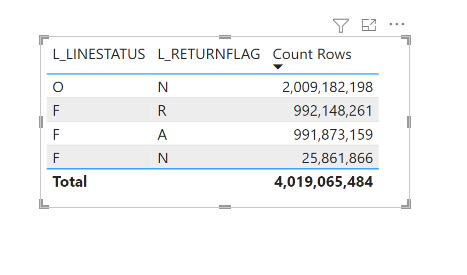
And here is the final results.

The duration will depend mainly on your CPU and SSD speed, DuckDB consume little memory, in that example less than 2 GB, the secret sauce is parallel scan of Parquet files.

Traditionally Big Data means; Data that don’t fit into RAM, nowadays, Big Data is how much Data can fit in your SSD, and that’s a welcome change.