I have been using AI in VS Code and Onelake, initially trying to make sense of Chat with your data (without much success, that thing is very hard and we need some breakthrough), and more recently for data engineering. I noticed something: AI has become useful enough in the last couple of months that it is changing my workflow.
None of the individual pieces here is new or particularly interesting by itself. But combine them and we have something!!! CI/CD, Iceberg REST catalog, Opus 4.8, me discovering how OIDC GitHub integration works in Fabric, and dbt, and suddenly everything makes more sense.
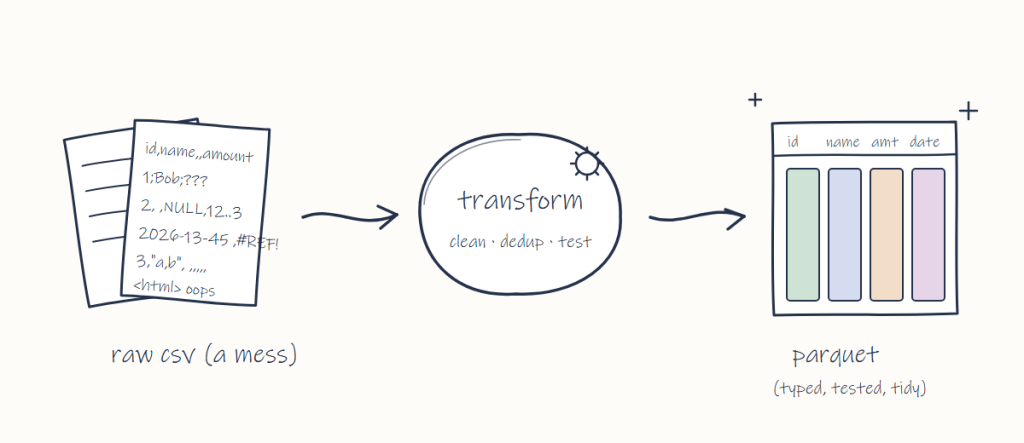
Let’s take a simple ETL job, read some CSV, clean it, and produce high quality Parquet files that humans and AI can consume.
From a human perspective, and although we like to think our judgement is based purely on cost and performance, that’s never really been the case. It is always influenced by personal bias: Spark people will always use Spark, T-SQL people will always use the DWH, and Pandas people don’t care, they will use their thing.
Now, if we imagine an AI doing that, the incentives are different. Yes, AI is biased by its training data, but it isn’t biased by tribe. Judging by my AI agent (I suspect it is telling me what I want to hear), it doesn’t care. It prefers short loops, and if you tell it “I want the cheapest option”, it is smart enough to try to do that.
1- ETL is just processing raw data into something coherent that can be consumed. It is a deterministic process, and as someone who mainly used GUI tools, it took me a while to get it: data engineering is just code!!! Those tools are writing code, it just happens that we don’t see it 🙂
2- All things considered, an AI agent has no personal attachment to an engine, assuming you give it a strict spec. An agent will not favour an engine because of familiarity, or because it spent so much time using it that it became tribal.
3- Opus 4.8 class AI is good enough for general purpose data engineering. The current issue is the cost. Right now you need a Max subscription in practise and it is just not sustainable, but I am confident the market will figure out a solution. We don’t need AGI, just a super cheap Opus 5 alternative 🙂
4- I am not saying all engines are equal, or that they become just a SQL runtime. That’s not true. But because the cost of switching from one SQL dialect to another is minimal, the human excuse of “I use what I know” (which is pretty tragic, when you think about it) will no longer be relevant.
Selecting an engine will be strictly based on facts: engine 1 can do efficient MERGE, engine 2 cannot, engine 1 wins. That’s fair.
And engines still have a lot to improve, see for example non-trivial incremental processing, async remote scans, partial caching, Dynamic Horizontal scaling etc.
And to be fair, the dialect alone is not the whole story. Subtle differences in engine behaviour, even when using the same SQL text, can be a pain. I learnt this the hard way. I spent too much time trying to debug a result, only to find out that two engines have different behaviour when doing a join using a word with padding: “spain” and “spain ” may or may not mean the same thing.
But the good thing is that a cross-engine parity check catches these subtleties automatically. Either the numbers match or they don’t (you can’t do that with Chat with your data).
5- Cloud storage vendors ultimately want to store more data, regardless of how it was processed — their incentives are aligned with this agentic trend. In my personal opinion, they need to spend less time on MCP and other AI stuff, and just focus on the boring stuff: authentication, documentation, and interoperability.
If you want to deviate from the catalog spec, at least spend some engineering time working with the open source engines to support your own variant.
6- The less a client has to do, the better for everyone: move more stuff to the catalog, including table scanning and server-side planning.
A read-only client has no interest in reading Avro files. Just give me a list of Parquet files and deletion vectors to read. Keep it opaque. Store it in a database, I don’t care. Just give me the data files to read.
7-I added this note because of early feedback on the blog, which was basically: “I don’t care about Iceberg, I use Delta.” That’s a fair reaction. The good news is it won’t really matter — Delta 5 will use the same adaptive metadata as Iceberg V4. They’re still two separate projects with different governance model(or rather, the lack of it), but ultimately they’ll produce the same thing in theory . Just give it another 2 years or so, there is a real table format fatigure, translating from one to another is a waste of everyone time, and to be honest, some vendors find it is much cheaper just to lock users using credential vending instead of weaponising the table format 🙂
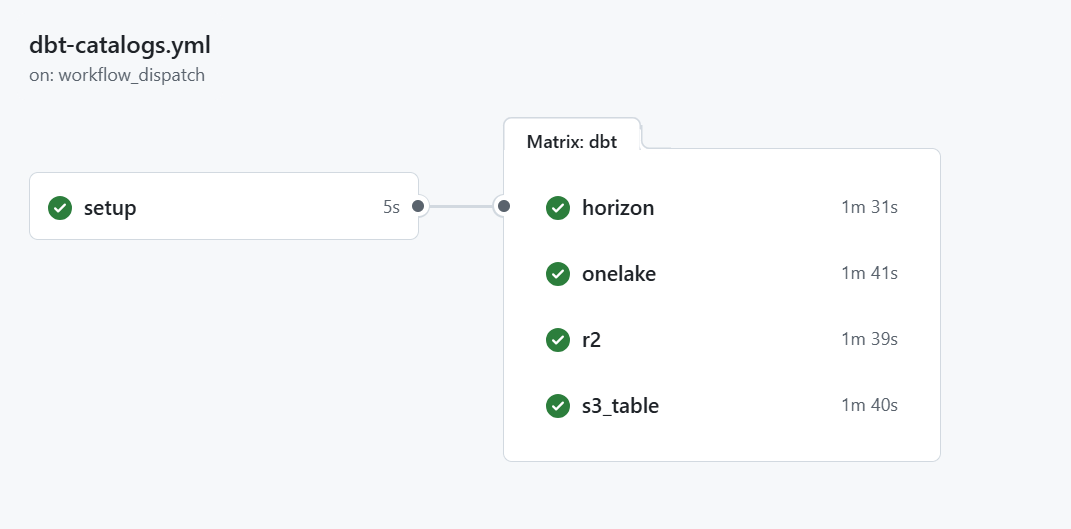
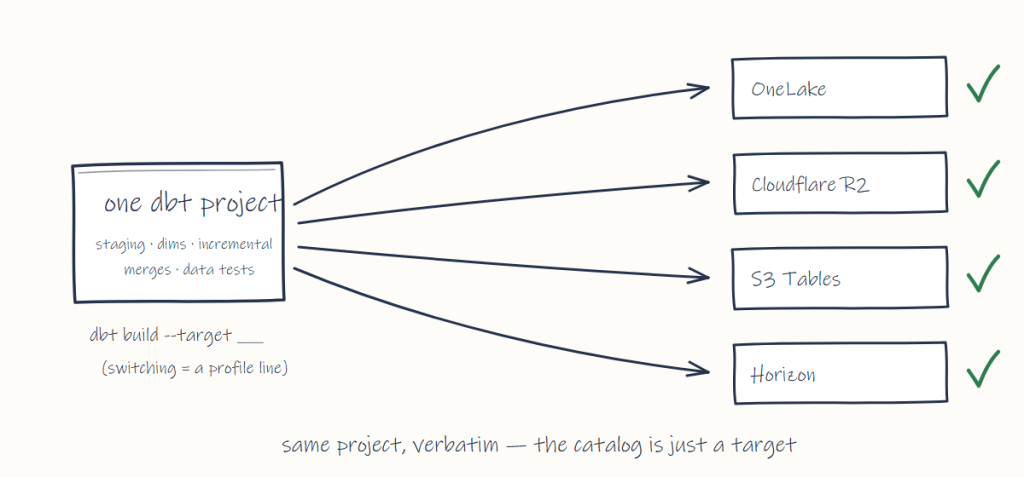
Instead of another abstract “thought leadership” blog post 🙂 here’s a concrete example: the same dbt project, unchanged, runs against four different vendors’ Iceberg REST catalogs: OneLake, Cloudflare R2, S3 Tables and Snowflake Horizon, each in about a minute, on a throwaway GitHub Actions runner with DuckDB as the engine.
Switching catalog is literally changing one ATTACH in profiles.yml.
Hopefully, data engineering will move away from configuring and fine-tuning engines and towards talking more to end users and understanding what they need: agreeing on what the numbers are supposed to mean, and writing the tests that catch it when they are wrong.
The machine can build the pipeline, and it will probably be better than us at it, but it doesn’t know what “correct” means. I was tempted to write something about ontology but I am not going there 🙂
And getting access to that ERP will always require a human. That’s an organizational thing, and no AI can fix it.
As a data analyst by trade, I always found data engineering a chore. I never enjoyed it , and to be honest ,it does not bother me if writing transformation becomes fully automated
So I have a bias, to be honest, and maybe this blog is just wishful thinking. But what if it is true? I think, at least, pay attention to this new trend.
duckrun is a package I built using AI exclusively, to solve pain points I hit when using Fabric Python notebooks. I like DuckDB very much, but I was tired of manually discovering table names every time and writing long Python deltalake code just to write a Delta table, so I combined those two packages under one helper package to make my workflow smoother. Recently I discovered how awesome dbt is, so why not add a dbt adapter too. Then someone trolled me about the lack of snapshot isolation when doing read-modify-write on the same table. Luckily DuckDB now exposes the read version in delta_scan (before, you had to do the weird attach thing), so I have something that might actually be useful. The rest of the blog is written by AI. It wrote my code, so I don’t see the issue; it’ll even write my blog.
I also added a web page with some projects I built: dbt projects I ported, and some non-trivial SQL statements with proper snapshot isolation.
So yes, it’s a hack, until Iceberg matures or we get a better Delta write story in DuckDB.
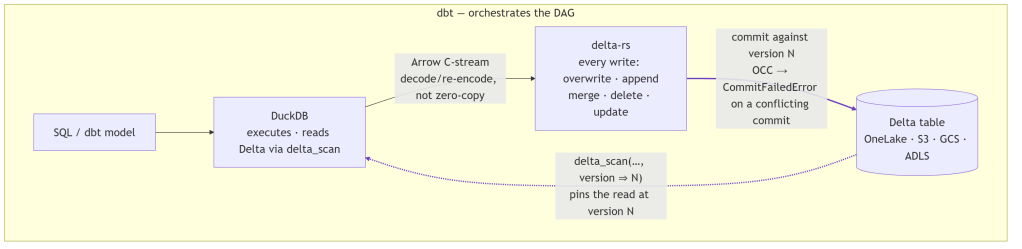
At its core, duckrun is a four-part split: DuckDB executes the SQL, Arrow streams the result, delta-rs commits it to Delta, and dbt (optionally) orchestrates the whole DAG.
It’s storage-agnostic, running anywhere DuckDB and delta-rs can reach: local filesystem, S3, GCS, ADLS, OneLake. In practice I test it on the local filesystem and Microsoft Fabric OneLake. S3 and GCS use the same code path, but I barely touch them, so treat them as untested.
The gap it fills
DuckDB reads Delta well (delta_scan). It does not write it well: its Delta support is blind INSERT only (no UPDATE, DELETE, or MERGE), and its trajectory points at writing through Unity Catalog, which defeats the point of filesystem-native Delta. So if you want DuckDB’s engine but need upserts on Delta tables, there is no single tool that does both today.
Approach
Reads Delta
Writes Delta (merge/update/delete)
DuckDB SQL engine
DuckDB alone
✅
❌ (blind INSERT only)
✅
delta-rs alone
✅
✅
❌
duckrun
✅
✅
✅
duckrun’s answer is a split:
DuckDB runs all SQL and model logic, and reads Delta through delta_scan views.
delta-rs handles every write: overwrite, append, merge, delete, update.
Arrow bridges the two: a DuckDB relation is streamed to delta-rs over the C-stream interface.
Snapshot isolation ties it together: each read pins a Delta version, and each read-modify-write commits against the version it read, so a concurrent commit errors instead of silently clobbering.
That’s the whole architecture. The README calls it glue, and that’s accurate: each layer does only the one thing it’s set up to do.
Two costs come with this. Two engines split one RAM budget with no shared allocator, and the Arrow handoff isn’t zero-copy: DuckDB’s native vector format isn’t Arrow, so each batch is decoded and re-encoded as it streams across the Arrow C Data Interface (a batch-at-a-time ArrowArrayStream, so even a large write never fully materializes in memory). duckrun manages this with a cgroup-aware memory split, sampled per job so it doesn’t get OOM-killed on Fabric/k8s, where DuckDB otherwise sees the whole node. The fractions are of the effective limit: on a merge, 0.3 to DuckDB and 0.6 to delta-rs spill, leaving 0.1 slack; on a plain write, 0.85 to DuckDB. The split leans toward delta-rs because that’s where the memory goes: profiling a merge attributes ~99% of resident memory to delta-rs and only ~15 MB to DuckDB. Keeping every write behind delta-rs also means the bridge (and the memory juggling) can be deleted the day DuckDB ships a real Delta writer, without touching the read or state model.
connect: read first
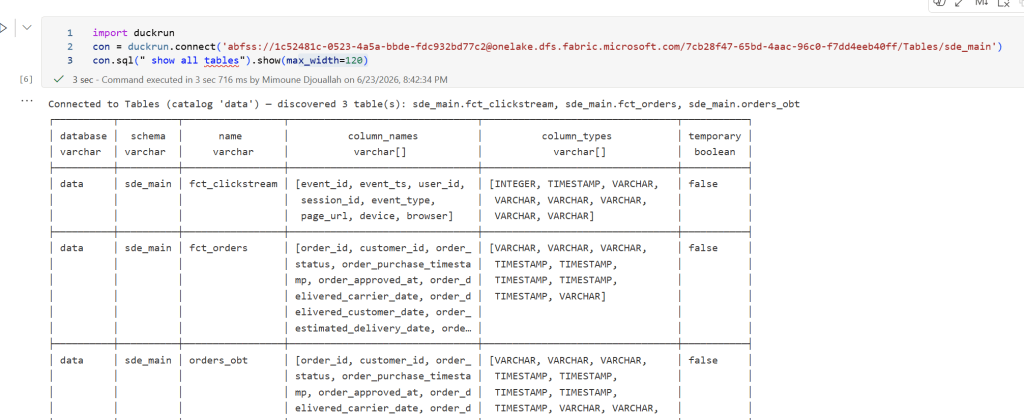
connect() is read-only by default, so you can point it at a lakehouse and explore with no chance of an accidental write. Tables are discovered for you, with no manual name bookkeeping:
Attach more lakehouses and query across them by three-part name. This is where the data warehouse case shows up: in Fabric a Warehouse is just a write-locked Lakehouse, so you attach it read_only=True next to a writable Lakehouse and join the two:
conn.sql accepts CREATE [OR REPLACE] TABLE AS, INSERT, UPDATE, DELETE, ALTER … ADD COLUMN, MERGE, and DROP (a soft tombstone: delta-rs has no drop, so data files persist until you purge them). CREATE TEMP TABLE and CREATE VIEW stay native DuckDB. Things that can’t be honored cleanly, like multi-statement strings or UPDATE … FROM, are rejected rather than silently mishandled.
The surface is small. It mirrors the Delta/DeltaTable API so notebook code reads familiarly, but there is no fluent transform builder and no second SQL engine. Transforms are SQL, run by DuckDB.
Snapshot isolation
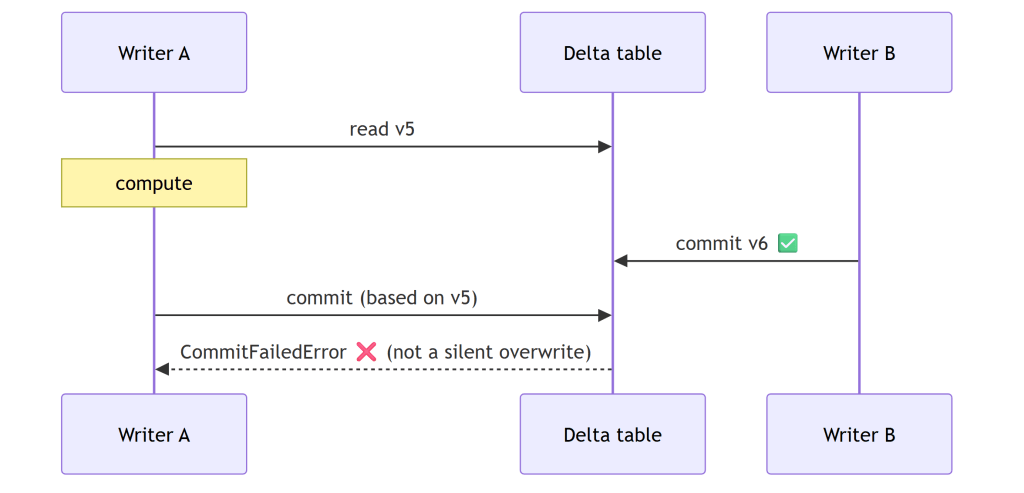
This started as someone trolling the project over read-modify-write on the same table, and it turned into the guarantee I rely on most. Honestly, I come from a Dataflow Gen1 background (basically a single writer), so all this concurrency stuff never made much sense to me. In a Lakehouse, where anyone can write to a table, even accidentally, it suddenly becomes a real factor. (Thanks Raki for the harsh feedback, lol.) A lakehouse has no transaction manager and no single-writer guarantee: two pipelines, a double-fired job, or a notebook racing a scheduled run can all commit to the same table. The dangerous shape is read → compute → write: if someone commits in between, a naïve write at HEAD silently overwrites them, a lost update with no error. duckrun’s job is to turn that into a CommitFailedError.
What’s fenced, and what isn’t.delete, update, and merge are read-modify-writes (they read the current rows, compute a change, then commit), so duckrun pins each to the version it read and delta-rs’s OCC validates the commit over (read, HEAD]. A conflicting concurrent commit makes them fail. Plain append and overwrite are not fenced, by design: they match Spark’s SaveMode. An append rebases onto HEAD (appends don’t conflict), and an overwrite is last-writer-wins. So the fence is automatic exactly where a lost update is possible, and absent where it isn’t.
How the OCC works. There’s no lock manager anywhere. A Delta commit is the atomic creation of the next log entry, _delta_log/…{N+1}.json, so if a racing writer already wrote it, your put-if-absent loses and delta-rs raises CommitFailedError. Optimistic, filesystem-native, no coordinator. The gap OCC alone leaves: it only checks the commit instant, not the version you read.
Pinning the version you read, the same whether you write SQL or a DataFrame. A DeltaTable handle captures the version at forName() (call it vB), and every merge() / delete() / update() through it commits against vB, so OCC validates the whole (vB, HEAD] window, not just the instant of the commit. conn.sql("delete …" / "update …" / "merge …") funnels into the exact same engine path, pinned the same way: there is no second code path for SQL. And DuckDB exposing the read version in delta_scan(…, version => vB) (the reason for the duckdb >= 1.5.4 floor) lets the read sit on vB too, so a read-modify-write split across statements still lands on one snapshot. Spark/Delta fences only the commit instant; this fences the version you actually read.
append_if_unchanged / overwrite_if_unchanged are the fenced siblings of plain append/overwrite. I had to coin the terms, because Delta/Spark has no built-in fenced append (you’d hand-write a MERGE for it). They’re a version compare-and-swap: load the table at the version you read and pass max_commit_retries=0 so delta-rs won’t rebase. If anything committed since, the target version is already taken and the commit fails. For the watermark/idempotent-append case this is cheaper than a merge, with no target scan and no key join. (safeappend is the deprecated alias.)
The dbt adapter
A thin wrapper over dbt-duckdb that adds Delta-backed table and incremental materializations; everything else (views, seeds, sources, tests, plugins) is inherited. Point a profile at a lakehouse and dbt run:
dbt with no catalog. Normally dbt leans on a metastore to know what exists and to resolve {{ this }}, ref(), and is_incremental(); duckrun has none, and state still survives across separate dbt build processes. At run start the adapter discovers Delta tables on disk (glob for local/az/s3/gs; the OneLake DFS REST API for abfss, since DuckDB can’t glob it reliably) and registers each as a delta_scan view named to match dbt’s database.schema.identifier. That view is what makes those references resolve against real Delta tables. Each materialization pre-registers its own {{ this }} view before running, then recreates the view after the delta-rs write, since that write lands a new Delta version and the old view would otherwise point at stale files. The namespace is rebuilt from storage on every run instead of read from a catalog.
Incremental strategies:
Strategy
Behavior
merge (default with unique_key)
upsert
insert
insert new keys only
append (default without unique_key)
blind append
append_if_unchanged / safeappend
append, commit only if version unchanged: cheap, no target scan, errors on conflict
microbatch
delete+insert per event_time window
Compaction and 7-day vacuum run automatically (every run for overwrites; past a file-count threshold for incrementals).
Two limits worth knowing up front. First, writes are single-threaded within a run (in-process delta-rs isn’t thread-safe; cross-process concurrency is fully supported). Second, constraints are enforced at the write boundary, not stored in the table: a contract with not_null columns is checked by a guard query before the write, so a null fails with NOT NULL constraint failed and the prior Delta version is left untouched. Two caveats there: delta-rs can’t persist column constraints into Delta metadata, and timestampNtz columns can’t be written yet.
On versions, duckrun is deliberately conservative because the underlying libraries move fast and break: duckdb >= 1.5.4 (first stable with delta_scan(version => N)) and deltalake == 1.5.0, the first release with MERGE max_spill_size. On Microsoft Fabric, pip install --upgrade and restart the kernel, since the bundled DuckDB is older than the floor.
Testing: the only way to trust AI code
If the AI writes the code, what makes it trustworthy? Not that it compiles, and not that the unit tests are green: an AI will happily write a test that passes for the wrong reason. The only signal I actually trust is integration testing: run a real dbt project end to end and check the tables it lands on real storage.
So that’s where most of the test weight sits. duckrun runs a few hundred tests across 26 files, but the ones that matter most are the 8 integration projects that build for real, most against live Microsoft Fabric OneLake (abfss://), not a mock. To keep them honest, with real models rather than toys I wrote to flatter the adapter, I ported existing dbt projects from the web: other people’s models kept as close to original as I could, with attribution:
sde_dbt_tutorial, a port of josephmachado/simple_dbt_project: raw tables → bronze typing → a Delta-backed SCD2 customer snapshot → a merge-incremental clickstream fact → an orders_obt gold mart.
coffee, ported from JosueBogran/coffeeshopdatageneratorv2: CSV ingest over https, a deduped SCD2 product dim, a region-partitioned fact, a revenue mart.
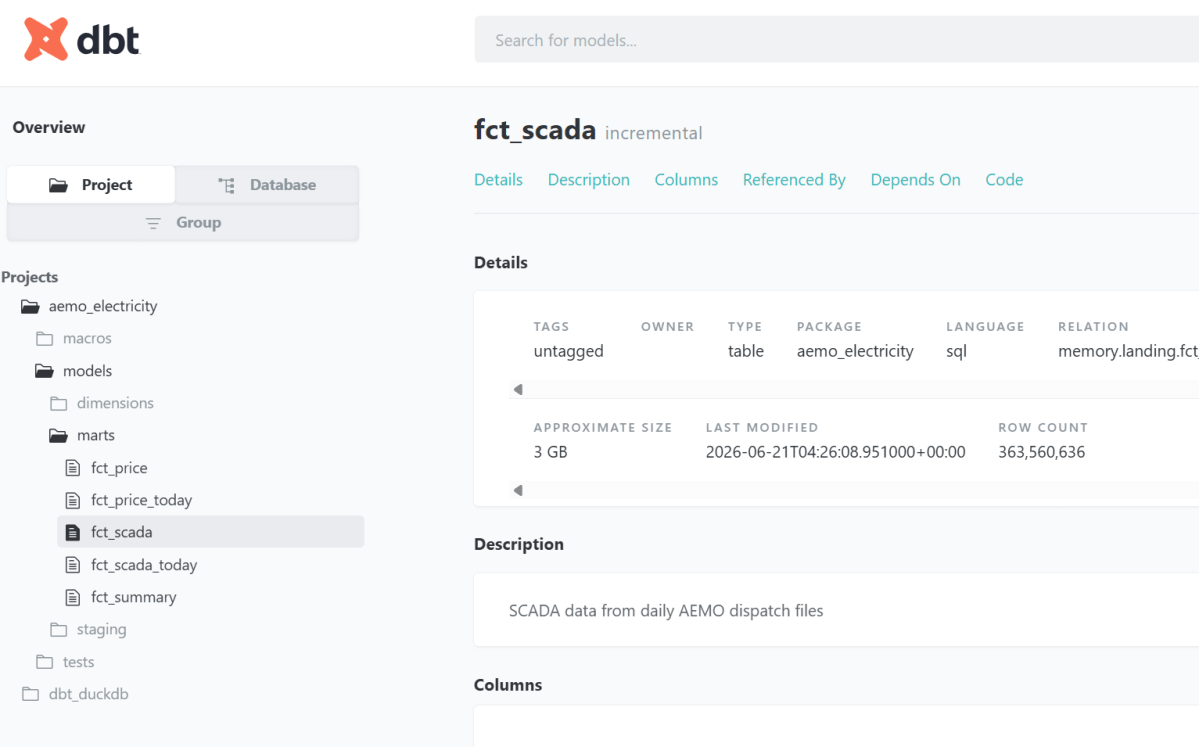
aemo, my own dbt_fabric_python_delta, built against live OneLake. The full run is published as browsable dbt docs: fct_scada is a 360M-row Delta table you can inspect yourself, not a screenshot.
snapshot_pin — a concurrent-writer test that asserts the guarantee above end to end: one writer reads a version, a second commits underneath it, and the first writer’s stale commit is rejected on real storage rather than silently overwriting.
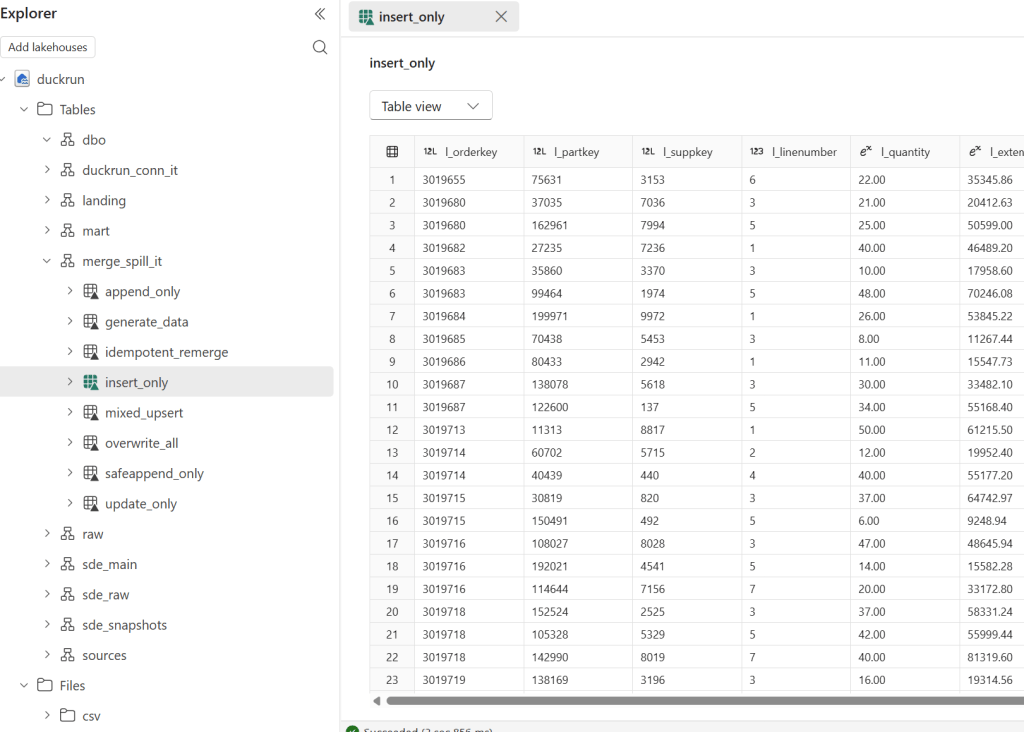
plus a TPCH merge/append/overwrite spill benchmark, a connection-API demo on live NYC TLC taxi data, and a multi-catalog lakehouse + warehouse + local join.
The rendered catalogs for these (real Delta stats, row counts, last-modified) are on the project page.
On top of the projects, the adapter runs the official dbt adapter test suite (dbt-tests-adapter, the same conformance suite every dbt adapter is measured against) at 126/135 passing (93%), regenerated on every push to main. The documented failures are deliberate choices: no persistent views in open Delta, and rejecting merge configs that would silently diverge.
The evidence that matters is tables on real storage, hit the same way a user would, not a passing test count and not “the AI said it works.”
What does it mean to build a package you don’t understand?
I should be honest: I don’t understand the code in detail. But that was always true. duckrun is glue over DuckDB and delta-rs (written in C++ and Rust), and I don’t have the slightest idea how those work internally either. Almost nobody who builds on a library understands its guts. So what does “writing a package” actually mean?
For me, two things. Expressing the problem, knowing the pain well enough to say exactly what should happen, and making the design decisions that follow: delta-rs for every write, delta_scan views for reads, snapshot isolation as the contract. The AI writes the code; I own the problem and the shape of the solution.
The third thing is what makes it real: tests, and a lot of them. duckrun runs an extensive unit and integration suite, but I only actually trust it when I see tables land in OneLake. Code that passes locally and code that materializes correctly on real storage are not the same claim.
One trick I’ve learned: use a second agent to verify the first one’s work, not the agent that wrote it. The catch is that AI still cheats to make a test pass: it’ll weaken or game the check even when it plainly knows that isn’t the right thing. I hope that improves. Until it does: don’t trust anything it produces. Verify it against reality.
Four years ago I wrote a blog about using DuckDB with Power BI in DirectQuery. It got a fair number of likes on LinkedIn 🙂 along with the one comment I didn’t want to hear: how does this work in production? (Craig, if you’re reading this, you were right.)
Back then I thought the technology was the hard part and the rest would sort itself out. It didn’t.
The ODBC driver never really worked in any non-trivial setup. Filters didn’t push down, decimal precision was buggy. It has gotten better since, but two show stoppers remained:
DuckDB is in-process, so the driver is the database. There’s no warm, long-running session. Every query starts from scratch.
I don’t think those drivers can realistically be certified (personal opinion). And Power BI Service, or any hosted BI service for that matter, is not going to host an in-process engine for free. An on-prem data gateway is not really a good option either.
In 2026 things are way better. MotherDuck (DuckDB’s SaaS) shipped a PostgreSQL endpoint. Problem solved: Power BI speaks Postgres, and it works out of the box.
Then last week DuckDB released Quack. For my own sanity I’ll just call it “DuckDB Server.” It is just an extension; a single function call and you have a server !!
My first reaction was annoyance. Four years of waiting, and they shipped a proprietary wire protocol. I was hoping for pg wire. I want my driver to work. I don’t really care about a 2x improvement if nothing interoperates.
Luckily I was partially wrong. Within two days there was an ADBC driver from gizmodata/adbc-driver-quack, and, to my surprise, a Power BI custom connector from Curt Hagenlocher (think of him as the Linus of Power Query). my understanding it is a side project, not official Microsoft.
And somehow, the whole thing worked. It was beautiful.
But lesson learned from last time: this is experimental, with no guarantee the connector will ever be certified.
The main change from the 2022 post is that instead of pointing at parquet files, I’m pointing at a catalog and getting tables back, like an actual database instead of a pile of files and duckdb got way better.
High level architecture
OneLake Iceberg Catalog — OneLake exposes data as tables. You need three things:
Path to the Lakehouse/Warehouse: workspace_name/Lakehouse_name.Lakehouse
DuckDB + iceberg extension — reads the catalog and the underlying parquet over HTTPS.
Entra ID — az account get-access-token --resource https://storage.azure.com/ mints a short-lived bearer token. No service principal, no app registration. I have a script that grabs the token, and I opened duckdb-azure#170 hoping to make this much simpler.
DuckDB Endpoint — turns the engine into a TCP server on 127.0.0.1:9494, speaking DuckDB’s native wire protocol (whatever that means).
The ADBC Driver — Python client and Power BI share the same DLL, you need to manually install it from curt github page
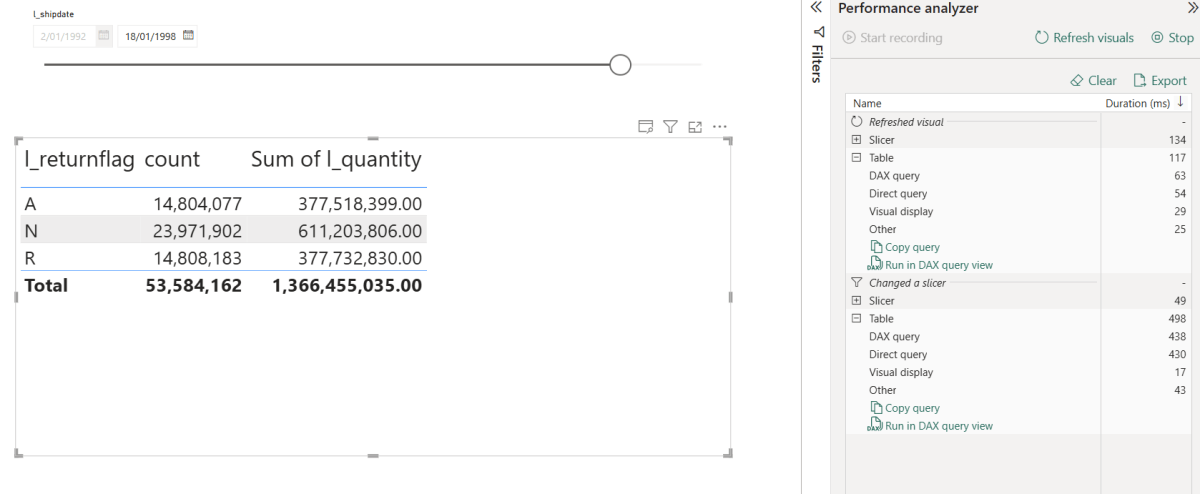
Let’s just share a video. Yes, 600M rows, warm run in my laptop
Python Notebook
TPC-H SF=10 (10 GB), 22 queries, run twice in the same session via client.ipynb. Numbers are seconds, copied straight from the notebook output.
Cold
Warm
Total
~5 min 29 s
~30 s
Cold time is dominated by parquet I/O over HTTPS from OneLake. Bandwidth and seek count, not CPU. Warm runs hit DuckDB’s in-process buffer cache, Onelake endpoint is in another continent and my internet provider is horrible 🙂
Optimization on this stack should target bytes read and seeks (codec, row-group size, predicate pushdown, range prefetch), not query plans.
This is exactly why server mode make sense, as the warm cache is shared by all client (notebook, Power BI, AI Agent)
Not production ready
The Entra token has a ~1h TTL. As far as I can tell, DuckDB has no way to auto-refresh tokens.
The driver is not certified, so it can’t be used in the service, if you want it added to PowerBI, create an idea in Fabric forum and vote
DuckDB Server is new. Don’t expect SQL Server maturity yet 🙂
DuckDB’s remote file cache is RAM only. When you restart DuckDB, you lose it and have to deal with the cold-run pain again and egress fees 😦
The DuckDB Azure extension is still pretty rough in places. To be fair, they’ve openly said they don’t have the bandwidth.
Hopefully it won’t take another four years to make this production ready.
Still, seeing DuckDB as a single binary serving a 600M row table to Power BI was genuinely fun. and The Iceberg catalog is awesome !!!
Edit: ducklake added support for SQL Server, so this hacks is not more needed
DuckLake supports multi-writer just fine — but only if your catalog is a real database, like Postgres (there’s some interest in SQL Server support too). But if all you have is object storage and a SQLite or DuckDB file as the catalog, you’re stuck with single-writer: object stores aren’t real filesystems, so the DB file can’t be locked. Nothing stops two processes from writing to it at the same time and corrupting it.
If single-writer is enough for you (one notebook, one pipeline, one user), you don’t need to stand up a database server. You just need accidental concurrent runs to fail fast.
The trick: take a blob lease
OneLake speaks the ADLS API, so you can take a lease on a blob — a mutex for free (it seems S3 needs DynamoDB and GCS needs a homemade lock object). Each run does:
Acquire a lease on metadata.db in abfss://.
Download it to local disk of the notebook.
Point DuckLake at the local copy and do the work.
Upload the modified file under the lease.
Release the lease.
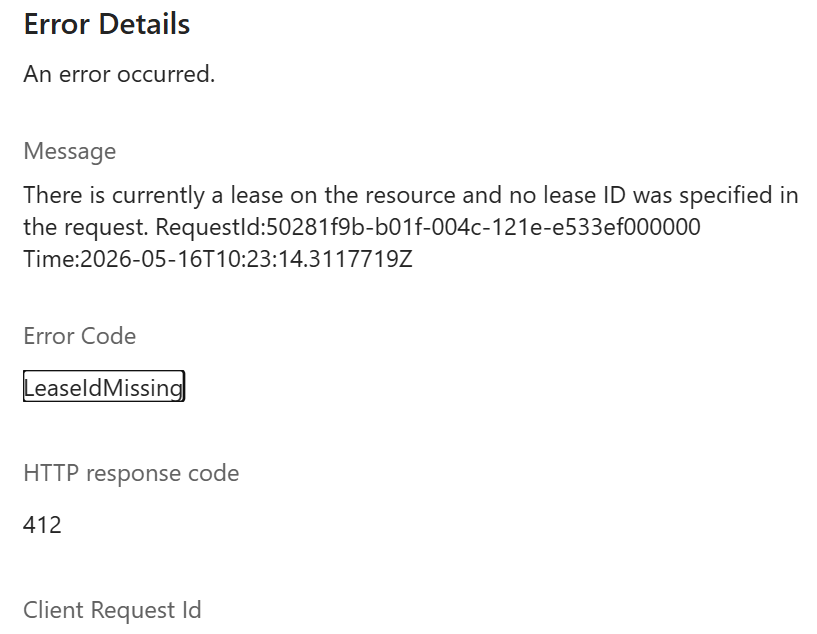
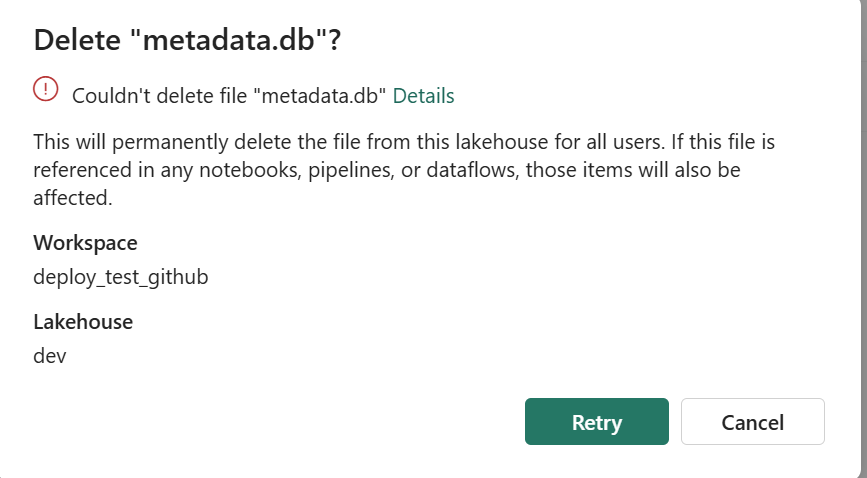
A second notebook that starts while the lease is held fails immediately on acquire_lease. It can’t even read a stale copy. and you can’t delete the file using the UI , I can see already some uses cases here:)
What about crashed runs?
ADLS leases are either 15–60 seconds fixed, or infinite. Fixed leases need a heartbeat — annoying inside a notebook. Infinite leases work until something crashes — then the file is stuck.
The fix: take an infinite lease, but stamp acquired_at = <utc iso> into the blob’s own metadata when you acquire. When the next run hits a lease conflict, read that timestamp. Older than 12 hours? Call break_lease and re-acquire. A crashed run self-heals within 12 hours. You can shorten that window, or break the lease manually with a one-line script if you can’t wait — there’s a snippet in the README.