You can download the file here or view the reports online
The last time I tried parsing an Xer file, I was using VBA and it was a horrible experience, anyway that was three years ago, The problem was not VBA per se, but supporting the different combination of Excel and Windows, I still receive sometimes emails from users complaining that Xer reader do not work for them, after a while I concluded it is not worth the effort.
Yesterday for no reason, I got this idea why not trying Powerquery , in 10 minutes I had a working prototype without writing a single line of code!!! even better it reads in bulk, copy a bunch of xer in the same folders, and there are loaded, only conditions they needs to have the same revisions( don’t mix P6 rev 7 with rev 8), as different revisions of P6 introduce some minor changes in the Xer schema, ( they add or remove some columns)
It is only a proof of concepts, I only loaded some tables, (activities and activities code), the data is loaded in the Data Model, and you need at least Excel 2013 with the free PowerQuery Installed.
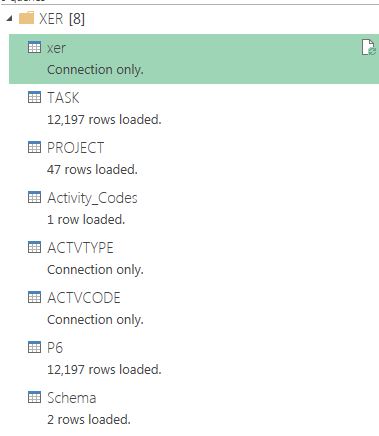
Make sure you write the path to where your Xer is stored

You need to refresh the Queries here

Here is a pivot with some measures, now you can group only by Project and Activity codes and obviously by activity id.

I test it with two Xer that contains 47 projects

