An Excel User’s Perspective on Lakehouse Architecture

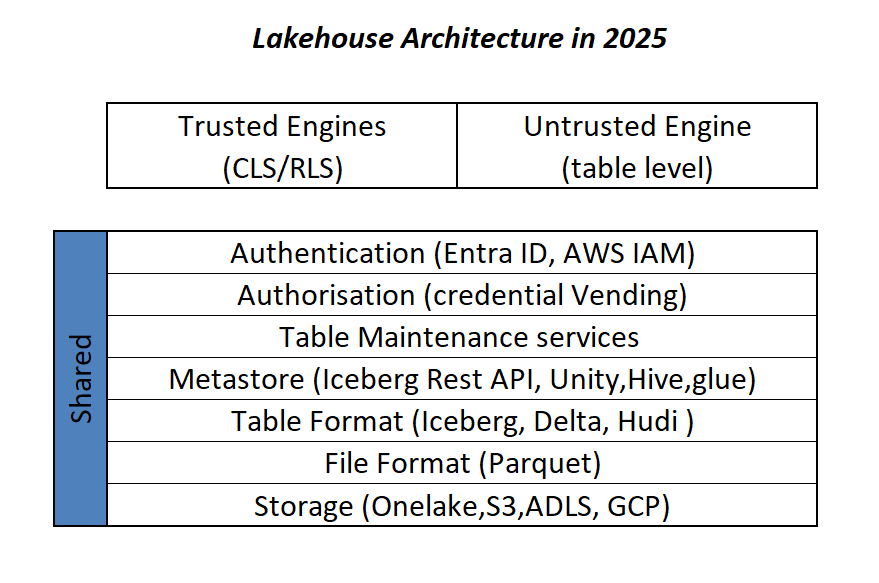
This is more or less the industry consensus on how a Lakehouse architecture should look in 2025.

By now, it’s become clear that Parquet is the de facto standard for storing data, and using an object store to separate storage from compute makes a lot of sense.

Another interesting development is how vendors want to package this offering. Storage vendors saw an opportunity to do more—after all, there’s no law that says the metastore belongs to the data warehouse! So you get things like S3 Table and Cloudflare R2, which I think is a good thing, especially if you’re a smaller analytics vendor. Life becomes much easier when table maintenance is done upstream, allowing you to focus solely on making the query engine faster.

Encouraging things are also happening in the table format space. I know a bit about Iceberg and Delta, but not much about the others. One very interesting development is Iceberg adopting deletion vectors from Delta in the V3 spec, while Delta will requires a catalog for read and write (at least for catalog managed table). I like to call it the “Icebergification” of Delta.

Another trend is the Delta Java writer making it easier to auto-generate Iceberg metadata. and Xtable is doing the same regardless of the delta writer, At this stage, one could argue: why do we need two table formats that are becoming virtually identical?

Data Analyst—How About Me?

These improvements mostly impact the write path, which is primarily managed by data engineers. But what about data analysts and end users?

if you have Fabric OneLake, you can use Direct Lake in OneLake mode. Marco has a great article about it. It’s a fantastic improvement compared to the initial version of Direct Lake. However, it doesn’t solve the problem if your data is hosted in an S3 table or BigQuery Iceberg table. Yes, you can create a shortcut to OneLake and read it from there, but that still depends on a data engineer setting it up.

Now imagine a world where an Excel, Tableau, or Power BI Desktop user (or any arbitrary client tool) can just point to a Lakehouse using a standard API, discover tables, read data, and build reports. Honestly, this isn’t a big ask , we already have this when connecting to databases using ODBC, and I don’t see any technical reason why we can’t have the same experience with Lakehouses.

We Already Have This API

For me, the most promising development in the Lakehouse ecosystem is the Iceberg Catalog REST API, and I genuinely hope it becomes a standard—just like ODBC is today (and hopefully ADBC in the future, but that’s another topic).

Again, speaking as a data analyst, I want my tools to support the read part of the API—just the ability to list tables and scan a table. That’s all. I have zero interest in how the data is stored or which table format is used. The catalog should be smart enough to generate metadata on the fly.

The Good News

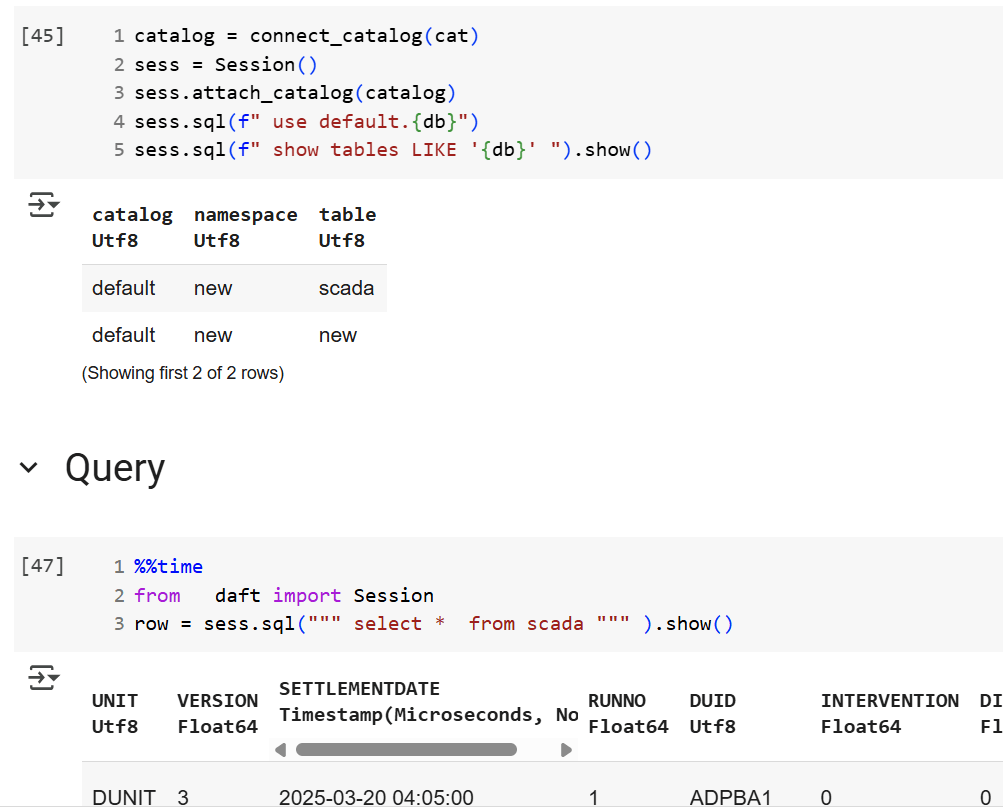
We’re getting there—at least if you’re using a Python notebook. Here’s an example where I use the same Iceberg REST API to query a table from four different Lakehouse implementations using Daft.

def connect_catalog(cat):
  match cat:
    case 'polaris':
      catalog = load_catalog(
              'default',
              uri= polaris_endpoint,
              warehouse='dwh',
              scope = 'PRINCIPAL_ROLE:data_engineer' ,
              credential= polaris_key
            )
    case 's3':
      catalog = load_catalog(
              'default',
              **{
                "type": "rest",
                "warehouse": s3_warehouse ,
                "uri": "https://s3tables.us-east-2.amazonaws.com/iceberg",
                "rest.sigv4-enabled": "true",
                "rest.signing-name": "s3tables",
                "rest.signing-region": "us-east-2"
              }
            )
    case 'uc':
      catalog = load_catalog(
               'default',
              token = token ,
              uri = endpoint,
              warehouse = 'ne'
              )
    case 'r2':
      catalog = RestCatalog(
              name = 'default',
              token = token_r2 ,
              uri = endpoint_r2,
              warehouse = r2_warehouse
              )
  return catalog

Then, I run a standard SQL query using Daft SQL.

Final Thoughts

It took Parquet a decade to become a standard. We may or may not have a single standard table format—and maybe we don’t need one. But if we want this Lakehouse vision to become mainstream, then everyone should support the Iceberg Catalog REST API, at least for read operations.

Reading a Delta Table Hosted in OneLake from Snowflake

I recently had a conversation about this topic and realized that it’s not widely known that Snowflake can read Delta tables hosted in OneLake. So, I thought I’d share this in a blog post.

Fundamentally, this process is similar to how XTable in Fabric works, but in reverse—it converts a Delta table to Iceberg by translating the table metadata ( AFAIK, Snowflake don’t use Xtable but an internal tool)

Recommended Documentation

For detailed information, I strongly recommend reading the official Snowflake documentation:
🔗 Create Iceberg Table from Delta


How It Works

External Volume and File Section

When creating an external volume in Snowflake that points to OneLake, only the Files section is supported. This isn’t an issue because you can simply add a shortcut that points to a schema.

SQL Code to Set Up External Volume and Map an Existing Table

CREATE OR REPLACE EXTERNAL VOLUME onelake_personal_tenant_delta
   STORAGE_LOCATIONS =
      (
         (
            NAME = 'onelake_personal_tenant_delta',
            STORAGE_PROVIDER = 'AZURE',
            STORAGE_BASE_URL = 'azure://onelake.dfs.fabric.microsoft.com/python/data.Lakehouse/Files',
            AZURE_TENANT_ID = 'xxxxxxxxxxxxxxxxxxxxxxxxxxxxxxxxxxx'
         )
      );

DESC EXTERNAL VOLUME onelake_personal_tenant_delta;

One-Time Setup: Authentication

You’ll need to complete a one-time authentication step:

  1. Copy the AZURE_CONSENT_URL from the output.
  2. Open it in your browser: "AZURE_CONSENT_URL":"https://login.microsoftonline.com/xx/oauth2/authorize?client_id=yy&response_type=code"
  3. Ensure you select the correct email address that has access to your tenant.
  4. This will create an Azure multi-tenant app with a service principal.
  5. Add this service principal to your workspace so that Snowflake can access the data.

Setting Up the Iceberg Table

CREATE OR REPLACE CATALOG INTEGRATION delta_catalog_integration
  CATALOG_SOURCE = OBJECT_STORE
  TABLE_FORMAT = DELTA
  ENABLED = TRUE;

CREATE DATABASE IF NOT EXISTS ONELAKE;

CREATE SCHEMA IF NOT EXISTS delta;

CREATE ICEBERG TABLE ONELAKE.delta.test
  CATALOG='delta_catalog_integration'
  EXTERNAL_VOLUME = 'onelake_personal_tenant_delta'
  BASE_LOCATION = 'aemo/test/';

SELECT COUNT(*) FROM ONELAKE.delta.test;


and here is the result

Limitations

  • Deletion Vectors Are Not Supported:
    If your table contains deletion vectors, make sure to run OPTIMIZE to handle them properly.

Reading BigQuery Iceberg Tables in Fabric

This is a quick guide on correctly reading Iceberg tables from BigQuery. Currently, there are two types of Iceberg tables in BigQuery, based on the writer:

BigQuery Iceberg Table

This is the table written using BigQuery engine

Iceberg Tables Written Using the BigQuery Metastore

Currently, only Spark is supported. I assume that, at some point, other engines will be added. The implementation is entirely open source but currently supports only Java (having a REST API would have been a nice addition).

How OneLake Iceberg Shortcuts Work

OneLake reads both the data and metadata of an Iceberg table from its storage location and dynamically generates a Delta Lake log. This is a quick and cost-effective operation, as it involves only generating JSON files. See an example here

The Delta log is added to OneLake, while the source data remains read-only. Whenever you make changes to the Iceberg table, new metadata is generated and translated accordingly. The process is straightforward.

BigQuery Iceberg Doesn’t Publish Metadata Automatically

BigQuery uses an internal system to manage transactions. When querying data from the BigQuery SQL endpoint, the results are always consistent. However, reading directly from storage may return an outdated state of the table.

For BigQuery Iceberg tables, you need to manually run the following command to update the metadata:

EXPORT TABLE METADATA FROM dataset.iceberg_table;

you can run it on a schedule, or make it the last step in an ETL pipeline.

Iceberg Tables Using the BigQuery Metastore (Written by Spark)

If the Iceberg table is written using the BigQuery metastore (e.g., by Spark), no additional steps are required. The metadata is automatically updated.

The interesting part about Iceberg’s translation to a Delta table in OneLake is that it is completely transparent to Fabric workloads. For example, Power BI simply recognizes it as a regular Delta table. 😊