First Look at OneLake Diagnostics

While preparing for a presentation about the FabCon announcement, one item was about OneLake Diagnostics. all ll I knew was that it had something to do with security and logs. As a Power BI user, that’s not exactly the kind of topic that gets me excited, but I needed to know at least the basic, so I can answer questions if someone ask 🙂

Luckily, we have a tradition at work , whenever something security-related comes up, we just ping Amnjeet 🙂

He showed me how it works , and I have to say, I loved it. It’s refreshingly simple.

You can download the notebook here:


You just select a folder in your Lakehouse and turn it on.

That’s it , the system automatically starts generating JSON files, neatly organized using Hive-style partitions, By default, user identity and IP tracking are turned off unless an admin explicitly enables them. You can find more details about the schema and setup here.


What the Logs Look Like

Currently, the logs are aggregated at the hourly level, but the folder structure also includes a partition for minutes (even though they’re all grouped at 00 right now).

Parsing the JSON Logs

Once the logs were available, I wanted to do some quick analysis , not necessarily about security, just exploring what’s inside.

There are probably half a dozen ways to do this in Fabric ; Shortcut Transform, RTI, Dataflow Gen2, DWH, Spark, and probably some AI tools too, Honestly, that’s a good problem to have.

But since I like Python notebooks and the data is relatively small, I went with DuckDB (as usual), but Instead of using plain DuckDB and delta_rs to store the results, I used my little helper library, duckrun, to make things simpler ( Self Promotion alert).

Then I asked Copilot to generate a bit of code for registering existing functions to look up the workspace name and lakehouse name from their GUIDs in DuckDB, using SQL to call python is cool 🙂


The data is stored incrementally, using the file path as a key , so you end up with something like this:

import duckrun

con = duckrun.connect('bigdata/tpch.lakehouse/dbo')

onelake_logs_path = (
    'abfss://bigdata@onelake.dfs.fabric.microsoft.com/'
    'tpch.Lakehouse/Files/DiagnosticLogs/OneLake/Workspaces/*/'
    'y=*/m=*/d=*/h=*/m=*/*.json'
)

Then I added only the new logs with this SQL script:

try:
    con.sql(f"""  
        CREATE VIEW IF NOT EXISTS logs(file) AS SELECT 'dummy';
        SET VARIABLE list_of_files =
        (
            WITH new_files AS (
                SELECT file
                FROM glob('{onelake_logs_path}')
                WHERE file NOT IN (SELECT DISTINCT file FROM logs)
                ORDER BY file
            )
            SELECT list(file) FROM new_files
        );
        SELECT * EXCLUDE(data), data.*, filename AS file  
        FROM read_json_auto(
            GETVARIABLE('list_of_files'),
            hive_partitioning = true,
            union_by_name = 1,
            FILENAME = 1
        )
    """).write.mode("append").option("mergeSchema", "true").saveAsTable('logs')
except Exception as e:
    print(f"An error occurred: {e}")

1- Using glob() to collect file names means you don’t open any files unnecessarily , a small but nice performance win.

2- DuckDB expand the struct using this expression data.*

3- union_by_name = 1 in case the json has different schemas

4- option(“mergeSchema”, “true”) for schema evolution in Delta table


Exploring the Data

Once the logs are in a Delta table, you can query them like any denormalize table.

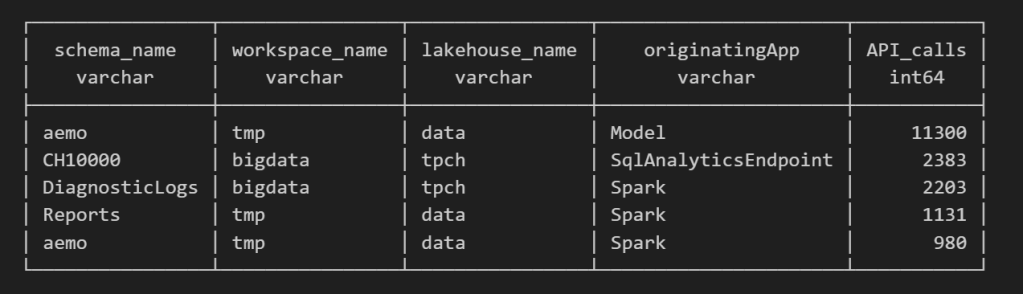
For example, here’s a simple query showing API calls per engine:

Note : using AI to get working regex is maybe the best thing ever 🙂

SELECT
    regexp_extract(resource, '([^&/]+)/([^&/]+)/(Tables|Files)(?:/([^&/]+))?(?:/([^&/]+))?', 4) AS schema_name,
    get_workspace_name(workspaceid) AS workspace_name,
    get_lakehouse_name(workspaceid, itemId) AS lakehouse_name,
    originatingApp,
    COUNT(*) AS API_calls
FROM logs
GROUP BY ALL
ORDER BY API_calls DESC
LIMIT 5;

Fun fact: OneLake tags Python notebook as Spark.
Also, I didn’t realize Lineage calls OneLake too!

as I have already register Python functions as UDFs, which is how I pulled in the workspace and lakehouse names in the query above.

Takeaway

This was just a bit of tinkering, but I’m really impressed with how easy OneLake Diagnostics is to set up and use.

I still remember the horrors of trying to connect Dataflow Gen1 to Azure Storage ,that was genuinely painful (and I never even got access from IT anyway).

It’s great to see how Microsoft Fabric is simplifying these scenarios. Not everything can always be easy, but making the first steps easy really gives the feature a very good impression.

First Look at Geometry Types in Parquet

Getting different parties in the software industry to agree on a common standard is rare. Most of the time, a dominant player sets the rules. Occasionally, however, collaboration happens organically and multiple teams align on a shared approach. Geometry types in Parquet are a good example of that.

In short: there is now a defined way to store GIS data in Parquet. Both Delta Lake and Apache Iceberg have adopted the standard ( at least the spec). The challenge is that actual implementation across engines and libraries is uneven.

  • Iceberg: no geometry support yet in Java nor Python, see spec
  • Delta:  it’s unclear if it’s supported in the  open source implementation (I need to try sedona and report back), nothing in the spec though ?
  • DuckDB: recently added support ( you need nightly build or wait for 1.4)
  • PyArrow: has included support for a few months, just use the latest release
  • Arrow rust : no support, it means, no delta python support 😦

The important point is that agreeing on a specification does not guarantee broad implementation. and even if there is a standard spec, that does not means the initial implementation will be open source, it is hard to believe we still have this situation in 2025 !!!

Let’s run it in Python Notebook

To test things out, I built a Python notebook that downloads public geospatial data, merges it with population data, writes it to Parquet, and renders a map using GeoPandas, male sure to install the latest version of duckdb, pyarrow and geopandas

!pip install -q duckdb  --pre --upgrade
!pip install -q pyarrow --upgrade
!pip install geopandas  --upgrade
import sys
sys.exit(0)

At first glance, that may not seem groundbreaking. After all, the same visualization could be done with GeoJSON. The real advantage comes from how geometry types in Parquet store bounding box coordinates. With this metadata, spatial filters can be applied directly during reads, avoiding the need to scan entire datasets.

That capability is what makes the feature truly valuable: efficient filtering and querying at scale, note that currently duckdb does not support pushing those filters, probably you need to wait to early 2026 ( it is hard to believe 2025 is nearly gone)

👉Workaround if your favorite Engine don’t support it .

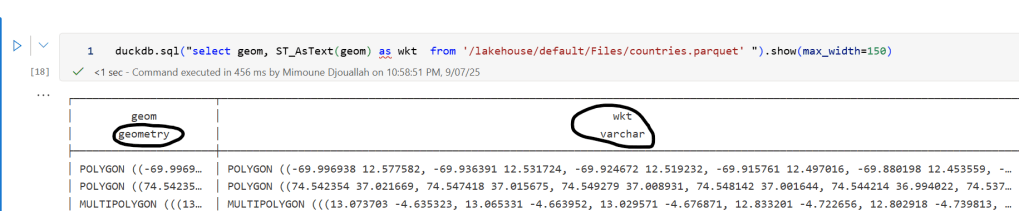
 A practical workaround is to read the Parquet file with DuckDB (or any library that supports geometry types) and export the geometry column back as WKT text. This allows Fabric to handle the data, albeit without the benefits of native geometry support, For example PowerBI can read WKT just fine

duckdb.sql("select geom, ST_AsText(geom) as wkt  from '/lakehouse/default/Files/countries.parquet' ")

For PowerBI support to wkt, I have written some blogs before, some people may argue that you need a specialized tool for Spatial, Personally I think BI tools are the natural place to display maps data 🙂

Does a Single-Node Python Notebook Scale?

I was giving a presentation about Microsoft Fabric Python notebooks and someone asked if they scale. The short answer is yes. You can download the notebook and try it for yourself. For the long answer, keep reading.

The dataset I used contains the last seven years of Australian electricity market data. Although it’s public, the government agency only keeps archives for two months. I had saved the data during a previous job and kept it around as a hobby. It’s a great real-world workload with realistic data distribution. The CSV files are messy. Technically, they’re more like reports, with different sections stacked on top of each other and varying numbers of columns. That’s often what you encounter in real projects, not the neat, well-structured datasets you see in demos.

For example, being able to read a CSV file with a variable number of columns is a critical feature. Yet this rarely gets mentioned in synthetic benchmarks.

To create a clean environment for testing, I copied the data from one Lakehouse in onelake to a brand-new workspace. I could have used a shortcut, but I wanted to start from scratch. The binary copy took just 2 minutes, with no transformations, which gives a throughput of 1.4 GB per second. That’s pretty good for a 150 GB uncompressed dataset.

The default configuration for Fabric Python notebooks includes 2 cores and 16 GB of RAM. That’s roughly the same size as Google Colab. But you can easily increase the number of cores to 4, 8, 16, 32, or even 64. At 64 cores, you get nearly half a terabyte of RAM. That’s a serious machine.

The job itself is simple. Ingest and process the data using several Python engines, then save the result as a Delta table. The raw data has around one billion records, and you end up extracting 311 million. If your engine cannot push down filters to the CSV level, you’re going to have a hard time. The trick here is not to be fast, but to avoid doing unnecessary work.

I used the following engines: DuckDB, Daft, Polars, CHDB (basically ClickHouse for Python), DataFusion, PyArrow, and Pandas. Technically, Pandas is not ideal here because you can’t pass a list of files without using a loop. But I had used it for nearly seven years, so I kept it for sentimental reasons.

I’m fairly confident using all of these engines except PyArrow and DataFusion. Their syntax is very intimidating, and I probably missed some configuration settings. I couldn’t get them to use more than a single thread, so CPU utilization stayed very low.

Results

  • Polars support streaming writes, but doesn’t allow exporting a record batch. This means the Delta writer has to load all data into memory. It works fine with 32 cores and 256 GB of RAM, but you’ll run into out-of-memory issues with 16 cores and below.
  • Chdb 3.5 added a user friendly way to export arrow record batch, it is the first release so still some bugs, for example got an error with 2 cores, I am sure it will get fixed soon
  • Daft is the only engine that supports native writing to Delta. It uses the Deltalake package only to commit the transaction log. The actual Parquet write is handled by the engine itself.
  • DuckDB preserves the sort order of the input files. it is trick to appeal to Pandas users who care about index ordering. For best performance though, you should turn this off. (Honestly, I think it should be off by default)
  • DuckDB exports Arrow tables by default. You need to explicitly use record_batch(). I’ve lost count of how many out-of-memory issues I’ve solved just by changing the export format.
  • Overall, DuckDB delivered the best performance, especially considering it’s not even writing Parquet files directly. It simply streams Arrow data to the writer.

When I first ran the test with DuckDB and saw it finish in under 4 minutes, I thought I made a mistake. It wasn’t until CHDB finished in under 5 minutes that I realized these engines are seriously impressive.

We’re talking about 625 MB per second for processing and ingestion on a single node.

Another key observation: using DuckDB and Daft, even with just 16 GB of RAM, the data was processed correctly. It took about an hour, but it worked without errors, that’s 10 X the size of the RAM

To verify correctness, I simply checked the total sum of a column and the number of records. Everything checked out.

Choosing the Right Size

Now that I know these notebooks work, choosing the right size becomes more nuanced. Surprisingly, the cheapest configuration in term of capacity usage was the 2 cores 🙂

In practice though, using more compute makes sense. A single node has no concept of fault tolerance. If something goes wrong, you need to restart the entire job. Personally, I’m not a fan of long-running jobs. Too many things can go wrong. I used 2 cores just to make a point. That said, using 64 cores doesn’t make much sense either. You’re doubling your compute cost to save 30 seconds.

One more thing: while Daft scales down very well, it doesn’t seem to scale up as efficiently as I had hoped. Ideally, you want a flat performance curve. The total amount of work is fixed, so adding more cores should just reduce execution time. I know the reality is more complex. It’s not easy to keep all processors busy at higher scales.

What This Means

As you may have guessed, I’m a big fan of single-node setups and DuckDB. But I don’t want just one engine to dominate every benchmark or deliver results that no other engine in its class can match. That’s why I was genuinely excited by Daft’s performance. I’m also looking forward to seeing Polars and CHDB add Arrow streaming support.

To be honest, I look at the world from a storage perspective. More competition between engines is a good thing. All of these tools are open source under the MIT license. Most of them can write to Delta in one form or another. and as a user you can choose any engine you want, I think that’s a fantastic thing to have.

So yes, Python notebooks do scale. The experience is far from being perfect, and there’s still room for improvement. But scalability is not something you should worry about, unless of course you are really doing real big data, then you go distributed 🙂 DWH and Spark are robust options in Fabric.

Edit : tested with chdb 3.5 which has support for arrow streaming

Stress Testing Iceberg shortcut in Onelake

TL;DR: Shared a notebook showing the results of Iceberg metadata conversion to Delta in Onelake.

I’ve been following the evolution of Iceberg shortcuts to OneLake and I’m genuinely impressed with how the engineering team has invested so much energy into making it more robust, it is a good idea to read the documentation.

Essentially, XTable is used behind the scenes. Think of it as a translator for your open table format. Instead of requiring you to convert data from one format (like Iceberg) to another (like Delta) just to query them together, XTable allows you to access and interact with tables in different formats as if they were a single, unified table within OneLake—all without user intervention.

To truly put this to the test, I recently ran an experiment in a real production environment using my paid tenant—no sandboxes here! Here’s the logic from the Python notebook:

  • Accessing data from an Iceberg table using a shortcut (sourced from Snowflake; the data can be stored anywhere—Azure, S3, GCP, or OneLake, You can use BigQuery too or any Iceberg writer).
  • Inserting arbitrary data and performing delete operations.
  • Counting the total rows using Snowflake.
  • Counting the total rows using Fabric notebook as a Delta Table.
  • Recording the record counts in a results table to track and visualize the comparison over time.

The results were quite awesome. I plotted the total record counts from both the Iceberg and Delta perspectives using two distinct colors and observed a perfect match. This confirms the seamless interoperability provided by XTable.


Lesson learned:

See the code snippet below for inserting data in Snowflake:

snow.execute(f'insert into ONELAKE.ICEBERG.scada select * from ONELAKE.AEMO.SCADARAW limit {limit};')
snow.execute('delete from ONELAKE.ICEBERG.scada where INITIALMW = 0')
snow.execute("SELECT SYSTEM$GET_ICEBERG_TABLE_INFORMATION('ONELAKE.iceberg.scada');")

In rare cases—especially when running multiple transactions at the same time—Snowflake may not instantly generate the metadata. To be 100% sure, run this SQL statement

SELECT SYSTEM$GET_ICEBERG_TABLE_INFORMATION('Table_name')

to force the engine to write new Iceberg metadata. It’s an annoying aspect of Iceberg: every commit generates three files. That’s a bit excessive. Some engines prefer to group multiple commits to reduce the size of the metadata. Again, it’s rare—but it does happen.