An Excel User’s Perspective on Lakehouse Architecture

This is more or less the industry consensus on how a Lakehouse architecture should look in 2025.

By now, it’s become clear that Parquet is the de facto standard for storing data, and using an object store to separate storage from compute makes a lot of sense.

Another interesting development is how vendors want to package this offering. Storage vendors saw an opportunity to do more—after all, there’s no law that says the metastore belongs to the data warehouse! So you get things like S3 Table and Cloudflare R2, which I think is a good thing, especially if you’re a smaller analytics vendor. Life becomes much easier when table maintenance is done upstream, allowing you to focus solely on making the query engine faster.

Encouraging things are also happening in the table format space. I know a bit about Iceberg and Delta, but not much about the others. One very interesting development is Iceberg adopting deletion vectors from Delta in the V3 spec, while Delta will requires a catalog for read and write (at least for catalog managed table). I like to call it the “Icebergification” of Delta.

Another trend is the Delta Java writer making it easier to auto-generate Iceberg metadata. and Xtable is doing the same regardless of the delta writer, At this stage, one could argue: why do we need two table formats that are becoming virtually identical?

Data Analyst—How About Me?

These improvements mostly impact the write path, which is primarily managed by data engineers. But what about data analysts and end users?

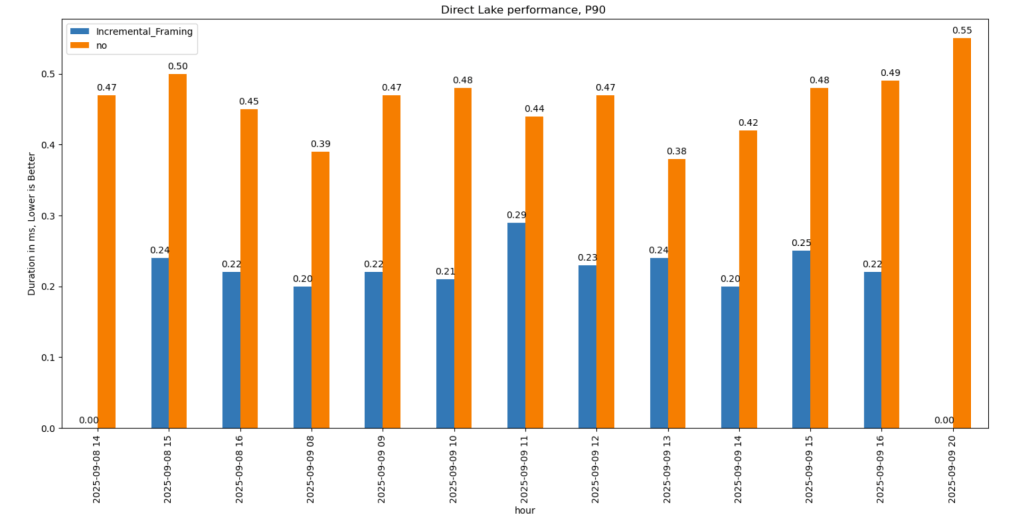
if you have Fabric OneLake, you can use Direct Lake in OneLake mode. Marco has a great article about it. It’s a fantastic improvement compared to the initial version of Direct Lake. However, it doesn’t solve the problem if your data is hosted in an S3 table or BigQuery Iceberg table. Yes, you can create a shortcut to OneLake and read it from there, but that still depends on a data engineer setting it up.

Now imagine a world where an Excel, Tableau, or Power BI Desktop user (or any arbitrary client tool) can just point to a Lakehouse using a standard API, discover tables, read data, and build reports. Honestly, this isn’t a big ask , we already have this when connecting to databases using ODBC, and I don’t see any technical reason why we can’t have the same experience with Lakehouses.

We Already Have This API

For me, the most promising development in the Lakehouse ecosystem is the Iceberg Catalog REST API, and I genuinely hope it becomes a standard—just like ODBC is today (and hopefully ADBC in the future, but that’s another topic).

Again, speaking as a data analyst, I want my tools to support the read part of the API—just the ability to list tables and scan a table. That’s all. I have zero interest in how the data is stored or which table format is used. The catalog should be smart enough to generate metadata on the fly.

The Good News

We’re getting there—at least if you’re using a Python notebook. Here’s an example where I use the same Iceberg REST API to query a table from four different Lakehouse implementations using Daft.

def connect_catalog(cat):
  match cat:
    case 'polaris':
      catalog = load_catalog(
              'default',
              uri= polaris_endpoint,
              warehouse='dwh',
              scope = 'PRINCIPAL_ROLE:data_engineer' ,
              credential= polaris_key
            )
    case 's3':
      catalog = load_catalog(
              'default',
              **{
                "type": "rest",
                "warehouse": s3_warehouse ,
                "uri": "https://s3tables.us-east-2.amazonaws.com/iceberg",
                "rest.sigv4-enabled": "true",
                "rest.signing-name": "s3tables",
                "rest.signing-region": "us-east-2"
              }
            )
    case 'uc':
      catalog = load_catalog(
               'default',
              token = token ,
              uri = endpoint,
              warehouse = 'ne'
              )
    case 'r2':
      catalog = RestCatalog(
              name = 'default',
              token = token_r2 ,
              uri = endpoint_r2,
              warehouse = r2_warehouse
              )
  return catalog

Then, I run a standard SQL query using Daft SQL.

Final Thoughts

It took Parquet a decade to become a standard. We may or may not have a single standard table format—and maybe we don’t need one. But if we want this Lakehouse vision to become mainstream, then everyone should support the Iceberg Catalog REST API, at least for read operations.

Experimenting with Text-to-SQL: Lessons from Optimizing Product Return Analysis

🌟 Introduction

While testing the DuckDB ODBC driver, which is getting better and better (not production ready but less broken compared to two years ago), I noticed something unexpected. Running queries through Power BI in DirectQuery mode was actually faster than executing them directly in the DuckDB native UI.

Naturally, that does not make sense !!!

What followed was an investigation that turned into a fun and insightful deep dive into text-to-SQL generation, Power BI’s query behavior, and the enduring relevance of manual SQL tuning

🧩 The Goal: Find the Worst Product by Return Rate

The task was straightforward:

Calculate total sales, total returns, and return rate by product. Rank the products and find the top 5 with the highest return rates.

To make it interesting, I decided to try:

  1. Letting an LLM generate the SQL by loading the semantic model.
  2. Using PowerBI in Direct Query Mode.
  3. Finally, manually tuning the query.

📝 Step 1: LLM-generated SQL — Clean and Understandable

chatgpt generated a good starting point:

WITH sales_by_product AS   (
SELECT
i.i_product_name AS product_name,
SUM(ss.ss_sales_price * ss.ss_quantity) AS total_sales
FROM store_sales ss
JOIN item i ON ss.ss_item_sk = i.i_item_sk
WHERE i.i_product_name IS NOT NULL
GROUP BY i.i_product_name
),

returns_by_product AS (
SELECT
i.i_product_name AS product_name,
SUM(sr.sr_return_amt) AS total_returns
FROM store_returns sr
JOIN item i ON sr.sr_item_sk = i.i_item_sk
WHERE i.i_product_name IS NOT NULL
GROUP BY i.i_product_name
),

combined AS (
SELECT
COALESCE(s.product_name, r.product_name) AS product_name,
COALESCE(s.total_sales, 0) AS total_sales,
COALESCE(r.total_returns, 0) AS total_returns
FROM sales_by_product s
FULL OUTER JOIN returns_by_product r
ON s.product_name = r.product_name
)

SELECT
product_name,
ROUND((total_returns / NULLIF(total_sales, 0)) * 100, 2) AS return_rate
FROM combined
WHERE total_sales > 0 -- Avoid divide by zero
ORDER BY return_rate DESC
limit 5 ;

Pros:

  • Clean and easy to read.
  • Logically sound.
  • Good for quick prototyping.

🔍 Observation: However, it used product_name (a text field) as the join key in the combined table, initially I was testing using TPC-DS10, the performance was good, but when I changed it to DS100, performance degraded very quickly!!! I should know better but did not notice that product_name has a lot of distinct values.

the sales table is nearly 300 M rows using my laptop, so it is not too bad

and it is nearly 26 GB of highly compressed data ( just to keep it in perspective)

📊 Step 2: Power BI DirectQuery Surprises

Power BI automatically generate SQL Queries based on the Data Model, Basically you defined measures using DAX, you add a visual which generate a DAX query that got translated to SQL, based on some complex logic, it may or may not push just 1 query to the source system, anyway in this case, it did generated multiple SQL queries and stitched the result together.

🔍 Insight: Power BI worked exactly as designed:

  • It split measures into independent queries.
  • It grouped by product_name, because that was the visible field in my model.
  • And surprisingly, it was faster than running the same query directly in DuckDB CLI!

Here’s my screenshot showing Power BI results and DAX Studio:


🧩 Step 3: DuckDB CLI — Slow with Text Joins

Running the same query directly in DuckDB CLI was noticeably slower, 290 seconds !!!


⚙️ Step 4: Manual SQL Tuning — Surrogate Keys Win

To fix this, I rewrote the SQL manually:

  • Switched to item_sk, a surrogate integer key.
  • Delayed lookup of human-readable fields.

Here’s the optimized query:

WITH sales_by_product AS (
SELECT
ss.ss_item_sk AS item_sk,
SUM(ss.ss_sales_price * ss.ss_quantity) AS total_sales
FROM store_sales ss
GROUP BY ss.ss_item_sk
),

returns_by_product AS (
SELECT
sr.sr_item_sk AS item_sk,
SUM(sr.sr_return_amt) AS total_returns
FROM store_returns sr
GROUP BY sr.sr_item_sk
),

combined AS (
SELECT
COALESCE(s.item_sk, r.item_sk) AS item_sk,
COALESCE(s.total_sales, 0) AS total_sales,
COALESCE(r.total_returns, 0) AS total_returns
FROM sales_by_product s
FULL OUTER JOIN returns_by_product r ON s.item_sk = r.item_sk
)

SELECT
i.i_product_name AS product_name,
ROUND((combined.total_returns / NULLIF(combined.total_sales, 0)) * 100, 2) AS return_rate
FROM combined
LEFT JOIN item i ON combined.item_sk = i.i_item_sk
WHERE i.i_product_name IS NOT NULL
ORDER BY return_rate DESC
LIMIT 5;

🚀 Result: Huge performance gain! from 290 seconds to 41 seconds

Check out the improved runtime in DuckDB CLI:


🌍 In real-world models, surrogate keys aren’t typically used

unfortunately in real life, people still use text as a join key, luckily PowerBI seems to do better there !!!


🚀 Final Thoughts

LLMs are funny, when I asked chatgpt why it did not suggest a better SQL Query, I got this answer 🙂

I guess the takeaway is this:


If you’re writing SQL queries, always prefer integer types for your keys!

And maybe, just maybe, DuckDB (and databases in general) could get even better at optimizing joins on text columns. 😉

But perhaps the most interesting question is:
What if, one day, LLMs not only generate correct SQL queries but also fully performance-optimized ones?

Now that would be exciting.

you can download the data here, it is using very small factor : https://github.com/djouallah/Fabric_Notebooks_Demo/tree/main/SemanticModel

Edit : run explain analyze show that it is group by is taking most of the time and not the joins

the optimized query assumed already that i.i_item_sk is unique, it is not very obvious for duckdb to rewrite the query without knowing the type of joins !!! I guess LLMs still have a lot to learn

How to Read a Delta Table with Deletion Vectors and Column Mapping in Python

When attempting to read a Delta table using Python with the deltalake library (Delta_rs, not Spark), you may encounter the following error:

import deltalake

DeltaTable('/lakehouse/default/Tables/xxx').to_pyarrow_dataset()

DeltaProtocolError: The table has set these reader features: {'deletionVectors'} but these are not yet supported by the deltalake reader.

Alternative: Using DuckDB

A simple alternative is to use DuckDB:

import duckdb

duckdb.sql("SELECT COUNT(*) FROM delta_scan('/lakehouse/default/Tables/xxx')")

Tested with a file that contains Deletion vectors

Column Mapping

The same approach applies to column mapping as well.

Upgrading DuckDB

Currently, Fabric Notebook comes preinstalled with DuckDB version 1.1.3. To use the latest features, you need to upgrade to the latest stable release (1.2.1) :

!pip install duckdb --upgrade
import sys
sys.exit(0)

Note: Installing packages using %pip install does not restart the kernel when you run the notebook , you need to use sys.exit(0) to apply the changes, as some packages may already be loaded into memory.

import duckdb
duckdb.sql(" force install delta from core_nightly ")
duckdb.sql(" from delta_scan('/lakehouse/default/Tables/dbo/evolution_column_change') ")

The Future of Delta Rust .

Currently, there are two Rust-based implementations of Delta:

  1. Delta_rs: The first and more mature implementation, developed by the community. It is an independent implementation of the Delta protocol and utilizes DataFusion and PyArrow (which will soon be deprecated) as its engine. However, Delta_rs does not support deletion vectors or column mapping, though it does support writing Delta tables.
  2. Delta Kernel_rs: The newer, “official” implementation of Delta, providing a low-level API for query engines. It is currently being adopted by DuckDB ( and Clickhouse apparently) with more engines likely to follow. However, it is still a work in progress and does not yet support writing.

There are ongoing efforts to merge Delta_rs with Delta Kernel_rs to streamline development and reduce duplication of work.

Note : although they are written in Rust, we mainly care about the Python API 🙂

Conclusion

At least for now, in my personal opinion, the best approach is to:

  • Use DuckDB for reading Delta tables
  • Use Python Deltalake (Delta_rs) for writing

Using OBSTORE to Load and Download Arbitrary Files to OneLake

Prerequisites

Before proceeding, ensure you have the necessary tools installed and configured. For more details, refer to the official installation guide: Install Azure CLI on Windows.

  1. Install Azure CLI (one-time setup) winget install Microsoft.AzureCLI Ensure you have the latest version installed.
  2. Login to Azure az login Follow the browser-based authentication flow.

Installing Required Python Package

The obstore package is a Python API for the Rust-based Object Store crate, which simplifies interaction with cloud storage systems.

pip install obstore --upgrade

Connecting to OneLake Storage

Once installed, you can connect to OneLake using the obstore package:

import obstore
from obstore.store import from_url

# Define storage path
store = from_url('abfss://sqlengines@onelake.dfs.fabric.microsoft.com/power.Lakehouse/Files', azure_use_azure_cli=True)

there is a PR by someone from the community where azure_use_azure_cli=True will not be needed the system will automatically pick the available authentification

Listing Files in OneLake

To list the files and folders inside OneLake, always specify a prefix to avoid long processing times:

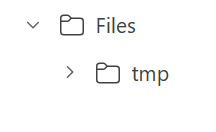
obstore.list(store, 'tmp').collect()

Uploading Local Files to OneLake

To upload files from a local directory to OneLake, use the following script:

import os

folder_path = '/test'  # Change this to the directory containing your files

for root, dirs, files in os.walk(folder_path):
    for file in files:
        local_path = os.path.join(root, file).replace("\\", "/")
        print(f"Uploading: {local_path}")
        obstore.put(store, local_path, local_path)

Downloading Files

for downloading files, you use get

xx = obstore.get(store,'plan/plan.png').bytes()
with open('output_file.png', 'wb') as file:
    file.write(xx)

Compatibility with Other Storage Solutions

The beauty of this approach is that the code remains largely the same whether you’re using OneLake or an S3-compatible storage service. The main differences lie in updating:

  • The storage path
  • Authentication credentials

Note: OpenDale provides a similar solution, but it does not currently support Entra OAuth 2

Summary

This short blog outlines a straightforward way to load files into OneLake using Python. With Azure CLI authentication and obstore, managing files in OneLake becomes both simple and specially standardized.

Obviously, it was always possible to do the same using Azure storage SDK but, the API is far from being user friendly (Personal opinion), it is designed for developers, but as a business user I like this package 🙂

Thanks Kyle Barron for creating this package  

You can download a sample notebook here :