Using Apache Arrow Dataset to compact old partitions

It is trick I learn today and thought it maybe useful to share, I have a folder of parquet files, partitioned by day using Hive style, the data is ingested every 5 minutes which end up generating 288 small parquet files per day, it is rather nice for a write scenario but reading that data will be slow as it generate a big overhead opening individual files, it is a well documented problem, and more sophisticated table format like Delta Table and Iceberg fix the problem by using compaction, but it does not work with Python. ( Edit by Python, I mean Engine Like Data Fusion, DuckDB , Pandas not Spark which does not make sense for a small Dataset)

In my example I use Only Python and pyarrow dataset which does not support compaction, but maybe there is a solution.

Just for illustration, here is a view of my Bucket in Cloudflare R2 (Pyarrow support S3, GCP and Azure)

Warning : the code will delete existing files, use at your own risk

  • Read the existing partitions except today data, as you may end up having concurrent Write , which will corrupt your table.
  • Filter only the partitions that contains more than 1 file , something like this Using DuckDB
create view base  as select * from  parquet_scan('s3://delta/aemo/scada/data/*/*.parquet' , HIVE_PARTITIONING = 1,filename=1) where Date < '{cut_off}';
create  view  filter as select Date, count(distinct filename) as cnt from  base  group by 1 having cnt>1 
  • Read the data using the previous filter, again, we are not touching today Partition to avoid any conflicts
tb=con.execute('''select SETTLEMENTDATE,DUID,SCADAVALUE,file,cast(base.Date as date) as Date from base inner join filter on base.Date= filter.Date''').arrow()
ds.write_dataset(xx,"delta/aemo/scada/data/", filesystem=s3,format="parquet" , partitioning=['Date'],partitioning_flavor="hive",
     min_rows_per_group=120000,existing_data_behavior="delete_matching")

Again there is no support for transaction, if your code for whatever reason, did not complete, you will end up with unstable table

  • And here is the results, all old partitions have only 1 file

You need to run the Job only once a day, hopefully next year sometimes, either Apache Iceberg or Delta Table will provide compaction for the Python client, in the meantime maybe this approach is good enough :), you can see the full code here

Another approach is copy on write, basically every time you ingest a new data, you need to copy the existing data append it to the new data and overwrite existing files, but it maybe an expensive operation, specially if your job runs more frequently.

Running a Serverless DuckDB on Google Cloud

TL;DR : it easy to setup and works relatively well, but there is a catch, watch out for Cloud Storage throughput. I shared a notebook here

in previous blog, I showed a POC how to run Queries from a Colab notebook against a delta lake table, but what if you want to run the same Query from other tools, or if you want to run a Query in a different region and avoid egress fees, turn out it is extremely easy to setup.

And here is an Overall View of the architecture. the most important decision is to make sure Cloud Storage and Cloud function are in the same region, in my case “us-central1”, you can call the function from anywhere.

Google Cloud Functions

As I said before the code is very simple, I spent some time googling to convert the results from a byte to json to dataframe, I think beside BigQuery, Google Cloud function is the easiest service to setup, just write your code and Google Cloud handle the rest , just for fun, I used a machine with 8 CPU and 32 GB of RAM.

import pyarrow.dataset as ds
import duckdb
import json
lineitem = ds.dataset("gs://xxxxx/lineitem",format="parquet", partitioning="hive")
con = duckdb.connect()
def Query(request):
    SQL = request.get_json().get('name')
    df = con.execute(SQL).df()
    return json.dumps(df.to_json(orient="records")), 200, {'Content-Type': 'application/json'}

How to Call web API

a lot of tool can send a web api call as long as it has the correct authentication, I started with a python script for a simple reason as it was the easiest to get the code from the internet.

Here is the interesting part, you write any arbitrary SQL code, Then you send an API call, in return you get a json with the results, a user don’t need to know anything about the cloud function, all he needs is the web address and write a correct SQL Query.

Performance considerations

This is where it get very interesting, I have no clue where is the bottleneck, but we can ask some Questions

Cold Start

  • The First example was 334 ms, that’s impressive, but I was cheating, I showed the best case scenario, Google Cloud function or more precisely Cloud Run was already running so no cold start and DuckDB was running a local Query which did not require a call to Cloud storage
  • Currently Cold Start for Cloud run Gen2 is around 10 second, notice it is still in preview.

Transfer from Google Cloud Storage

let’s try this simple Query, we get the result in 29 second

The Same Query using my Laptop, 600 ms, btw table lineitem contains 60 Million rows !!!

I don’t know why the massive difference, I presume network speed is limited, but when I look at the the bucket stats, it is actually very good, nearly 500 MB/S

I am no expert in network, but that number don’t seems right !!, when I check how much Data the cloud function is receiving then the whole discrepancy start making more sense, in average I am getting around 30 MB/s, the maximum was 50 MB/s , I have to say this is really slow !!!

File Pruning

Arrow dataset is smart enough to prune columns that are not used for partitions, in this Query, I made a filter on L_shipdate , notice the parquet file was sorted on that field, and as expected the performance is very good 1.7 second, DuckDB scan only the row groups that contains the date ‘1998-09-02’

Dataset Catalog

I am defining a very rudimentary catalog, the user can just call ” Show Tables”

You can even check the table schema

Cloud Storage throughput is the bottleneck.

having a speed of 30 MB/S make the whole setup just good for POC or doing a Query on a small dataset , I don’t know the reason why such a poor performance from Cloud Run, I suspect Apache arrow implementation is not optimized for GCP although it works very well in a local file system.

Another missing piece is the lack of cache, it would have being good if somehow DuckDB cache the data already Queried, but cache is very hard to implement specially if you want cache invalidation, and you risk reinventing a full Data warehouse. I genuinely hope it is a bug and cloud run can provide a better network performance.

Poor Man’s lakehouse using Cloud Storage, Delta lake and DuckDB

TL;DR : a proof of concept how to assemble a ‘Toy’ Lakehouse using Delta Table and DuckDB, You can download the Notebook here . Cloud storage throughput is the bottleneck of the system, I will appreciate a vote on this feature request

Delta lake one of the main storage file format used by Databricks and Microsoft has an experimental support for a standalone reader, it means you don’t need a big Data Engine to read it nor to write it, it is experimental at this stage but under active development.

I already blogged about it already, But I was using my laptop, turn out it works relatively well using any major Cloud storage provider, initially I tried Azure Cloud Storage and it did works, but I could not find any free Azure notebook offering, and I am not interested in paying any egress fees, instead I end up used Google Cloud Storage and Colab

I would like to talk more about arrow dataset, which I think is an amazing technology

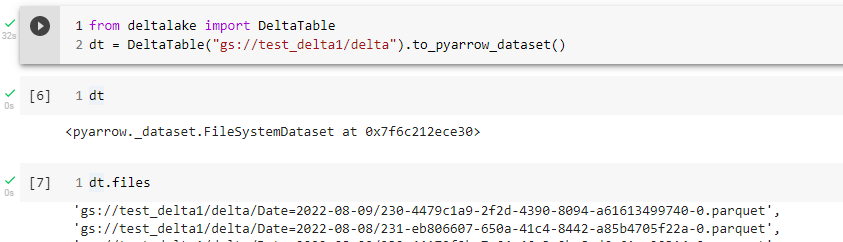
The Overall Idea is simple, I have a delta table in a cloud storage created by something like Apache Spark, DuckDB can’t read Delta Directly but instead I am using the Delta lake python package that can produce an arrow Dataset whch can be Queried by DuckDB or any other engine that support Arrow.

Arrow Dataset

Let’s look at this section of the code, as per the documentation, an arrow dataset does not copy the data but it is like a Virtual Table that knows about all the files inside that particular path, what’s exciting in theory Engine does not need to know about the storage at all, if it is csv, parquet or something else.

For example in the future, a Query engine would not even care if the Table is Delta or Iceberg, obviously it is not the case today but there is no reason it will not happen.

Filter Pushdown

When you read data from a cloud storage, for latency issues, it make sense to read the minimum possible number of files, currently only filter partition works, but they are working on adding filter on any columns

Final results

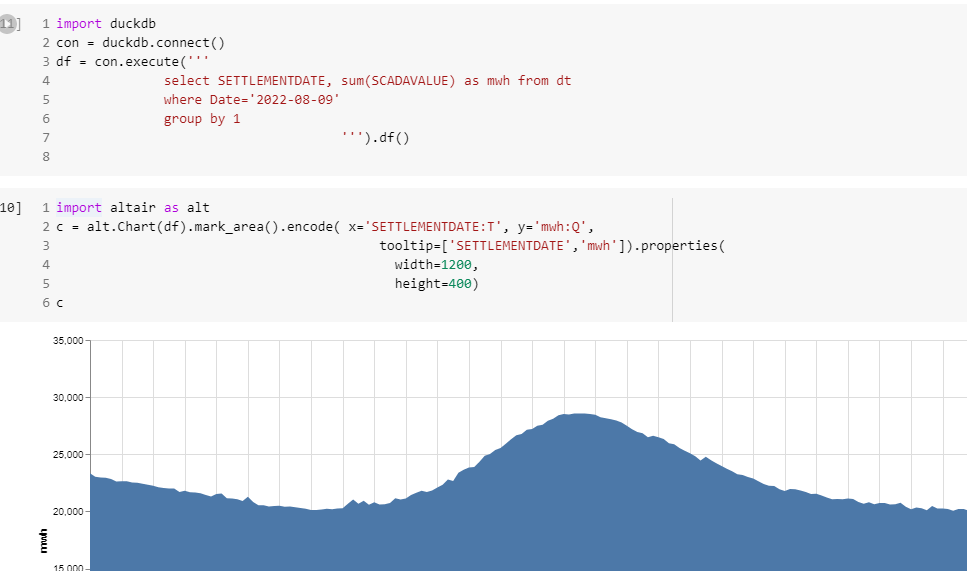
Currently, it is not particularly fast, but I can Query the Data Directly from a cloud storage and show arbitrary chart.

Local Cache

If the data is small and fit the notebook SSD, and does not change very often, it make sense to first download the data into a local DuckDB Database file and run Queries locally , it will be substantially Faster.

Take Away

I was a bit suspicious about this whole Lake House thing, but maybe I was wrong about it, having an open storage format will open all kind of interesting possibilities and that’s a very good thing.

As you can see, anyone can build a lake house, now we need to figure out a boring details, the overall performance of the system 🙂

Query Performance in Vertipaq vs DuckDB

Edit : this blog generated some strong feedback, This is not a benchmark of Vertipaq, but rather me arguing that it is indeed possible to have a good enough OLAP SQL Engine that read from disk instead of RAM ?

Vertipaq is the columnar Database used In PowerBI, Excel and Analysis service, it is an extremely fast DB and I have being using it since 2015 without really understanding how it works, it is just there giving back results in sub second, the only time I got performance issue was when I wrote terribly bad DAX.

Just for fun and hopefully we may even learn something useful, I run a couple of simple SQL Queries in DuckDB and replicate them in PowerBI desktop and see how the two system behave,Unfortunately Vertipaq don’t expose a fully functional SQL Endpoint, so you can’t simply run a typical SQL benchmark.

Setup

All test were done using my laptop ( a Dell with 16 GB of RAM), the data is TPCH-SF10, 60 million of rows for the base table, I had to add a PK for PowerBI as it does not support join on multiple fields, you can download the raw Data here

DuckDB queries were run using Visual studio notebook, I would had prefered Malloy but it does not support native DuckDB storage format yet , you can download the python files here and how to create the DB and Tables

For PowerBI, I use DAX Studio with cache turned off.

Loading Data

DuckDB support multiple mode, you can just run Queries directly on parquet files, you can load the data to memory using temp tables or you can import the data using DuckDB storage format, for performance reason I import the data, DuckDB don’t support compression very well yet, and consider the storage format as a work in progress, Index currently are not compressed and take a lot of space, without index, the size is around 3.6 GB

Parquet : 2.9 GB

DuckDB storage file format : 17 GB

Vertipaq : 3.9 GB

Notice here, DuckDB is reading from disk to run Queries, if does filter pushdown and scan only column used in Queries, Vertipaq has to load the whole database into memory before you can run any Queries, as far as I can tell this is the most important difference between the two systems and has a massive implication, both positive and negative.

Data Model

I am using the same Data Model as the previous blog, it is a nice bad Model for testing 🙂

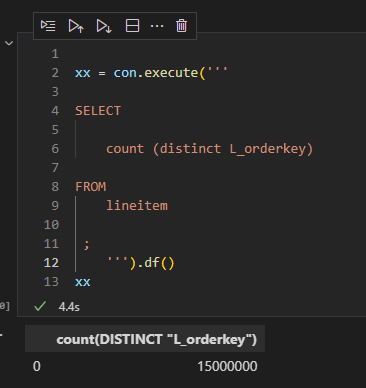
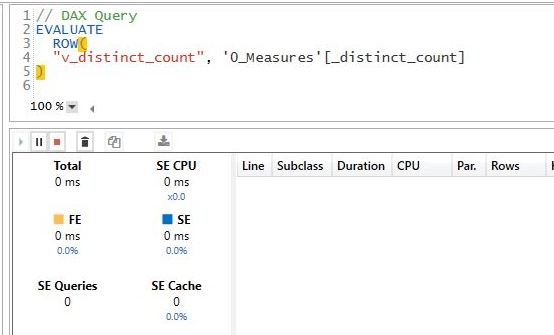
1- Simple Count Distinct

DuckDB : 4.4 S

Vertipaq : 0 S

For vertipaq it is a metadata Query, the distinct count for a whole column is created when you import the data, DuckDB don’t save that particular statistic.

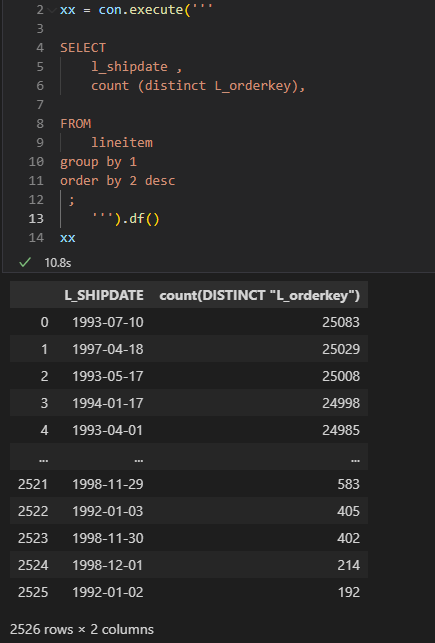
2- Count Distinct group by low Cardinality

low cardinality simply means column with small number of unique values.

DuckDB : 10.8 S

Vertipaq : 7.1 S

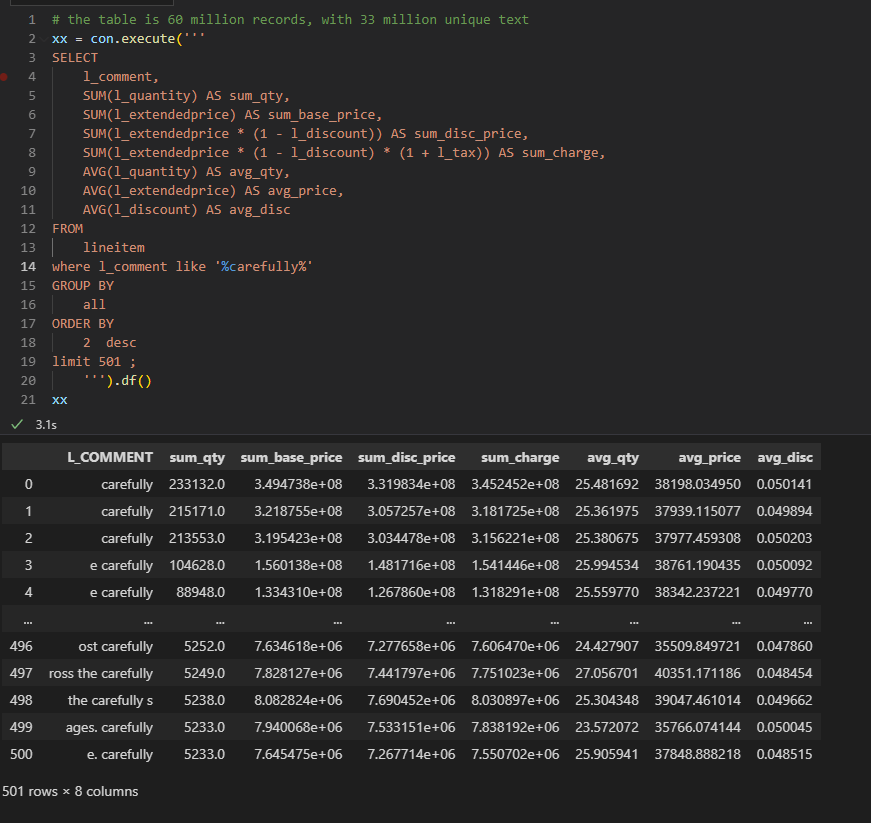
3- Count Distinct group by high Cardinality

now count the distinct values but grouping by a column L_comments which contains 33 Million unique values

DuckDB : 49 S

Vertipaq : 29 S

4 – Sum group by low Cardinality

This one is using the Famous Query 1 of TPCH Benchmark

DuckDB : 0.7 S

Vertipaq : 0.3 S

5 – Sum group by high Cardinality

DuckDB : 2.7 S

Vertipaq : 17 S

6 – Aggregate using complex relationship but group by Low cardinality

The performance of Vertipaq keep surprising me, it is using some kind of index on joins, I don’t know really how it works, but the performance is impressive

DuckDB : 4.9 S

Vertipaq : 0.9 S

7 – Aggregate using complex relationship but group by High cardinality

DuckDB : 8.4 S

Vertipaq : 5.1 S

I was surprised by this results, it seems when you group by high cardinality column it will impact Vetipaq performance.

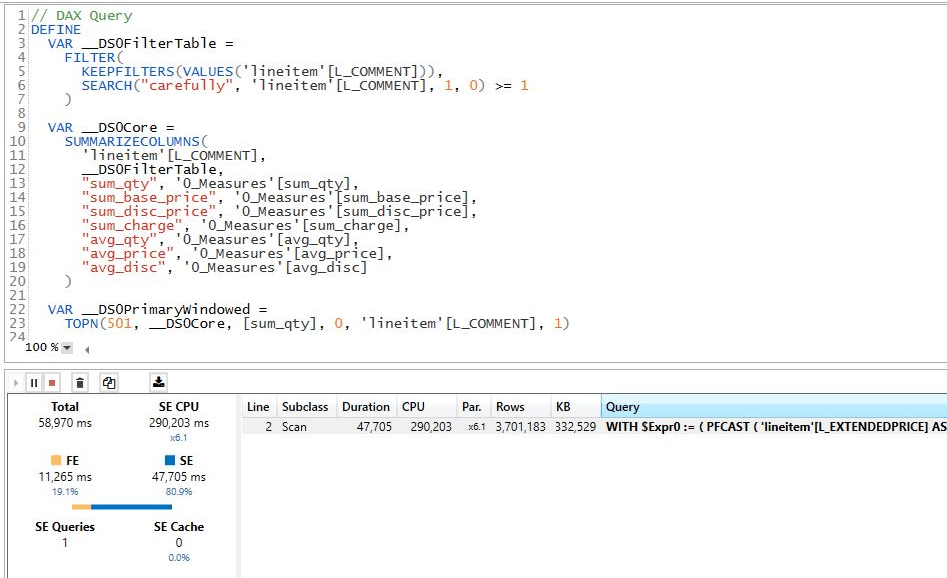
8 – Aggregate and filter on Text

DuckDB : 3.1 S

Vertipaq : 58 S

The performance seems odd for vertipaq, maybe I am doing something wrong, but it should be straightforward

Edit : Alex was kind enough and provided this excellent explanation.

9- Count Distinct group by high Cardinality base Table 120 Million records

Basically that’s the point of the blog, yes Vertipaq works well because it does fit into my Laptop RAM, let’s try a complex Query using 120 Million ? I start getting memory errors

Actually the whole experience became sluggish, just saving any edits take ages.

Let’s try DuckDB, I will just Query from parquet, I don’t want to ingest 120 million records for one Query

Take Away

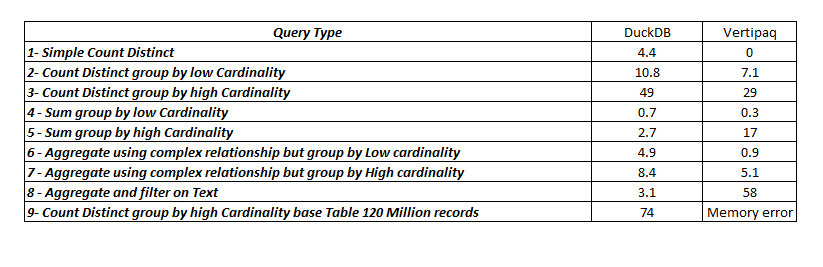
here is the summary results

Vertipaq is extremely fast but the performance degrade when dealing with High cardinality columns, filtering using string seems slow though, the Index on join or whatever the engine is doing is genius, the result for the Query 4 and 6 are magic as far as I am concerned.

DuckDB is impressive especially with the fact it is reading from Disk, yes, it is slower than Vertipaq for a small Data size which is expected as generally speaking scanning from RAM will be faster than Disk, but it does scale better.

If your data don’t fit into the RAM, DuckDB seems like an interesting proposition.