If you’ve ever worked with Delta tables, for example using delta_rs, you know that writing to one is as simple as passing the URL and credentials. It doesn’t matter whether the URL points to OneLake, S3, Google Cloud, or any other major object store — the process works seamlessly. The same applies whether you’re writing data using Spark or even working with Iceberg tables.
However, things get complicated when you try to list a bucket or copy a file. That’s when the chaos sets in. There is no standard method for these tasks, and every vendor has its own library. For instance, if you have a piece of code that works with S3, and you want to replicate it in Azure, you’ll need to rewrite it from scratch.
This is where OpenDalcomes in. OpenDal is an open-source library written in Rust (with Python bindings) that aims to simplify this problem. It provides a unified library to abstract all object store primitives, offering the same API for file management across multiple platforms (or “unstructured data” if you want to sound smart). While the library has broader capabilities, I’ll focus on this particular aspect for now.
I tested OpenDal with Azure ADLS Gen2, OneLake, and Cloudflare R2. To do so, I created a small Python notebook (with the help of ChatGPT) that syncs any local folder to remote storage. It works both ways: if you add a file to the remote storage, it gets replicated locally as well.
Currently, there’s a limitation: OpenDal doesn’t work with OneLake yet, as it doesn’t support OAuth tokens, and SAS tokens have a limited functionality ( it is by design, you can’t list a container for example from OneLake)
you need just to define your object store and the rest is the same, list, create folder, copy, write etc all the same !!! this is really a very good job
Unlike Delta, Iceberg requires a catalog in order to write data, there are a lot of options, from sqlite to full managed service like Snowflake Polaris, unfortunately pyiceberg has a bug when checking if a table exists in Polaris, the issue was fixed but it is not released yet.
SQLite is just local db, and I wanted to read and write those tables using my laptop and Fabric notebook, fortunately PostgreSQL is supported
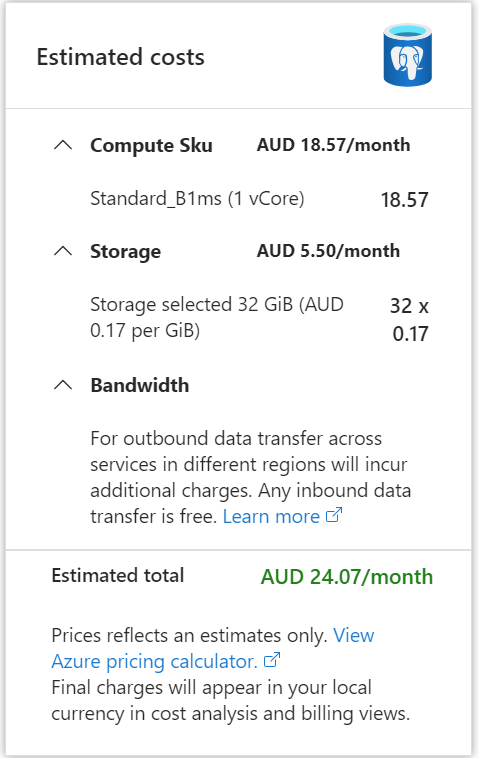
I spinned up a PostgreSQL DB in Azure, I used the cheapest option possible, notice here, iceberg catalog doesn’t store any data, just a pointer to the latest snapshot, the DB is used for consistency guarantee not data storage.
Anyway, 24 AU $/ Month is not too bad.
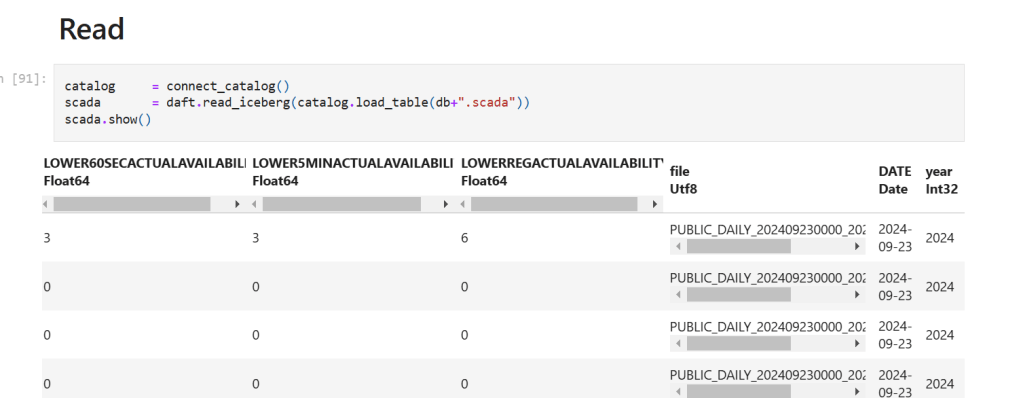
My initial plan was to use Daft for data preparation as it has a good integration with Iceberg catalog, unfortunately as of today, it does not support adding filename as a column in the table destination, so I endup using Duckdb for data preparation and Daft for reading from the catalog.
Daft added support for adding filename when reading from csv, so, it is used both for reading and writing.
The convenience of the catalog
what I really like about the catalog is the ease of use, you just need to initiate the catalog connection once.
TL;DR : OneLake is really an Open Storage system and works with any tool that understands Azure ADLS Gen2 API, but they changed the endpoint naming which was very confusing, (at least for me), but there is no catch, it is the same tech under the hood, there is no Vendor Lock-in, it is totally an open ecosystem.
Use Case :
For no obvious reason, I thought about an unusual scenario: Load data to OneLake using Dataflow Gen2 and Query the results using Snowflake, it works with any Engine that understands Delta Table, mind you, no Spark was involved at all, all using native code.
Azure AD
Fabric use Azure AD for authentication, and support service principal too , this is the recommended route, I am not sure if Snowflake understand OneLake Endpoint format, I think it expect something like this : “accountname.blob.core.windows.net/container_name/”
Maybe it works but I have not tested it, probably it is a blog for another day.
Shortcut
Another approach is to create a shortcut to an existing ADLS Gen2 storage account, it is trivial to setup and support read and write, which I did
I can write the data using either Spark or Dataflow Gen2, the Data Warehouse is not supported, you can read only using the OneLake Endpoint, anyway, for this example I am using Dataflow Gen2 to write the data
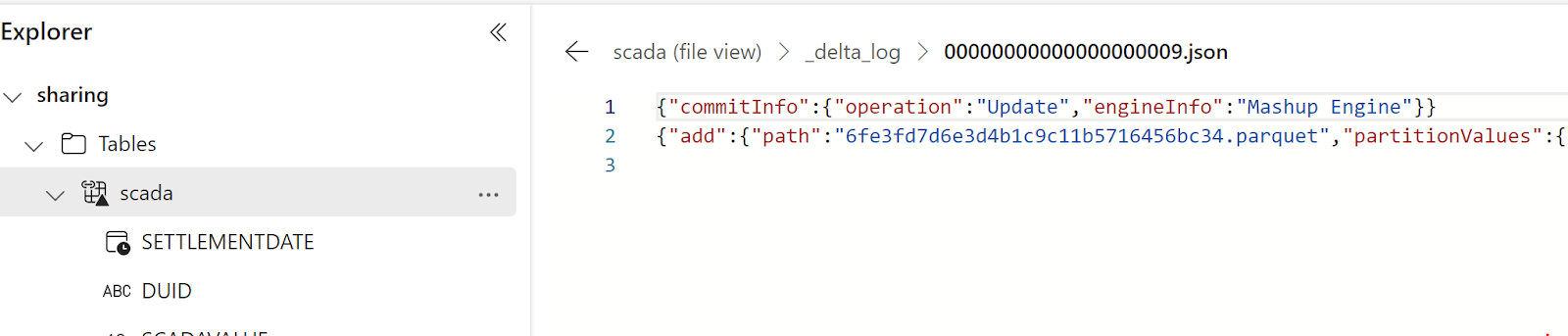
Turns out, PowerQuery has a native Delta table writer 🙂 , you can see it in the log
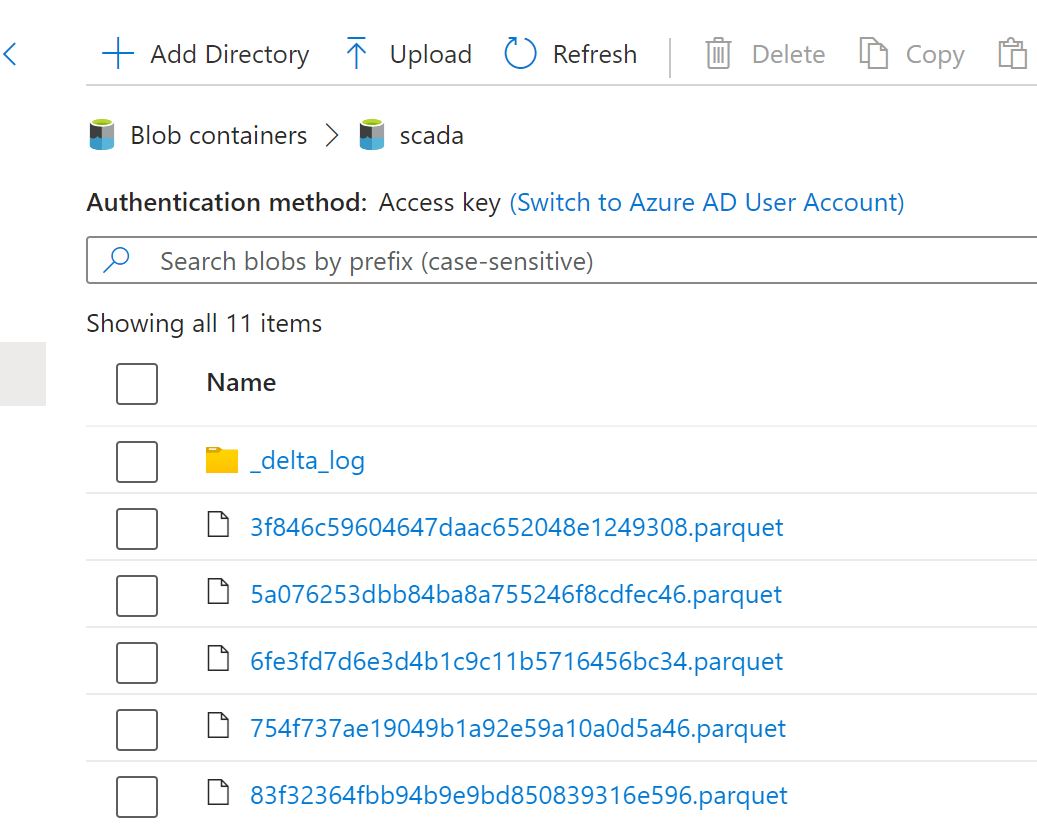
And here is the Data in Azure Storage
I feel like if you want to share data with external parties, maybe using an external Azure Container is a more flexible solution. I know it may sound silly but the fact I can see the data using the storage explorer in Azure independently of Fabric makes it seem more neutral.
Reading from Snowflake
Snowflake recommends using a service principal,but for this quick demo, I used a SAS token, making sure to grant read and list.
And then used this SQL Script the define the external table
create database ONELAKE ;
create schema AEMO ;
USE ONELAKE.AEMO ;
CREATE OR REPLACE STAGE onelake
  URL='azure://fabricshare.blob.core.windows.net/scada/'
  CREDENTIALS=(AZURE_SAS_TOKEN='xxxxxxxxxxxxxxxxxxxxxxxxxxxxxxxxxxx') ;

CREATE or replace EXTERNAL TABLE scada(
 SETTLEMENTDATE TIMESTAMP AS (value:SETTLEMENTDATE::VARCHAR::TIMESTAMP),
 DUID varchar AS (value:DUID::varchar),
 SCADAVALUE NUMBER(12,5) AS (value:SCADAVALUE::NUMBER(12,5)),
 file varchar AS (value:file::varchar))
 LOCATION=@ONELAKE
 REFRESH_ON_CREATE =  FALSE
 AUTO_REFRESH = FALSE
 FILE_FORMAT = (TYPE = PARQUET)
 TABLE_FORMAT = DELTA;
 ALTER EXTERNAL TABLE SCADA  REFRESH;
 select settlementdate,sum(scadavalue) as mw from scada group by all;
to get the latest Data, you can run this SQL code
ALTER EXTERNAL TABLE SCADA REFRESH;
and because it is using Delta Table, you will not get dirty reads, only fully committed data is read.
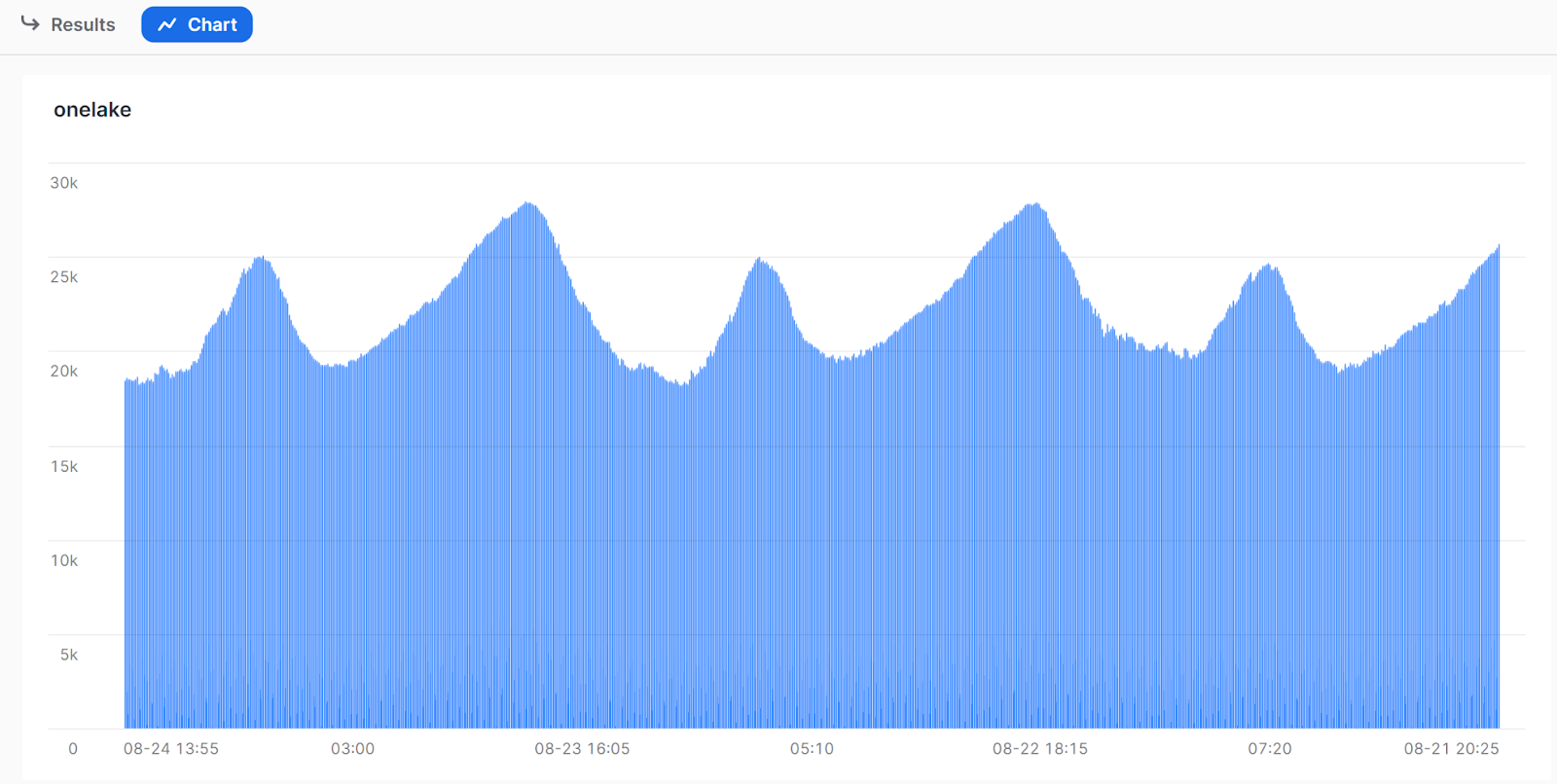
And here is a sample chart from Snowflake
Writing from Snowflake
Snowflake doesn’t support writing to Delta Table, which I think is a great use case for PowerBI users with Direct Lake mode. I guess for now, a user can use Fabric Data Factory to get the data, I feel there is a missed opportunity here.
Parting thoughts
I had a mixed feeling about Delta Table and the concept of Lakehouse in general, I felt it was too tight to Spark ecosystem, rather useful only for big data setup, I changed my mind,first by using Delta Rust and now Fabric is doing a good job making it even more accessible for business users, I think that’s progress, and to be very clear this setup works with Databricks, DuckDB and any Database that reads Delta Table.
A simple script that load some data from Azure Storage into a disk cache, run complex Queries using DuckDB and save the results into a destination Bucket using a cheap Azure ML Notebook, The resulting bucket can be consumed in Synapse serverless/ PowerBI/ Notebook etc
Notice, I am more interested in the overall Azure ecosystem, so it is vendor neutral.
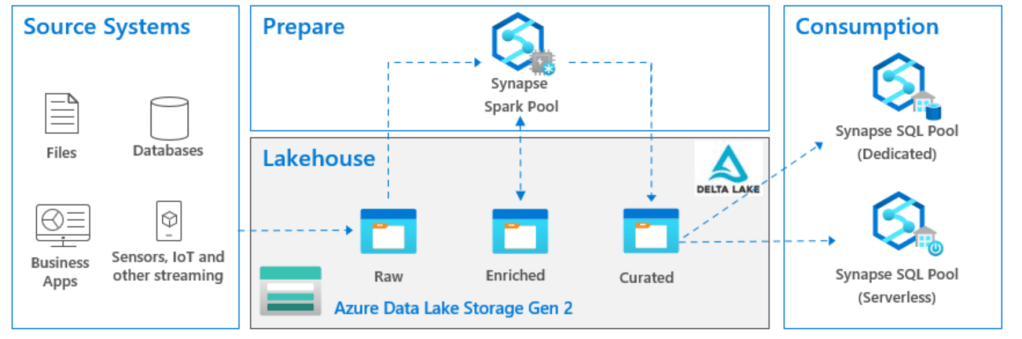
In practical term, Lakehouse here means the storage system with an open Table Format, now if you ask three different people about this diagram, probably they will give you 4 different answers.
An Old school Dedicated pool professional will argue this is an over complicated system, and all you need is Source system —> Data integration tool —> Dedicated Pool
As I have a soft spot for Serverless, ideally, I would say, add Write capabilities to Serverless and call it a day
A Snowflake or Databricks Person will argue, One Engine should do everything; prepare and serve.
My colleague who is an Azure data engineer will say the whole thing does not make any sense, ADF and SQL Server is all you need 🙂
What if you don’t have big Data ?
The Previous Diagram assume a big data workload, as Spark has a massive overhead in compute usage and cost and does not make much sense for a smaller data.
What if you have a smaller data size, can we keep this overall architecture and keep the lower cost, maybe we can, I will argue, it maybe even be useful very soon 🙂
Why you are keeping the serverless Pool
I think it maybe the obvious question, DuckDB is an awesome Execution Engine, but it is not a client server DB, you can’t have a SQL Endpoint that you just use to run Queries from PowerBI etc.
Obviously you can use Azure ML notebook just to do exploratory analysis, but that’s not something that make sense for Business intelligence People 🙂
PowerBI
The theory is because the data is prepared and cleaned at the Storage level, PowerBI can just import the Parquet files, a SQL Endpoint is not strictly needed
Ok sweet, so where do you run this Duck thing?
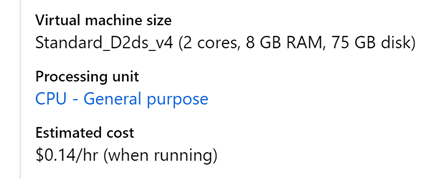
Honestly that was the hardest Part, using synapse Compute fail the purpose as it is designed for Spark, the minimum is three VM, turn out Azure has an Amazing machine learning service, that we can just use for data engineering, you can run VM as low as 1 Core (8 cents/hour), auto shutdown is available, so you pay only for what you use, and you can schedule jobs, yes it is supposed to be for ML but it does work just fine for Data engineering Jobs.
Show me an Example
The Pipeline is very simple
-Read Data from Azure Storage bucket
-Run Some Complex Queries (22 Queries)
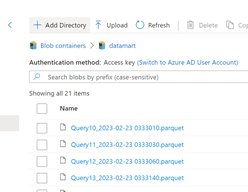
-Save the results in a Bucket
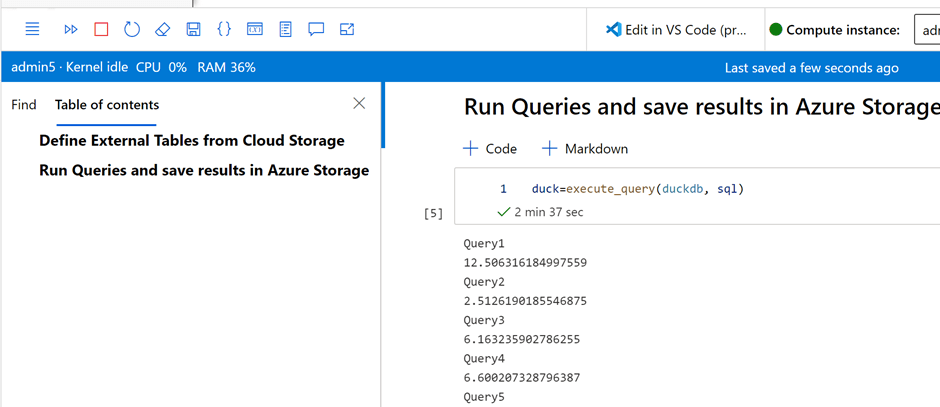
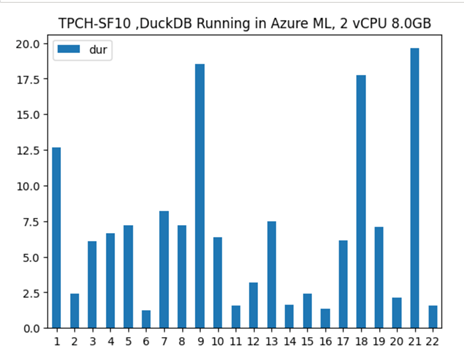
The Compute used is an Azure ML VM that cost 14 cents/Hour, the Raw Data is around 3 GB, main table 60 million rows, the overall pipeline took 2 minutes and 37 second, I think this is the most cost-effective way to run this workload on Azure. ( synapse serverless would have being perfect with the pay by scan model but write capabilities is rudimentary, basically you can’t overwrite a folder, but that may change anytime)
And The results
I Appreciate TPCH is not a benchmark for heavy write, but I used something easily accessible, and I can compare to other systems.
Thanks to Koen Vossen for showing how to use the disk cache with fsspec
What’s the catch?
As of this writing, Python support for open Table format (Iceberg, Delta ) is very limited, personally I found that Arrowdataset is the most mature offering today, but it support only Hive tables and only append or Overwrite.
if you need a merge or update directly on a remote storage, your only option is to do those operation in DuckDB using the native file format and overwrite the files in the remote storage, it works well for small data but it will not scale.
Note : my experience with Python Delta table (Not Spark) was mainly with GCP, turn out Azure has a better support ( can read, write, show history, vacuum) still as of today, I still think Arrow Dataset is more stable.
Final Thoughts
Regardless of what you use, I think it is important to ask your vendor, what’s your solution for smaller data? are you to paying a premium for a big data solution and is it justified by your workload ?








 Small Data And self service