DeltaProtocolError: The table has set these reader features: {'deletionVectors'} but these are not yet supported by the deltalake reader.
Alternative: Using DuckDB
A simple alternative is to use DuckDB:
import duckdb

duckdb.sql("SELECT COUNT(*) FROM delta_scan('/lakehouse/default/Tables/xxx')")
Tested with a file that contains Deletion vectors
Column Mapping
The same approach applies to column mapping as well.
Upgrading DuckDB
Currently, Fabric Notebook comes preinstalled with DuckDB version 1.1.3. To use the latest features, you need to upgrade to the latest stable release (1.2.1) :
Note: Installing packages using %pip install does not restart the kernel when you run the notebook , you need to use sys.exit(0) to apply the changes, as some packages may already be loaded into memory.
import duckdb
duckdb.sql(" force install delta from core_nightly ")
duckdb.sql(" from delta_scan('/lakehouse/default/Tables/dbo/evolution_column_change') ")
The Future of Delta Rust .
Currently, there are two Rust-based implementations of Delta:
Delta_rs: The first and more mature implementation, developed by the community. It is an independent implementation of the Delta protocol and utilizes DataFusion and PyArrow (which will soon be deprecated) as its engine. However, Delta_rs does not support deletion vectors or column mapping, though it does support writing Delta tables.
Delta Kernel_rs: The newer, “official” implementation of Delta, providing a low-level API for query engines. It is currently being adopted by DuckDB ( and Clickhouse apparently) with more engines likely to follow. However, it is still a work in progress and does not yet support writing.
There are ongoing efforts to merge Delta_rs with Delta Kernel_rs to streamline development and reduce duplication of work.
Note : although they are written in Rust, we mainly care about the Python API 🙂
Conclusion
At least for now, in my personal opinion, the best approach is to:
While experimenting with different access modes in Power BI, I thought it is maybe worth sharing as a short blog to show why the Lakehouse architecture offers versatile options for Power BI developers. Even when they use Only Import Mode.
And Instead of sharing a conceptual piece, perhaps focus on presenting some dollar figures 🙂
Scenario: A Small Consultancy
According to local regulations, a small enterprise is defined as having fewer than 15 employees. Let’s consider this setup:
Data Storage: The data resides in Microsoft OneLake, utilizing an F2 SKU.
Number of Users: 15 employees.
Data Size: Approximately 94 million rows.
Pricing Model: For simplicity, assume the F2 SKU uses a reserved pricing model.
Monthly Costs:
Power BI Licensing: 15 users × 15 AUD = 225 AUD.
F2 SKU Reserved Pricing: 293 AUD.
Total Cost: 518 AUD per month.
ETL Workload
Currently, the ETL workload consumes approximately 50% of the available capacity.
For comparison, I ran the same workload on another Lakehouse vendor. To minimize costs, the schedule was adjusted to operate only from 8 AM to 6 PM. Despite this adjustment, the cost amounted to:
Daily Cost: 40 AUD.
Monthly Cost: 1,200 AUD.
In contrast, the F2 SKU’s reserved price of 293 AUD per month is significantly more economical. Even the pay-as-you-go model, which costs 500 AUD per month, remains competitive.
Key Insight:
While serverless billing is attractive, what matter is how much you end up paying per month.
For smaller workloads (less than 100 GB of data), data transformation becomes commoditized, and charging a premium for it is increasingly challenging.
Analytics in Power BI
I prefer to separate Power BI reports from the workspace used for data transformation. End users care primarily about clean, well-structured tables—not the underlying complexities.
With OneLake, there are multiple ways to access the stored data:
Import Mode: Directly import data from OneLake.
DirectQuery: Use the Fabric SQL Endpoint for querying.
Direct Lake Model: Access data with minimal latency.
Composite Models: All the above ( this is me trying to be funny)
All the Semantic Models and reports are hosted in the Pro license workspace, Notice that an import model works even when the capacity is suspended ( if you are using pay as you go pricing)
The Trade-Off Triangle
In analytical databases, including Power BI, there is always a trade-off between cost, freshness, and query latency. Here’s a breakdown:
Import Mode: Ideal if eight refreshes per day suffice and the model size is small. Reports won’t consume Fabric capacity (Onelake Transactions cost are insignificant for small data import)
Direct Lake Model: Provides excellent freshness and latency but will probably impacts F2 capacity, in other words, it will cost more.
DirectQuery: Balances freshness and latency (seconds rather than milliseconds) while consuming less capacity. This approach is particularly efficient as Fabric treats those Queries as background operations, with low consumption rates in many cases. Looking forward to the release of Fabric DWH result cache.
Key Takeaways
Cost-Effectiveness: Reserved pricing for smaller Fabric F SKUs combined with Power BI Pro license offers a compelling value proposition for small enterprises.
Versatility: OneLake provides flexible options for ETL workflows, even when using import mode exclusively.
The Lakehouse architecture and Power BI’s diverse access modes make it possible to efficiently handle analytics, even for smaller enterprises with limited budgets.
This is not an official benchmark—just an exercise to experiment with the new Fabric Python notebook.
You can download the notebook and the results here
There is a growing belief that most structured data will eventually be stored in an open table format within object stores, with users leveraging various engines to query that data. The idea of data being tied to a specific data warehouse (DWH) may soon seem absurd, as everything becomes more open and interoperable.
While I can’t predict the future, 2024 will likely be remembered as the year when the lakehouse concept decoupled from Spark. It has become increasingly common for “traditional” DWHs or any Database for that matter to support open table formats out of the box. Fabric DWH, for instance, uses a native storage layer based on Parquet and publishes Delta tables for consumption by other engines. Snowflake now supports Iceberg, and BigQuery is slowly adding support as well.
I’m not particularly worried about those DWH engines—they have thousands of engineers and ample resources, they will be doing just fine.
My interest lies more in the state of open source Python engines, such as Polars and DataFusion, and how they behave with a limited resource environment.
Benchmarking Bias
Any test inherently involves bias, whether conscious or unconscious. For interactive queries, SQL is the right choice for me. I’m aware of the various DataFrame APIs, but I’m not inclined to learn a new API solely for testing. For OLAP-type queries, TPC-DS and TPC-H are the two main benchmarks. This time, I chose TPC-DS for reasons explained later.
Benchmark Setup
All data is stored in OneLake’s Melbourne region, approximately 1,400 km away from my location, the code will check if the data exists otherwise it will be generated, the whole thing is fully reproducible.
I ran each query only once, ensuring that the DuckDB cache, which is temporary, was cleared between sessions. This ensures a fair comparison.
I explicitly used the smallest available hardware since larger setups could mask bottlenecks. Additionally, I have a specific interest in the Fabric F2 SKU.
While any Python library can be used, as of this writing, only two libraries—DuckDB and DataFusion—support:
Running the 99 TPC-DS queries (DataFusion supports 95, which is sufficient for me).
Native Delta reads for abfss or at least local paths.
Python APIs, as they are required to run queries in a notebook.
Other libraries like ClickHouse, Databend, Daft, and Polars lack either mature Delta support or compatibility with complex SQL benchmarks like TPC-DS.
Why TPC-DS ?
TPC-DS presents a significantly greater challenge than TPC-H, with 99 queries compared to TPC-H’s 22. Its more complex schema, featuring multiple fact and dimension tables, provides a richer and more demanding testing environment.
Why 10GB?
The 10GB dataset reflects the type of data I encountered as a Power BI developer. My focus is more on scaling down than scaling up. For context:
The largest table contains 133 million rows.
The largest table by size is 1.1GB.
Admittedly, TPC-DS 10GB is overkill since my daily workload was around 1GB. However, running it on 2 cores and 16GB of RAM highlights DuckDB’s engineering capabilities.
btw, I did run the same test using 100GB and the python notebook with 16 GB did works just fine, but it took 45 minutes.
OneLake Access Modes
You can query OneLake using either abfss or mounted storage. I prefer the latter, as it simulates a local path and libraries don’t require authentication or knowledge of abfss. Moreover, it caches data on runtime SSDs, which is an order of magnitude faster than reading from remote storage. Transactions are also included in the base capacity unit consumption, eliminating extra OneLake costs.
It’s worth noting that disk storage in Fabric notebook is volatile and only available during the session, while OneLake provides permanent storage.
You can read more about how to laverage DuckDB native storage format as a cache layer here
Onelake Open internet throughput
My internet connection is not too bad but not great either, I managed to get a peak of 113 Mbps, notice here the extra compute of my laptop will not help much as the bottleneck is network access.
Results
The table below summarizes the results across different modes, running both in Fabric notebooks and on my laptop.
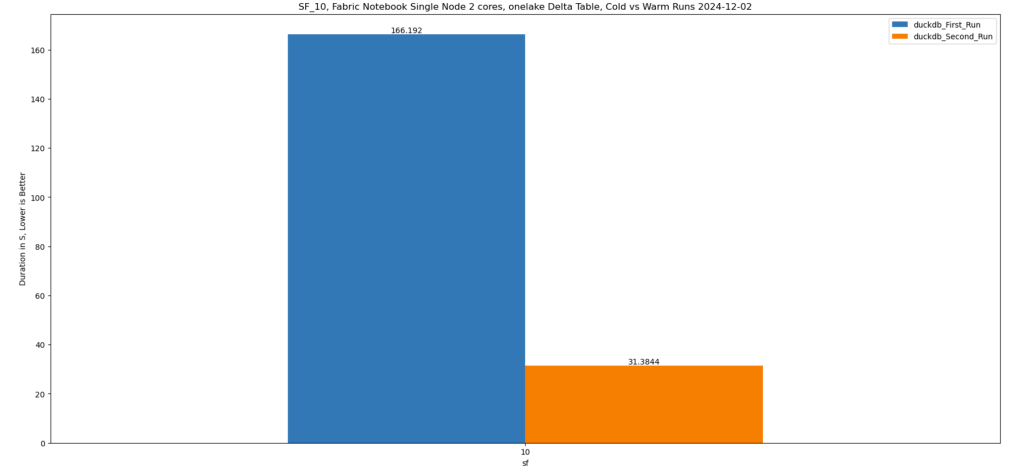
DuckDB Disk caching yielded the shortest durations but the worst individual query performance, as copying large tables to disk takes time.
Delta_rs SQL performance was somewhat erratic.
Performance on my laptop was significantly slower, influenced by my internet connection speed.
Mounted storage offered the best overall experience, caching only the Parquet files needed for queries.
And here is the geomean
Key Takeaways
For optimal read performance, use mounted storage.
For write operations, use the abfss path.
Having a data center next to your laptop is probably a very good idea 🙂
Due to network traffic, Querying inside the same region will be faster than Querying from the web (I know, it is a pretty obvious observation)
but is Onelake throughput good ?
I guess that’s the core question, to answer that I changed the Python notebook to use 8 cores, and run the test from my laptop using the same data stored in my SSD Disk, no call to onelake, and the results are just weird
Reading from Onelake using mounted storage in Fabric Notebook is faster than reading the same data from my Laptop !!!!
Looking Ahead to 2025
2024 has been an incredible year for Python engines, evolving from curiosities to tools supported by major vendors. However, as of today, no single Python library supports disk caching for remote storage queries. This remains a gap, and I hope it’s addressed in 2025.
For Polars and Daft, seriously works on better SQL support
Use SQGLot to parse the SQL query and extract the list of Delta tables that need to be scanned from OneLake.
Track Table Metadata
Capture the Delta table version and ID to ensure consistency.
Selective Copy
Copy only the necessary tables locally to satisfy the query.
Reuse Cached Data
For subsequent queries, check if the Delta table has changed:
If unchanged, read data from the local SSD.
If new tables are required, repeat the caching process for those tables.
Why It Works
This approach effectively creates a temporary, ad hoc disk cache in the notebook. The cache:
Persists only for the session’s duration.
Evicts automatically when the session ends.
Ensures consistency by validating whether the Delta table in OneLake has changed before reusing cached data.
Thanks to the Delta format, this validation is a relatively cheap operation.
Leverages the user-level isolation in Fabric notebooks to eliminate risks of data inconsistency.
Despite its simplicity, this method has proven to be highly effective for query acceleration! 🚀
Limitations
Yes, I know—the cache is rather naïve since it loads the entire table. Other systems go further by:
Copying only the columns needed for the query.
Fetching just the row groups relevant to the query.
However, these optimizations would need to be implemented natively by the engine itself.
Industry Gap
Although virtually all Python engines (e.g., Polars, DataFusion, etc.) support reading formats like Delta and Iceberg, almost none offer built-in disk or RAM caching. This lack of caching support limits performance optimization opportunities.
Hopefully, this will change in the future, enabling more efficient workflows out of the box.
Btw, this is really fast !!! just a hint, this is faster than the results obtained by a state of the art DWH in 2022 !!!


 Small Data And self service