Reading a Delta Table Hosted in OneLake from Snowflake

I recently had a conversation about this topic and realized that it’s not widely known that Snowflake can read Delta tables hosted in OneLake. So, I thought I’d share this in a blog post.

Fundamentally, this process is similar to how XTable in Fabric works, but in reverse—it converts a Delta table to Iceberg by translating the table metadata ( AFAIK, Snowflake don’t use Xtable but an internal tool)

Recommended Documentation

For detailed information, I strongly recommend reading the official Snowflake documentation:
🔗 Create Iceberg Table from Delta


How It Works

External Volume and File Section

When creating an external volume in Snowflake that points to OneLake, only the Files section is supported. This isn’t an issue because you can simply add a shortcut that points to a schema.

SQL Code to Set Up External Volume and Map an Existing Table

CREATE OR REPLACE EXTERNAL VOLUME onelake_personal_tenant_delta
   STORAGE_LOCATIONS =
      (
         (
            NAME = 'onelake_personal_tenant_delta',
            STORAGE_PROVIDER = 'AZURE',
            STORAGE_BASE_URL = 'azure://onelake.dfs.fabric.microsoft.com/python/data.Lakehouse/Files',
            AZURE_TENANT_ID = 'xxxxxxxxxxxxxxxxxxxxxxxxxxxxxxxxxxx'
         )
      );

DESC EXTERNAL VOLUME onelake_personal_tenant_delta;

One-Time Setup: Authentication

You’ll need to complete a one-time authentication step:

  1. Copy the AZURE_CONSENT_URL from the output.
  2. Open it in your browser: "AZURE_CONSENT_URL":"https://login.microsoftonline.com/xx/oauth2/authorize?client_id=yy&response_type=code"
  3. Ensure you select the correct email address that has access to your tenant.
  4. This will create an Azure multi-tenant app with a service principal.
  5. Add this service principal to your workspace so that Snowflake can access the data.

Setting Up the Iceberg Table

CREATE OR REPLACE CATALOG INTEGRATION delta_catalog_integration
  CATALOG_SOURCE = OBJECT_STORE
  TABLE_FORMAT = DELTA
  ENABLED = TRUE;

CREATE DATABASE IF NOT EXISTS ONELAKE;

CREATE SCHEMA IF NOT EXISTS delta;

CREATE ICEBERG TABLE ONELAKE.delta.test
  CATALOG='delta_catalog_integration'
  EXTERNAL_VOLUME = 'onelake_personal_tenant_delta'
  BASE_LOCATION = 'aemo/test/';

SELECT COUNT(*) FROM ONELAKE.delta.test;


and here is the result

Limitations

  • Deletion Vectors Are Not Supported:
    If your table contains deletion vectors, make sure to run OPTIMIZE to handle them properly.

Process 1 Billion rows of raw csv in Fabric Notebook for less than 20 Cents 

The Use case

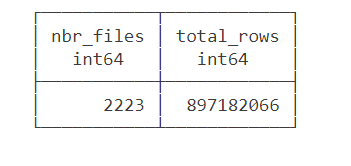
Data source is around 2200 files with a total of 897 Million rows of weird csv files (the file has more columns than the header) , This is a real world data not some synthetic dataset, it is relatively small around 100 GB uncompressed.

The Pipeline will read those files and extract clean data from it using non trivial transformation and save it as a Delta Table.

we used the smallest Compute available in Fabric Notebook which is 4 cores with 32 GB. to be clear this is a real single node (not 1 driver and 1 executor), Although the Runtime is using Spark, All the Engines interact Directly with the Operating system, as far as I can tell, Spark has a very minimum overhead when not used Directly by the Python code.

You need to pick the Engine

Nowadays we have plenty of high quality Calculation Engines,  but two seems to gain traction (Polars and DuckDB) , at least by the number of package downloaded and the religious wars that seems to erupt occasionally in twitter 🙂

For a change I tried to use Polars, as I was accused of having a bias toward DuckDB, long story short, hit a bug with Polars , I tried Datafusion too but did managed to get a working code, there is not enough documentation on the web, after that I did test Clickhouse chdb, but find a bug, anyway the code is public, feel free to test your own Engine.

So I ended up using DuckDB, the code is published here , it is using only 60 files as it is available publicly, the whole archive is saved in my tenant (happy to share it if interested) 

The results is rather surprising (God bless Onelake throughput), I am using the excellent Python Package Delta Lake to write to Onelake

26 minutes, that’s freaking fast, using Fabric F2, the total cost will be

0.36 $/Hour X(26/60) =  15 Cents

you need to add a couple of cents for Onelake Storage Transactions.

As far as I can tell, this is maybe one of the cheapest option in the Market.

0.36 $/Hour is the rate for pay as you go, if you have a reservation then it is substantially cheaper.

because it is Delta Table Then Any Fabric Engine ( SQL, PowerBI, Spark) can read it.

What’s the catch ?

Today DuckDB can not write directly to Delta Table ( it is coming though eventually) instead it will export data to Delta Lake writer using Arrow Table, it is supposed to be zero copy but as far as I can tell, it is the biggest bottleneck and will generate out of memory errors , the solution is easy ; process the files in chunks , not all at once

#############################################
list_files=[os.path.basename(x) for x in glob.glob(Source+'*.CSV')]
files_to_upload_full_Path = [Source + i for i in list_files]
if len(files_to_upload_full_Path) >0 :
  for i in range(0, len(files_to_upload_full_Path), chunk_len):
    chunk = files_to_upload_full_Path[i:i + chunk_len]
    df=get_scada(chunk)
    write_deltalake("/lakehouse/default/Tables/scada_duckdb",df,mode="append",engine='rust',partition_by=['YEAR'],storage_options={"allow_unsafe_rename":"true"})
    del df

By experimentation, I notice 100 files works fine with 16 GB, 200 files with 32 GB etc

When exporting to Parquet, DuckDB managed the memory natively and it is faster too.

Native Lakehouse Is the future of Data Engineering

The combination of Open table format like Delta and Iceberg with ultra efficient Open Source Engine like DuckDB, Polars, Velox, datafusion all written in C++/Rust will give data engineers an extremely powerful tools to build more flexible and way cheaper data solutions.

if I have to give an advice for young Data engineers/Analysts, Learn Python/SQL.

Would like to thanks Pedro Holanda for fixing some very hard to reproduce bugs in the DuckDB csv reader.

And Ion Koutsouris for answering my silly questions about Delta lake writer.