a new experimental support for Writing Delta storage format using only Python was added recently and I thought it is a nice opportunity to play with it.
Apache Spark had a native support since day one, but personally the volume of data I deal with does not justify running Spark, hence the excitement when I learned we can finally just use Python.
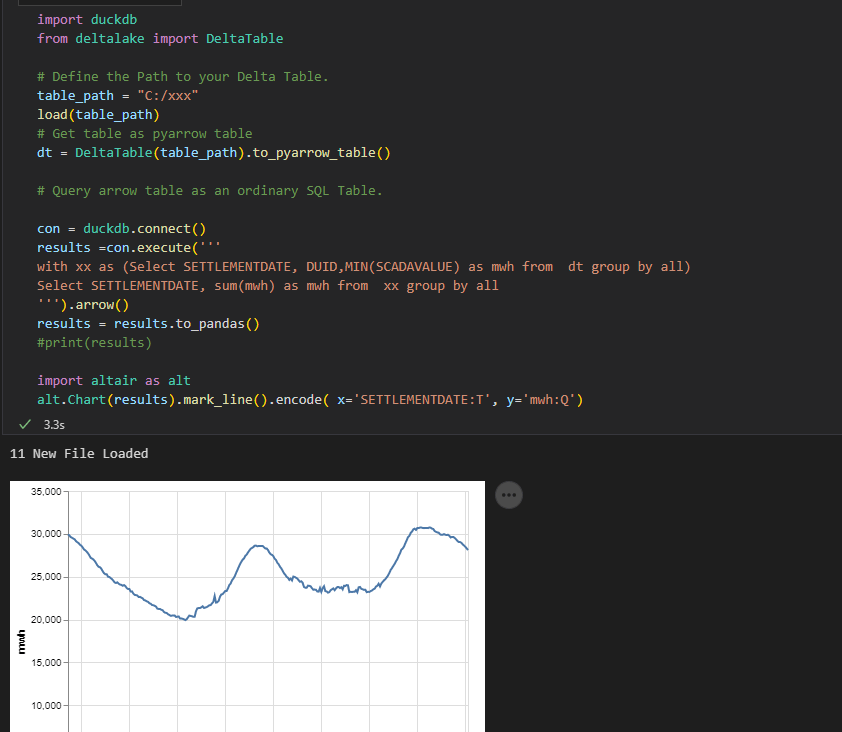
instead of another hot take on how Delta Works, I just built a Python Notebook, that download files from a web site ( Australian Energy Market), create a delta table, then I use DuckDB and vega lite to show a chart, all you need to do is to define the Location of the Delta Table, I thought it maybe a useful example, all the code are located here
And I added a PowerBI report using the delta Connector
Some Observations
Currently DuckDB don’t support Delta natively, instead we first read the Delta table using pyarrow which DuckDB can read automatically, at this stage, I am not sure if DuckDB can push down filter selection or read the stats saved in the Log file, and currently, it seems only AWS S3 is supported.
I spend a lot of time thinking about project controls, it is my love and passion. Specifically in the planning world, P6 is weapon we are tasked with us. While I firmly believe the way in which P6 is used on projects needs to be expanded (extended) with the use of Agile (JIRA), nothing tops the user base and acceptance P6 has in our business.
P6 is fundamentally, just a CPM platform. We have activities and we have relationships (and constraints). It would seem simple to use at first; however, in practice, it is anything but simple and the way we build schedules is not helping matters.
What has specifically changed over the past 15-20 years is the DATA SOURCE from which we derive our data. 20years ago, we would run progress reports from P6 (we still do, but have complicated matters). Today there is much better visibility into deliverables on a project. What follows are some example from a construction project; however I feel as if the issue is more visible in the engineering and study side of things. Additionally, what has changed is the global adoption of EPR tools (Enterprise Progress Tools – aka Ecosys).
And that is the problem – we now have 2 or 3 sources of data that everyone looks at – and everyone thinks are integrated. Everyone has clear visibility into document progress by way of our document control tools, everyone has clear visibility into our EPR reports, and everyone struggles to understand what is in the schedule and why it is different. EPR is forcing document progress to drive overall reporting, but P6 does not track documents. We do not build schedules from a bottoms up document world. We (should) build schedules based on overall workflows. I will demonstrate this in many examples that follow and what we have been forced to do inside P6 to try to solve this conundrum, and exactly why our solutions all fail because we have fundamentally deviated from the CPM roots that used to make schedules valuable.
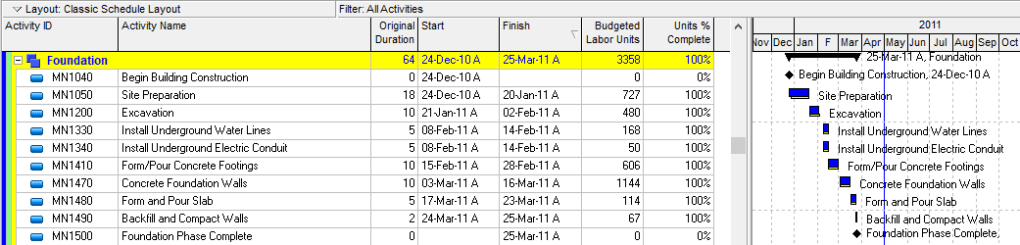
This is what a schedule is meant to look like
As Planned
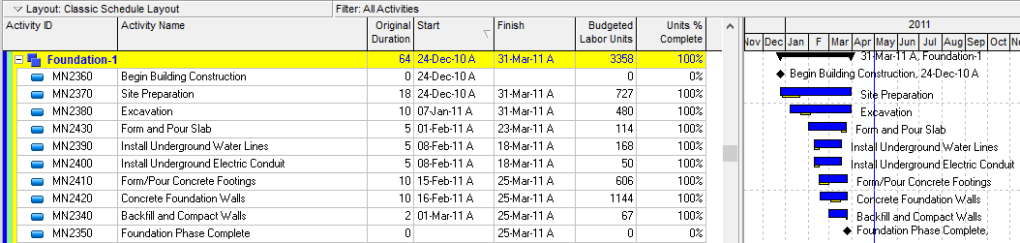
In reality, below is what the schedule would look like today. Extended durations on everything, broken relationships, out of sequence work and worse than anything – NO CRITICAL PATH! This is not a good example – however I am confident you have dealt with a schedule like this and know this isn’t just an isolated issue anymore.
As Built
What is driving this insanity is the method (the data source) for where our progress comes from. The concept of what “site prep” meant in the original schedule was not the full site prep scope, but only the key site prep work required to commence the excavation.
What changed is the method and data source for where the progress is coming for our activities. Because we are not progressing the schedule, and instead are progressing an excel file to load into our EPR systems – to most likely drive a progress payment – the way data then flows into the schedule becomes meaningless.
There are many that would counter that we are simply running our progress system wrong, and that indeed the site prep should have been 100% earlier. And, likely true. In the above I am just being silly, but we have all seen this and we all know the issue.
So what is the solution?
The solution is to understand that when progress is measured outside the schedule and at a level that is at a finer level of detail than the schedule – the schedule becomes meaningless at certain levels. You therefore need to build schedules AT A HIGHER LEVEL.
The Correct Schedule
Instead of tracking the work at a lower level, for the schedule to bring back meaning, we need to only represent the high level workflows and leave the details in our progress system.
Keep your detail in Excel or you EPR System
The project should retain clear visibility to the detail and the detailed % complete; however, the detail items should not flow into the schedule because they can not be scheduled in a proper CPM way.
Again what is driving this is the method of progress no longer aligning with the methods of schedule. I understand this is severely controversial but when you start looking at your schedules these days and see countless in progress parallel activities that are simply being driven by interfaces with EPR systems to mirror a % – and not a proper schedule workflow – something is broken in our business. We would like to think our progress are all nice CPM logically driven schedules, and obviously I am not suggesting all our schedules are broken. However, the more I see issues such as this popping up in our As Builts Schedules, the more I want our industry to understand we are simply building crap schedules that are not agile enough to capture the intricate data now available in our other systems.
This article is only meant to better illustrate the problem – the why CPM is broken. Solutions (using CPM) are available. In the above I have actually suggested one solution, but several different models that can retain alignment with detailed progress items and retain a workflow CPM model are possible. Hopefully I will dive into those in subsequent discussions.
Was chatting with David Eldersveld and he suggested that he wants to run a competition using the famous New York Taxi Dataset with Datamart, long story short, I did endup publishing my attempt before he had the time to start the competition, my sincere apology.
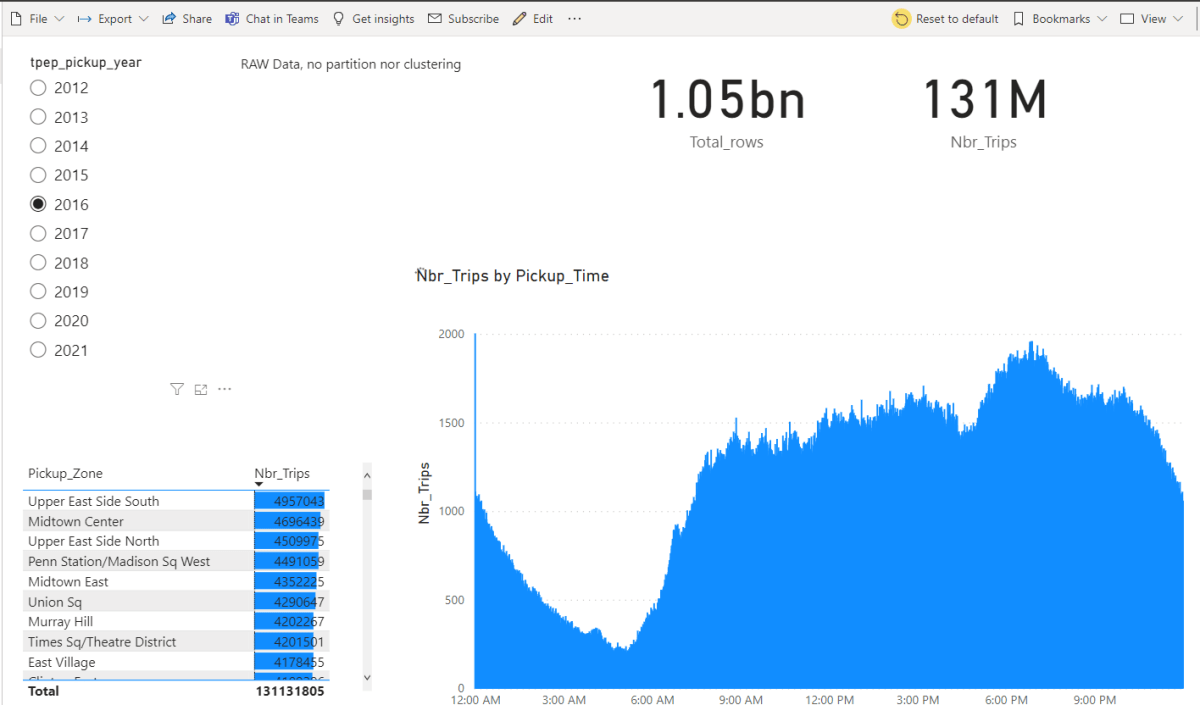
The report is using my personal PPU instance, the data is located here , personally I wanted to exclusively use tools available in PowerBI out of the box, no Synapse nor Azure stuff or BigQuery, Just pure self service tools.
Initially I didn’t really believed that PowerQuery can download such a big volume of data, my first set back , PowerQuery can not read parquet files available in public url, but as usual Chris Webb has an excellent blog explaining the reason, and gave a workaround.
I added the code here, it does work with any PowerQuery in Dataflow, Datamart and PowerBI desktop, unfortunately Excel is not supported yet, when prompted for authentication use anonymous
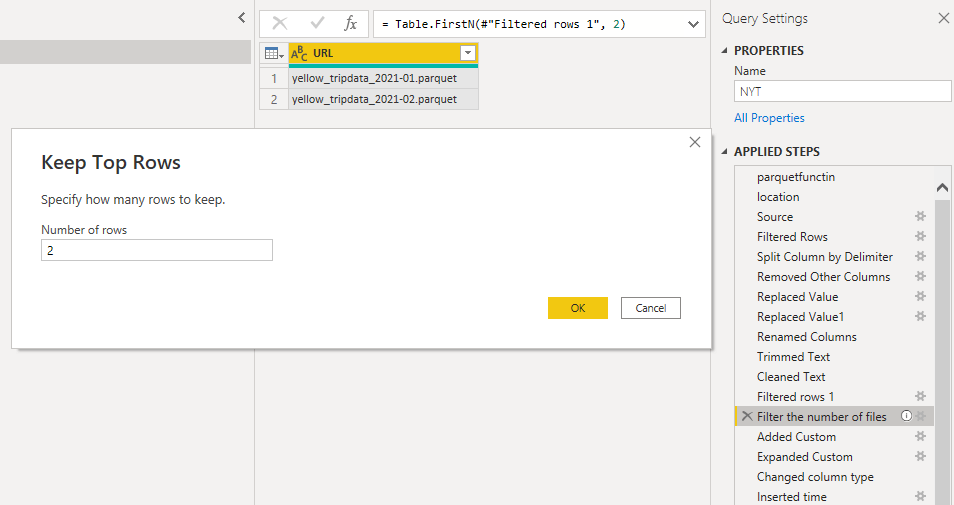
The only section of the code that you should pay attention to is selecting the number of files to download by default it is 2, but you can increase it
Only when I was writing this blog, I noticed the files for 2022 are using a slightly different URL, will update the code later. Code Updated.
To reduce the database size, I had to split Datetime to date and time, low cardinality is good for performance too.
Loading into Datamart
I don’t know how much it took datamart to load the data, currently Query refresh history is broken, but I think it is more than 6 hours, I maybe wrong, but Datamart take a bit of time to generate the tables with Clustered Columnstore Index
Initially I loaded only 2 then 30 files just to see how Datamart behave and finally I went for 100 files, and it did work again to my surprise.
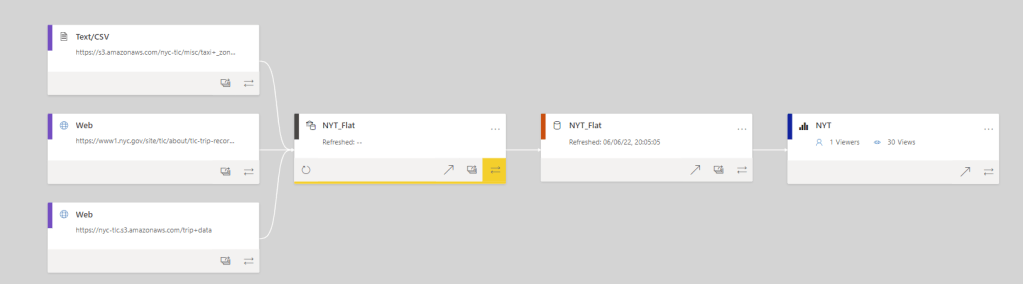
and the Lineage View of the report
Performance
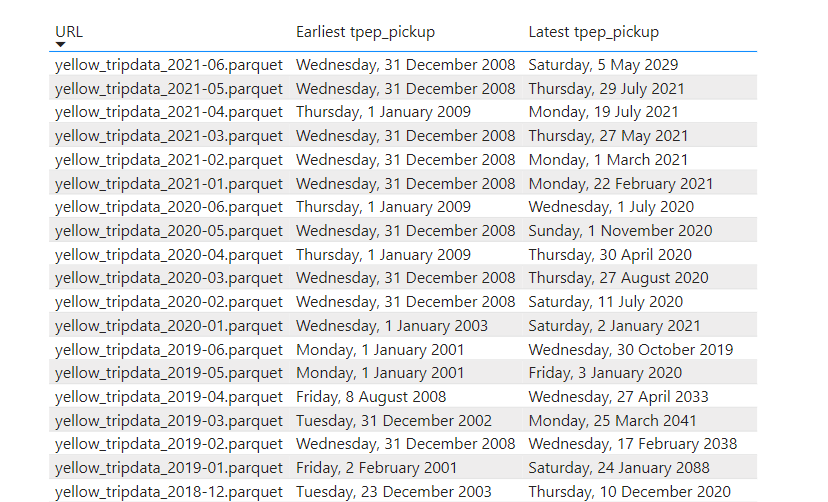
The Performance is not bad at all considering, the data was loaded as it is and it not sorted, although the parquet files are organized by month, unfortunately there are some outlier in every file see for example, so you get overlapping segments.
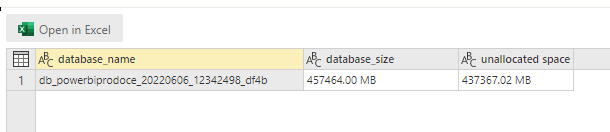
You can check the database size on disk by running this Query
EXEC sp_spaceused
Optimisation
Pretty much the only optimisation you can do in Datamart is to pre sort the data before loading it, but when you have 1 billion rows saved in parquet files, sorting is a very expensive operation, but there are options I think.
Create another Datamart and load it from the “raw” Datamart and define incremental refresh which will create partitions, yes partitions should improve the performance.
Hybrid table in PowerBI Dataset where only the recent data is cached in Vertipaq and the history kept in Datamart as a Direct Query Mode.
Final thoughts
The Publish to web report is here, a very big missing piece is the option to append data to an existing Datamart, this will make adding new data without a full refresh extremely trivial, I know about incremental refresh, and I am sure a hack like this may work, but we want the real deal, Dataflow people hurry up 🙂
I notice something interesting because the price of PPU is fixed, I felt I can experiment without the fear of getting a massive bill, maybe reserved pricing is not a bad thing after all.
My first reaction when I saw datamart was, that it will be a big validation for PowerQuery, and it is, as Alex said, PowerQuery everything !!!
My previous blog about Datamart was based on my daily work, but with the official release of the preview, Microsoft made datamart available in Premium per user License, it happen I have my personal tenant, and what an opportunity to take an advantage of the free 2 month free trial.
Full Online experience
I have some data already available in BigQuery, one thing I notice, I did not thought about dataset at all when I built the report, I had Datamart open in one tab and the report in another.
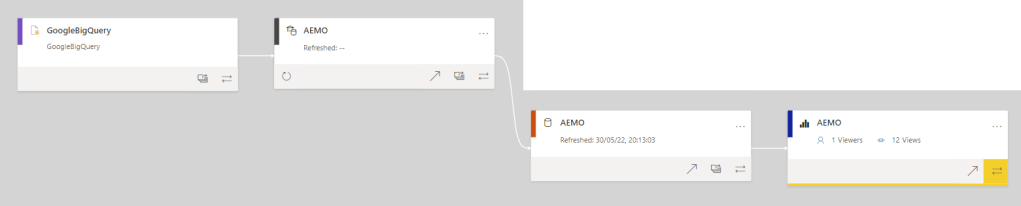
here is an overview of all components used (PowerBI lineage View is a killer feature)
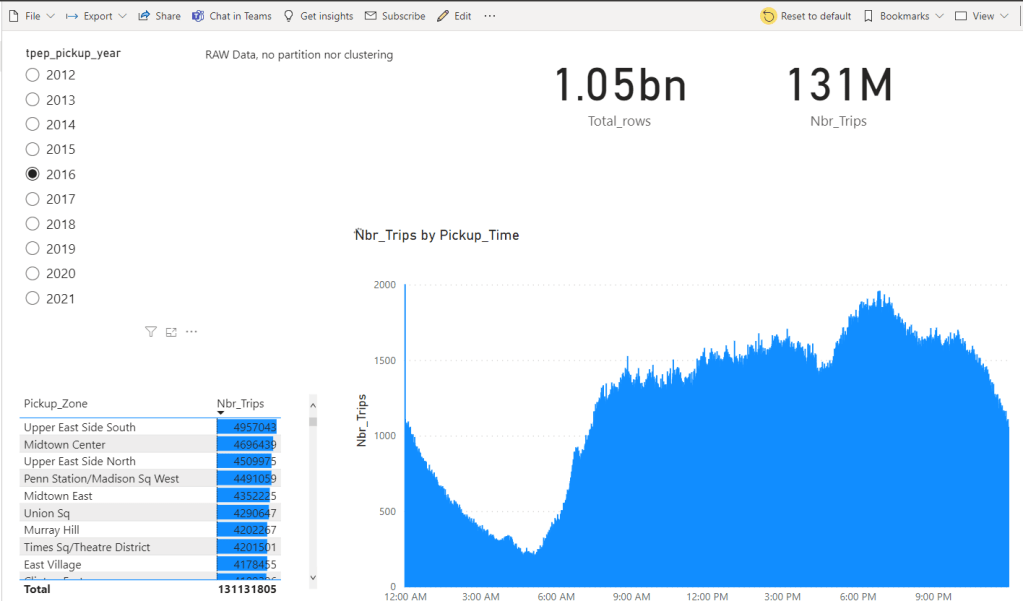
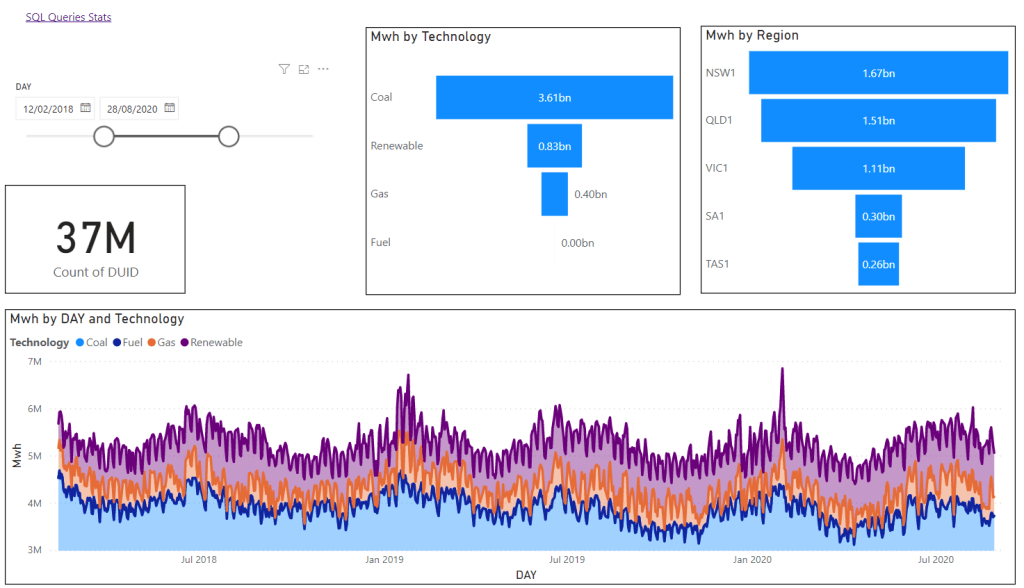
And the final report
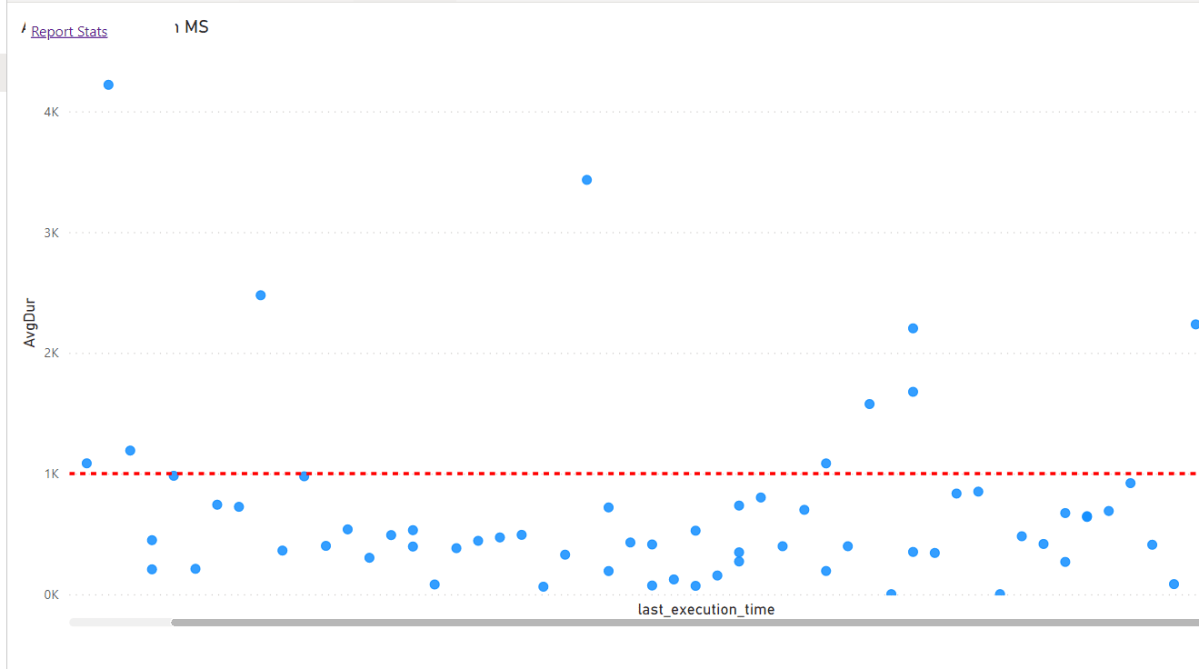
I Built a report too to capture the SQL Queries generated by the first report
most of the Queries render under 1 second, that’s not bad at all for a Fact table with 80 millions records !!!
No vertipaq was involved in the previous report, The auto generated dataset is using Direct Query mode, the user click on a visual, DAX Engine translate the DAX Query and generate SQL which is served by Datamart SQL DB !!!!
Vertipaq is Cool, why use something else ?
Vertipaq has a fundamental flaw, it is simply too fast, the original designers sacrificed a lot of features just to get maximum speed, which is a brilliant decision when you work with a smaller dataset and data that does not change very often ( which is 99.99 % of my daily workload), but it does not support, out of memory operation, if the size of your data compressed is bigger than the RAM, out of luck,and stuff life columns elimination are not supported, in Vertipaq everything is loaded in memory either used or not, again the right choice for extreme speed.
is Vertipaq dead ?
No, again for a simple reason, it is the best engine for the most common workload available in the market, Marco famously said it, PowerBI is successful because most models fit in memory
So why it is a big deal
Microsoft is simply being proactive , a lot of customers especially in the tech sector have higher expectations, they want everything, Good enough latency (it does not need to be in ms), freshness and lower cost, and Vertipaq is not the right answers for all situations, and the first implementation of that Vision is Datamart a fully decoupled architecture where the semantic layer is fully separated from the Execution Engine, yes PowerBI already supported Direct Query, but this is an offering where it is the default mode.
You don’t need a lot of imagination to guess that nothing stop Microsoft from using another SQL Engine, maybe a massive MPP or something like that.
So, what is PowerBI ? I think it is just the DAX Engine, you can pick your Compute Engine, and probably a lot of users will still stick to vertipaq, but we will have the choice, very low latency with smaller data size or good enough latency with a bigger data size.