First Look at Geometry Types in Parquet

Getting different parties in the software industry to agree on a common standard is rare. Most of the time, a dominant player sets the rules. Occasionally, however, collaboration happens organically and multiple teams align on a shared approach. Geometry types in Parquet are a good example of that.

In short: there is now a defined way to store GIS data in Parquet. Both Delta Lake and Apache Iceberg have adopted the standard ( at least the spec). The challenge is that actual implementation across engines and libraries is uneven.

  • Iceberg: no geometry support yet in Java nor Python, see spec
  • Delta:  it’s unclear if it’s supported in the  open source implementation (I need to try sedona and report back), nothing in the spec though ?
  • DuckDB: recently added support ( you need nightly build or wait for 1.4)
  • PyArrow: has included support for a few months, just use the latest release
  • Arrow rust : no support, it means, no delta python support 😦

The important point is that agreeing on a specification does not guarantee broad implementation. and even if there is a standard spec, that does not means the initial implementation will be open source, it is hard to believe we still have this situation in 2025 !!!

Let’s run it in Python Notebook

To test things out, I built a Python notebook that downloads public geospatial data, merges it with population data, writes it to Parquet, and renders a map using GeoPandas, male sure to install the latest version of duckdb, pyarrow and geopandas

!pip install -q duckdb  --pre --upgrade
!pip install -q pyarrow --upgrade
!pip install geopandas  --upgrade
import sys
sys.exit(0)

At first glance, that may not seem groundbreaking. After all, the same visualization could be done with GeoJSON. The real advantage comes from how geometry types in Parquet store bounding box coordinates. With this metadata, spatial filters can be applied directly during reads, avoiding the need to scan entire datasets.

That capability is what makes the feature truly valuable: efficient filtering and querying at scale, note that currently duckdb does not support pushing those filters, probably you need to wait to early 2026 ( it is hard to believe 2025 is nearly gone)

👉Workaround if your favorite Engine don’t support it .

 A practical workaround is to read the Parquet file with DuckDB (or any library that supports geometry types) and export the geometry column back as WKT text. This allows Fabric to handle the data, albeit without the benefits of native geometry support, For example PowerBI can read WKT just fine

duckdb.sql("select geom, ST_AsText(geom) as wkt  from '/lakehouse/default/Files/countries.parquet' ")
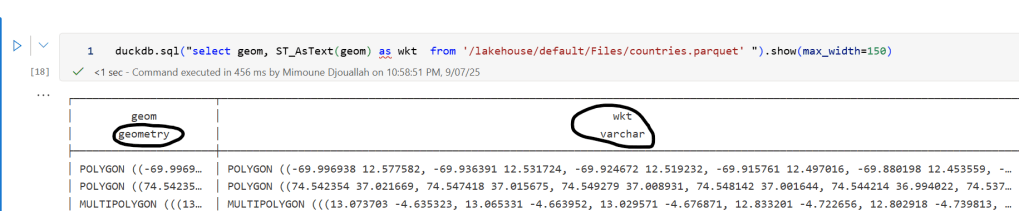
For PowerBI support to wkt, I have written some blogs before, some people may argue that you need a specialized tool for Spatial, Personally I think BI tools are the natural place to display maps data 🙂
Advance Geospatial analysis using location Parameter with Streamlit

This blog is a POC of something that I always wanted to have in a BI tool, and I tried Tableau, PowerBI and Data Studio, without success ( not interested in adding an invisible grid as a hack), The idea is extremely simple yet very powerful, retrieve data when you click on a map, you may think it should simple, it seems BI tool are good at retrieving data based on filter, but it is very hard to push a parameter from a map back to a source data.

Traditionally, if you want to have this kind of interactivity, you need to write code, to be honest the idea of writing javascript and learning how to deploy a web server was not very interesting for me, but luckily we have a new Option in Streamlit

Streamlit is a code first, web app platform using only Python, web page are generated behind the scene, and there are a lot of component where you need to write a minimum of code, and deployment is absolutely trivial using Streamlit Cloud, and because it is open source, you can deploy using alternative approach like Cloud Run, or Azure

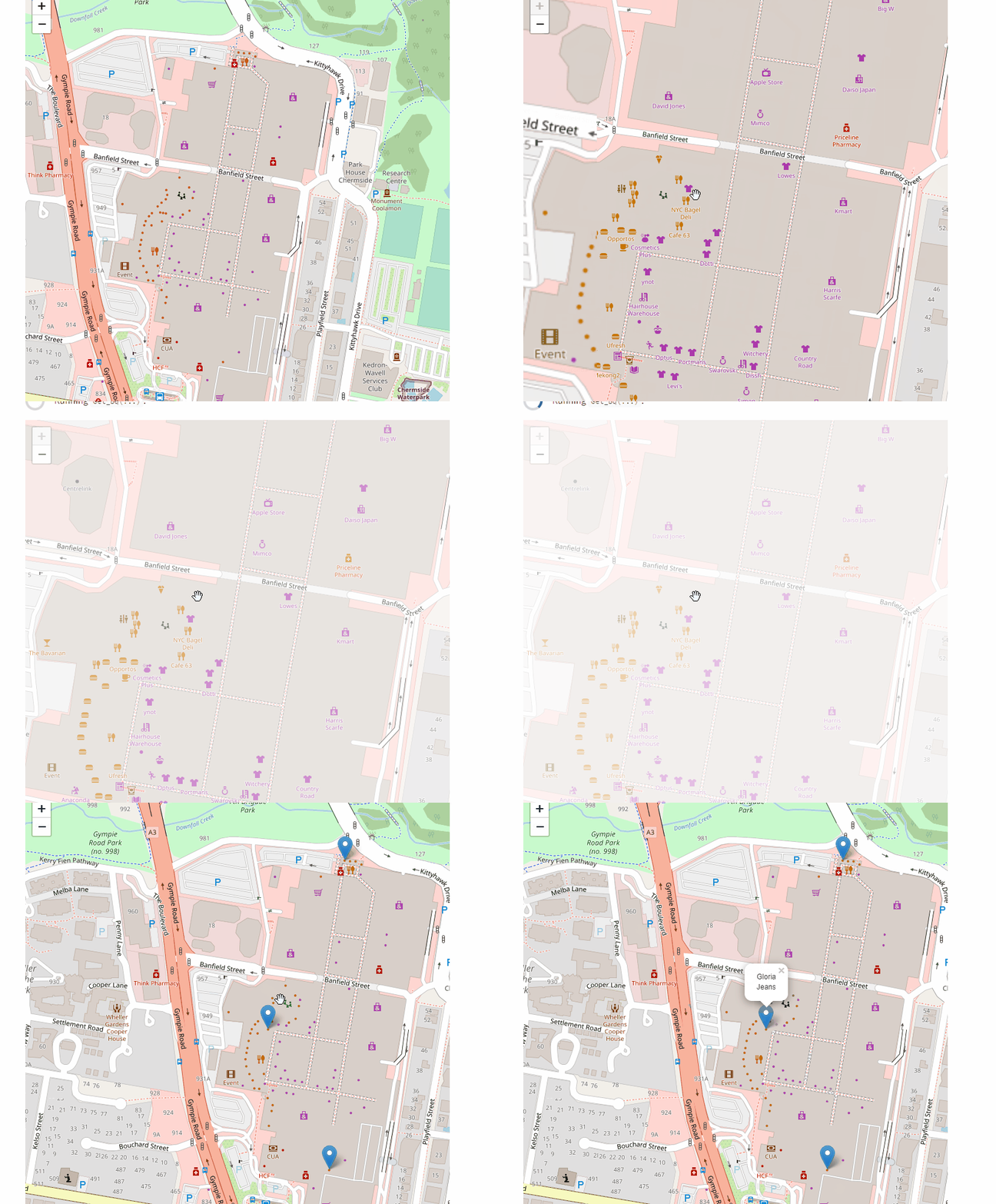
I came across this component Streamlit-Folium recently, and it is magnificent work, when you click on a map, it does provide variable back on the last location clicked zoom, bounds etc, all for free, no code required !!!!

All I have done is copied the code from the source and built a SQL Query that take the last clicked item filter all the “cafe” in a radius of 500 m, the SQL Code is copied from this previous Blog

The Source Data is nearly half a Million, as you can imagine plotting a massive dataset just to see a small portion is a waste of computer resources.

here is the final results

Here an example of a SQL Query generated.

State management

I added the code here, again it was too easy to write as I nearly copied everything from the component sample code, the tricky part was how to update the value of a variable which was already declared, Streamlit has a brilliant solution using State Management, the solution is very simple

Assign a default value when the Streamlit run for the first time

if 'key' not in st.session_state:
    st.session_state.key = '( 153.024198,-27.467276)'
    st.session_state.key1 = [-27.467276, 153.024198]
    st.session_state.key2 = 16
point_clicked = st.session_state.key
location_ini  = st.session_state.key1
zoom_Start    = st.session_state.key2 

Update the values when a user click on the map, the next run in the same session will use those new values

 st.session_state.key = point_clicked
       st.session_state.key1 = location_ini
       st.session_state.key2 = map_data['zoom']

Currently I don’t know how to stop Streamlit from redrawing the map, as I am only interested in updating the markers.

Database

it works with Any Database as long as it has a minimum support for GIS functions, Currently I used bigQuery BI Engine as I am familiar with it and to speak freely :), it is very cheap for this kind of workload, small Data and potentially a lot of concurrency 🙂

I tried PowerBI Datamart but it seems Python access is blocked , DuckDB don’t support GIS functions yet, I am sure you can reproduce the results using only SQL, but I did not bother.

ST_DWithin(ST_GeogPoint(lng,lat),params.center,params.maxdist_m)

Take Away

I think there is a third way between no code and only Code, Streamlit managed to create a new category, maybe simple code 🙂 having said that BI Vendor should up their games, Location Parameter should not be that hard to implement.

Analyse Big Spatial Dataset using hex bin maps in PowerBI

Come across this blog post in Twitter and I thought this approach can be very useful in PowerBI to deal with Big GIS dataset.

The idea is simple, let’s say you have a big spatial dataset with million of coordinates, so instead of plotting all the individual points which is unfeasible for performance reason, you simply do this,

– First generate a grid for the area you want to analyse using something like QGIS.

– Then count how my point belong to every cell in the grid and color the results accordingly, you need a spatial Join for that, either using QGIS , SQL Server etc

– Drill down to individual points using WKT multi point

Publish to web here and pbix

Generate a Grid System

After a lot of googling as I did not even know what to look for, turn out QGIS can very easily generate a Grid, here is a good tutorial I found

and here is a results for Chicago area as I am using it as an example for this blog, Please notice, the grid should have less than 30K polygons which is the maximum number of rows that PowerBI can plot.

Spatial Join

I could have used QGIS to do the spatial join, but my data is from BigQuery public dataset (bigquery-public-data.chicago_crime.crime) and for convenience, it is easier to do the join there, the previous link show how to do the join in QGIS.

After loading the grid geometry to BigQuery, I am using this Query to join the two dataset, Grid and my current example, Crime data in Chicago

CREATE OR REPLACE TABLE
  XXXXXX.GIS.crime AS
WITH
  crime AS (
  SELECT
    fbi_code,
    ST_GEOGPOINT(longitude,
      latitude) AS geo,
    longitude,
    latitude
  FROM
    `bigquery-public-data.chicago_crime.crime`)
SELECT
  fbi_code,
  geo,polygon,
  longitude,
  latitude,
  ID
FROM
  crime
JOIN
  XXXX.GIS.Grid AS Grid
ON
  ST_INTERSECTS(geo,
    polygon)

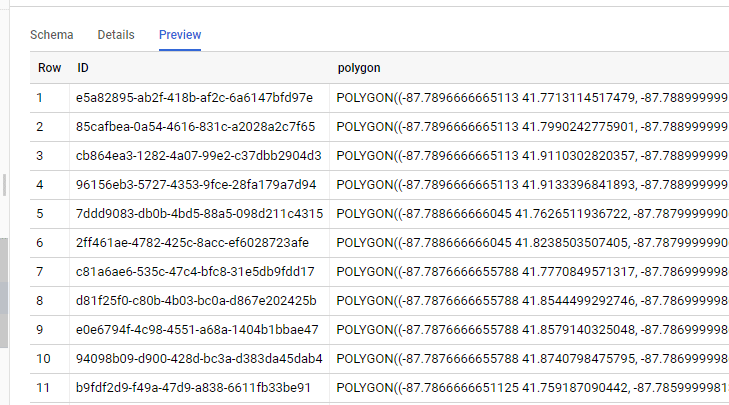
The Query is checking every coordinates and looking up which polygons it belong to, so the Grid table is something like this

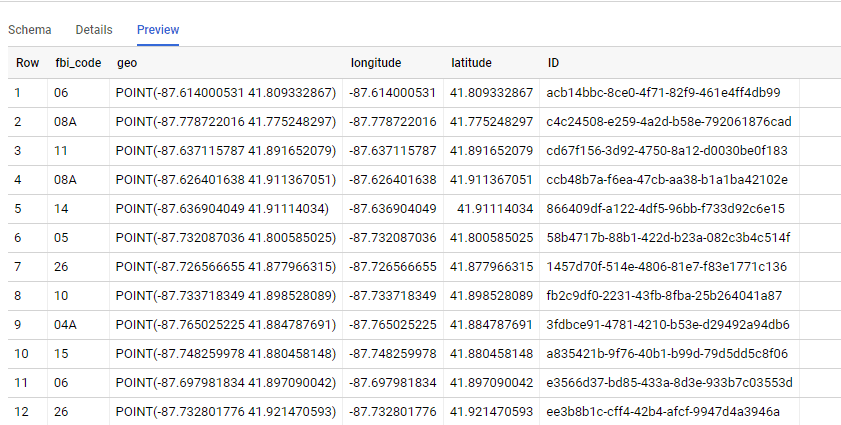
And the Query results is like this, we go the ID from the Grid Dataset, Any DB that support geometry can be used SQL Server, PostgreSQL etc

PowerBI

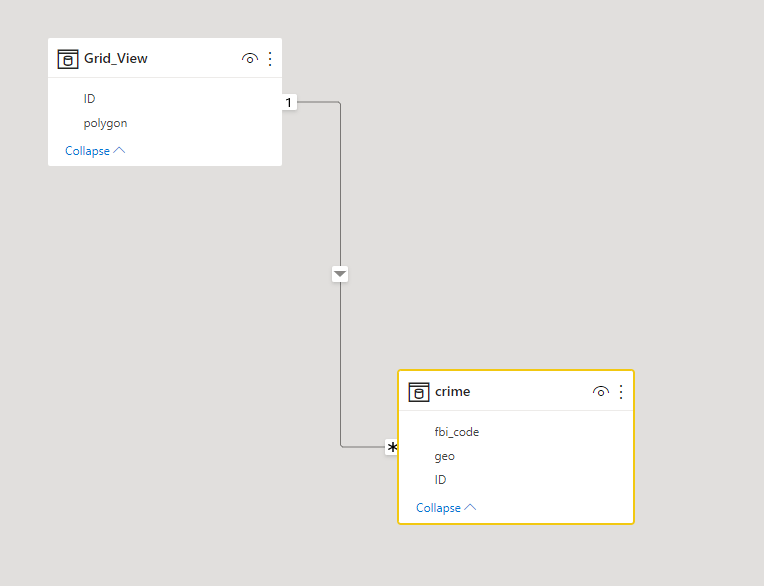
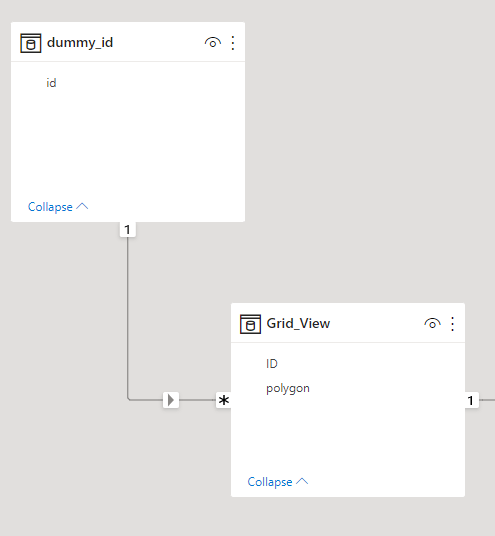
Let’s import those two table to PowerBI, the two tables are joined by the field ID

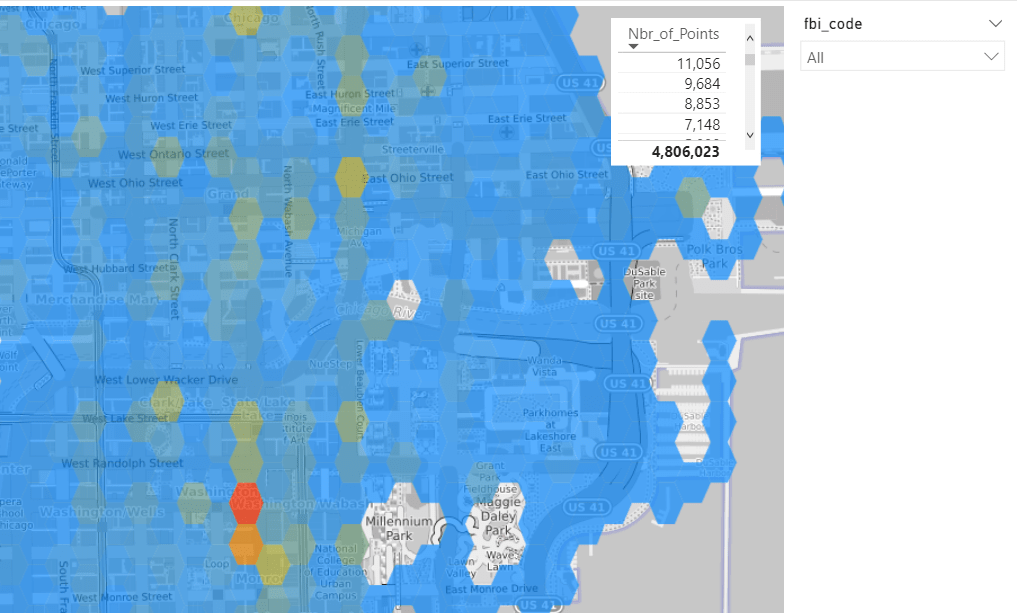
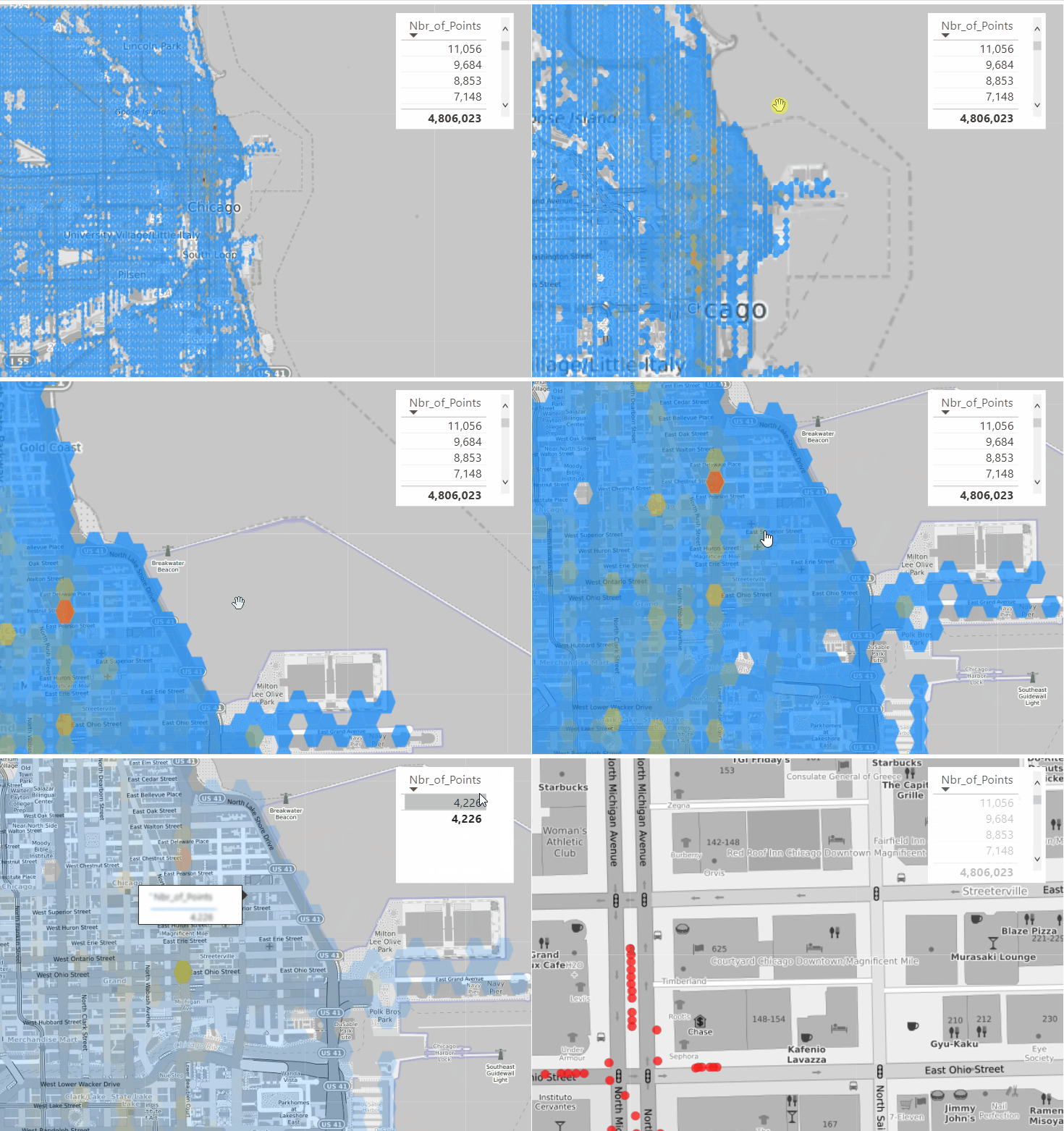
Luckily PowerBI support WKT format using Icon Map, show the grid with the count of number of coordinates is straightforward

Ok, it is great we have an aggregation of 4 Millions points and we can see the areas with the highest Number of recorded crime, you can filter by FBI code which classify the crime gravity (I have zero knowledge about this dataset, I just used as an example)

Drill Down to individual Cell

because we have the individual points, all I need to do is to generate Multi point geometry using DAX , that’s why I love Icon Map so flexible , The measure will simply detect if the cell ID is filtered or not and then switch between Polygons and Multi point

Geometry =
VAR polygon =
    MIN ( Grid_View[polygon] )
VAR concat =
    CONCATENATEX ( VALUES ( crime[geo] ), crime[geo], "," )
VAR Multi_point = "MULTIPOINT (" & concat & ")"
RETURN
    IF ( ISFILTERED ( dummy_id[id] ), Multi_point, polygon )

Notice Here, as a PowerBI Visual can not filter itseelf, I had to add a dummy dimension

and here is the final result

Take Away

PowerBI Icon map and QGIS is a very powerful combination, and the fact that DAX can generate a geometry on the fly is very interesting Pattern.

Calculate route distance, Tableau vs PowerBI

My previous  blog turn out to be very popular but unfortunately it is still not good enough, the Visual Interaction was just a hack by combining two Maps together with a big compromise the Zoom does not work and that’s very annoying ( Icon map is amazing, but still has to operate inside PowerBI framework)

The Second issue PowerBI is very chatty and insteading of sending 1 SQL Query by selection, it sends two SQL Queries, so selecting two points start and finish will generate 4 SQL Queries, usually I don’t care much, but in this case, it is relatively heavy calculation, and 1 extra Query can change the experience from this is a nice demo to I can do that at Work.

This behavior is hard to fix because it is basically how PowerBI was designed in the first place, the assumption was; you create a visual and the values change based on external filter selection or cross filtering from other visual, but there are a class of User interaction where the visual itself is the filter , a typical scenario is updating a visual title based on rows selected.

Instead of theoretical talks let’s rebuild the same visual in Tableau using parameter actions

Define a Parameter

Define SQL Query

WITH
      initial_parameter AS (
      SELECT
        *
      FROM
        UNNEST(split(<Parameters.TagsList> , ', ')) AS element ),
      mynetwork AS (
      SELECT
        ARRAY_AGG(geometry) roads   FROM   `test-187010.gis_free.brisbane_Road_Network_cluster` ),
      calculation AS(
      SELECT
        `libjs4us.routing.geojson_path_finder`(roads, st_geogfromtext(a.element), st_geogfromtext(b.element)) AS tt
      FROM
        mynetwork,    initial_parameter a,    initial_parameter b
      WHERE
        a.element>b.element
      LIMIT
        100),
        result as (
    SELECT
       1 as dummy,tt.weight    AS len,tt.path AS GEO
    FROM  calculation),
    points_extract as (
    SELECT ST_PointN(geo, idx) mypoint,len, dummy,idx
  FROM result,
  unnest(GENERATE_ARRAY(1,ST_NUMPOINTS(geo))) idx  )
  select len,  st_y(mypoint) as lat, st_x(mypoint) as lng, cast (idx as string) idx ,1 as type from points_extract
  union all
  select null as len,st_y(center_location) as lat, st_x(center_location) as lng, st_astext(center_location) as idx, 2 as type  from test-187010.gis_free.Brisbane_Bus_Stop

Define Parameter Action

in Tableau you can define exactly what happen when you select point either it will filter or update a parameter in this case we want Tableau to add the value selected to the previous selection , as for calculating distance you need Start and finish point, PowerBI by default will do that using icon map, so far so good both Product have the same behavior

Auto Update Behavior

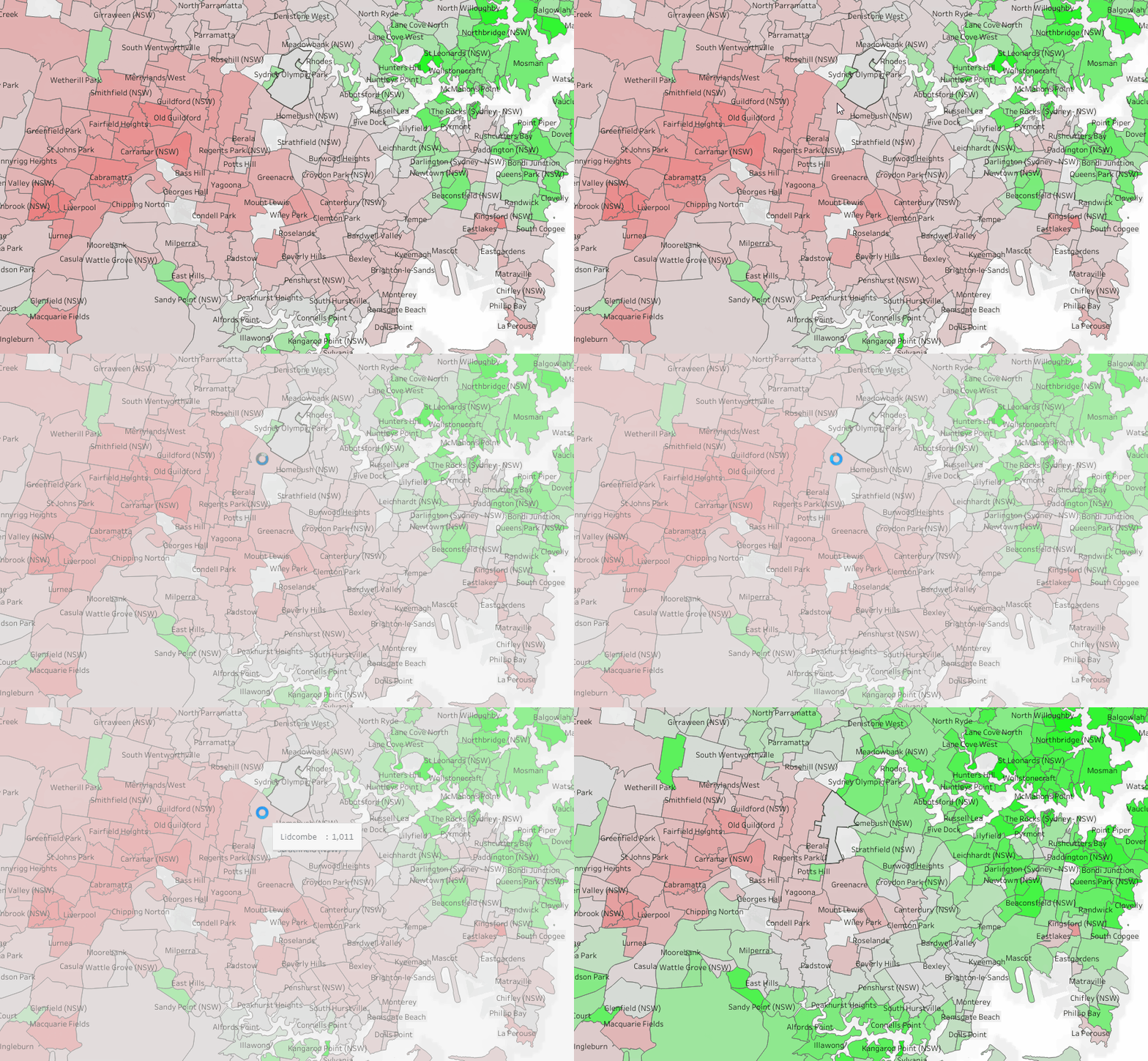
Unlike PowerBI, Tableau auto update the Map if the data change, and because I am using only 1 visual, the zoom works and the experience is more pleasant, Tableau send only 1 SQL Query by selection.

See here another example, when you click on a suburb, the Map Auto update and change colors relative to the suburb selected, very simple yet very powerful

And please I have zero interest in this useless debate who is a better BI tool, I just want PowerBI to implement a similar behavior or giving us an alternative, Maybe make a Visual accept multiple datasets.

As a user all I can do is to show my displeasure in public and hope other users will vote