Assume you have multiple Data Source and you can’t build a conformed dimension ( IT people like to used it to sound smart, it simply means common field 🙂 and you want to merge the results using a common field, notice every table contains different values of the same field, and before you get excited, filtering does not work except for Dates
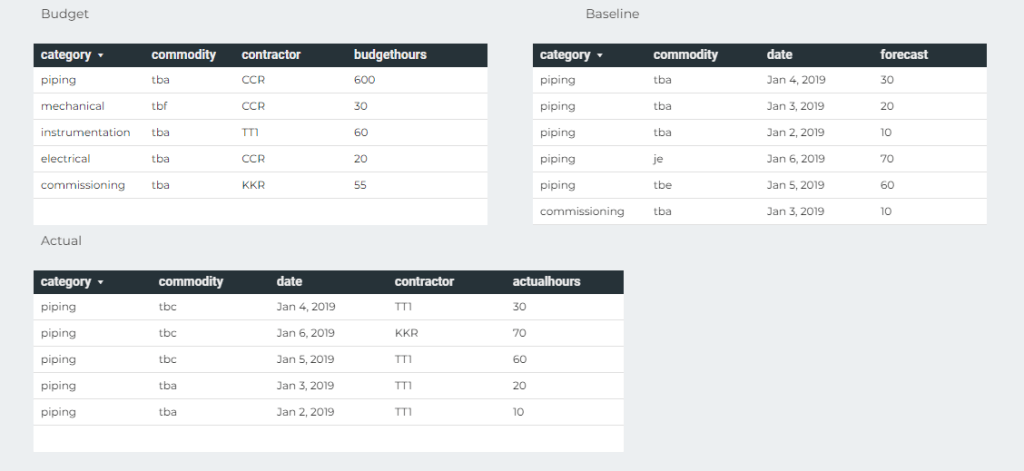
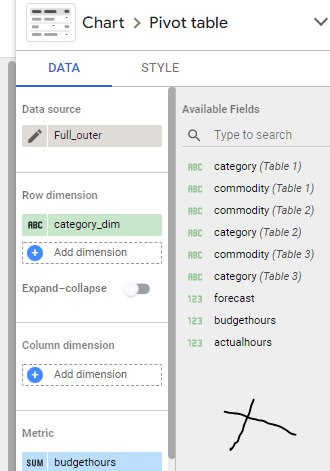
we have three Tables, Budget, Actual and Baseline, the common field is Category and commodity
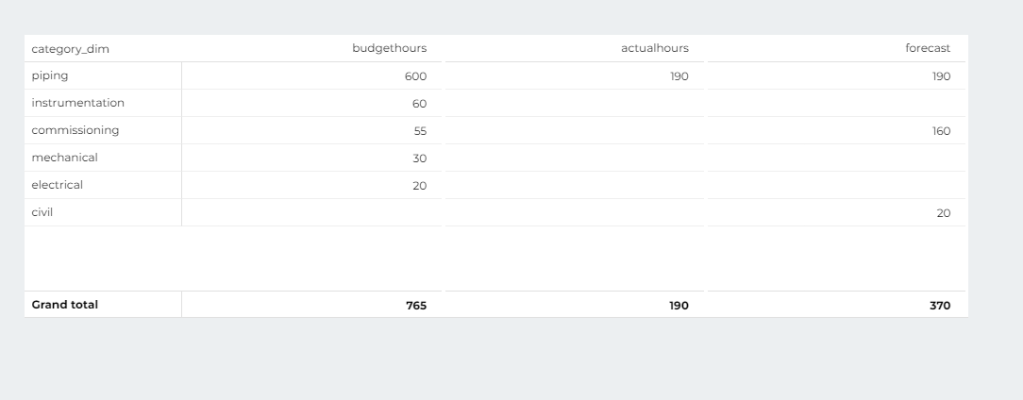
And you want this Final Results
Notice that the category Civil exist only in forecast, and instrumentation, mechanical, electrical exist only in the Table Budget, how to show the results in the same Visual
Full Outer Join for the win
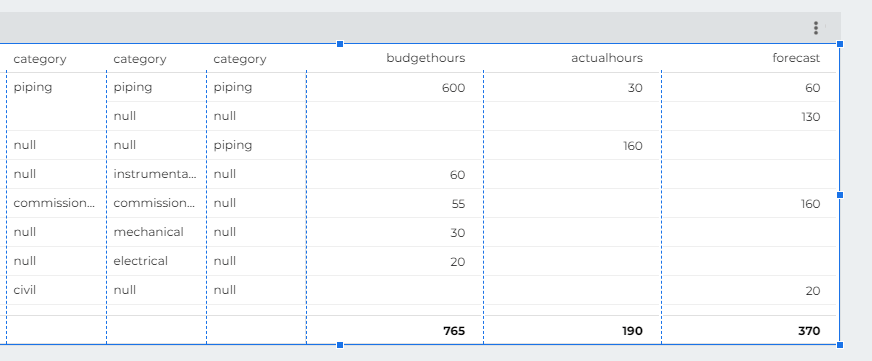
the trick is to join the tables using full joins so not values get dropped
which give you this results
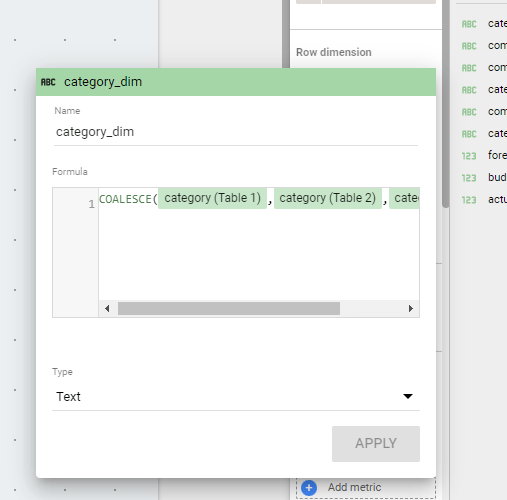
Obviously, you want only 1 column Category not three, too easy just add a column in the table calculation using the function coalesce
unfortunately as of this writing you can’t add a dimension in the results of a blending, it has to be in the Visual, which means, you can’t use that common dimension in filters, which make this approach not very useful to be honest.
I added a link to the report, which contains other approach for the same problem, if you are still reading, it is really unfortunate, Blending is very powerful but it needs constant improvements from the product team
I was intrigued why Tableau and PowerBI have a different behavior when operating in a Direct Query Mode ( Tableau call it Live Mode), I always assumed it is just a driver difference, but it seems it is a little bit more complicated than That.
It is a long weekend, and Tableau released the next version as a beta (which is free), so it is a perfect opportunity to do some testing, Hopefully it will be a series, but let’s start with the fundamental difference, Query Results Cache
Again, this is not about import mode, also known as extract in Tableau, which generally speaking works the same way (PowerBI can have mixed mode, which is not supported in Tableau as far as I know)
The Data Model
The Model is very simple Star Schema, 1 Fact ( 5 years of electricity Data) and two dimensions, Calendar Table and Power Generation Plan attribute
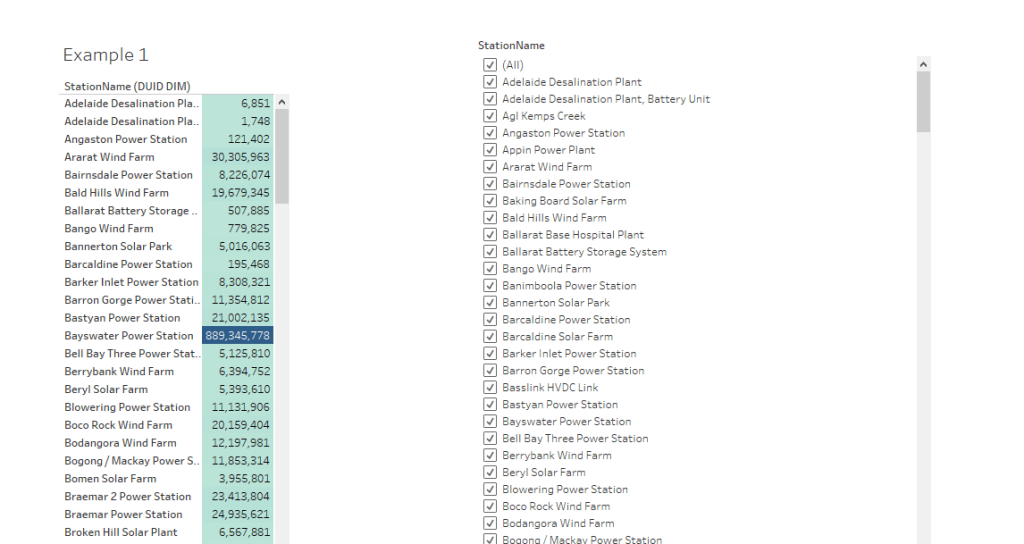
I built this simple report, Total Mwh by substation
Tableau generate an Inner Join, same behavior as PowerBI
SELECT `DUID_DIM`.`StationName` AS `StationName__DUID_DIM_`,
  SUM(`UNITARCHIVE`.`Mwh`) AS `sum_Mwh_ok`
FROM `test-187010.ReportingDataset`.`UNITARCHIVE` `UNITARCHIVE`
  INNER JOIN `test-187010.ReportingDataset`.`DUID_DIM` `DUID_DIM` ON (`UNITARCHIVE`.`DUID` = `DUID_DIM`.`DUID`)
GROUP BY 1
Filtering Data
Tableau
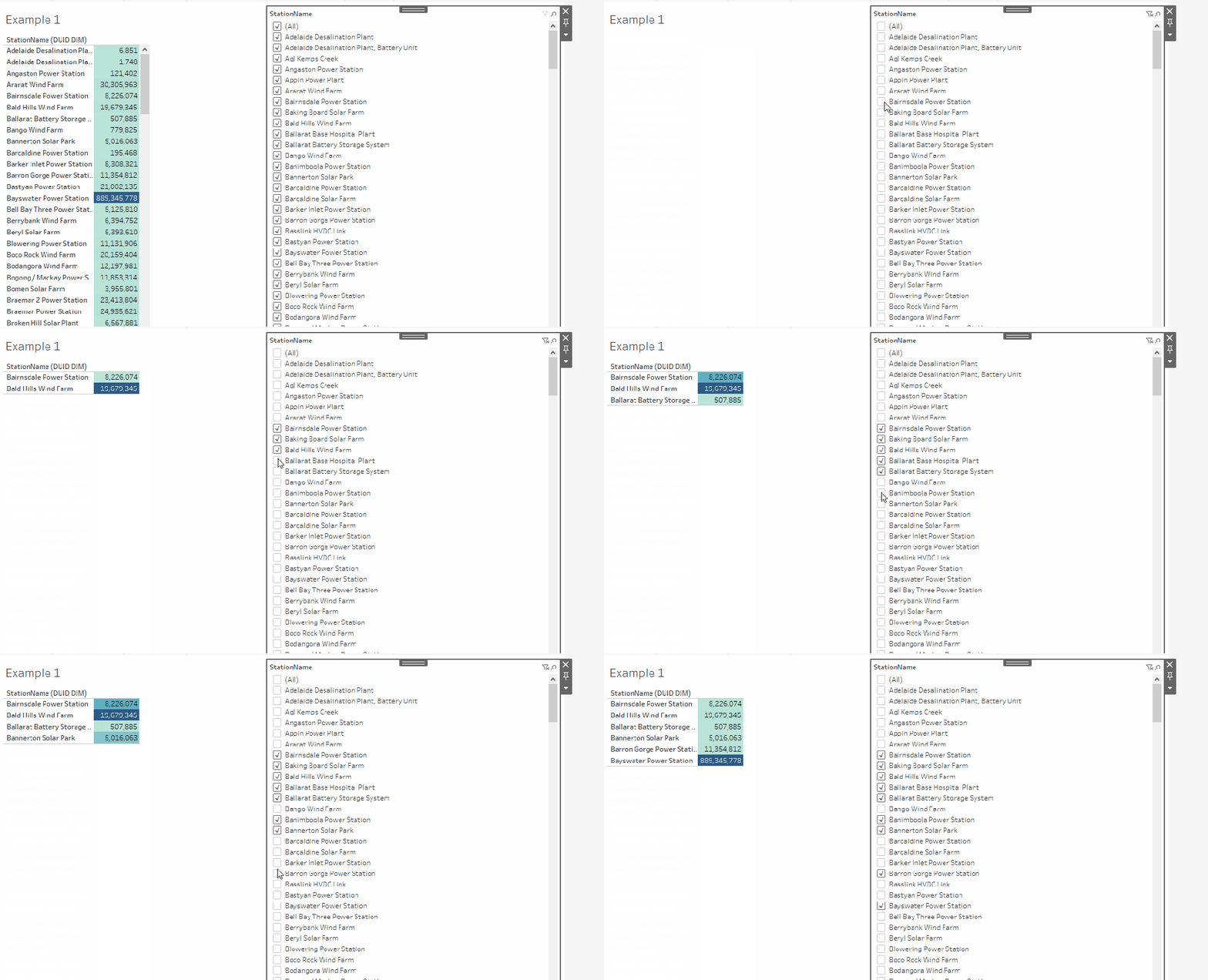
I noticed filtering data is basically instantaneous, it is hard to believe it is using Direct Query Mode, you can see it here.
Tableau cached the results of the first Query, when you filter a substation, the data is already there, it does not need to send another SQL Query
PowerBI
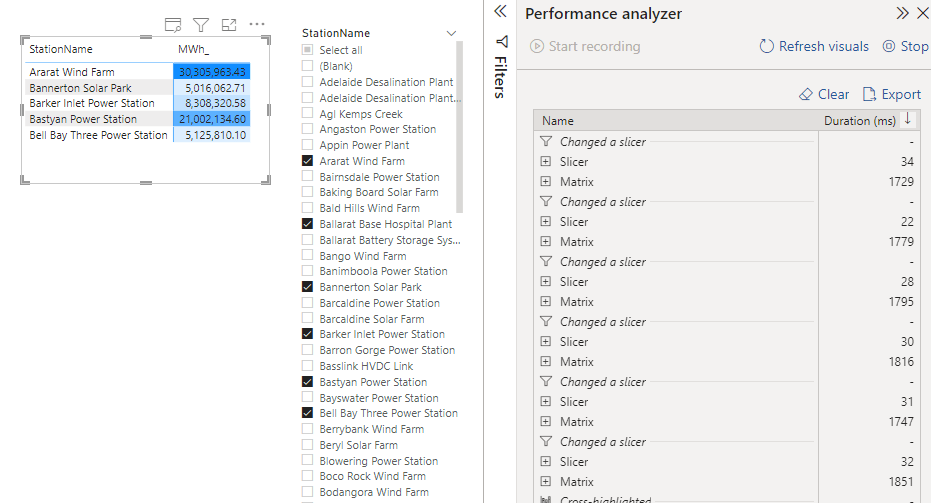
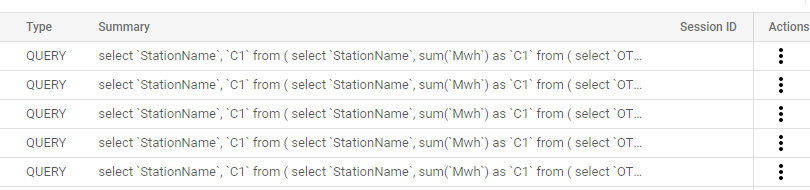
Built the same report in PowerBI, every selection will fire a new SQL Query, yes it is still fast ( under a 2 second), but it is not instantaneous.
Here is an example in BigQuery Console
Take away
That was a simple example, but imagine 100 of users with a lot of Visuals, I suspect it will create a massive Workload on the source system, I think Tableau behavior, as a lot of other BI tools (Superset, Looker etc) make a lot of sense, and maybe it will be useful too for PowerBI.
DuckDB is one of the most promising OLAP Engine in the market, it is open Source, very lightweight, and has virtually no dependencies and work in-Process (think the good Old MS Access ) and it is extremely fast, specially in reading and querying parquet files. and has an Amazing SQL Support
The ODBC driver is getting more stable, I thought it is an opportunity to test it with PowerBI, notice JDBC was always supported and can be used with SQL frontend like DBeaver and obviously Python and R has a native integration
I download the ODBC driver using the latest version 0.3.3, you need to check always the latest release and make sure it is the right file.
Installing the binary is straightforward, but unfortunately you need to be an administrator
Configuring PowerBI
Select ODBC, if the driver was installed correctly, you should see an entry for DuckDB
As of this writing there is a bug in the driver, if you add a path to the DuckDB database file, the driver will not recognise the tables and views inside it, Instead I selected
database=:memory:
And defining the base Table as a CTE, reading Directly from a folder of parquet files
Just for fun, I duplicated the parquet file just to reach the 1 Billion Rows mark
The total size is 30 GB compressed.
1 Billion rows in a Laptop
And here is the results in PowerBI
The size of the PowerBI report is only 48 KB, as I import only the results of the query not the whole 30 GB of data, yes separation of Storage and Compute make a lot of sense in this case.
Although the POC in this blog was just for fun, the query take 70 seconds using the ODBC driver in PowerBI ( which is still in an Alpha stage), The same query using dbeaver take 19 second using the more mature JDBC driver, and it works only with import, for Direct Query you need a custom connector and the use of the Gateway, But I see a lot of potential.
There are a lot of people doing very interesting scenarios, like Building extremely fast and cheap ETL pipeline just using Parquet, DuckDB running on a cloud Functions. I think we will hear more about DuckDB in the coming years.
Flat table modeling in PowerBI can generated some very heated arguments, every time someone suggest that that it may be useful for a particular use case, the reaction is nearly universal, flat table are bad, I think it may be useful in some very specific scenarios.
let’s say you have a nice wide fact table generated by dbt and hosted in a fast Cloud DWH, all dimensions are pre joined, , to be very clear you will not need to join it with another fact, it is a simple analysis of 1 fact table at a very specific grain
I will use Power generation in the Australian market for the last 5 years as an example.
Import Mode
When using Import Mode, PowerBI import the data to the internal Database Vertipaq, it is just a columnar database, with some very specific behavior, because the whole table is loaded into memory, less columns, means less memory requirement, which is faster, and because it does uses index joins between Fact and dimensions when you define relationships, counterintuitively, the cost of doing join is less expensive than loading a whole column in the base table.
In Import Mode, it is a no-brainer, Star Schema is nearly always the right choice.
Direct Query Mode
In Direct Query Mode, the whole way of thinking change, PowerBI is just sending SQL Queries to the source system and get back results, you try to optimize to the source system, and contrary to popular beliefs Star Schema is not always the most performant ( it is rather the exception), see this excellent blog for more details , basically pre join will often give you better performance.
let’s test it with with one fact table ( The Table is 80 millions with a materialized view to aggregate data)
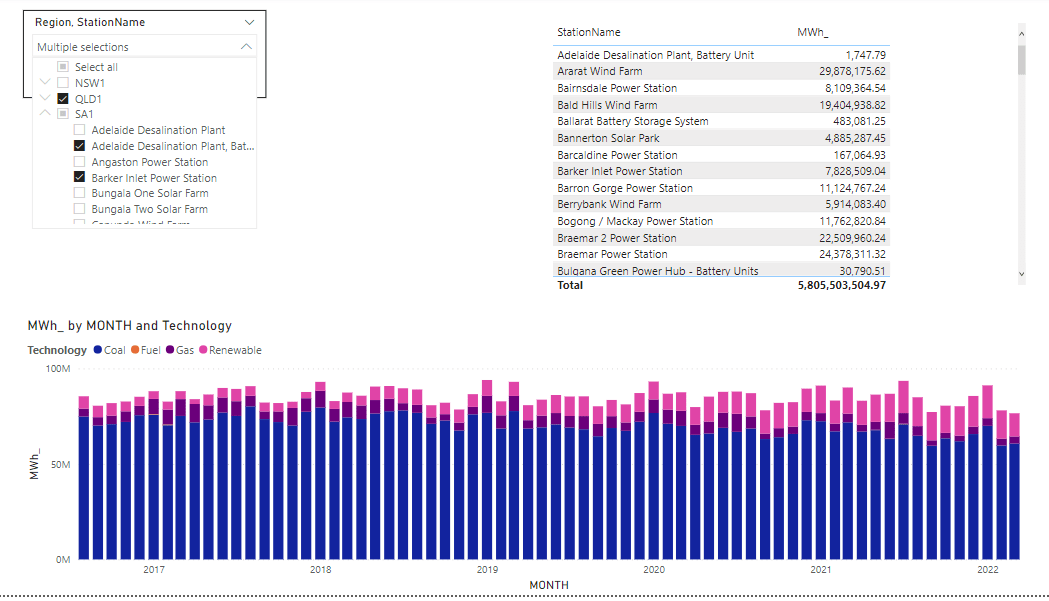
And the glorious Model in PowerBI, yes, just 1 Table
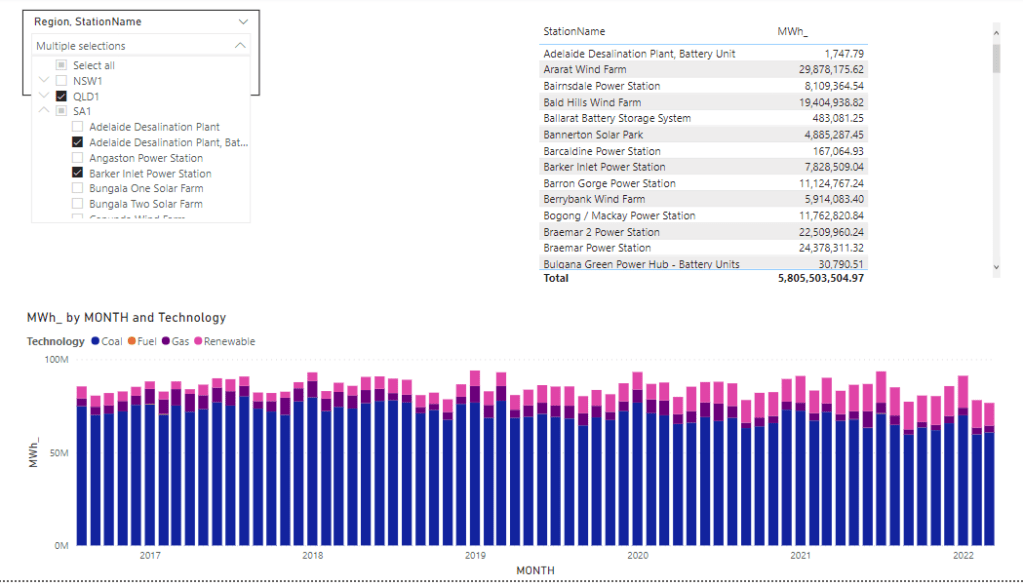
and let’s build some visuals
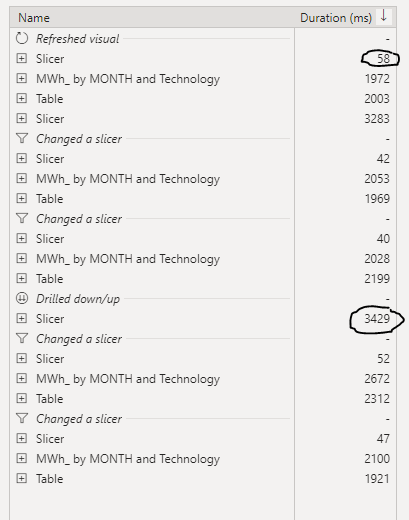
Now let’s check the Data Source performance
Slow Slicer
The Slicer is rather slow, probably you will say, of course scanning a whole 80 million columns is not very smart, actually that’s not the Problem.
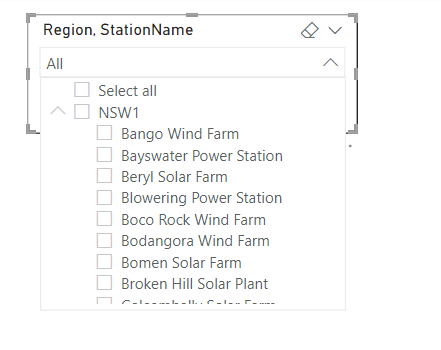
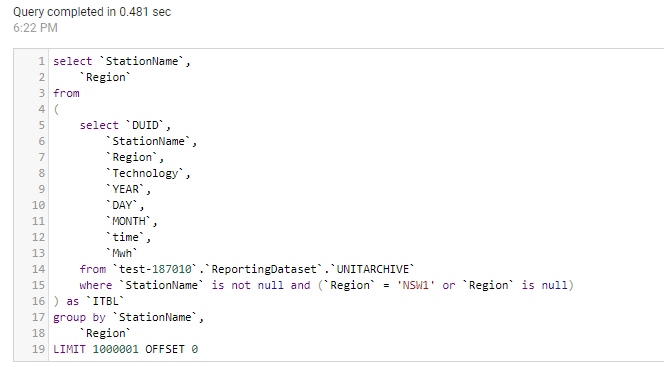
for example when I extend the State NSW, PowerBI will generate two SQL Queries
the first one to get the station Name and took 481 ms
And the second Query to get the regions, 361 ms
PowerBI Formula Language will take some time to stitch the results together ( 1023 ms, that’s seems very slow to me ?)
in this case it is only 5 states, not a big deal, the Query results will be cached eventually after the report users expand all the options.
Is 3 second ? a good enough experience for an end user, I don’t think so, slicers have to be instantaneous, Visual can take up to 5 second, I don’t mind personally , but as a user I have a higher expectation for the slicers responsiveness, I will still use Dual Mode with a star schema
Take Away
If your Database can give you a sub second response time for the slicer selection and you have a very limited and clear analysis to do and you have to do it in Direct Query Mode, then flat wide table is just fine as long as you are happy with the SQL Generated.










 Small Data And self service