DeltaProtocolError: The table has set these reader features: {'deletionVectors'} but these are not yet supported by the deltalake reader.
Alternative: Using DuckDB
A simple alternative is to use DuckDB:
import duckdb

duckdb.sql("SELECT COUNT(*) FROM delta_scan('/lakehouse/default/Tables/xxx')")
Tested with a file that contains Deletion vectors
Column Mapping
The same approach applies to column mapping as well.
Upgrading DuckDB
Currently, Fabric Notebook comes preinstalled with DuckDB version 1.1.3. To use the latest features, you need to upgrade to the latest stable release (1.2.1) :
Note: Installing packages using %pip install does not restart the kernel when you run the notebook , you need to use sys.exit(0) to apply the changes, as some packages may already be loaded into memory.
import duckdb
duckdb.sql(" force install delta from core_nightly ")
duckdb.sql(" from delta_scan('/lakehouse/default/Tables/dbo/evolution_column_change') ")
The Future of Delta Rust .
Currently, there are two Rust-based implementations of Delta:
Delta_rs: The first and more mature implementation, developed by the community. It is an independent implementation of the Delta protocol and utilizes DataFusion and PyArrow (which will soon be deprecated) as its engine. However, Delta_rs does not support deletion vectors or column mapping, though it does support writing Delta tables.
Delta Kernel_rs: The newer, “official” implementation of Delta, providing a low-level API for query engines. It is currently being adopted by DuckDB ( and Clickhouse apparently) with more engines likely to follow. However, it is still a work in progress and does not yet support writing.
There are ongoing efforts to merge Delta_rs with Delta Kernel_rs to streamline development and reduce duplication of work.
Note : although they are written in Rust, we mainly care about the Python API 🙂
Conclusion
At least for now, in my personal opinion, the best approach is to:
I recently had a conversation about this topic and realized that it’s not widely known that Snowflake can read Delta tables hosted in OneLake. So, I thought I’d share this in a blog post.
Fundamentally, this process is similar to how XTable in Fabric works, but in reverse—it converts a Delta table to Iceberg by translating the table metadata ( AFAIK, Snowflake don’t use Xtable but an internal tool)
Recommended Documentation
For detailed information, I strongly recommend reading the official Snowflake documentation: 🔗 Create Iceberg Table from Delta
How It Works
External Volume and File Section
When creating an external volume in Snowflake that points to OneLake, only the Files section is supported. This isn’t an issue because you can simply add a shortcut that points to a schema.
SQL Code to Set Up External Volume and Map an Existing Table
While experimenting with different access modes in Power BI, I thought it is maybe worth sharing as a short blog to show why the Lakehouse architecture offers versatile options for Power BI developers. Even when they use Only Import Mode.
And Instead of sharing a conceptual piece, perhaps focus on presenting some dollar figures 🙂
Scenario: A Small Consultancy
According to local regulations, a small enterprise is defined as having fewer than 15 employees. Let’s consider this setup:
Data Storage: The data resides in Microsoft OneLake, utilizing an F2 SKU.
Number of Users: 15 employees.
Data Size: Approximately 94 million rows.
Pricing Model: For simplicity, assume the F2 SKU uses a reserved pricing model.
Monthly Costs:
Power BI Licensing: 15 users × 15 AUD = 225 AUD.
F2 SKU Reserved Pricing: 293 AUD.
Total Cost: 518 AUD per month.
ETL Workload
Currently, the ETL workload consumes approximately 50% of the available capacity.
For comparison, I ran the same workload on another Lakehouse vendor. To minimize costs, the schedule was adjusted to operate only from 8 AM to 6 PM. Despite this adjustment, the cost amounted to:
Daily Cost: 40 AUD.
Monthly Cost: 1,200 AUD.
In contrast, the F2 SKU’s reserved price of 293 AUD per month is significantly more economical. Even the pay-as-you-go model, which costs 500 AUD per month, remains competitive.
Key Insight:
While serverless billing is attractive, what matter is how much you end up paying per month.
For smaller workloads (less than 100 GB of data), data transformation becomes commoditized, and charging a premium for it is increasingly challenging.
Analytics in Power BI
I prefer to separate Power BI reports from the workspace used for data transformation. End users care primarily about clean, well-structured tables—not the underlying complexities.
With OneLake, there are multiple ways to access the stored data:
Import Mode: Directly import data from OneLake.
DirectQuery: Use the Fabric SQL Endpoint for querying.
Direct Lake Model: Access data with minimal latency.
Composite Models: All the above ( this is me trying to be funny)
All the Semantic Models and reports are hosted in the Pro license workspace, Notice that an import model works even when the capacity is suspended ( if you are using pay as you go pricing)
The Trade-Off Triangle
In analytical databases, including Power BI, there is always a trade-off between cost, freshness, and query latency. Here’s a breakdown:
Import Mode: Ideal if eight refreshes per day suffice and the model size is small. Reports won’t consume Fabric capacity (Onelake Transactions cost are insignificant for small data import)
Direct Lake Model: Provides excellent freshness and latency but will probably impacts F2 capacity, in other words, it will cost more.
DirectQuery: Balances freshness and latency (seconds rather than milliseconds) while consuming less capacity. This approach is particularly efficient as Fabric treats those Queries as background operations, with low consumption rates in many cases. Looking forward to the release of Fabric DWH result cache.
Key Takeaways
Cost-Effectiveness: Reserved pricing for smaller Fabric F SKUs combined with Power BI Pro license offers a compelling value proposition for small enterprises.
Versatility: OneLake provides flexible options for ETL workflows, even when using import mode exclusively.
The Lakehouse architecture and Power BI’s diverse access modes make it possible to efficiently handle analytics, even for smaller enterprises with limited budgets.
TL:DR; Delta_rs does not support Vorder so we need workaround, we notice by changing row groups size and sorting data we improved a direct Lake model from not working at all to returning queries in 100 ms
I was having another look at Fabric F2 (hint: I like it very much; you can watch the video here). I tried to use Power BI in Direct Lake mode, but it did not work well, and I encountered memory errors. My first instinct was to switch it to Fabric DWH in Direct Query mode, and everything started working again.
Obviously, I did complain to the Power BI team that I was not happy with the results, and their answer was to just turn on V-order, which I was not using. I had used Delta_rs to write the Delta table, and the reason I never thought about Parquet optimization was that when I used F64, everything worked just fine since that SKU has more hardware. However, F2 is limited to 3 GB of RAM.
There are many scenarios where Fabric is primarily used for reading data that is produced externally. In such cases, it is important to understand how to optimize those Parquet files for better performance.
Phil Seamark (yes the same guy who built a 3D games using DAX) gave me some very good advice: you can still achieve very good performance even without using V-order. Just sort by date and partition as a first step, and you can go further by splitting columns.
As I got the report working perfectly, even inside F2, I thought it was worth sharing what I learned.
Note: I used the term ‘parquet’ as it is more relevant than specifying the table format, whether it is a Delta table or Iceberg, after all this is where the data is stored, there is no standard for Parquet layout, different Engines will produce different files with massive difference in row group, file size, encoding etc.
Memory Errors
This is not really something you would like to see, but that’s life. F2 is the lowest tier of Fabric, and you will encounter hardware limitations.
When trying to run a query from DAX Studio, you will get the same error:
Rule of Thumb
Split datetime into date and time
It may be a good idea to split the datetime column into two separate columns, date and time. Using a datetime column in a relationship will not give you good performance as it usually has a very high number of distinct values.
Reduce Precision if You Don’t Need It
If you have a number with a lot of decimals, changing the type to decimal(18,4) may give you better compression.
Sorting Data
Find Column Cardinality
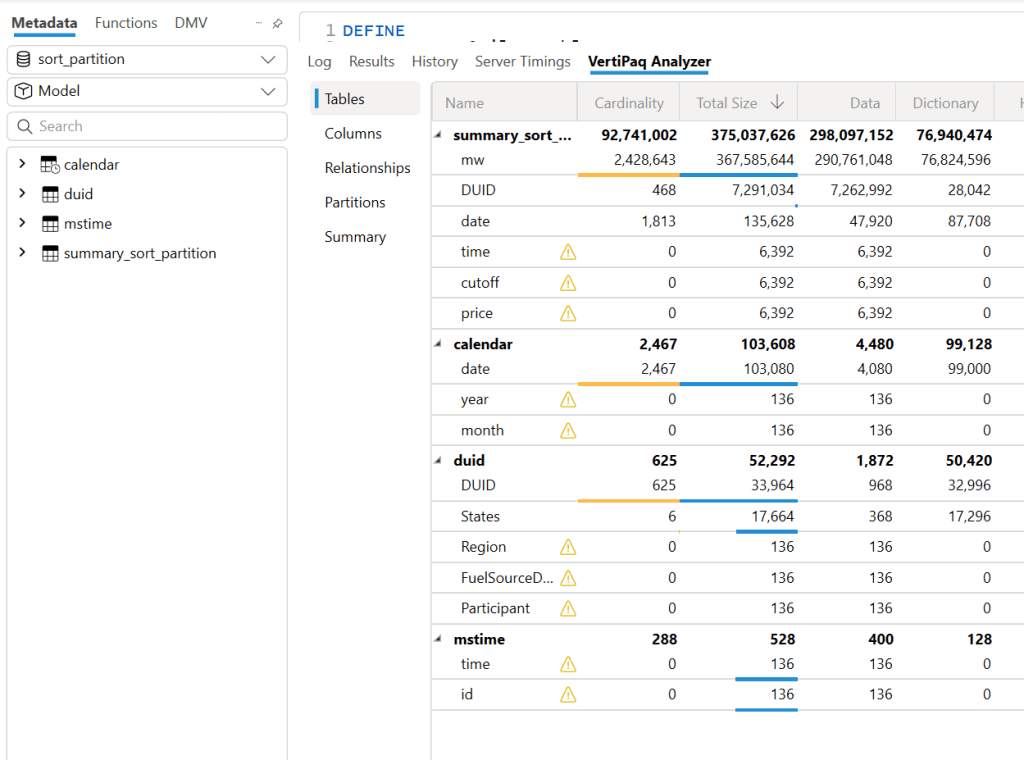
First, let’s check the cardinality of all columns in the Delta table. I used DuckDB for this, but you can use any tool—it’s just a personal choice.
First, upgrade DuckDB and configure authentication:
A very simple rule is to sort the columns from low to high cardinality , in this example : time, duid, date, price, mw.
Columns like cutoff don’t matter as they have only one value.
The result isn’t too bad—I went from 753 MB to 643 MB.
However, this assumes that the column has a uniform data distribution, which is rarely the case in real life. In more serious implementations, you need to account for data skewness.
Sort Based on Query Patterns
I built the report, so I know exactly the types of queries. The main columns used for aggregation and filters are date and duid, so that’s exactly what I’m going to use: sort by date, then duid, and then from low to high cardinality.
I think I just got lucky—the size is now 444 MB, which is even better than V-order. Again, this is not a general rule; it just happened that for my particular fact table, with that particular data distribution, this ordering gave me better results.
But more importantly, it’s not just about the Parquet size. Power BI in Direct Lake mode (and import mode) can keep only the columns used by the query into memory at the row group level. If I query only the year 2024, there is a good chance that only the row groups containing that data will be kept into memory. However, for this to work, the data must be sorted. If 2024 data is spread all over the place, there is no way to page out the less used row groups.
edit : to be very clear, Vertipaq needs to see all the data to build a global dictionary, so initially all columns needed for a query has to be fully loaded into Memory.
More Advanced Sorting Heuristics
These are more complex row-reordering algorithms. Instead of simply sorting by columns, they analyze the entire dataset and reorder rows to achieve the best Run-Length Encoding (RLE) compression across all columns simultaneously. I suspect that V-order uses something similar, but this is a more complex topic that I don’t have much to say about.
To make matters more complex, it’s not just about finding a near-optimal solution; the algorithm must also be efficient. Consuming excessive computational resources to determine the best reordering might not be a practical approach.
Reducing column cardinality by splitting decimals into separate columns can also help. For example, instead of storing price = 73.3968, store it in two columns: 73 and 3968.
Indeed, this gave even better results—a size reduction to 365 MB.
To be totally honest, though, while it gave the best compression result, I don’t feel comfortable using it. Let’s just say it’s for aesthetic reasons, and because the data is used not only for Power BI but also for other Fabric engines. Additionally, you pay a cost later when combining those two columns.
Partitioning
Once the sorting is optimized, note that compression occurs at the row group level. Small row groups won’t yield better results.
For this particular example, Delta_rs generates row groups with 2 million rows, even when I changed the options. I might have been doing something wrong. Using Rust as an engine reduced it to 1 million rows. If you’re using Delta_rs, consider using pyarrow instead:
Notice here, I’m not partitioning by column but by file. This ensures uniform row groups, even when data distribution is skewed. For example, if the year 2020 has 30M rows and 2021 has 50M rows, partitioning by year would create two substantially different Parquet files.
Testing Again in Fabric F2
Using F2 capacity, let’s see how the new semantic models behave. Notice that the queries are generated from the Power BI report. I manually used the reports to observe capacity behavior.
Testing Using DAX Studio
To understand how each optimization works, I ran a sample query using DAX Studio. Please note, this is just one query and doesn’t represent the complexity of existing reports, as a single report generates multiple queries using different group-by columns. So, this is not a scientific benchmark—just a rough indicator.
Make sure that PowerBI has no data in memory, you can use the excellent semantic lab for that
!pip install -q semantic-link-labs
import sempy_labs as labs
import sempy.fabric as fabric
def clear(sm):
    labs.refresh_semantic_model(sm, refresh_type='clearValues')
    labs.refresh_semantic_model(sm)
    return "done"
for x in ['sort_partition_split_columns','vorder','sort_partition','no_sort']:
    clear(x)
Cold Run
The cold run is the most expensive query, as VertiPaq loads data from OneLake and builds dictionaries in memory. Only the columns needed are loaded. Pay attention to CPU duration, as it’s a good indicator of capacity unit usage.
Warm Run
All queries read from memory, so they’re very fast, often completing in under 100 milliseconds, SQL endpoint return the data around 2 seconds, yes, it is way slower than vertipaq but virtually it does not consume any interactive compute.
using DAX Studio you can view the column loaded into Memory, any column not needed will not be loaded
and the total data size into Memory
Hot Run
This isn’t a result cache. VertiPaq keeps the result of data scans in a buffer (possibly called datacache). If you run another query that can reuse the same data cache, it will skip an unnecessary scan. Fabric DWH would greatly benefit from having some sort of result cache (and yes, it’s coming).
Takeaways
VertiPaq works well with sorted Parquet files. V-order is one way to achieve that goal, but it is not a strict requirement.
RLE Encoding is more effective with larger row groups, and when the data is sorted
Writing data in Fabric is inexpensive; optimizing for user-facing queries is more important.
Don’t dismiss Direct Query mode in Fabric DWH—it’s becoming good enough for interactive, user-facing queries.
Fabric DWH background consumption of compute unit is an attractive proposition
Power BI will often read Parquet files written by Engines other than Fabric. A simple UI to display whether a Delta Table is optimized would be beneficial.
Fabric DWH appears to handle less optimized Parquet files with greater tolerance




 Small Data And self service