Experimenting with Text-to-SQL: Lessons from Optimizing Product Return Analysis

🌟 Introduction

While testing the DuckDB ODBC driver, which is getting better and better (not production ready but less broken compared to two years ago), I noticed something unexpected. Running queries through Power BI in DirectQuery mode was actually faster than executing them directly in the DuckDB native UI.

Naturally, that does not make sense !!!

What followed was an investigation that turned into a fun and insightful deep dive into text-to-SQL generation, Power BI’s query behavior, and the enduring relevance of manual SQL tuning

🧩 The Goal: Find the Worst Product by Return Rate

The task was straightforward:

Calculate total sales, total returns, and return rate by product. Rank the products and find the top 5 with the highest return rates.

To make it interesting, I decided to try:

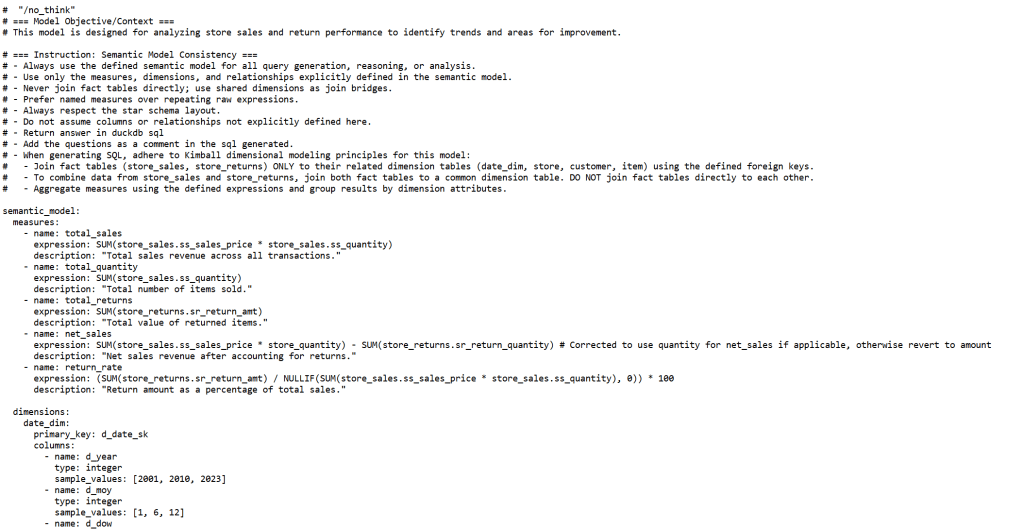
  1. Letting an LLM generate the SQL by loading the semantic model.
  2. Using PowerBI in Direct Query Mode.
  3. Finally, manually tuning the query.

πŸ“ Step 1: LLM-generated SQL β€” Clean and Understandable

chatgpt generated a good starting point:

WITH sales_by_product AS   (
SELECT
i.i_product_name AS product_name,
SUM(ss.ss_sales_price * ss.ss_quantity) AS total_sales
FROM store_sales ss
JOIN item i ON ss.ss_item_sk = i.i_item_sk
WHERE i.i_product_name IS NOT NULL
GROUP BY i.i_product_name
),

returns_by_product AS (
SELECT
i.i_product_name AS product_name,
SUM(sr.sr_return_amt) AS total_returns
FROM store_returns sr
JOIN item i ON sr.sr_item_sk = i.i_item_sk
WHERE i.i_product_name IS NOT NULL
GROUP BY i.i_product_name
),

combined AS (
SELECT
COALESCE(s.product_name, r.product_name) AS product_name,
COALESCE(s.total_sales, 0) AS total_sales,
COALESCE(r.total_returns, 0) AS total_returns
FROM sales_by_product s
FULL OUTER JOIN returns_by_product r
ON s.product_name = r.product_name
)

SELECT
product_name,
ROUND((total_returns / NULLIF(total_sales, 0)) * 100, 2) AS return_rate
FROM combined
WHERE total_sales > 0 -- Avoid divide by zero
ORDER BY return_rate DESC
limit 5 ;

βœ… Pros:

  • Clean and easy to read.
  • Logically sound.
  • Good for quick prototyping.

πŸ” Observation: However, it used product_name (a text field) as the join key in the combined table, initially I was testing using TPC-DS10, the performance was good, but when I changed it to DS100, performance degraded very quickly!!! I should know better but did not notice that product_name has a lot of distinct values.

the sales table is nearly 300 M rows using my laptop, so it is not too bad

and it is nearly 26 GB of highly compressed data ( just to keep it in perspective)

πŸ“Š Step 2: Power BI DirectQuery Surprises

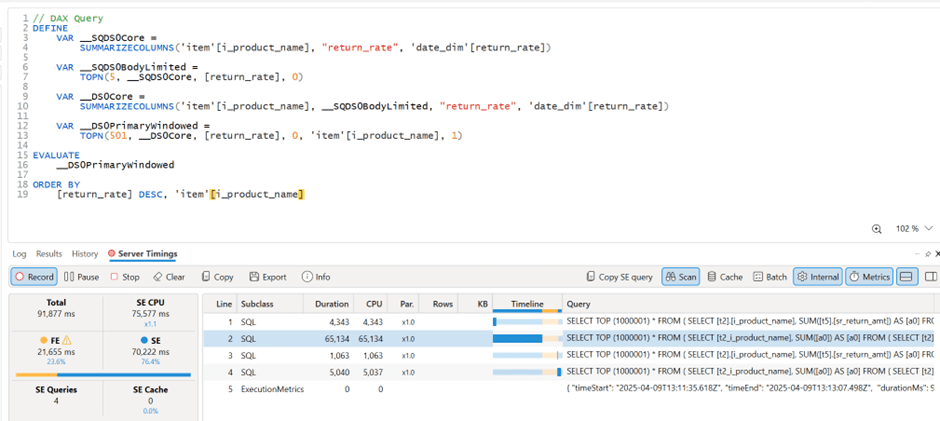
Power BI automatically generate SQL Queries based on the Data Model, Basically you defined measures using DAX, you add a visual which generate a DAX query that got translated to SQL, based on some complex logic, it may or may not push just 1 query to the source system, anyway in this case, it did generated multiple SQL queries and stitched the result together.

πŸ” Insight: Power BI worked exactly as designed:

  • It split measures into independent queries.
  • It grouped by product_name, because that was the visible field in my model.
  • And surprisingly, it was faster than running the same query directly in DuckDB CLI!

Here’s my screenshot showing Power BI results and DAX Studio:


🧩 Step 3: DuckDB CLI β€” Slow with Text Joins

Running the same query directly in DuckDB CLI was noticeably slower, 290 seconds !!!


βš™οΈ Step 4: Manual SQL Tuning β€” Surrogate Keys Win

To fix this, I rewrote the SQL manually:

  • Switched to item_sk, a surrogate integer key.
  • Delayed lookup of human-readable fields.

Here’s the optimized query:

WITH sales_by_product AS (
SELECT
ss.ss_item_sk AS item_sk,
SUM(ss.ss_sales_price * ss.ss_quantity) AS total_sales
FROM store_sales ss
GROUP BY ss.ss_item_sk
),

returns_by_product AS (
SELECT
sr.sr_item_sk AS item_sk,
SUM(sr.sr_return_amt) AS total_returns
FROM store_returns sr
GROUP BY sr.sr_item_sk
),

combined AS (
SELECT
COALESCE(s.item_sk, r.item_sk) AS item_sk,
COALESCE(s.total_sales, 0) AS total_sales,
COALESCE(r.total_returns, 0) AS total_returns
FROM sales_by_product s
FULL OUTER JOIN returns_by_product r ON s.item_sk = r.item_sk
)

SELECT
i.i_product_name AS product_name,
ROUND((combined.total_returns / NULLIF(combined.total_sales, 0)) * 100, 2) AS return_rate
FROM combined
LEFT JOIN item i ON combined.item_sk = i.i_item_sk
WHERE i.i_product_name IS NOT NULL
ORDER BY return_rate DESC
LIMIT 5;

πŸš€ Result: Huge performance gain! from 290 seconds to 41 seconds

Check out the improved runtime in DuckDB CLI:


🌍 In real-world models, surrogate keys aren’t typically used

unfortunately in real life, people still use text as a join key, luckily PowerBI seems to do better there !!!


πŸš€ Final Thoughts

LLMs are funny, when I asked chatgpt why it did not suggest a better SQL Query, I got this answer πŸ™‚

I guess the takeaway is this:


If you’re writing SQL queries, always prefer integer types for your keys!

And maybe, just maybe, DuckDB (and databases in general) could get even better at optimizing joins on text columns. πŸ˜‰

But perhaps the most interesting question is:
What if, one day, LLMs not only generate correct SQL queries but also fully performance-optimized ones?

Now that would be exciting.

you can download the data here, it is using very small factor : https://github.com/djouallah/Fabric_Notebooks_Demo/tree/main/SemanticModel

Edit : run explain analyze show that it is group by is taking most of the time and not the joins

the optimized query assumed already that i.i_item_sk is unique, it is not very obvious for duckdb to rewrite the query without knowing the type of joins !!! I guess LLMs still have a lot to learn

LLMs Are Getting Better at SQL

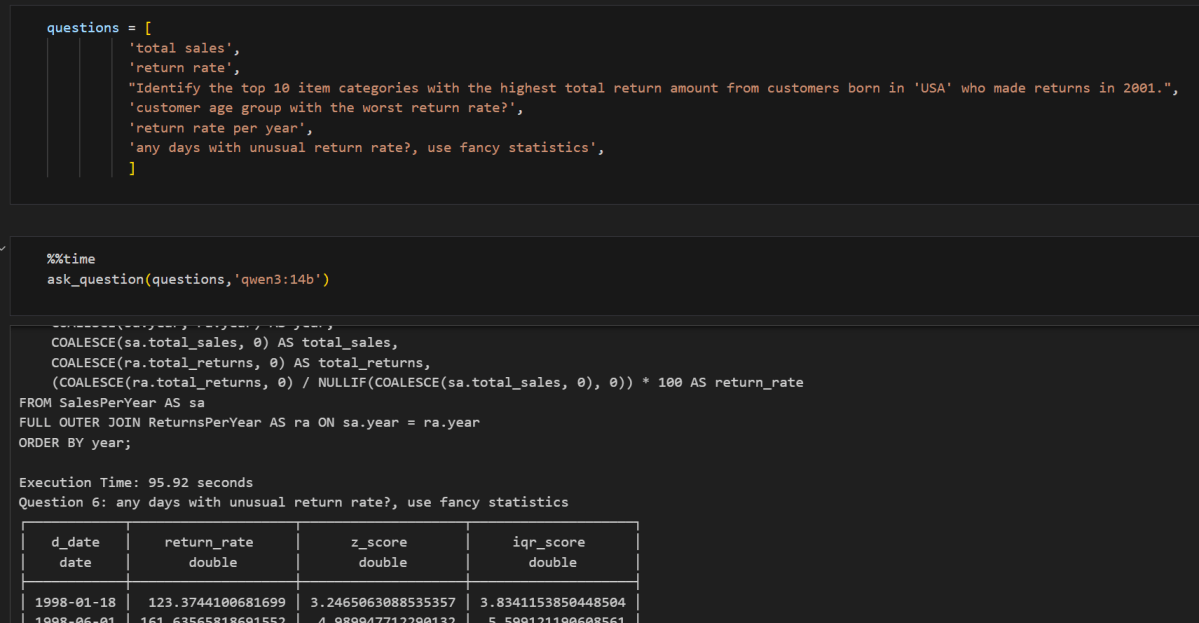
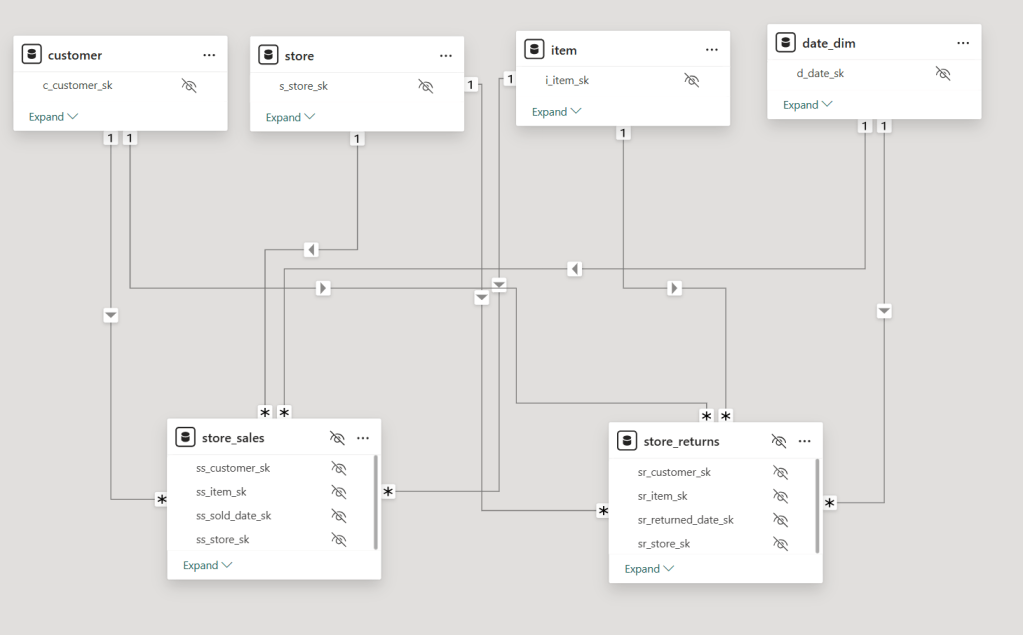
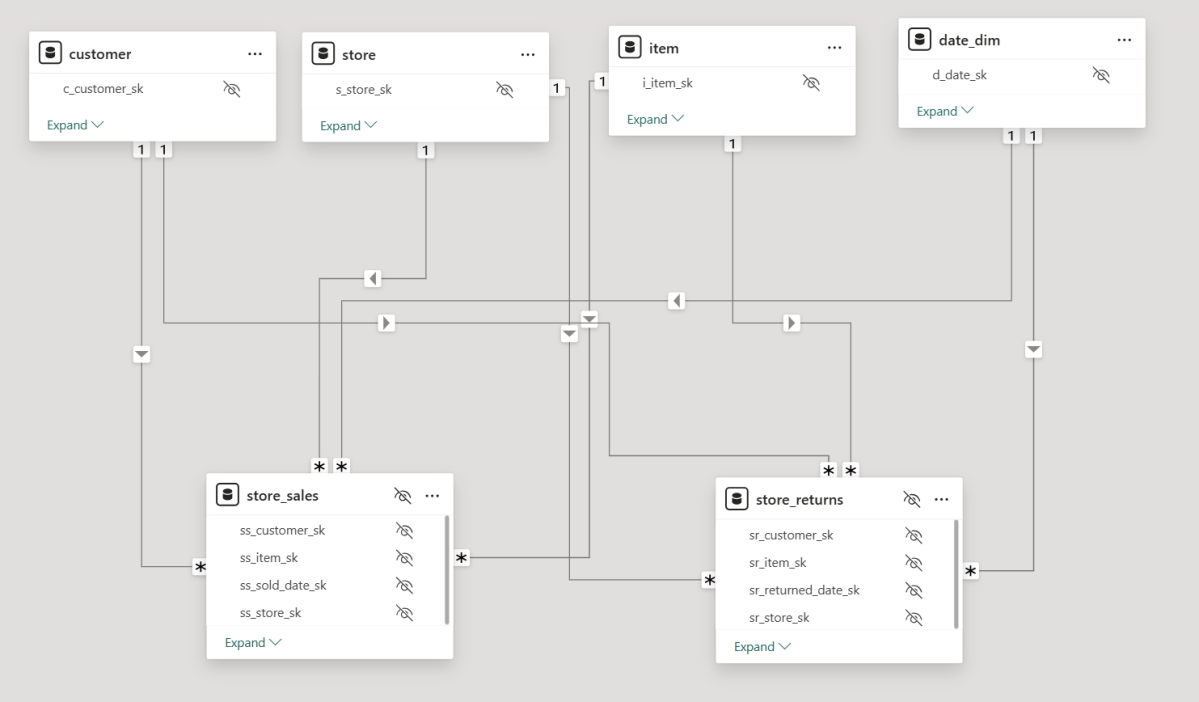
For no particular reason, I recently opened a Power BI report with two fact tables, exported the model definition to TMDL, saved it as a file, and loaded it into several state-of-the-art LLMs, including ChatGPT, Grok, Anthropic, and Qwen QWQ. I wasn’t particularly interested in comparing specific modelsβ€”I just wanted to get a general sense of how they performed. To keep things simple, I used only the free tiers.

To my surprise, these models are getting really smart. They all recognized that the file represented a Power BI semantic model. They understood the concept of tables, columns, relationships, and measures, which was quite impressive.

You can download the Model here , i added a semantic Model as a text file in case you don’t have PowerBI

The Power of Semantic Models

Power BI, and before that PowerPivot, has supported multiple fact tables from day one. I remember the first time I used PowerPivotβ€” a colleague showed me how to handle multiple fact tables: just don’t join fact to fact. Instead, use a common dimension, and everything will work fine. Back then, I had no idea about Kimball, multi-stage SQL queries, chasm trap etc. As a business user, I only cared that I got the correct results. It took me years to appreciate the ingenuity and engineering that went into making this work seamlessly. To me, this is an example of great product design: solve a very hard problem, and people will use it.

But this blog isn’t about Power BI and DAXβ€”that’s a solved problem. Instead, I wanted to explore whether LLMs, by reading only metadata, could generate correct SQL queries for relatively complex questions.

Note: for people not familiar with TMDL, it is a human readable format of PowerBI semantic Model ( if human can read it, then LLMs will understand it too)

Testing LLMs with SQL Generation

I started with simple queries involving only one fact table, and the results were straightforward. The models correctly referenced measure definitions, avoiding column name hallucinations. Good news so far.

Things got more interesting when I asked for a query using a more complex measure, such as Net Sales:

Net Sales = [Total Sales] - [Total Returns]

This measure involves two tables: store_sales and store_returns.

Expected SQL Approach: Drilling Across

My expectation was that the models would use the Drilling Across technique. For example, when asked for net sales and cumulative sales by year and brand, a well-structured query would look like this:

  1. Compute total sales by year and brand.
  2. Compute total returns by year and brand.
  3. Join these results on year and brand.
  4. Calculate net sales as [Total Sales] - [Total Returns].
  5. Calculate cumulative Sales

Most LLMs generated a similar approach. Some required a hint (“don’t ever join fact to fact”), but the biggest issue was the final join. Many models defaulted to a LEFT JOIN, which is problematicβ€”some returns for a brand might not occur in the same period as the sales, leading to incomplete results.

That said, some models got it right on the first attempt, which was very impressive. something like this:

WITH sales AS (
    SELECT
        d.d_year,
        i.i_brand,
        SUM(s.ss_sales_price * s.ss_quantity) AS total_sales
    FROM store_sales s
    JOIN item i ON s.ss_item_sk = i.i_item_sk
    JOIN date_dim d ON s.ss_sold_date_sk = d.d_date_sk
    GROUP BY d.d_year, i.i_brand
),
returns AS (
    SELECT
        d.d_year,
        i.i_brand,
        SUM(r.sr_return_amt) AS total_returns
    FROM store_returns r
    JOIN item i ON r.sr_item_sk = i.i_item_sk
    JOIN date_dim d ON r.sr_returned_date_sk = d.d_date_sk
    GROUP BY d.d_year, i.i_brand
)
SELECT
    COALESCE(s.d_year, r.d_year) AS year,
    COALESCE(s.i_brand, r.i_brand) AS brand,
    COALESCE(s.total_sales, 0) AS total_sales,
    COALESCE(r.total_returns, 0) AS total_returns,
    (COALESCE(s.total_sales, 0) - COALESCE(r.total_returns, 0)) AS net_sales,
    SUM(COALESCE(s.total_sales, 0) - COALESCE(r.total_returns, 0))
        OVER (PARTITION BY COALESCE(s.i_brand, r.i_brand) ORDER BY COALESCE(s.d_year, r.d_year)
        ROWS BETWEEN UNBOUNDED PRECEDING AND CURRENT ROW) AS cumulative_net_sales
FROM sales s
FULL OUTER JOIN returns r
ON s.d_year = r.d_year AND s.i_brand = r.i_brand
ORDER BY COALESCE(s.i_brand, r.i_brand), COALESCE(s.d_year, r.d_year);

An Alternative Approach: UNION ALL

One LLM got creative and proposed a different solution using UNION ALL:

WITH combined AS (
    SELECT d.d_year, i.i_brand, 'sales' AS type, s.ss_sales_price * s.ss_quantity AS amount
    FROM store_sales s
    JOIN date_dim d ON s.ss_sold_date_sk = d.d_date_sk
    JOIN item i ON s.ss_item_sk = i.i_item_sk
    UNION ALL
    SELECT d.d_year, i.i_brand, 'returns' AS type, r.sr_return_amt AS amount
    FROM store_returns r
    JOIN date_dim d ON r.sr_returned_date_sk = d.d_date_sk
    JOIN item i ON r.sr_item_sk = i.i_item_sk
)
SELECT
    d_year AS year,
    i_brand AS brand,
    SUM(CASE WHEN type = 'sales' THEN amount ELSE 0 END) AS total_sales,
    SUM(CASE WHEN type = 'returns' THEN amount ELSE 0 END) AS total_returns,
    (SUM(CASE WHEN type = 'sales' THEN amount ELSE 0 END) - SUM(CASE WHEN type = 'returns' THEN amount ELSE 0 END)) AS net_sales,
    SUM(SUM(CASE WHEN type = 'sales' THEN amount ELSE 0 END) - SUM(CASE WHEN type = 'returns' THEN amount ELSE 0 END))
        OVER (PARTITION BY i_brand ORDER BY d_year ROWS BETWEEN UNBOUNDED PRECEDING AND CURRENT ROW) AS cumulative_net_sales
FROM combined
GROUP BY d_year, i_brand
ORDER BY i_brand, d_year;

Edit : people who know what they are doing , did not like the union all solution for performance reason

So, Is SQL a Solved Problem?

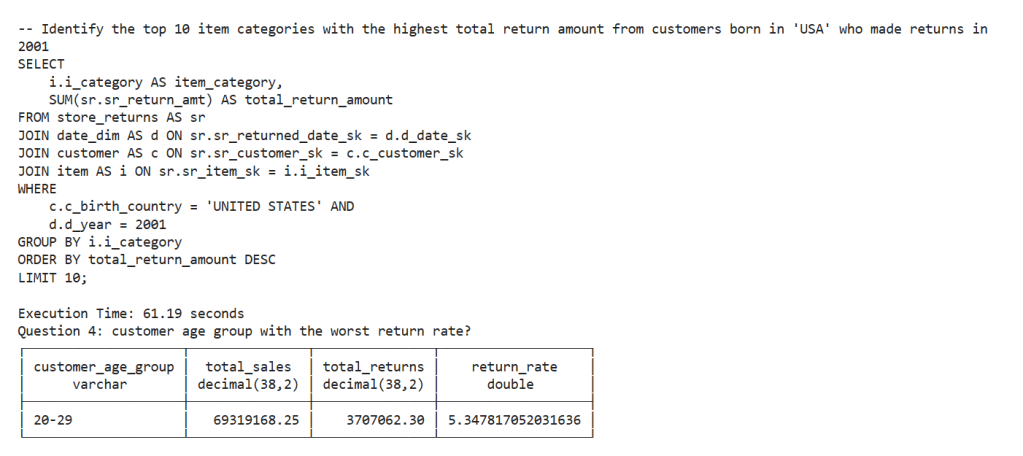
No, of course not. There’s still no guarantee of getting the same answer when asking the same question multiple times. Additionally, AI has no real understanding of the data. The moment you introduce filters, you can get all sorts of unexpected results,Although Providing sample values from columns into a semantic model helps a lot, still real-world models are far more complex and often contain ambiguities.

While LLMs generate correct SQL, they don’t always generate the most efficient queries, But you can argue, it is the Database problem to solve πŸ™‚

Compute Considerations

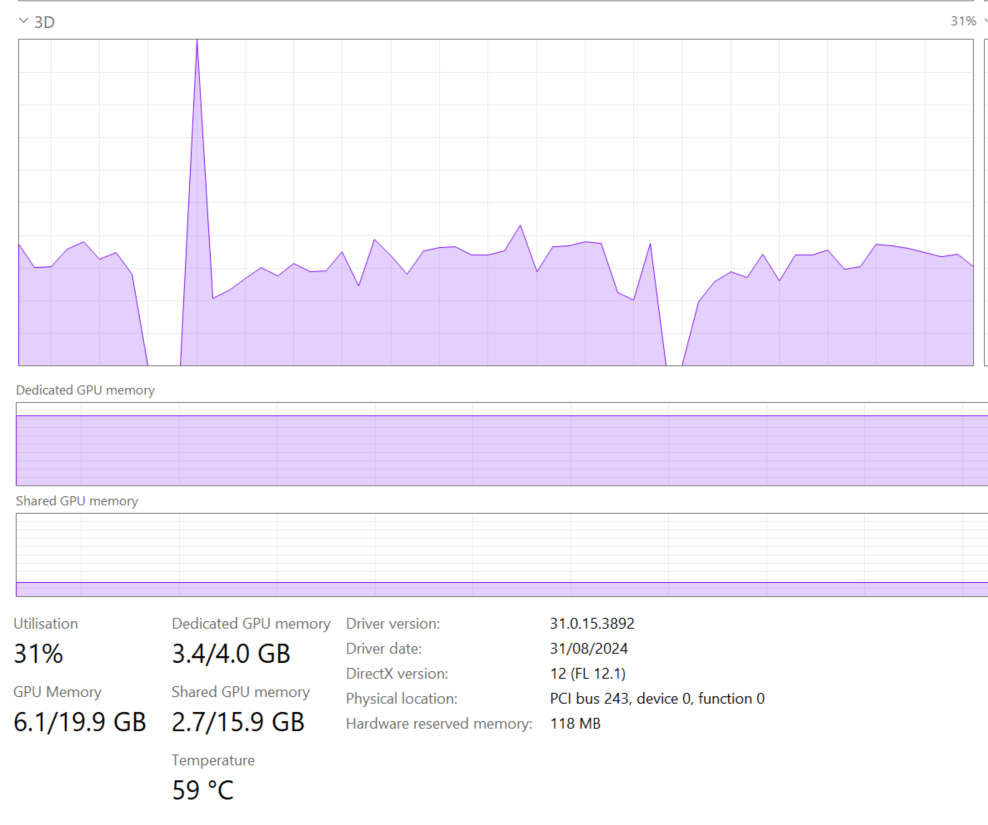
I don’t know enough to make a strong statement about the current cost of running LLMs, but I ran a simple experiment: I tested QWQ-32 on my laptop (which has an NVIDIA RTX A2000 GPU with 4GB of dedicated memory). The good news? It worked. Running an open-source “thinking model” on a personal laptop is already impressive. The bad news? It was painfully slowβ€”so much so that I’m not eager to repeat the test.

From a practical perspective, generating SQL queries this way seems extremely expensive. A decent BI tool can generate similar queries in milliseconds, using orders of magnitude less compute power, but as LLMs continue to improve in efficiency, maybe in a couple of years, the compute requirement to generate SQL Queries will become trivial ?

Final Thoughts

Having experimented with LLMs since 2023, I can say with confidence that they have improved significantly ( LLMs in 2023 were not very good to be honest). They are getting better and, more importantly, cheaper, opening the door for new applications.

The initial promise was that you could just throw data at an AI system, and it would figure out everything. I suspect that’s not true. In reality, to get useful results, you need more structure, and well-defined semantic models will play a crucial role in making asking your Data a reality.