TPC-DS 100GB with Only 2 Cores and 16 GB of RAM

As the year comes to a close, I decided to explore a fun yet somewhat impractical challenge: Can DuckDB run the TPC-DS benchmark using just 2 cores and 16 GB of RAM? The answer is yes, but with a caveat—it’s slow. Despite the limitations, it works!

Notice; I am using lakehouse mounted storage, for a background on the different access mode, you can read the previous blog

Data Generation Challenges

Initially, I encountered an out-of-memory error while generating the dataset. Upgrading to the development release of DuckDB resolved this issue. However, the development release currently lacks support for reading Delta tables, as Delta functionality is provided as an extension available only in the stable release.

Here are some workarounds:

  1. Increase the available RAM.
  2. Use the development release to generate the data, then switch back to version 1.1.3 for querying.
  3. Wait for the upcoming version 1.2, which should resolve this limitation.

The data is stored as Delta tables in OneLake, it was exported as a parquet files by duckdb and converted to delta table using delta_rs (the conversion was very quick as it is a metadata only operation)

Query Performance

Running all 99 TPC-DS queries worked without errors, albeit very slowly( again using only 2 cores ).

I also experimented with different configurations:

4, 8, and 16 cores: Predictably, performance improved as more cores were utilized.

For comparison, I ran the same test on my laptop, which has 8 cores and reads my from local SSD storage, The Data was generated using the same notebook.

Results

Python notebook compute consumption is straightforward, 2 cores = 1 CUs, the cheapest option is the one that consume less capacity units, assuming speed of execution is not a priority.

  • Cheapest configuration: 8 cores offered a good balance between cost and performance.
  • Fastest configuration: 16 cores delivered the best performance.

Interestingly, the performance of a Fabric notebook with 8 cores reading from OneLake was comparable to my laptop with 8 cores and an SSD. This suggests that OneLake’s throughput is competitive with local SSDs.

Honestly, It’s About the Experience

At the end of the day, it’s not just about the numbers. There’s a certain joy in using a Python notebook—it just feels right. DuckDB paired with Python creates an intuitive, seamless experience that makes analytical work enjoyable. It’s simply a very good product.

Conclusion

While this experiment may not have practical applications, it highlights DuckDB’s robustness and adaptability. Running TPC-DS with such limited resources showcases its potential for lightweight analytical workloads.

You can download the notebook for this experiment here:

How to attach Onelake Lakehouse to DuckDB

Update 26-Oct-2024 : using DuckDB 1.1.2, you don’t need to to mount a lakehouse to the notebooks and add support for reading Onelake Lakehouse outside of Fabric . currently it is read only, for writing you need Delta_rs

it is a very simple Python script how you can attach a Lakehouse to DuckDB in a Fabric notebook (you can use the same logic for Polars,Daft etc)

it is read only and will create views based on your existing Delta tables, it assumes you are using schemas, but you can edit it for simpler use cases, or if you have a lot of tables, maybe it is more practical just to attach one specific schema.

import duckdb
from glob import glob
def attach_lakehouse(base_path): 
    list_tables = glob(f"{base_path}*/*/", recursive=True)
    sql_schema = set()
    sql_statements = set()
    for table_path in list_tables:
        parts = table_path.strip("/").split("/")
        schema = parts[-2]
        table = parts[-1]
        sql_schema.add(f"CREATE SCHEMA IF NOT EXISTS {schema};")
        sql_statements.add(f"CREATE OR REPLACE VIEW {schema}.{table} AS SELECT * FROM delta_scan('{table_path}');")
    duckdb.sql(" ".join(sql_schema))
    duckdb.sql(" ".join(sql_statements))
    display(duckdb.sql("SHOW ALL TABLES").df())
attach_lakehouse('/lakehouse/default/Tables/')

and here is an example

now you can read and joins any tables even from different schemas

Notice Delta support in DuckDB is not very performant at this stage, compared to pure Parquet, but I suspect we will see a massive improvement in the next version 1.1

Process 1 Billion rows of raw csv in Fabric Notebook for less than 20 Cents 

The Use case

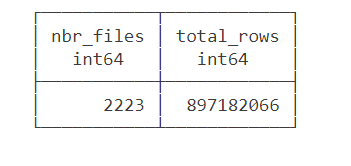
Data source is around 2200 files with a total of 897 Million rows of weird csv files (the file has more columns than the header) , This is a real world data not some synthetic dataset, it is relatively small around 100 GB uncompressed.

The Pipeline will read those files and extract clean data from it using non trivial transformation and save it as a Delta Table.

we used the smallest Compute available in Fabric Notebook which is 4 cores with 32 GB. to be clear this is a real single node (not 1 driver and 1 executor), Although the Runtime is using Spark, All the Engines interact Directly with the Operating system, as far as I can tell, Spark has a very minimum overhead when not used Directly by the Python code.

You need to pick the Engine

Nowadays we have plenty of high quality Calculation Engines,  but two seems to gain traction (Polars and DuckDB) , at least by the number of package downloaded and the religious wars that seems to erupt occasionally in twitter 🙂

For a change I tried to use Polars, as I was accused of having a bias toward DuckDB, long story short, hit a bug with Polars , I tried Datafusion too but did managed to get a working code, there is not enough documentation on the web, after that I did test Clickhouse chdb, but find a bug, anyway the code is public, feel free to test your own Engine.

So I ended up using DuckDB, the code is published here , it is using only 60 files as it is available publicly, the whole archive is saved in my tenant (happy to share it if interested) 

The results is rather surprising (God bless Onelake throughput), I am using the excellent Python Package Delta Lake to write to Onelake

26 minutes, that’s freaking fast, using Fabric F2, the total cost will be

0.36 $/Hour X(26/60) =  15 Cents

you need to add a couple of cents for Onelake Storage Transactions.

As far as I can tell, this is maybe one of the cheapest option in the Market.

0.36 $/Hour is the rate for pay as you go, if you have a reservation then it is substantially cheaper.

because it is Delta Table Then Any Fabric Engine ( SQL, PowerBI, Spark) can read it.

What’s the catch ?

Today DuckDB can not write directly to Delta Table ( it is coming though eventually) instead it will export data to Delta Lake writer using Arrow Table, it is supposed to be zero copy but as far as I can tell, it is the biggest bottleneck and will generate out of memory errors , the solution is easy ; process the files in chunks , not all at once

#############################################
list_files=[os.path.basename(x) for x in glob.glob(Source+'*.CSV')]
files_to_upload_full_Path = [Source + i for i in list_files]
if len(files_to_upload_full_Path) >0 :
  for i in range(0, len(files_to_upload_full_Path), chunk_len):
    chunk = files_to_upload_full_Path[i:i + chunk_len]
    df=get_scada(chunk)
    write_deltalake("/lakehouse/default/Tables/scada_duckdb",df,mode="append",engine='rust',partition_by=['YEAR'],storage_options={"allow_unsafe_rename":"true"})
    del df

By experimentation, I notice 100 files works fine with 16 GB, 200 files with 32 GB etc

When exporting to Parquet, DuckDB managed the memory natively and it is faster too.

Native Lakehouse Is the future of Data Engineering

The combination of Open table format like Delta and Iceberg with ultra efficient Open Source Engine like DuckDB, Polars, Velox, datafusion all written in C++/Rust will give data engineers an extremely powerful tools to build more flexible and way cheaper data solutions.

if I have to give an advice for young Data engineers/Analysts, Learn Python/SQL.

Would like to thanks Pedro Holanda for fixing some very hard to reproduce bugs in the DuckDB csv reader.

And Ion Koutsouris for answering my silly questions about Delta lake writer.

CPM is Broken – The WHY

I spend a lot of time thinking about project controls, it is my love and passion. Specifically in the planning world, P6 is weapon we are tasked with us. While I firmly believe the way in which P6 is used on projects needs to be expanded (extended) with the use of Agile (JIRA), nothing tops the user base and acceptance P6 has in our business.

P6 is fundamentally, just a CPM platform. We have activities and we have relationships (and constraints). It would seem simple to use at first; however, in practice, it is anything but simple and the way we build schedules is not helping matters.

What has specifically changed over the past 15-20 years is the DATA SOURCE from which we derive our data. 20years ago, we would run progress reports from P6 (we still do, but have complicated matters). Today there is much better visibility into deliverables on a project. What follows are some example from a construction project; however I feel as if the issue is more visible in the engineering and study side of things. Additionally, what has changed is the global adoption of EPR tools (Enterprise Progress Tools – aka Ecosys).

And that is the problem – we now have 2 or 3 sources of data that everyone looks at – and everyone thinks are integrated. Everyone has clear visibility into document progress by way of our document control tools, everyone has clear visibility into our EPR reports, and everyone struggles to understand what is in the schedule and why it is different. EPR is forcing document progress to drive overall reporting, but P6 does not track documents. We do not build schedules from a bottoms up document world. We (should) build schedules based on overall workflows. I will demonstrate this in many examples that follow and what we have been forced to do inside P6 to try to solve this conundrum, and exactly why our solutions all fail because we have fundamentally deviated from the CPM roots that used to make schedules valuable.

This is what a schedule is meant to look like

As Planned

In reality, below is what the schedule would look like today. Extended durations on everything, broken relationships, out of sequence work and worse than anything – NO CRITICAL PATH! This is not a good example – however I am confident you have dealt with a schedule like this and know this isn’t just an isolated issue anymore.

As Built

What is driving this insanity is the method (the data source) for where our progress comes from. The concept of what “site prep” meant in the original schedule was not the full site prep scope, but only the key site prep work required to commence the excavation.

What changed is the method and data source for where the progress is coming for our activities. Because we are not progressing the schedule, and instead are progressing an excel file to load into our EPR systems – to most likely drive a progress payment – the way data then flows into the schedule becomes meaningless.

There are many that would counter that we are simply running our progress system wrong, and that indeed the site prep should have been 100% earlier. And, likely true. In the above I am just being silly, but we have all seen this and we all know the issue.

So what is the solution?

The solution is to understand that when progress is measured outside the schedule and at a level that is at a finer level of detail than the schedule – the schedule becomes meaningless at certain levels. You therefore need to build schedules AT A HIGHER LEVEL.

The Correct Schedule

Instead of tracking the work at a lower level, for the schedule to bring back meaning, we need to only represent the high level workflows and leave the details in our progress system.

Keep your detail in Excel or you EPR System

The project should retain clear visibility to the detail and the detailed % complete; however, the detail items should not flow into the schedule because they can not be scheduled in a proper CPM way.

Again what is driving this is the method of progress no longer aligning with the methods of schedule. I understand this is severely controversial but when you start looking at your schedules these days and see countless in progress parallel activities that are simply being driven by interfaces with EPR systems to mirror a % – and not a proper schedule workflow – something is broken in our business. We would like to think our progress are all nice CPM logically driven schedules, and obviously I am not suggesting all our schedules are broken. However, the more I see issues such as this popping up in our As Builts Schedules, the more I want our industry to understand we are simply building crap schedules that are not agile enough to capture the intricate data now available in our other systems.

This article is only meant to better illustrate the problem – the why CPM is broken. Solutions (using CPM) are available. In the above I have actually suggested one solution, but several different models that can retain alignment with detailed progress items and retain a workflow CPM model are possible. Hopefully I will dive into those in subsequent discussions.