Building Idempotent Data Pipelines with DuckDB SQL

Alright using the term “idempotent” was just a clickbait 🙂 it simply means avoiding the processing of the same file multiple times ( ok for a formal definition wikipedia has a nice article). in this case the script will process only new files added to the source system, assuming the filenames are unique.

Although this is easily accomplished using Python API , achieving the same result using DuckDB SQL was a bit tricky until the introduction of SQL variables in the developpement branch a couple of weeks ago, particularly Variables can now be referenced within read files operation.

in summary this is what the SQL script is doing.

  1. Creation of a Hive table in the file section of onelake, it is very important step, if you query an empty folder you will get an error, , as DuckDB does not support external table, we will just add a dummy parquet file with empty rows, it is filtered out in the next step.
  COPY (
  SELECT
    '' AS filename,
    NULL AS year ) TO "/lakehouse/default/Files/scada" (FORMAT PARQUET,
    PARTITION_BY (year),
    OVERWRITE_OR_IGNORE ) ;
  1. Listing of CSV files for ingestion from the source system.
  2. Removal of already ingested files
SET
  VARIABLE list_of_files = (
  SELECT
    list(file)
  FROM
    glob("/lakehouse/default/Files/Daily_Reports/*.CSV")
  WHERE
    parse_filename(file) NOT IN (
    SELECT
      filename
    FROM
      read_parquet("/lakehouse/default/Files/scada/*/*.parquet")))
  1. Generate list of new files and pass it to DuckDB for processing.

just a preview of the query plan for this step

  1. Saving as partitioned Hive parquet folders

Note : I am using Fabric notebook as an example, but obviously you can run it anywhere, actually I did it run in my laptop and as far as I can tell, Onelake throughput is competitive with my ssd disk 🙂

  COPY (
  SELECT
    '' AS filename,
    NULL AS year ) TO "/lakehouse/default/Files/scada" (FORMAT PARQUET,
    PARTITION_BY (year),
    OVERWRITE_OR_IGNORE ) ;
SET
  VARIABLE list_of_files = (
  SELECT
    list(file)
  FROM
    glob("/lakehouse/default/Files/Daily_Reports/*.CSV")
  WHERE
    parse_filename(file) NOT IN (
    SELECT
      filename
    FROM
      read_parquet("/lakehouse/default/Files/scada/*/*.parquet"))) ;
CREATE OR REPLACE VIEW
  raw AS (
  SELECT
    *
  FROM
    read_csv(getvariable('list_of_files'),
      Skip=1,
      header =0,
      all_varchar=1,
      COLUMNS={ 'I': 'VARCHAR',
      'UNIT': 'VARCHAR',
      'XX': 'VARCHAR',
      'VERSION': 'VARCHAR',
      'SETTLEMENTDATE': 'VARCHAR',
      'RUNNO': 'VARCHAR',
      'DUID': 'VARCHAR',
      'INTERVENTION': 'VARCHAR',
      'DISPATCHMODE': 'VARCHAR',
      'AGCSTATUS': 'VARCHAR',
      'INITIALMW': 'VARCHAR',
      'TOTALCLEARED': 'VARCHAR',
      'RAMPDOWNRATE': 'VARCHAR',
      'RAMPUPRATE': 'VARCHAR',
      'LOWER5MIN': 'VARCHAR',
      'LOWER60SEC': 'VARCHAR',
      'LOWER6SEC': 'VARCHAR',
      'RAISE5MIN': 'VARCHAR',
      'RAISE60SEC': 'VARCHAR',
      'RAISE6SEC': 'VARCHAR',
      'MARGINAL5MINVALUE': 'VARCHAR',
      'MARGINAL60SECVALUE': 'VARCHAR',
      'MARGINAL6SECVALUE': 'VARCHAR',
      'MARGINALVALUE': 'VARCHAR',
      'VIOLATION5MINDEGREE': 'VARCHAR',
      'VIOLATION60SECDEGREE': 'VARCHAR',
      'VIOLATION6SECDEGREE': 'VARCHAR',
      'VIOLATIONDEGREE': 'VARCHAR',
      'LOWERREG': 'VARCHAR',
      'RAISEREG': 'VARCHAR',
      'AVAILABILITY': 'VARCHAR',
      'RAISE6SECFLAGS': 'VARCHAR',
      'RAISE60SECFLAGS': 'VARCHAR',
      'RAISE5MINFLAGS': 'VARCHAR',
      'RAISEREGFLAGS': 'VARCHAR',
      'LOWER6SECFLAGS': 'VARCHAR',
      'LOWER60SECFLAGS': 'VARCHAR',
      'LOWER5MINFLAGS': 'VARCHAR',
      'LOWERREGFLAGS': 'VARCHAR',
      'RAISEREGAVAILABILITY': 'VARCHAR',
      'RAISEREGENABLEMENTMAX': 'VARCHAR',
      'RAISEREGENABLEMENTMIN': 'VARCHAR',
      'LOWERREGAVAILABILITY': 'VARCHAR',
      'LOWERREGENABLEMENTMAX': 'VARCHAR',
      'LOWERREGENABLEMENTMIN': 'VARCHAR',
      'RAISE6SECACTUALAVAILABILITY': 'VARCHAR',
      'RAISE60SECACTUALAVAILABILITY': 'VARCHAR',
      'RAISE5MINACTUALAVAILABILITY': 'VARCHAR',
      'RAISEREGACTUALAVAILABILITY': 'VARCHAR',
      'LOWER6SECACTUALAVAILABILITY': 'VARCHAR',
      'LOWER60SECACTUALAVAILABILITY': 'VARCHAR',
      'LOWER5MINACTUALAVAILABILITY': 'VARCHAR',
      'LOWERREGACTUALAVAILABILITY': 'VARCHAR' },
      filename =1,
      null_padding = TRUE,
      ignore_errors=1,
      auto_detect=FALSE)
  WHERE
    I='D'
    AND UNIT ='DUNIT'
    AND VERSION = '3' ) ; COPY (
  SELECT
    UNIT,
    DUID,
    parse_filename(filename) AS filename,
    CAST(COLUMNS(*EXCLUDE(DUID,
          UNIT,
          SETTLEMENTDATE,
          I,
          XX,
          filename)) AS double),
    CAST (SETTLEMENTDATE AS TIMESTAMPTZ) AS SETTLEMENTDATE,
    isoyear (CAST (SETTLEMENTDATE AS timestamp)) AS year
  FROM
    raw) TO "/lakehouse/default/Files/scada" (FORMAT PARQUET,
    PARTITION_BY (year),
    APPEND ) ;

While the Python API in a notebook is IMHO  the easiest approach for data transformation, it is nice to see that Pure SQL can support it. 

However, the real game-changer will be when DuckDB introduces support for Delta write. for now, you need another step to load those Parquet files to Delta either using Deltalake Python package or Spark Delta writer.

How to attach Onelake Lakehouse to DuckDB

Update 26-Oct-2024 : using DuckDB 1.1.2, you don’t need to to mount a lakehouse to the notebooks and add support for reading Onelake Lakehouse outside of Fabric . currently it is read only, for writing you need Delta_rs

it is a very simple Python script how you can attach a Lakehouse to DuckDB in a Fabric notebook (you can use the same logic for Polars,Daft etc)

it is read only and will create views based on your existing Delta tables, it assumes you are using schemas, but you can edit it for simpler use cases, or if you have a lot of tables, maybe it is more practical just to attach one specific schema.

import duckdb
from glob import glob
def attach_lakehouse(base_path): 
    list_tables = glob(f"{base_path}*/*/", recursive=True)
    sql_schema = set()
    sql_statements = set()
    for table_path in list_tables:
        parts = table_path.strip("/").split("/")
        schema = parts[-2]
        table = parts[-1]
        sql_schema.add(f"CREATE SCHEMA IF NOT EXISTS {schema};")
        sql_statements.add(f"CREATE OR REPLACE VIEW {schema}.{table} AS SELECT * FROM delta_scan('{table_path}');")
    duckdb.sql(" ".join(sql_schema))
    duckdb.sql(" ".join(sql_statements))
    display(duckdb.sql("SHOW ALL TABLES").df())
attach_lakehouse('/lakehouse/default/Tables/')

and here is an example

now you can read and joins any tables even from different schemas

Notice Delta support in DuckDB is not very performant at this stage, compared to pure Parquet, but I suspect we will see a massive improvement in the next version 1.1

Quickly view Delta Table stats

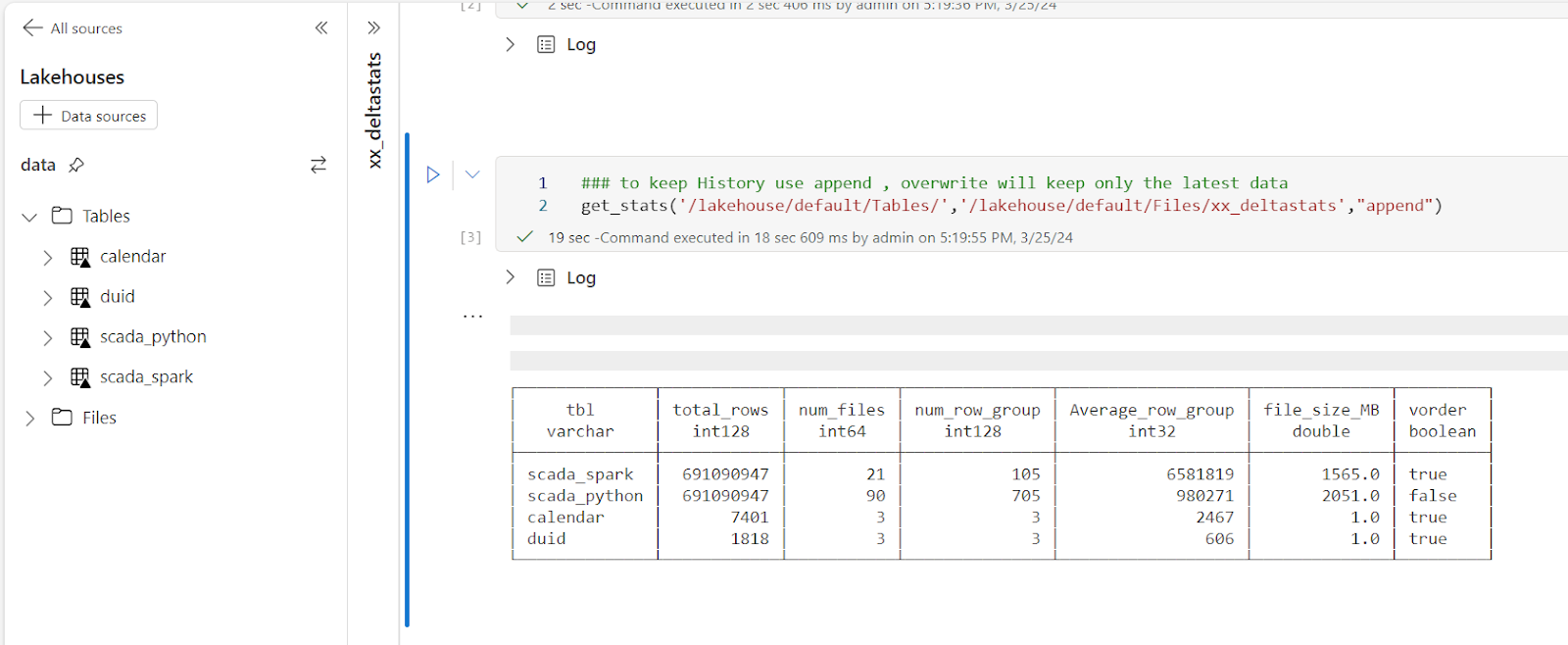
With the recent release of Deltalake  Python,we can write to Fabric Onelake using a local Path, using this new functionality, I updated a notebook I had built previously to show quick stats for all the tables in a particular lakehouse, it is using pure Python, so not only it works in Fabric but offline too in your  local machine.

You can download the notebook here

All you have to do is to import the notebook and attach the lakehouse you want to analyze.

You can use append to keep the history.

It is using two packages

Delta Lake Python to get the delta stats

DuckDB to get the Parquet stats ( number of row groups)

And a SQL Query to combine the results from the two previous packages 🙂 

The notebook is very simple and show only the major metrics for a Table, total rows, number of files, number of row groups and average row per row group, and if V-Order is applied

If you want more details, you can use the excellent delta analyser  

Why you should care about Table stats

Fabric Direct Lake mode has some guardrails as of today for example, the maximum number of row groups in a table for F SKU  less than F64 is 1000, which is reasonably a very big number but if you do frequent small insert without Table maintenance you may end up quickly generate a lot of files ( and row groups), so it is important to be aware of the table layout,  especially when using Lakehouse, DWH do support automatic Table maintenance though.

Parting Thoughts 

Hopefully in the near future, Lakehouse will expose the basic information about Tables in the UI, in the meantime, you can use code as a workaround. 

Using Arrow and Delta Rust to transfer Data from BigQuery to Fabric OneLake

 It is just a POC on how using Arrow with Delta Rust can give you a very good experience when importing Data from BigQuery to OneLake 

For a serious implementation, you need to use Azure Key Vault and use it from Fabric Notebook, again this is just a POC

The core idea is that Delta Rust accept Arrow Table as an input without the need for a conversion to Pandas 

The Data is public, the Query scans nearly 19 GB of uncompressed data. 

It took less than 2 minutes to run the Query and Transfer the Data !!! That’s GCP Tokyo Region To Azure Melbourne and nearly a minute and 25 second to write the Data to Delta Table using a small single Node ( 4 vCores and 32 GB of RAM) 

Show me the Code.

You can download the notebook here. although The Package is written in Rust, they do have a great Python binding which I am using .

Make sure you Install google-cloud-bigquery[‘all’] to have the Storage API Active otherwise it will be extremely slow 

Notice though that using Storage API will incur egress Cost from Google Cloud

and use Fabric Runtime 1.1 not 1.2 as there is a bug with Delta_Rust Package.

Nice Try, how about vOrder ?

Because the data is loaded into a staging area, the lack of vOrder should not be a problem as ultimately it will be further transformed into the DWH ( it is a very wide table), as a matter of fact, one can load the data as just Parquet files. 

Obviously it works too with Spark, but trying to understand why datetime 64 whatever !!! and NA did not works well with Spark Dataframe was a nightmare.

I am sure it is trivial for Spark Ninja, but watching a wall of java errors was scary, honestly I wonder why Spark can’t just read Arrow without Pandas in the middle ?

With Delta Rust it did just work, datetime works fine, time type though is not supported but it gave me a very clear error message ( for now I cast it as string , will figure out later what to do with it) , but it was an enjoyable experience.

As it is just  code, you can implement more complex scenarios like incremental refresh, or merge and all those fancy data engineering things easily using Spark or stored procedure or any Modern Python Library. 

Running a simple Query to make sure it is working

Take Away

The Notebook experience in Fabric is awesome, I hope we get some form of secret management soon, and Delta Rust is awesome !!!