Track BI Engine using information Schema

BigQuery team recently released a fantastic new functionality, when using BI engine, all the statistics are saved in the INFORMATION_SCHEMA.

When using BI Engine one major pain was it was not very clear why sometimes the Query is not accelerated, yes you can see the the result in the console, but it not very sustainable when you run a lot of queries.

Here is a query I use to tack the workload in a particular region

SELECT
  job_id,
  (case when bi_engine_statistics.bi_engine_mode is null then "BigQuery" else bi_engine_statistics.bi_engine_mode end) as Engine_Mode ,
  user_email,
  xx.project_id,
  query,
  creation_time,
  start_time,
  cache_hit,
  TIMESTAMP_DIFF(end_time,start_time,MILLISECOND)/1000 AS duration,
  SUM(total_bytes_processed/1000000000) AS GB,
  SUM(total_bytes_billed/1000000000) AS GB_billed,
  STRING_AGG(t.message) AS reason
FROM
  `region-asia-northeast1`.INFORMATION_SCHEMA.JOBS_BY_PROJECT xx
LEFT JOIN
  UNNEST(bi_engine_statistics.bi_engine_reasons) AS t
WHERE
  creation_time >= '2022-01-01'
GROUP BY
  1,
  2,
  3,
  4,
  5,
  6,
  7,
  8,
  9

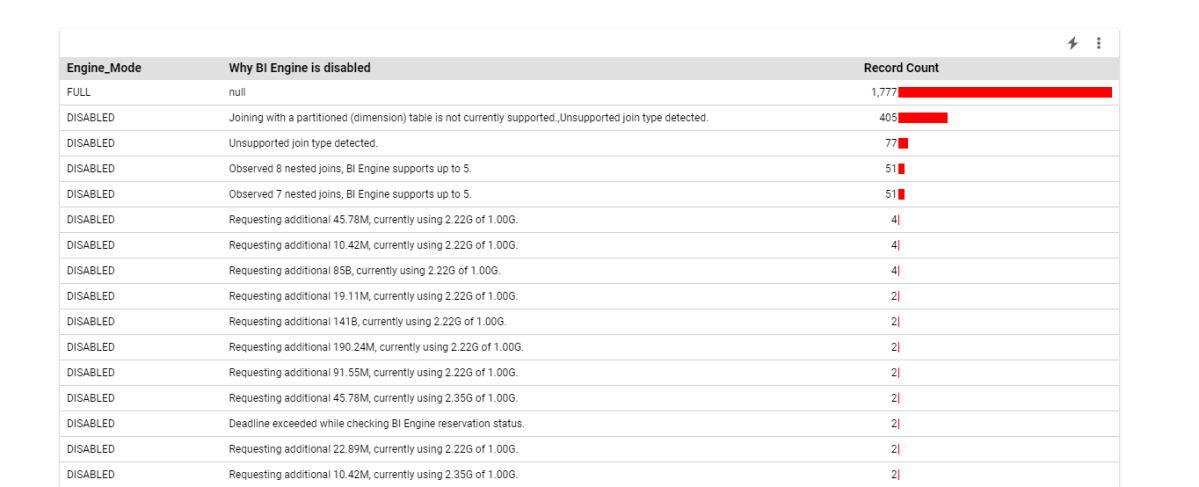
And to make the results easy to explore, I load the query results in Google Data Studio.

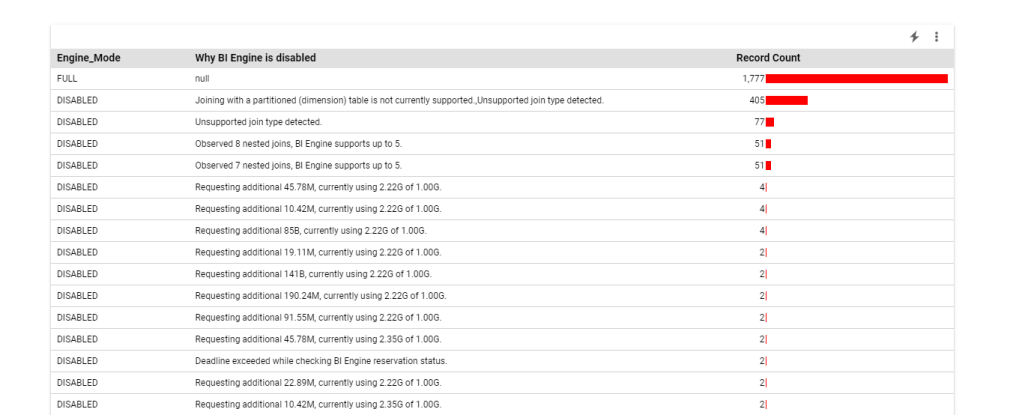
For example, I aggregate the reason why the Query was not accelerated by BI Engine

Based on the results, you can decide for a some mitigation, The Obvious one is to increase the reservation, or if you hit some current limitation of BI Engine change the Data Model.

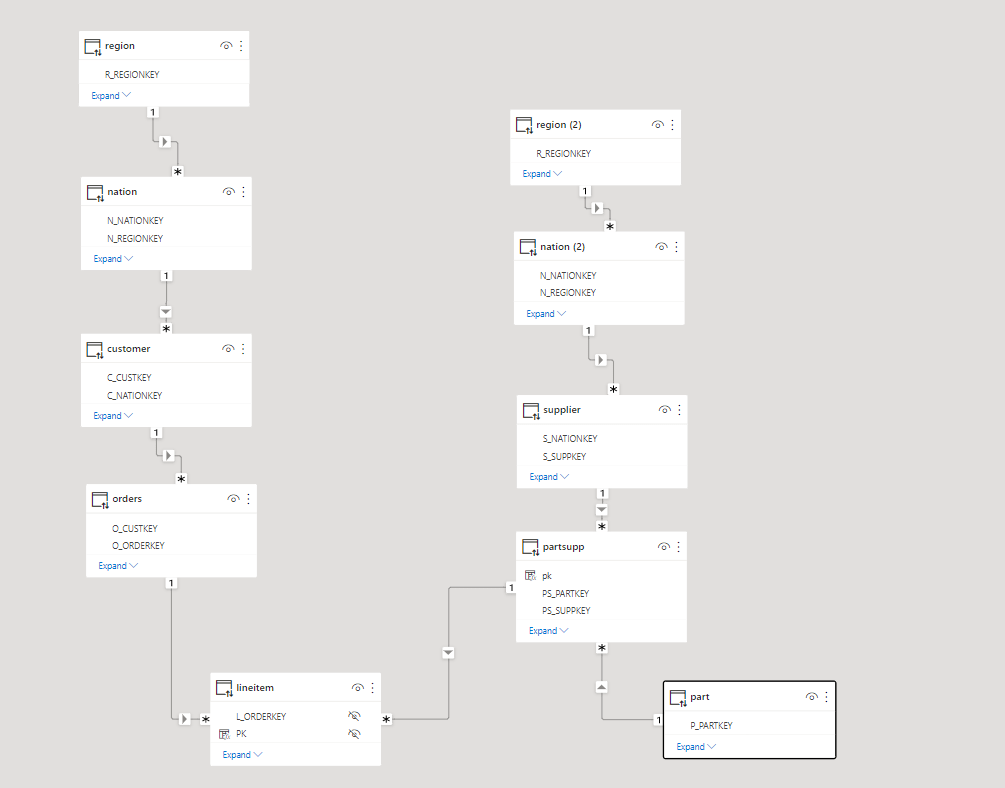
In this particular case I am using TPC-H Data Model as an example, although it is very useful for benchmark, it is not really optimized for a BI Workload, joins are expensive.

Star Schema for the Win

As of this writing ( it may change anytime though), BI Engine support a Star Schema with up to 5 unpartitioned dimension tables.

You can denormalize the tables supplier and customer by merging nation and region, and orders and lineitem to get rid of join to a partitioned table.

Alternatively if the data don’t change much, you can go rogue and Build a giant flat table.

Or use Nested Data Model, although I did find it very complex to understand just conceptually, and there are no easy to use front end tool to take advantage of it.

Usually Data Modeling can be bring some strong arguments, Star vs Flat vs Snowflake, I think it does not really matter, what is important in the Case of BigQuery, any interactive Workload has to be accelerated by BI Engine, the extra boost in speed and specially the cost is very hard to ignore, so Model any Schema you want as long as BI Engine support it.

I am keeping the stats in the public report

Poor man’s snapshot using PowerBI Dataflow

It is a quick Hack and maybe useful, let’s say you want to keep a snapshot of a previous data, for example you have a dimension table and you want to see how the data has changed between multiple load.

This Scenario was famously hard to do in PowerBI, because when you load a table a into PowerBI Database, by default it will overwrite the existing data, there is an option for incremental refresh, but it assume your data change daily or at least regularly.

The canonical solution for this scenario nowadays is to attach a workspace to an Azure Storage, unfortunately, it is very problematic for a couple of of reasons

– Business users don’t usually have access to Azure Resources.

– As of today, a PowerBI admin need to opt for that Option, which apply for all Workspace Admins, it would have being easier if that option can be granted to only some Workspace Admins.

XMLA End Point

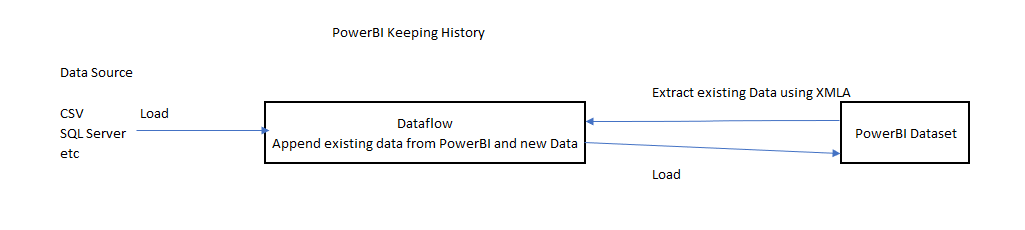
The Idea is very simple.

  • Getting already Loaded Data from a PowerBI using XMLA Endpoint ( See this blog for how to use it).
  • Load the new data using a Dataflow.
  • In the Same Dataflow you can append only the new Data, or any operation you want ( like merging new Data), it is very flexible, it can use any attribute not only Date
  • Just make sure there is a lag between Dataflow refresh and PowerBI Dataset refresh

Dataflow Should be Better

The Obvious Question ? because Dataflow keep snapshots of recent loads, why we need the extra step of attaching an Azure Storage, why not exposing this data using some extra option in the UI.

I think after all this years, it is time for Dataflow to tackle more use cases, can we have an option to append Data instead of overwrite ? or why not an easy to use upsert.

PowerBI made Data Modeling nearly trivial, Hopefully Dataflow can make Enterprise ETL available for everyone.

Optimize BigQuery BI Engine Memory usage by Using Materialized Views

I blog previously how to create a Materialized View in BigQuery, and Obviously I talk a lot about BI Engine, but do they work together ?

To test it, I built a simple report in PowerBI using live mode ( you can use your favorite BI tool), 1 fact table with 78 Millions records at the minute granularity and a small dimension Table

In every Selection PowerBI send a SQL Query which scan 1.79 GB

Then I created a Materialized View , notice I skipped the time dimension

SELECT
  xx.DUID,
  yy.StationName,
  yy.Region,
  yy.FuelSourceDescriptor,
  yy.Technology,
  yy.latitude,
  yy.longitude,
  yy.Tech,
  DAY,
  SUM(Mwh) AS Mwh
FROM
  `xxxxx.UNITARCHIVE` xx
INNER JOIN
  xxxxx.DUID_DIM yy
ON
  xx.DUID=YY.DUID
GROUP BY
  1,
  2,
  3,
  4,
  5,
  6,
  7,
  8,
  9

The Same Query will scan only 10 MB, and take 700 ms

Now let’s add 1 GB of BI Engine Reservation, the duration was reduced from 700 ms to 400 ms

But the nice surprise is this !!! The Memory used is only 2.78 MB

BI Engine was smart enough to load only the Materialized View instead of the Base Table, That’s a better usage of resources and will scale better.

Obviously if you select another column not available in the Materialized View ( like time), BI Engine will load the column Required automatically from the base Table.

PowerBI Hybrid Table, you can have your cake and Eat it too.

Hybrid table is a Clever technical solution to a very fundamental problem in Data Analytics, How to keep Data fresh and at the same time fast, PowerBI , Tableau, Qlik solved this problem by importing data to a local Cache, this solution work for most of the use cases, but as with any solution it has limitation.

  • If the Data Source is too big, you can’t simply keep importing to the local cache.
  • If the Data Source change very frequently, like every couple of minutes or second, importing become just not practical or very hard.

PowerBI Engine team came up with a very simple Idea, you can have both Mode in the same table, Historical data that don’t change is cached and today data is queried live as it changed very quickly, Patrick from Guy in the Cube has a great video , Andy has another Video but specific to Synapse Serverless

This functionality was released in the December 2021 edition of PowerBI , but unfortunately when I test it with BigQuery, it did not work, I reported the issue and I have to say, I was really impressed by the Product team, (Kudos to Christian Wade and Krystian Sakowski ), yesterday they released an updated version and it fixed the issue. (it works with Snowflake, Databricks etc)

Setup

it is literary just an extra box to click compared to the Previous incremental refresh User interface

Yes, Just like that, The Engine will generate table partitions behind the scene, if you want to know why PowerBI is so successful, it is because of stuff like this, take a very hard problem and make it extremely easy for Non Tech people to use.

The Data Model is very simple; one fact table with Data that change every couple of minutes, and a Date dimension in a Mixed mode, ( watch Patrick Video, he explain why)

Premium Only

Yes, it is a premium only feature, and obviously it works with Premium per User, I am not going to complain, someone needs to pay for those R&D cost, but it will be really nice if they release it to the PRO license too, it just feels Odd that a core feature of the Engine is tied to a particular license, we had this situation before with incremental refresh and they did release it even for the free license, I hope the same will happen with Hybrid Table.

Mixed Partitions

I published the report to the service, and used Tabular Editor to see what’s going on behind the scene (make sure you download the latest version of Tabular Editor, works with the free version too)

Image

As expected the Last Partition is Live Mode, and everything else is cached in PowerBI.

How it Works

I used DAX Studio to capture what the engine is doing when you run a Query

Image

PowerBI formula engine send two Queries one to the remote DB in my case BigQuery and the local Storage, you can clearly see the difference in speed

1 Day using DQ : 2 second ( the Query take 400 ms at the end point, But BigQuery has a very substandard ODBC driver)

13 Months worth of Data Cached : 47 ms

The Point is, if you can just import, do it, you will get the best performance and user experience

( At Work we have a sub 5 minute pipeline end to end from the Source DB to PowerBI).

The Devil is in the details

As far as I can tell, Formula Engine keep sending two Queries every time, even when the required data is cached already, obviously the Query from the external DB will return null results, in Theory , it should not be a big deal, Modern DW are fast specially with partitioning pruning.

Unfortunately no, only some Database can return a sub second null result set to PowerBI ( yes the Quality of the Driver is as important as the DB Engine itself)

Take Away

It is a very interesting solution worth testing for specific scenarios, but if you can get away with Importing data only, then it is still the best way, yes Hybrid Table reduce the Workload on the remote Database, but still you need a solid Database, getting a sub second Query from end to end is still a hard problem even for 1 day worth of data ( just test it, don’t forget concurrency )

I heard a different use cases, which I find very intriguing, some users want the other way around, recent Data as Import and historical Data as Direct Query, I guess it is useful if you have a real big fact Table.

A Surprising side effect of PowerBI Hybrid table,( maybe it was planned, who knows) Synapse Serverless in Direct Query mode looks now like a very good candidate to use, scanning one day of data is faster and an order of magnitude cheaper !!!

I still Hope that the Vetipaq Engine team surprise us in a future update and somehow let the Formula engine generate only 1 Query when all Data needed is in the Local cache.