First Look at Thoughtspot Modeling language TML

I have a bit of an obsession with Modeling language, I am referring to semantic model language like PowerBI tabular Model , Looker LookML and the new alpha release of dbt metrics and Google Malloy

For some reason, TML the modeling language of thoughtspot is not getting enough attention, although IMO, it is one of the most mature offering right now in the so called “Modern” Data Stack.

This is not a review, I spend some time in the weekend playing with the free trial, (no credit card required , and you don’t need to talk to a sales department) and I thought it is worth sharing some notes.

For Any test, I always start with the same Model, 3 facts tables with different granularity and a couple of common dimensions, because this is the kind of Model I use at Work with PowerBI.

My Data is loaded into BigQuery, connecting to the database in Live Mode and selecting the Tables was very straightforward, adding the relationship between Tables was very easy too, using a simple GUI.

Here we go, a Multi facts ( AKA Galaxy Schema ) is supported out of the box, in other BI tool Like Tableau for example, you can have only 1 Base Table, here like PowerBI it is not an issue.
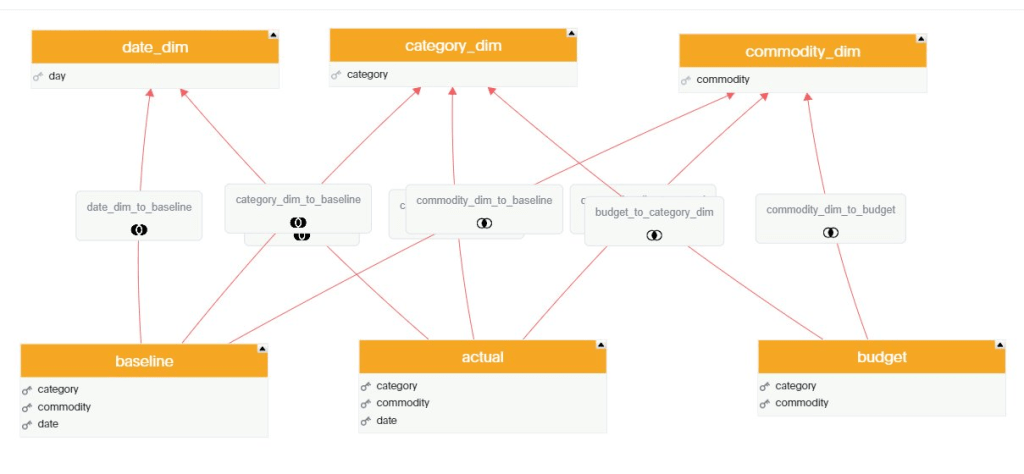
The Join between Tables are Progressive, only the joins need between the selected columns in the visual will be used.

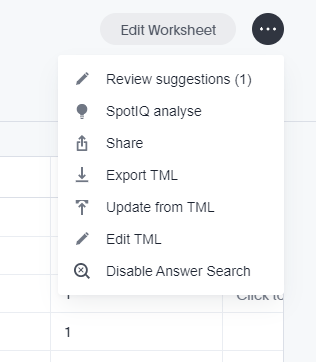
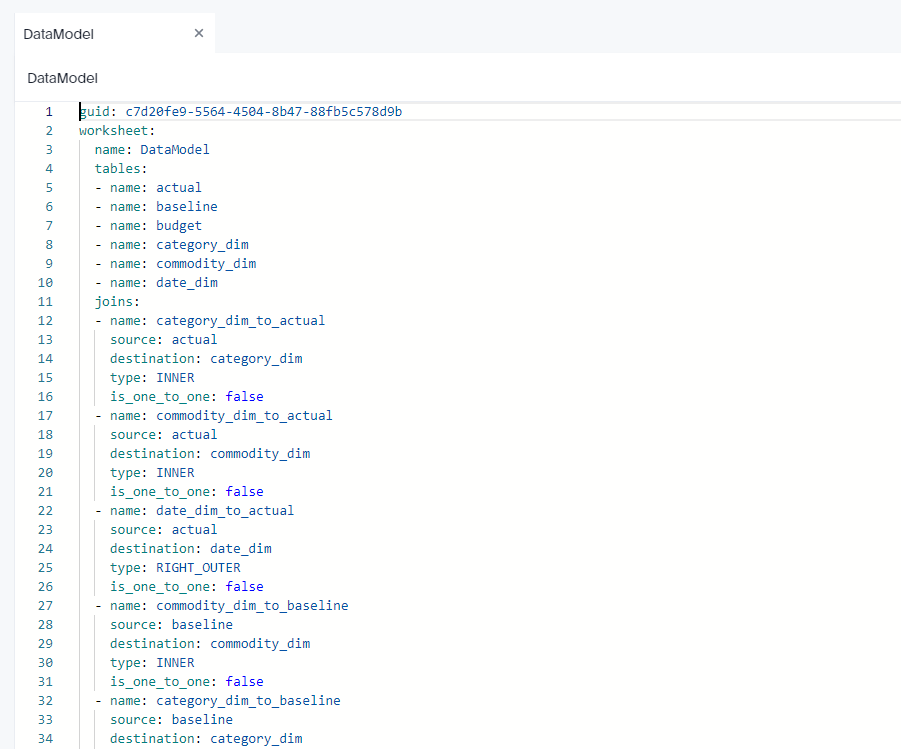
Although I build the Model using GUI, the code is written behind the scene, you can build it by hand or edit it, or simply import it.
Complex Measures

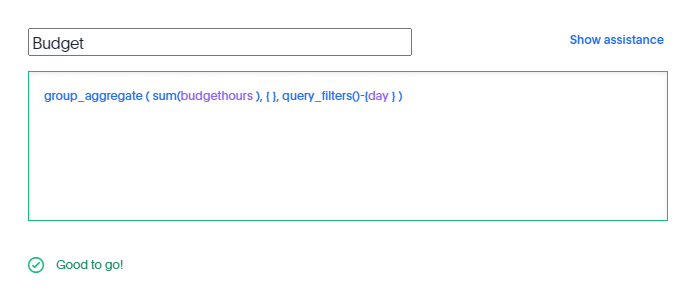
in this Model the table Budget don’t have a date dimension ( 1 Km of Electric cable is the same independent of time), to model that, I need to tell TML that the measure budget should ignore the date dimension
Calculating cumulative sum is straightforward,
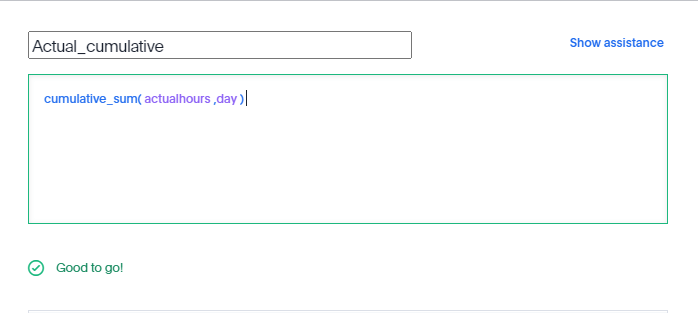
All sort of level of details calculation are supported, including measures from different tables.

All SQL

As far as I can tell and based on the SQL Generated by Thoughtspot , there no Post processing for the calculation, Like PowerBI Formula Engine and Looker Merge results, all the calculations are done at the Source Database level, there is even a very nice visual Query Planner

And here is an example of the Query generated, I think it use the concept of Drill across
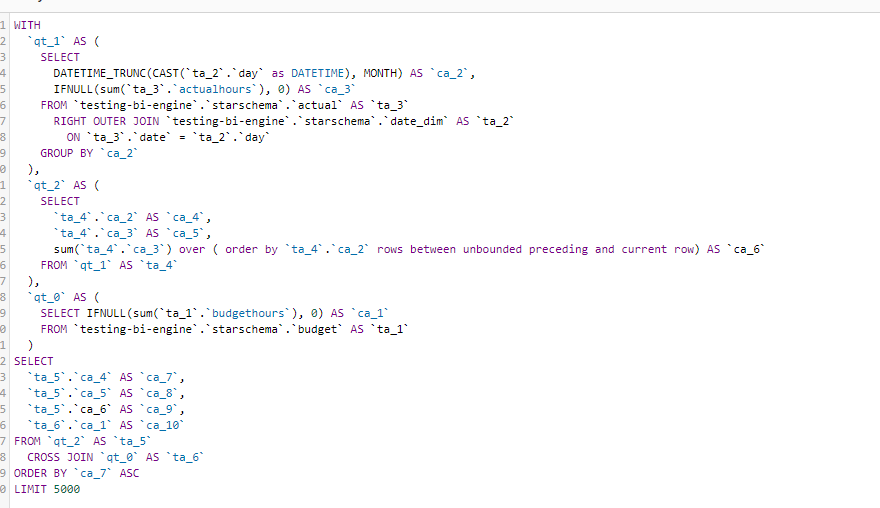
You can see how sum cumulative was translated to SQL sum () over (order by)

Take Away

There is a lot of discussion nowadays about the need for a pure logical metric layer, where all the calculations are done by the DWH, unfortunately most of the proposals are either immature or sometimes are just magical thinking, TML is a damn solid language and a Query generator, and the guys building it knows what they are talking about.

I think if thoughtspot somehow decide to release TML as an open source Project with the Query generator it will change the current market dynamic, The Cloud Data Warehouse are getting really Fast and they deserve a decent Semantic Layer.

First Look at Dynamic M Query parameter using SQL Server

Edit 26 May 22 Please vote to have table function available in Datamart

With PowerBI February 2022 release , finally we can use M Dynamic parameter with SQL Server in Direct Query Mode, I was really excited, I had a couple of patterns where I used M Parameter with BigQuery to do calculation on the fly that iare not supported natively in PowerBI, for example Geospatial calculation.

My first example was dynamic changing of dimension, it just works as it is relatively simple, see example here, very excited it works.

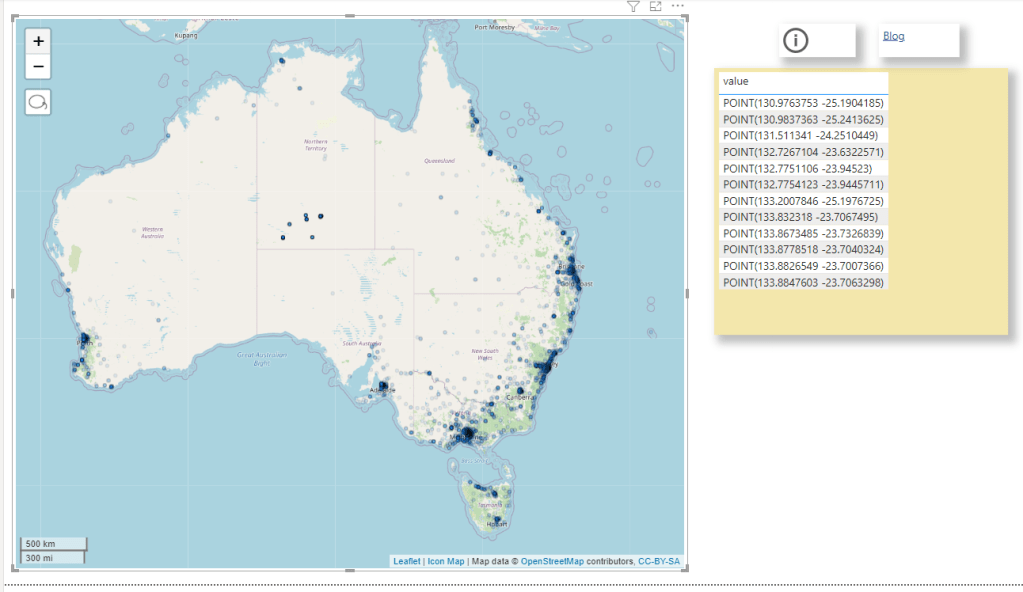
Then I tried to port this example from BigQuery, basically you select some points in a map, and you get back the polygon and the area, The calculation has to be done on the fly, pre calculating the results is not practical, generating all possible calculation is just too much.

The first step of getting the points selected as a nice list was very easy, see code here

let
TagsList =  if Type.Is(Value.Type(tag_selection), List.Type) then 

     Text.Combine({"'" , Text.Combine(tag_selection, ",") , "'"})

    else

Text.Combine({"'" , tag_selection , "'"}),


finalQuery= "select 1 as poly, value from string_split("& TagsList&",',') ",  

      
Source = Sql.Database("XXXXXXXX", "DB", [Query=finalQuery])

in
    Source

I selected some points in Icon Map and dynamic M parameter get populated, I was really excited, The hard part is done and all I need is to write some T-SQL

T-SQL Rabbit hole

I am no SQL expert by any means, by some weird coincidence, my first Database was BigQuery, (I used MS Access long time ago ), so this is the first time I tried to use T-SQL in a non trivial way ( at work I use T-SQL to retrieve data, maybe doing some joins and stuff in that nature but no GIS for sure).

The Good thing is , the amount of resources available on SQL Server is phenomenal, I got some indication on Stack overflow, but something weird happen.

I start writing T-SQL code in SSMS and it works fine, when I copy it to PowerBI, it generate errors, I was really angry and can’t understand what’s going on, I thought it is something weird about PowerBI.

I know that PowerBI, embed any custom SQL inside a Subquery, that’s very standard, actually Tableau does the same as well as Google Data Studio.

Turn out, SQL Server don’t support CTE inside a subquery

Chris has blogged about it here, that was very kind of him, basically his points is just write a view in a database, it is better to have the logic upstream anyway, which totally make sense, except it is not a realistic solution, Business users don’t just get write access to the database, actually they are very lucky to get even read access.

Update : we now have Datamart which will change everything.

Track BI Engine using information Schema

BigQuery team recently released a fantastic new functionality, when using BI engine, all the statistics are saved in the INFORMATION_SCHEMA.

When using BI Engine one major pain was it was not very clear why sometimes the Query is not accelerated, yes you can see the the result in the console, but it not very sustainable when you run a lot of queries.

Here is a query I use to tack the workload in a particular region

SELECT
  job_id,
  (case when bi_engine_statistics.bi_engine_mode is null then "BigQuery" else bi_engine_statistics.bi_engine_mode end) as Engine_Mode ,
  user_email,
  xx.project_id,
  query,
  creation_time,
  start_time,
  cache_hit,
  TIMESTAMP_DIFF(end_time,start_time,MILLISECOND)/1000 AS duration,
  SUM(total_bytes_processed/1000000000) AS GB,
  SUM(total_bytes_billed/1000000000) AS GB_billed,
  STRING_AGG(t.message) AS reason
FROM
  `region-asia-northeast1`.INFORMATION_SCHEMA.JOBS_BY_PROJECT xx
LEFT JOIN
  UNNEST(bi_engine_statistics.bi_engine_reasons) AS t
WHERE
  creation_time >= '2022-01-01'
GROUP BY
  1,
  2,
  3,
  4,
  5,
  6,
  7,
  8,
  9

And to make the results easy to explore, I load the query results in Google Data Studio.

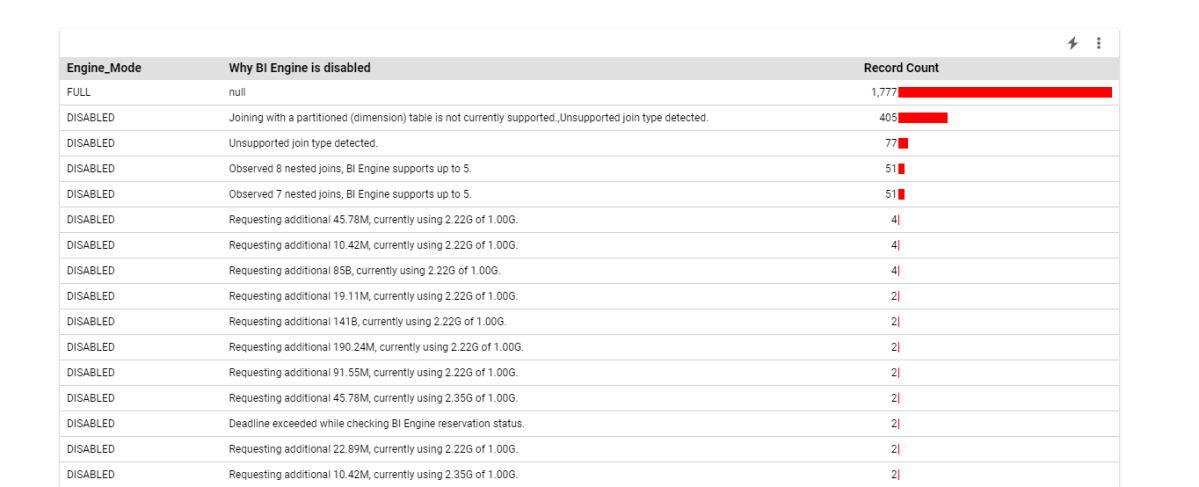
For example, I aggregate the reason why the Query was not accelerated by BI Engine

Based on the results, you can decide for a some mitigation, The Obvious one is to increase the reservation, or if you hit some current limitation of BI Engine change the Data Model.

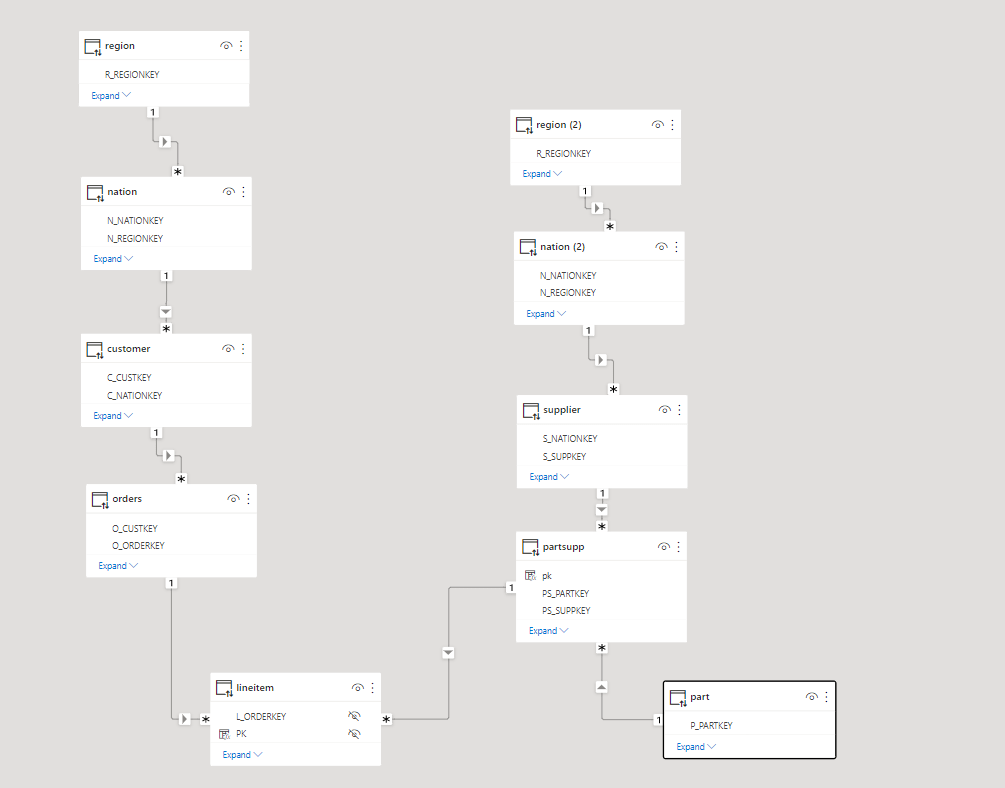
In this particular case I am using TPC-H Data Model as an example, although it is very useful for benchmark, it is not really optimized for a BI Workload, joins are expensive.

Star Schema for the Win

As of this writing ( it may change anytime though), BI Engine support a Star Schema with up to 5 unpartitioned dimension tables.

You can denormalize the tables supplier and customer by merging nation and region, and orders and lineitem to get rid of join to a partitioned table.

Alternatively if the data don’t change much, you can go rogue and Build a giant flat table.

Or use Nested Data Model, although I did find it very complex to understand just conceptually, and there are no easy to use front end tool to take advantage of it.

Usually Data Modeling can be bring some strong arguments, Star vs Flat vs Snowflake, I think it does not really matter, what is important in the Case of BigQuery, any interactive Workload has to be accelerated by BI Engine, the extra boost in speed and specially the cost is very hard to ignore, so Model any Schema you want as long as BI Engine support it.

I am keeping the stats in the public report

Poor man’s snapshot using PowerBI Dataflow

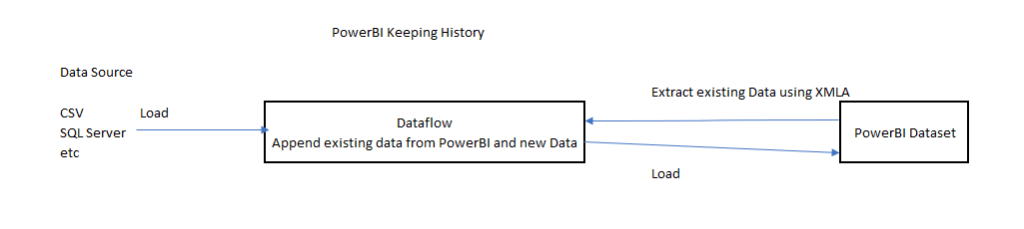
It is a quick Hack and maybe useful, let’s say you want to keep a snapshot of a previous data, for example you have a dimension table and you want to see how the data has changed between multiple load.

This Scenario was famously hard to do in PowerBI, because when you load a table a into PowerBI Database, by default it will overwrite the existing data, there is an option for incremental refresh, but it assume your data change daily or at least regularly.

The canonical solution for this scenario nowadays is to attach a workspace to an Azure Storage, unfortunately, it is very problematic for a couple of of reasons

– Business users don’t usually have access to Azure Resources.

– As of today, a PowerBI admin need to opt for that Option, which apply for all Workspace Admins, it would have being easier if that option can be granted to only some Workspace Admins.

XMLA End Point

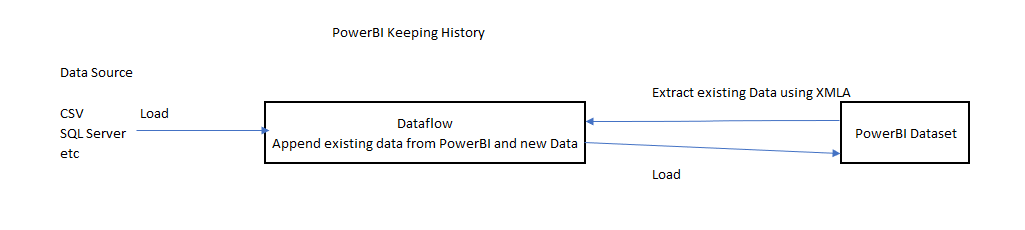
The Idea is very simple.

  • Getting already Loaded Data from a PowerBI using XMLA Endpoint ( See this blog for how to use it).
  • Load the new data using a Dataflow.
  • In the Same Dataflow you can append only the new Data, or any operation you want ( like merging new Data), it is very flexible, it can use any attribute not only Date
  • Just make sure there is a lag between Dataflow refresh and PowerBI Dataset refresh

Dataflow Should be Better

The Obvious Question ? because Dataflow keep snapshots of recent loads, why we need the extra step of attaching an Azure Storage, why not exposing this data using some extra option in the UI.

I think after all this years, it is time for Dataflow to tackle more use cases, can we have an option to append Data instead of overwrite ? or why not an easy to use upsert.

PowerBI made Data Modeling nearly trivial, Hopefully Dataflow can make Enterprise ETL available for everyone.