Building an Ad Hoc Disk Cache with DuckDB and Fabric Notebook

This weekend, I came up with an idea to speed up query execution when running DuckDB inside a Fabric Notebook—and it actually works! 🎉

You can download the notebook here


Approach

  1. Parse the Query
    • Use SQGLot to parse the SQL query and extract the list of Delta tables that need to be scanned from OneLake.
  2. Track Table Metadata
    • Capture the Delta table version and ID to ensure consistency.
  3. Selective Copy
    • Copy only the necessary tables locally to satisfy the query.
  4. Reuse Cached Data
    • For subsequent queries, check if the Delta table has changed:
      • If unchanged, read data from the local SSD.
      • If new tables are required, repeat the caching process for those tables.

Why It Works

This approach effectively creates a temporary, ad hoc disk cache in the notebook. The cache:

  • Persists only for the session’s duration.
  • Evicts automatically when the session ends.
  • Ensures consistency by validating whether the Delta table in OneLake has changed before reusing cached data.
    • Thanks to the Delta format, this validation is a relatively cheap operation.
  • Leverages the user-level isolation in Fabric notebooks to eliminate risks of data inconsistency.

Despite its simplicity, this method has proven to be highly effective for query acceleration! 🚀


Limitations

Yes, I know—the cache is rather naïve since it loads the entire table. Other systems go further by:

  • Copying only the columns needed for the query.
  • Fetching just the row groups relevant to the query.

However, these optimizations would need to be implemented natively by the engine itself.


Industry Gap

Although virtually all Python engines (e.g., Polars, DataFusion, etc.) support reading formats like Delta and Iceberg, almost none offer built-in disk or RAM caching. This lack of caching support limits performance optimization opportunities.

Hopefully, this will change in the future, enabling more efficient workflows out of the box.

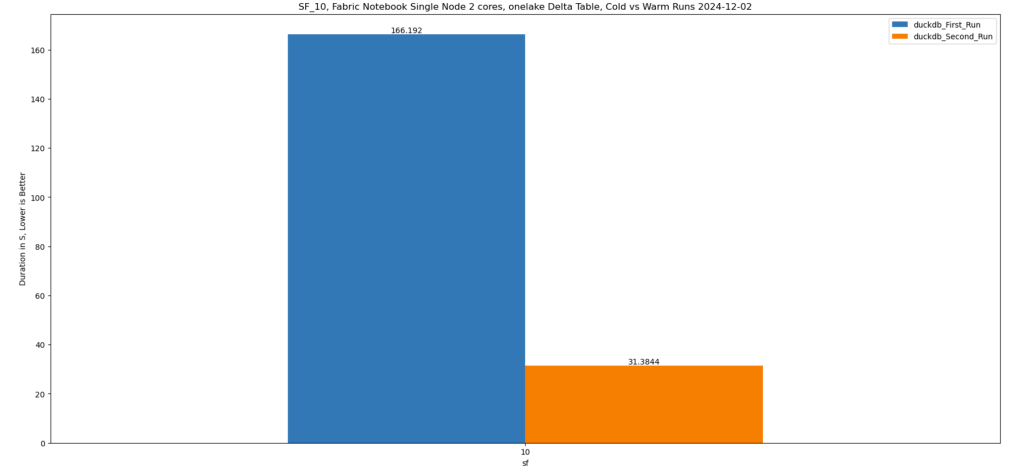
Btw, this is really fast !!! just a hint, this is faster than the results obtained by a state of the art DWH in 2022 !!!
Reading Delta table in Fabric Python notebook without attaching a lakehouse. 

This is just a code snippet on how to read a delta table using pure Python (no Spark) without attaching a lakehouse.

First in spark notebook you need to install those two package ( this step will be unnecessary with pure Python notebook)

%pip install deltalake
!pip install duckdb

Then get the abfss path of the table, it can be anywhere, even in different workspace.

from deltalake import DeltaTable
import duckdb
access_token = notebookutils.credentials.getToken('storage')
storage_options=     {"bearer_token": access_token, "use_fabric_endpoint": "true"}
TAXI = DeltaTable('abfss://xxx@onelake.dfs.fabric.microsoft.com/NY.Lakehouse/Tables/ny/taxi',storage_options = storage_options).to_pyarrow_dataset()

For this example the table is not small ( 1.3 billion rows) , having filter pushdown is a must for a good user experience, for smaller data it does not matter.

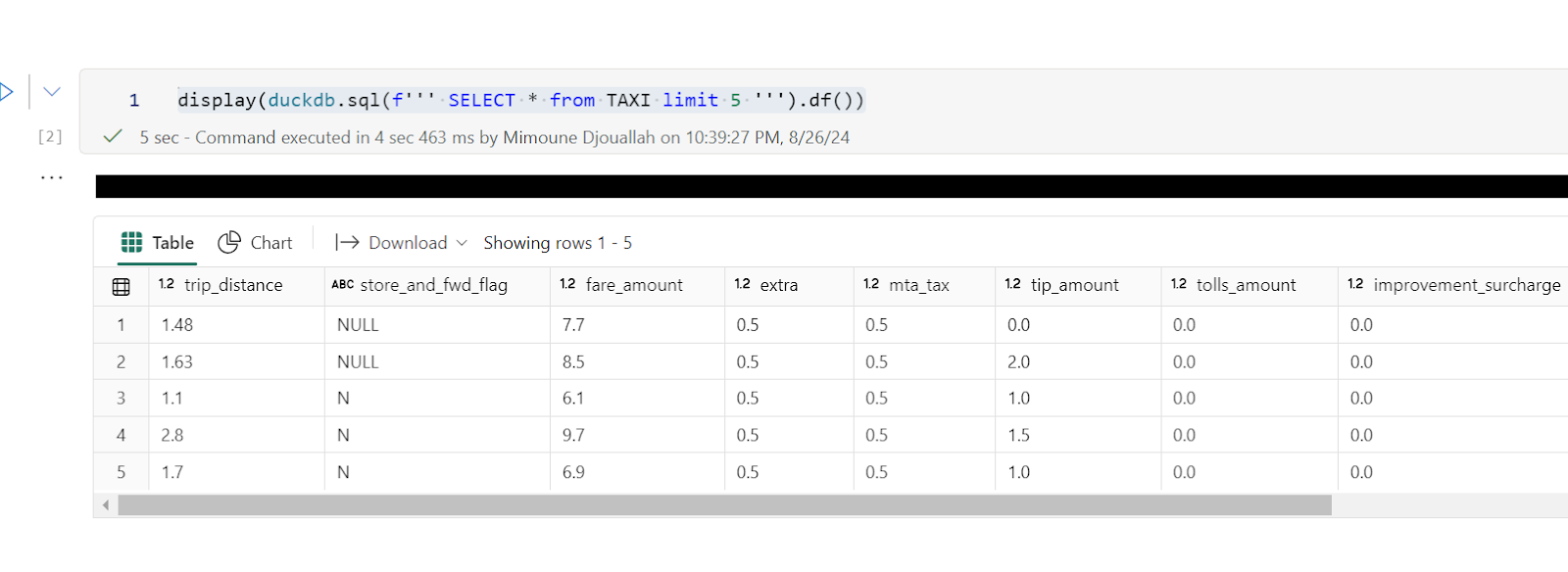
let’s show 5 rows, the limit is pushed to the source, we don’t need to scan 20 GB just to see some rows.

display(duckdb.sql(f''' SELECT * from TAXI limit 5 ''').df())

Note : you can use any Engine that understand arrow dataset , personally I prefer duckdb but it is a personal taste

Now let’s filter the data only for this year, again, filter pruning works, what I really like ; although the table is not partitioned somehow the scan is leveraging the stats in the delta table log

data = duckdb.sql(f''' SELECT date ,  ROUND (SUM (fare_amount),0) as TotalFares , ROUND (AVG (fare_amount),0) as AVGFares
             FROM TAXI where year = 2024 GROUP BY ALL ''').df()
display(data)

Not everything is perfect yet 😦

max (column) , count(*) unfortunately does not use the delta log and trigger a whole table scan.

let’s show some interactive chart

I have the aggregated data already, using the excellent library Altair, I can easily plot an interactive chart

import altair as alt
brush = alt.selection_interval()
details = alt.Chart(data).mark_bar().encode(alt.X('date:T'),  alt.Y('TotalFares:Q'), tooltip=[alt.Tooltip('date:T',format='%Y-%m-%d %H'),'TotalFares:Q']
).properties( width=1400,  height=400 ).add_params( brush)

summary = alt.Chart(data).mark_square().encode( alt.X('date:T'), alt.Y('AVGFares:Q'), tooltip=['AVGFares:Q'] ).properties(  width=1400,  height=400).transform_filter( brush)
details & summary

honestly, I did not know how much covid had impacted the Taxi industry 😦

You can use Other Engines too

as I said it is not specific to duckdb, for example using Polars

import polars as pl
access_token = notebookutils.credentials.getToken('storage')
storage_options=     {"bearer_token": access_token, "use_fabric_endpoint": "true"}
scada = pl.scan_delta('abfss://xxx@onelake.dfs.fabric.microsoft.com/NY.Lakehouse/Tables/ny/taxi', storage_options=storage_options)
x = scada.limit(10).collect()

and Daft

import daft
from daft.io import IOConfig, AzureConfig
io_config = IOConfig(azure=AzureConfig(storage_account="onelake",endpoint_url="https://onelake.blob.fabric.microsoft.com",bearer_token=access_token))
df = daft.read_deltalake('abfss://xxx@onelake.dfs.fabric.microsoft.com/NY.Lakehouse/Tables/ny/taxi', io_config=io_config)
df

Process 1 Billion rows of raw csv in Fabric Notebook for less than 20 Cents 

The Use case

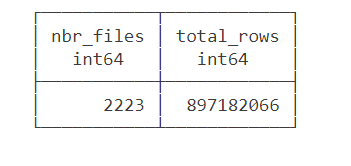
Data source is around 2200 files with a total of 897 Million rows of weird csv files (the file has more columns than the header) , This is a real world data not some synthetic dataset, it is relatively small around 100 GB uncompressed.

The Pipeline will read those files and extract clean data from it using non trivial transformation and save it as a Delta Table.

we used the smallest Compute available in Fabric Notebook which is 4 cores with 32 GB. to be clear this is a real single node (not 1 driver and 1 executor), Although the Runtime is using Spark, All the Engines interact Directly with the Operating system, as far as I can tell, Spark has a very minimum overhead when not used Directly by the Python code.

You need to pick the Engine

Nowadays we have plenty of high quality Calculation Engines,  but two seems to gain traction (Polars and DuckDB) , at least by the number of package downloaded and the religious wars that seems to erupt occasionally in twitter 🙂

For a change I tried to use Polars, as I was accused of having a bias toward DuckDB, long story short, hit a bug with Polars , I tried Datafusion too but did managed to get a working code, there is not enough documentation on the web, after that I did test Clickhouse chdb, but find a bug, anyway the code is public, feel free to test your own Engine.

So I ended up using DuckDB, the code is published here , it is using only 60 files as it is available publicly, the whole archive is saved in my tenant (happy to share it if interested) 

The results is rather surprising (God bless Onelake throughput), I am using the excellent Python Package Delta Lake to write to Onelake

26 minutes, that’s freaking fast, using Fabric F2, the total cost will be

0.36 $/Hour X(26/60) =  15 Cents

you need to add a couple of cents for Onelake Storage Transactions.

As far as I can tell, this is maybe one of the cheapest option in the Market.

0.36 $/Hour is the rate for pay as you go, if you have a reservation then it is substantially cheaper.

because it is Delta Table Then Any Fabric Engine ( SQL, PowerBI, Spark) can read it.

What’s the catch ?

Today DuckDB can not write directly to Delta Table ( it is coming though eventually) instead it will export data to Delta Lake writer using Arrow Table, it is supposed to be zero copy but as far as I can tell, it is the biggest bottleneck and will generate out of memory errors , the solution is easy ; process the files in chunks , not all at once

#############################################
list_files=[os.path.basename(x) for x in glob.glob(Source+'*.CSV')]
files_to_upload_full_Path = [Source + i for i in list_files]
if len(files_to_upload_full_Path) >0 :
  for i in range(0, len(files_to_upload_full_Path), chunk_len):
    chunk = files_to_upload_full_Path[i:i + chunk_len]
    df=get_scada(chunk)
    write_deltalake("/lakehouse/default/Tables/scada_duckdb",df,mode="append",engine='rust',partition_by=['YEAR'],storage_options={"allow_unsafe_rename":"true"})
    del df

By experimentation, I notice 100 files works fine with 16 GB, 200 files with 32 GB etc

When exporting to Parquet, DuckDB managed the memory natively and it is faster too.

Native Lakehouse Is the future of Data Engineering

The combination of Open table format like Delta and Iceberg with ultra efficient Open Source Engine like DuckDB, Polars, Velox, datafusion all written in C++/Rust will give data engineers an extremely powerful tools to build more flexible and way cheaper data solutions.

if I have to give an advice for young Data engineers/Analysts, Learn Python/SQL.

Would like to thanks Pedro Holanda for fixing some very hard to reproduce bugs in the DuckDB csv reader.

And Ion Koutsouris for answering my silly questions about Delta lake writer.

Quickly view Delta Table stats

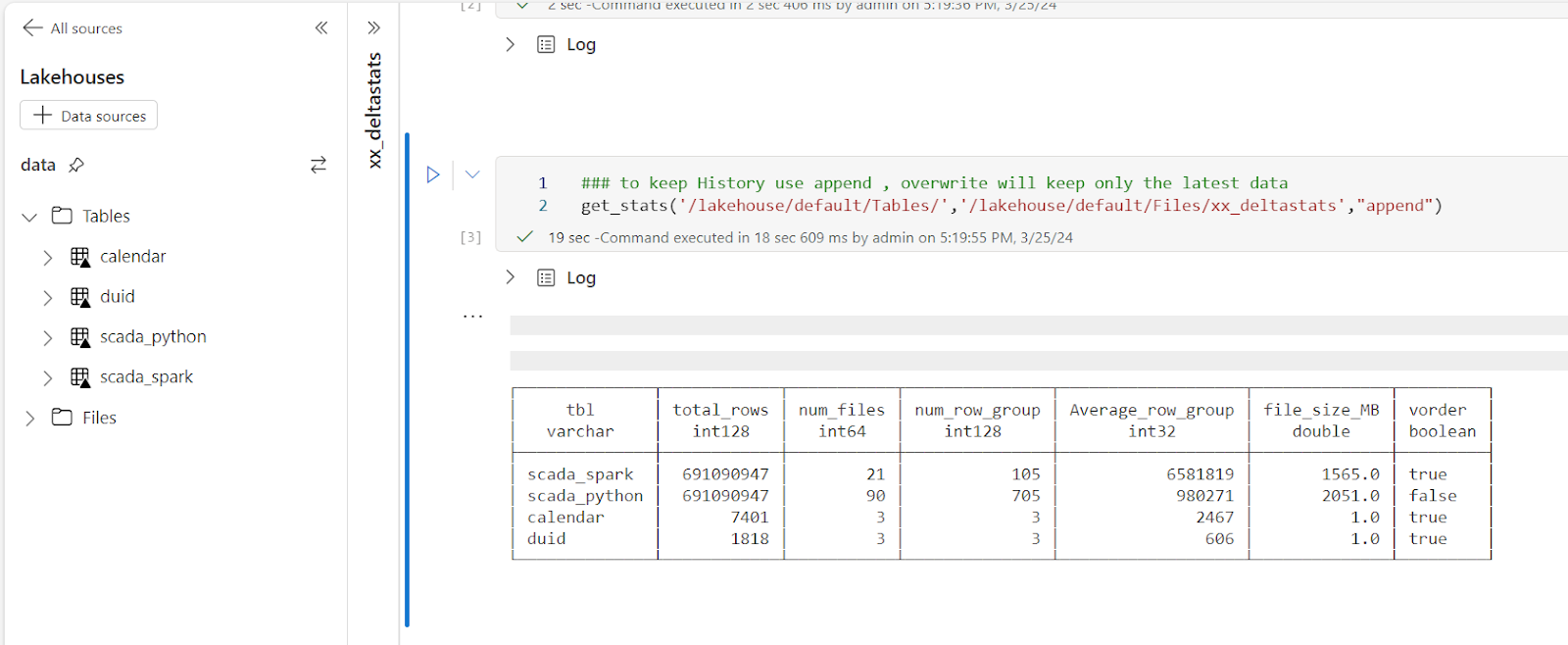
With the recent release of Deltalake  Python,we can write to Fabric Onelake using a local Path, using this new functionality, I updated a notebook I had built previously to show quick stats for all the tables in a particular lakehouse, it is using pure Python, so not only it works in Fabric but offline too in your  local machine.

You can download the notebook here

All you have to do is to import the notebook and attach the lakehouse you want to analyze.

You can use append to keep the history.

It is using two packages

Delta Lake Python to get the delta stats

DuckDB to get the Parquet stats ( number of row groups)

And a SQL Query to combine the results from the two previous packages 🙂 

The notebook is very simple and show only the major metrics for a Table, total rows, number of files, number of row groups and average row per row group, and if V-Order is applied

If you want more details, you can use the excellent delta analyser  

Why you should care about Table stats

Fabric Direct Lake mode has some guardrails as of today for example, the maximum number of row groups in a table for F SKU  less than F64 is 1000, which is reasonably a very big number but if you do frequent small insert without Table maintenance you may end up quickly generate a lot of files ( and row groups), so it is important to be aware of the table layout,  especially when using Lakehouse, DWH do support automatic Table maintenance though.

Parting Thoughts 

Hopefully in the near future, Lakehouse will expose the basic information about Tables in the UI, in the meantime, you can use code as a workaround.