As the year comes to a close, I decided to explore a fun yet somewhat impractical challenge: Can DuckDB run the TPC-DS benchmark using just 2 cores and 16 GB of RAM? The answer is yes, but with a caveat—it’s slow. Despite the limitations, it works!
Notice; I am using lakehouse mounted storage, for a background on the different access mode, you can read the previous blog
Data Generation Challenges
Initially, I encountered an out-of-memory error while generating the dataset. Upgrading to the development release of DuckDB resolved this issue. However, the development release currently lacks support for reading Delta tables, as Delta functionality is provided as an extension available only in the stable release.
Here are some workarounds:
Increase the available RAM.
Use the development release to generate the data, then switch back to version 1.1.3 for querying.
Wait for the upcoming version 1.2, which should resolve this limitation.
The data is stored as Delta tables in OneLake, it was exported as a parquet files by duckdb and converted to delta table using delta_rs (the conversion was very quick as it is a metadata only operation)
Query Performance
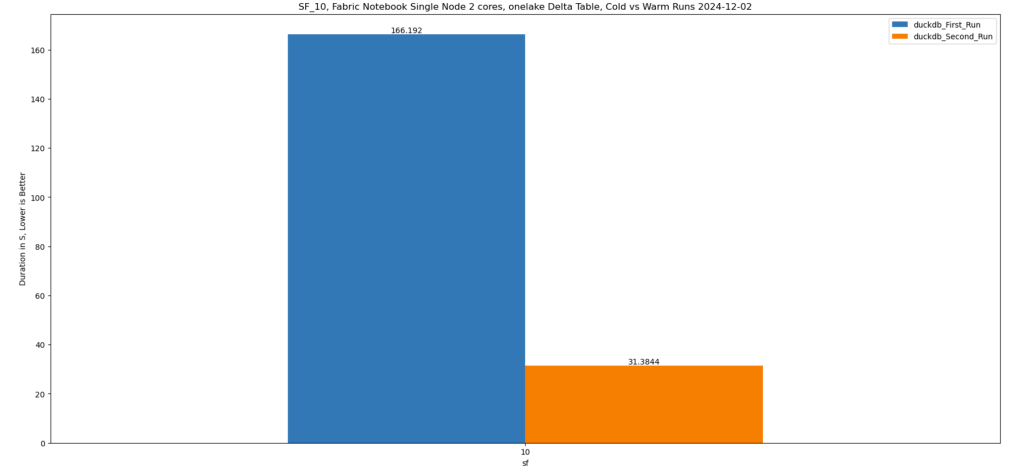
Running all 99 TPC-DS queries worked without errors, albeit very slowly( again using only 2 cores ).
I also experimented with different configurations:
4, 8, and 16 cores: Predictably, performance improved as more cores were utilized.
For comparison, I ran the same test on my laptop, which has 8 cores and reads my from local SSD storage, The Data was generated using the same notebook.
Results
Python notebook compute consumption is straightforward, 2 cores = 1 CUs, the cheapest option is the one that consume less capacity units, assuming speed of execution is not a priority.
Cheapest configuration: 8 cores offered a good balance between cost and performance.
Fastest configuration: 16 cores delivered the best performance.
Interestingly, the performance of a Fabric notebook with 8 cores reading from OneLake was comparable to my laptop with 8 cores and an SSD. This suggests that OneLake’s throughput is competitive with local SSDs.
Honestly, It’s About the Experience
At the end of the day, it’s not just about the numbers. There’s a certain joy in using a Python notebook—it just feels right. DuckDB paired with Python creates an intuitive, seamless experience that makes analytical work enjoyable. It’s simply a very good product.
Conclusion
While this experiment may not have practical applications, it highlights DuckDB’s robustness and adaptability. Running TPC-DS with such limited resources showcases its potential for lightweight analytical workloads.
This is not an official benchmark—just an exercise to experiment with the new Fabric Python notebook.
You can download the notebook and the results here
There is a growing belief that most structured data will eventually be stored in an open table format within object stores, with users leveraging various engines to query that data. The idea of data being tied to a specific data warehouse (DWH) may soon seem absurd, as everything becomes more open and interoperable.
While I can’t predict the future, 2024 will likely be remembered as the year when the lakehouse concept decoupled from Spark. It has become increasingly common for “traditional” DWHs or any Database for that matter to support open table formats out of the box. Fabric DWH, for instance, uses a native storage layer based on Parquet and publishes Delta tables for consumption by other engines. Snowflake now supports Iceberg, and BigQuery is slowly adding support as well.
I’m not particularly worried about those DWH engines—they have thousands of engineers and ample resources, they will be doing just fine.
My interest lies more in the state of open source Python engines, such as Polars and DataFusion, and how they behave with a limited resource environment.
Benchmarking Bias
Any test inherently involves bias, whether conscious or unconscious. For interactive queries, SQL is the right choice for me. I’m aware of the various DataFrame APIs, but I’m not inclined to learn a new API solely for testing. For OLAP-type queries, TPC-DS and TPC-H are the two main benchmarks. This time, I chose TPC-DS for reasons explained later.
Benchmark Setup
All data is stored in OneLake’s Melbourne region, approximately 1,400 km away from my location, the code will check if the data exists otherwise it will be generated, the whole thing is fully reproducible.
I ran each query only once, ensuring that the DuckDB cache, which is temporary, was cleared between sessions. This ensures a fair comparison.
I explicitly used the smallest available hardware since larger setups could mask bottlenecks. Additionally, I have a specific interest in the Fabric F2 SKU.
While any Python library can be used, as of this writing, only two libraries—DuckDB and DataFusion—support:
Running the 99 TPC-DS queries (DataFusion supports 95, which is sufficient for me).
Native Delta reads for abfss or at least local paths.
Python APIs, as they are required to run queries in a notebook.
Other libraries like ClickHouse, Databend, Daft, and Polars lack either mature Delta support or compatibility with complex SQL benchmarks like TPC-DS.
Why TPC-DS ?
TPC-DS presents a significantly greater challenge than TPC-H, with 99 queries compared to TPC-H’s 22. Its more complex schema, featuring multiple fact and dimension tables, provides a richer and more demanding testing environment.
Why 10GB?
The 10GB dataset reflects the type of data I encountered as a Power BI developer. My focus is more on scaling down than scaling up. For context:
The largest table contains 133 million rows.
The largest table by size is 1.1GB.
Admittedly, TPC-DS 10GB is overkill since my daily workload was around 1GB. However, running it on 2 cores and 16GB of RAM highlights DuckDB’s engineering capabilities.
btw, I did run the same test using 100GB and the python notebook with 16 GB did works just fine, but it took 45 minutes.
OneLake Access Modes
You can query OneLake using either abfss or mounted storage. I prefer the latter, as it simulates a local path and libraries don’t require authentication or knowledge of abfss. Moreover, it caches data on runtime SSDs, which is an order of magnitude faster than reading from remote storage. Transactions are also included in the base capacity unit consumption, eliminating extra OneLake costs.
It’s worth noting that disk storage in Fabric notebook is volatile and only available during the session, while OneLake provides permanent storage.
You can read more about how to laverage DuckDB native storage format as a cache layer here
Onelake Open internet throughput
My internet connection is not too bad but not great either, I managed to get a peak of 113 Mbps, notice here the extra compute of my laptop will not help much as the bottleneck is network access.
Results
The table below summarizes the results across different modes, running both in Fabric notebooks and on my laptop.
DuckDB Disk caching yielded the shortest durations but the worst individual query performance, as copying large tables to disk takes time.
Delta_rs SQL performance was somewhat erratic.
Performance on my laptop was significantly slower, influenced by my internet connection speed.
Mounted storage offered the best overall experience, caching only the Parquet files needed for queries.
And here is the geomean
Key Takeaways
For optimal read performance, use mounted storage.
For write operations, use the abfss path.
Having a data center next to your laptop is probably a very good idea 🙂
Due to network traffic, Querying inside the same region will be faster than Querying from the web (I know, it is a pretty obvious observation)
but is Onelake throughput good ?
I guess that’s the core question, to answer that I changed the Python notebook to use 8 cores, and run the test from my laptop using the same data stored in my SSD Disk, no call to onelake, and the results are just weird
Reading from Onelake using mounted storage in Fabric Notebook is faster than reading the same data from my Laptop !!!!
Looking Ahead to 2025
2024 has been an incredible year for Python engines, evolving from curiosities to tools supported by major vendors. However, as of today, no single Python library supports disk caching for remote storage queries. This remains a gap, and I hope it’s addressed in 2025.
For Polars and Daft, seriously works on better SQL support
TL:DR; Delta_rs does not support Vorder so we need workaround, we notice by changing row groups size and sorting data we improved a direct Lake model from not working at all to returning queries in 100 ms
I was having another look at Fabric F2 (hint: I like it very much; you can watch the video here). I tried to use Power BI in Direct Lake mode, but it did not work well, and I encountered memory errors. My first instinct was to switch it to Fabric DWH in Direct Query mode, and everything started working again.
Obviously, I did complain to the Power BI team that I was not happy with the results, and their answer was to just turn on V-order, which I was not using. I had used Delta_rs to write the Delta table, and the reason I never thought about Parquet optimization was that when I used F64, everything worked just fine since that SKU has more hardware. However, F2 is limited to 3 GB of RAM.
There are many scenarios where Fabric is primarily used for reading data that is produced externally. In such cases, it is important to understand how to optimize those Parquet files for better performance.
Phil Seamark (yes the same guy who built a 3D games using DAX) gave me some very good advice: you can still achieve very good performance even without using V-order. Just sort by date and partition as a first step, and you can go further by splitting columns.
As I got the report working perfectly, even inside F2, I thought it was worth sharing what I learned.
Note: I used the term ‘parquet’ as it is more relevant than specifying the table format, whether it is a Delta table or Iceberg, after all this is where the data is stored, there is no standard for Parquet layout, different Engines will produce different files with massive difference in row group, file size, encoding etc.
Memory Errors
This is not really something you would like to see, but that’s life. F2 is the lowest tier of Fabric, and you will encounter hardware limitations.
When trying to run a query from DAX Studio, you will get the same error:
Rule of Thumb
Split datetime into date and time
It may be a good idea to split the datetime column into two separate columns, date and time. Using a datetime column in a relationship will not give you good performance as it usually has a very high number of distinct values.
Reduce Precision if You Don’t Need It
If you have a number with a lot of decimals, changing the type to decimal(18,4) may give you better compression.
Sorting Data
Find Column Cardinality
First, let’s check the cardinality of all columns in the Delta table. I used DuckDB for this, but you can use any tool—it’s just a personal choice.
First, upgrade DuckDB and configure authentication:
A very simple rule is to sort the columns from low to high cardinality , in this example : time, duid, date, price, mw.
Columns like cutoff don’t matter as they have only one value.
The result isn’t too bad—I went from 753 MB to 643 MB.
However, this assumes that the column has a uniform data distribution, which is rarely the case in real life. In more serious implementations, you need to account for data skewness.
Sort Based on Query Patterns
I built the report, so I know exactly the types of queries. The main columns used for aggregation and filters are date and duid, so that’s exactly what I’m going to use: sort by date, then duid, and then from low to high cardinality.
I think I just got lucky—the size is now 444 MB, which is even better than V-order. Again, this is not a general rule; it just happened that for my particular fact table, with that particular data distribution, this ordering gave me better results.
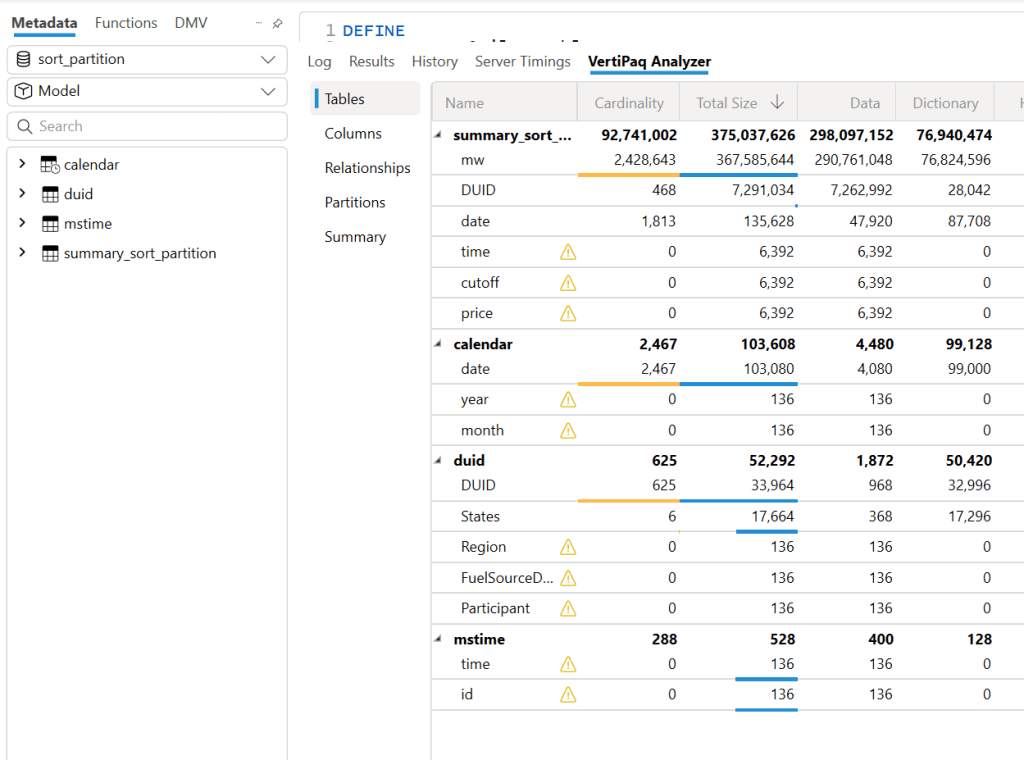
But more importantly, it’s not just about the Parquet size. Power BI in Direct Lake mode (and import mode) can keep only the columns used by the query into memory at the row group level. If I query only the year 2024, there is a good chance that only the row groups containing that data will be kept into memory. However, for this to work, the data must be sorted. If 2024 data is spread all over the place, there is no way to page out the less used row groups.
edit : to be very clear, Vertipaq needs to see all the data to build a global dictionary, so initially all columns needed for a query has to be fully loaded into Memory.
More Advanced Sorting Heuristics
These are more complex row-reordering algorithms. Instead of simply sorting by columns, they analyze the entire dataset and reorder rows to achieve the best Run-Length Encoding (RLE) compression across all columns simultaneously. I suspect that V-order uses something similar, but this is a more complex topic that I don’t have much to say about.
To make matters more complex, it’s not just about finding a near-optimal solution; the algorithm must also be efficient. Consuming excessive computational resources to determine the best reordering might not be a practical approach.
Reducing column cardinality by splitting decimals into separate columns can also help. For example, instead of storing price = 73.3968, store it in two columns: 73 and 3968.
Indeed, this gave even better results—a size reduction to 365 MB.
To be totally honest, though, while it gave the best compression result, I don’t feel comfortable using it. Let’s just say it’s for aesthetic reasons, and because the data is used not only for Power BI but also for other Fabric engines. Additionally, you pay a cost later when combining those two columns.
Partitioning
Once the sorting is optimized, note that compression occurs at the row group level. Small row groups won’t yield better results.
For this particular example, Delta_rs generates row groups with 2 million rows, even when I changed the options. I might have been doing something wrong. Using Rust as an engine reduced it to 1 million rows. If you’re using Delta_rs, consider using pyarrow instead:
Notice here, I’m not partitioning by column but by file. This ensures uniform row groups, even when data distribution is skewed. For example, if the year 2020 has 30M rows and 2021 has 50M rows, partitioning by year would create two substantially different Parquet files.
Testing Again in Fabric F2
Using F2 capacity, let’s see how the new semantic models behave. Notice that the queries are generated from the Power BI report. I manually used the reports to observe capacity behavior.
Testing Using DAX Studio
To understand how each optimization works, I ran a sample query using DAX Studio. Please note, this is just one query and doesn’t represent the complexity of existing reports, as a single report generates multiple queries using different group-by columns. So, this is not a scientific benchmark—just a rough indicator.
Make sure that PowerBI has no data in memory, you can use the excellent semantic lab for that
!pip install -q semantic-link-labs
import sempy_labs as labs
import sempy.fabric as fabric
def clear(sm):
    labs.refresh_semantic_model(sm, refresh_type='clearValues')
    labs.refresh_semantic_model(sm)
    return "done"
for x in ['sort_partition_split_columns','vorder','sort_partition','no_sort']:
    clear(x)
Cold Run
The cold run is the most expensive query, as VertiPaq loads data from OneLake and builds dictionaries in memory. Only the columns needed are loaded. Pay attention to CPU duration, as it’s a good indicator of capacity unit usage.
Warm Run
All queries read from memory, so they’re very fast, often completing in under 100 milliseconds, SQL endpoint return the data around 2 seconds, yes, it is way slower than vertipaq but virtually it does not consume any interactive compute.
using DAX Studio you can view the column loaded into Memory, any column not needed will not be loaded
and the total data size into Memory
Hot Run
This isn’t a result cache. VertiPaq keeps the result of data scans in a buffer (possibly called datacache). If you run another query that can reuse the same data cache, it will skip an unnecessary scan. Fabric DWH would greatly benefit from having some sort of result cache (and yes, it’s coming).
Takeaways
VertiPaq works well with sorted Parquet files. V-order is one way to achieve that goal, but it is not a strict requirement.
RLE Encoding is more effective with larger row groups, and when the data is sorted
Writing data in Fabric is inexpensive; optimizing for user-facing queries is more important.
Don’t dismiss Direct Query mode in Fabric DWH—it’s becoming good enough for interactive, user-facing queries.
Fabric DWH background consumption of compute unit is an attractive proposition
Power BI will often read Parquet files written by Engines other than Fabric. A simple UI to display whether a Delta Table is optimized would be beneficial.
Fabric DWH appears to handle less optimized Parquet files with greater tolerance
Use SQGLot to parse the SQL query and extract the list of Delta tables that need to be scanned from OneLake.
Track Table Metadata
Capture the Delta table version and ID to ensure consistency.
Selective Copy
Copy only the necessary tables locally to satisfy the query.
Reuse Cached Data
For subsequent queries, check if the Delta table has changed:
If unchanged, read data from the local SSD.
If new tables are required, repeat the caching process for those tables.
Why It Works
This approach effectively creates a temporary, ad hoc disk cache in the notebook. The cache:
Persists only for the session’s duration.
Evicts automatically when the session ends.
Ensures consistency by validating whether the Delta table in OneLake has changed before reusing cached data.
Thanks to the Delta format, this validation is a relatively cheap operation.
Leverages the user-level isolation in Fabric notebooks to eliminate risks of data inconsistency.
Despite its simplicity, this method has proven to be highly effective for query acceleration! 🚀
Limitations
Yes, I know—the cache is rather naïve since it loads the entire table. Other systems go further by:
Copying only the columns needed for the query.
Fetching just the row groups relevant to the query.
However, these optimizations would need to be implemented natively by the engine itself.
Industry Gap
Although virtually all Python engines (e.g., Polars, DataFusion, etc.) support reading formats like Delta and Iceberg, almost none offer built-in disk or RAM caching. This lack of caching support limits performance optimization opportunities.
Hopefully, this will change in the future, enabling more efficient workflows out of the box.
Btw, this is really fast !!! just a hint, this is faster than the results obtained by a state of the art DWH in 2022 !!!




 Small Data And self service