Horizontal Calculation in DuckDB SQL

Was doing some visualization in Fabric Python Notebook and I end up with this report, don’t worry, it is not the source table, my data is normalized, it is just a pivot table not a Delta Table.

It makes sense visually, I can easily see the numbers side by side, that’s a decent Pivot Table, there is something deeply human about seeing the raw numbers. 

Note : Don’t read too much in the data itself, it is not very rigorous ( OS cache is messing everything up)

SQL Excel Style 

Then I wanted to add a column to show the biggest number for every row. Yes, I know how to do it the Proper way 🙂  but why can’t I do it here without doing unpivot and stuff, after all it is trivial in Excel right ? turn out it is possible now using DuckDB SQL ( development build) 

xx = duckdb.sql(f" select *, greatest(*columns(*exclude(query))) as max from result  ")
xx

Yes, that’s right, it’s looking for the highest number horizontally !!! I think it is awesome, it seems only the greatest and the least are supported so far, but I will not be surprised if they add sum and addition after all there is no natural law that dictate a sum in SQL should accept only 1 column as a parameter. 

I want to normalize the numbers , the worst performance will be 1, I can do that by dividing the columns values  by the the column max, again, I am doing calculations at the row, level, probably an Excel user will wonder what’s the big deal about it 🙂

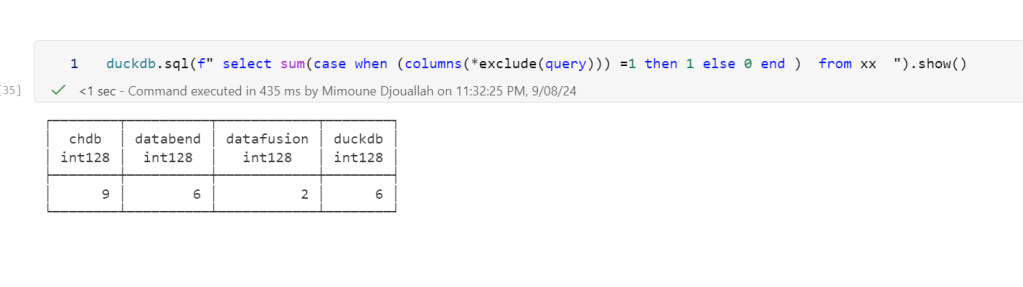
I want to count the worst Query by engine, I will just count all the rows with number 1

Now let’s use the original report “results” to see the total duration for all Engines

And geometric mean

Cast multiple columns in one go

This one was really helpful as I had a table with nearly 40 columns to cast to double, which is a trivial operation when using Dataframe API but a nightmare in SQL as you need to type every column name, with columns, it is trivial

cast(columns(*exclude(DUID,UNIT,SETTLEMENTDATE,I,XX,filename)) as double)

Take away

As an Excel user, who try to play a bit with SQL, sometimes I ask myself, surely there must be a better  way, why SQL can’t do this or that easily ?  and I remember asking the same question to an industry veteran a couple of years ago and his answer was basically the current status quo is the natural order of things and you should try a Dataframe API for that, but now  I know it is not true, SQL can do anything in theory, no one has bothered to do the hard work, I had the same reaction when I “discovered” TSQL where it acts literally as a programming language with loops and if then !!!

Having said that, i feel the industry has more appetite for a change, notice for example how quickly DWH vendors adopted group by all, maybe it is more practical to enhance SQL than hope for the adoption of a standard DataFrame API ?

and by the way, if you want to do analysis using SQL do yourself a favor and use a notebook 🙂

Reading Delta table in Fabric Python notebook without attaching a lakehouse. 

This is just a code snippet on how to read a delta table using pure Python (no Spark) without attaching a lakehouse.

First in spark notebook you need to install those two package ( this step will be unnecessary with pure Python notebook)

%pip install deltalake
!pip install duckdb

Then get the abfss path of the table, it can be anywhere, even in different workspace.

from deltalake import DeltaTable
import duckdb
access_token = notebookutils.credentials.getToken('storage')
storage_options=     {"bearer_token": access_token, "use_fabric_endpoint": "true"}
TAXI = DeltaTable('abfss://xxx@onelake.dfs.fabric.microsoft.com/NY.Lakehouse/Tables/ny/taxi',storage_options = storage_options).to_pyarrow_dataset()

For this example the table is not small ( 1.3 billion rows) , having filter pushdown is a must for a good user experience, for smaller data it does not matter.

let’s show 5 rows, the limit is pushed to the source, we don’t need to scan 20 GB just to see some rows.

display(duckdb.sql(f''' SELECT * from TAXI limit 5 ''').df())

Note : you can use any Engine that understand arrow dataset , personally I prefer duckdb but it is a personal taste

Now let’s filter the data only for this year, again, filter pruning works, what I really like ; although the table is not partitioned somehow the scan is leveraging the stats in the delta table log

data = duckdb.sql(f''' SELECT date ,  ROUND (SUM (fare_amount),0) as TotalFares , ROUND (AVG (fare_amount),0) as AVGFares
             FROM TAXI where year = 2024 GROUP BY ALL ''').df()
display(data)

Not everything is perfect yet 😦

max (column) , count(*) unfortunately does not use the delta log and trigger a whole table scan.

let’s show some interactive chart

I have the aggregated data already, using the excellent library Altair, I can easily plot an interactive chart

import altair as alt
brush = alt.selection_interval()
details = alt.Chart(data).mark_bar().encode(alt.X('date:T'),  alt.Y('TotalFares:Q'), tooltip=[alt.Tooltip('date:T',format='%Y-%m-%d %H'),'TotalFares:Q']
).properties( width=1400,  height=400 ).add_params( brush)

summary = alt.Chart(data).mark_square().encode( alt.X('date:T'), alt.Y('AVGFares:Q'), tooltip=['AVGFares:Q'] ).properties(  width=1400,  height=400).transform_filter( brush)
details & summary

honestly, I did not know how much covid had impacted the Taxi industry 😦

You can use Other Engines too

as I said it is not specific to duckdb, for example using Polars

import polars as pl
access_token = notebookutils.credentials.getToken('storage')
storage_options=     {"bearer_token": access_token, "use_fabric_endpoint": "true"}
scada = pl.scan_delta('abfss://xxx@onelake.dfs.fabric.microsoft.com/NY.Lakehouse/Tables/ny/taxi', storage_options=storage_options)
x = scada.limit(10).collect()

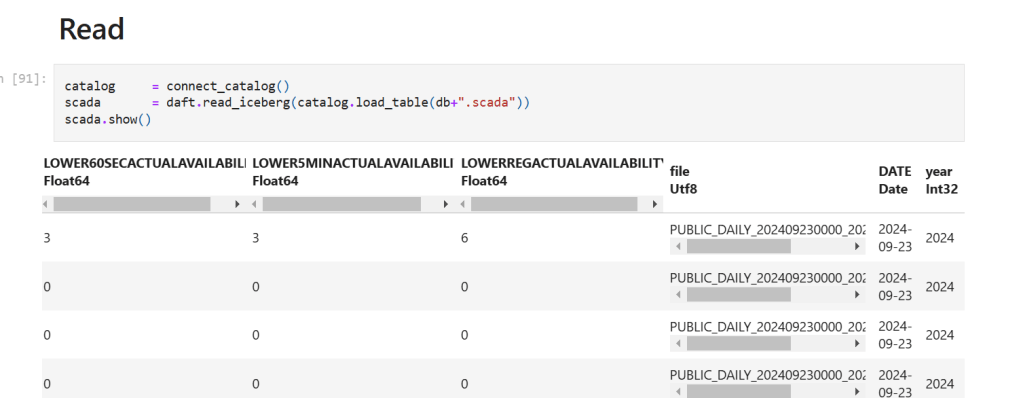
and Daft

import daft
from daft.io import IOConfig, AzureConfig
io_config = IOConfig(azure=AzureConfig(storage_account="onelake",endpoint_url="https://onelake.blob.fabric.microsoft.com",bearer_token=access_token))
df = daft.read_deltalake('abfss://xxx@onelake.dfs.fabric.microsoft.com/NY.Lakehouse/Tables/ny/taxi', io_config=io_config)
df

Building Idempotent Data Pipelines with DuckDB SQL

Alright using the term “idempotent” was just a clickbait 🙂 it simply means avoiding the processing of the same file multiple times ( ok for a formal definition wikipedia has a nice article). in this case the script will process only new files added to the source system, assuming the filenames are unique.

Although this is easily accomplished using Python API , achieving the same result using DuckDB SQL was a bit tricky until the introduction of SQL variables in the developpement branch a couple of weeks ago, particularly Variables can now be referenced within read files operation.

in summary this is what the SQL script is doing.

  1. Creation of a Hive table in the file section of onelake, it is very important step, if you query an empty folder you will get an error, , as DuckDB does not support external table, we will just add a dummy parquet file with empty rows, it is filtered out in the next step.
  COPY (
  SELECT
    '' AS filename,
    NULL AS year ) TO "/lakehouse/default/Files/scada" (FORMAT PARQUET,
    PARTITION_BY (year),
    OVERWRITE_OR_IGNORE ) ;
  1. Listing of CSV files for ingestion from the source system.
  2. Removal of already ingested files
SET
  VARIABLE list_of_files = (
  SELECT
    list(file)
  FROM
    glob("/lakehouse/default/Files/Daily_Reports/*.CSV")
  WHERE
    parse_filename(file) NOT IN (
    SELECT
      filename
    FROM
      read_parquet("/lakehouse/default/Files/scada/*/*.parquet")))
  1. Generate list of new files and pass it to DuckDB for processing.

just a preview of the query plan for this step

  1. Saving as partitioned Hive parquet folders

Note : I am using Fabric notebook as an example, but obviously you can run it anywhere, actually I did it run in my laptop and as far as I can tell, Onelake throughput is competitive with my ssd disk 🙂

  COPY (
  SELECT
    '' AS filename,
    NULL AS year ) TO "/lakehouse/default/Files/scada" (FORMAT PARQUET,
    PARTITION_BY (year),
    OVERWRITE_OR_IGNORE ) ;
SET
  VARIABLE list_of_files = (
  SELECT
    list(file)
  FROM
    glob("/lakehouse/default/Files/Daily_Reports/*.CSV")
  WHERE
    parse_filename(file) NOT IN (
    SELECT
      filename
    FROM
      read_parquet("/lakehouse/default/Files/scada/*/*.parquet"))) ;
CREATE OR REPLACE VIEW
  raw AS (
  SELECT
    *
  FROM
    read_csv(getvariable('list_of_files'),
      Skip=1,
      header =0,
      all_varchar=1,
      COLUMNS={ 'I': 'VARCHAR',
      'UNIT': 'VARCHAR',
      'XX': 'VARCHAR',
      'VERSION': 'VARCHAR',
      'SETTLEMENTDATE': 'VARCHAR',
      'RUNNO': 'VARCHAR',
      'DUID': 'VARCHAR',
      'INTERVENTION': 'VARCHAR',
      'DISPATCHMODE': 'VARCHAR',
      'AGCSTATUS': 'VARCHAR',
      'INITIALMW': 'VARCHAR',
      'TOTALCLEARED': 'VARCHAR',
      'RAMPDOWNRATE': 'VARCHAR',
      'RAMPUPRATE': 'VARCHAR',
      'LOWER5MIN': 'VARCHAR',
      'LOWER60SEC': 'VARCHAR',
      'LOWER6SEC': 'VARCHAR',
      'RAISE5MIN': 'VARCHAR',
      'RAISE60SEC': 'VARCHAR',
      'RAISE6SEC': 'VARCHAR',
      'MARGINAL5MINVALUE': 'VARCHAR',
      'MARGINAL60SECVALUE': 'VARCHAR',
      'MARGINAL6SECVALUE': 'VARCHAR',
      'MARGINALVALUE': 'VARCHAR',
      'VIOLATION5MINDEGREE': 'VARCHAR',
      'VIOLATION60SECDEGREE': 'VARCHAR',
      'VIOLATION6SECDEGREE': 'VARCHAR',
      'VIOLATIONDEGREE': 'VARCHAR',
      'LOWERREG': 'VARCHAR',
      'RAISEREG': 'VARCHAR',
      'AVAILABILITY': 'VARCHAR',
      'RAISE6SECFLAGS': 'VARCHAR',
      'RAISE60SECFLAGS': 'VARCHAR',
      'RAISE5MINFLAGS': 'VARCHAR',
      'RAISEREGFLAGS': 'VARCHAR',
      'LOWER6SECFLAGS': 'VARCHAR',
      'LOWER60SECFLAGS': 'VARCHAR',
      'LOWER5MINFLAGS': 'VARCHAR',
      'LOWERREGFLAGS': 'VARCHAR',
      'RAISEREGAVAILABILITY': 'VARCHAR',
      'RAISEREGENABLEMENTMAX': 'VARCHAR',
      'RAISEREGENABLEMENTMIN': 'VARCHAR',
      'LOWERREGAVAILABILITY': 'VARCHAR',
      'LOWERREGENABLEMENTMAX': 'VARCHAR',
      'LOWERREGENABLEMENTMIN': 'VARCHAR',
      'RAISE6SECACTUALAVAILABILITY': 'VARCHAR',
      'RAISE60SECACTUALAVAILABILITY': 'VARCHAR',
      'RAISE5MINACTUALAVAILABILITY': 'VARCHAR',
      'RAISEREGACTUALAVAILABILITY': 'VARCHAR',
      'LOWER6SECACTUALAVAILABILITY': 'VARCHAR',
      'LOWER60SECACTUALAVAILABILITY': 'VARCHAR',
      'LOWER5MINACTUALAVAILABILITY': 'VARCHAR',
      'LOWERREGACTUALAVAILABILITY': 'VARCHAR' },
      filename =1,
      null_padding = TRUE,
      ignore_errors=1,
      auto_detect=FALSE)
  WHERE
    I='D'
    AND UNIT ='DUNIT'
    AND VERSION = '3' ) ; COPY (
  SELECT
    UNIT,
    DUID,
    parse_filename(filename) AS filename,
    CAST(COLUMNS(*EXCLUDE(DUID,
          UNIT,
          SETTLEMENTDATE,
          I,
          XX,
          filename)) AS double),
    CAST (SETTLEMENTDATE AS TIMESTAMPTZ) AS SETTLEMENTDATE,
    isoyear (CAST (SETTLEMENTDATE AS timestamp)) AS year
  FROM
    raw) TO "/lakehouse/default/Files/scada" (FORMAT PARQUET,
    PARTITION_BY (year),
    APPEND ) ;

While the Python API in a notebook is IMHO  the easiest approach for data transformation, it is nice to see that Pure SQL can support it. 

However, the real game-changer will be when DuckDB introduces support for Delta write. for now, you need another step to load those Parquet files to Delta either using Deltalake Python package or Spark Delta writer.

How to attach Onelake Lakehouse to DuckDB

Update 26-Oct-2024 : using DuckDB 1.1.2, you don’t need to to mount a lakehouse to the notebooks and add support for reading Onelake Lakehouse outside of Fabric . currently it is read only, for writing you need Delta_rs

it is a very simple Python script how you can attach a Lakehouse to DuckDB in a Fabric notebook (you can use the same logic for Polars,Daft etc)

it is read only and will create views based on your existing Delta tables, it assumes you are using schemas, but you can edit it for simpler use cases, or if you have a lot of tables, maybe it is more practical just to attach one specific schema.

import duckdb
from glob import glob
def attach_lakehouse(base_path): 
    list_tables = glob(f"{base_path}*/*/", recursive=True)
    sql_schema = set()
    sql_statements = set()
    for table_path in list_tables:
        parts = table_path.strip("/").split("/")
        schema = parts[-2]
        table = parts[-1]
        sql_schema.add(f"CREATE SCHEMA IF NOT EXISTS {schema};")
        sql_statements.add(f"CREATE OR REPLACE VIEW {schema}.{table} AS SELECT * FROM delta_scan('{table_path}');")
    duckdb.sql(" ".join(sql_schema))
    duckdb.sql(" ".join(sql_statements))
    display(duckdb.sql("SHOW ALL TABLES").df())
attach_lakehouse('/lakehouse/default/Tables/')

and here is an example

now you can read and joins any tables even from different schemas

Notice Delta support in DuckDB is not very performant at this stage, compared to pure Parquet, but I suspect we will see a massive improvement in the next version 1.1