If you’re utilizing Microsoft Fabric and notice consistently high usage—perhaps averaging 90%—or experience occasional throttling, it’s a clear indication that you’re nearing your capacity limit. This situation could pose challenges as you scale your workload. To address this, you have three primary options to consider:
- Upgrade to a Higher SKU
Increasing your capacity by upgrading to a higher SKU is a straightforward solution, though it comes with additional costs. This option ensures your infrastructure can handle increased demand without requiring immediate changes to your workflows. - Optimize Your Workflows
Workflow optimization can reduce capacity consumption, though it’s not always a simple task. Achieving meaningful improvements often demands a higher level of expertise than merely maintaining functional operations. This approach requires a detailed analysis of your processes to identify inefficiencies and implement refinements. - Reduce Data Refresh Frequency
A practical and often overlooked option is to adjust the freshness of your data. Review the workflows consuming the most capacity and assess whether the current refresh rate is truly necessary. For instance, if a process runs continuously or frequently throughout the day, consider scheduling it to operate within a specific window—say, from 9 AM to 5 PM—or at reduced intervals. As an example, I adjusted a Python notebook that previously refreshed every 5 minutes to run hourly, limiting it to 10 executions per day. The results demonstrated a significant reduction in capacity usage without compromising core business needs.
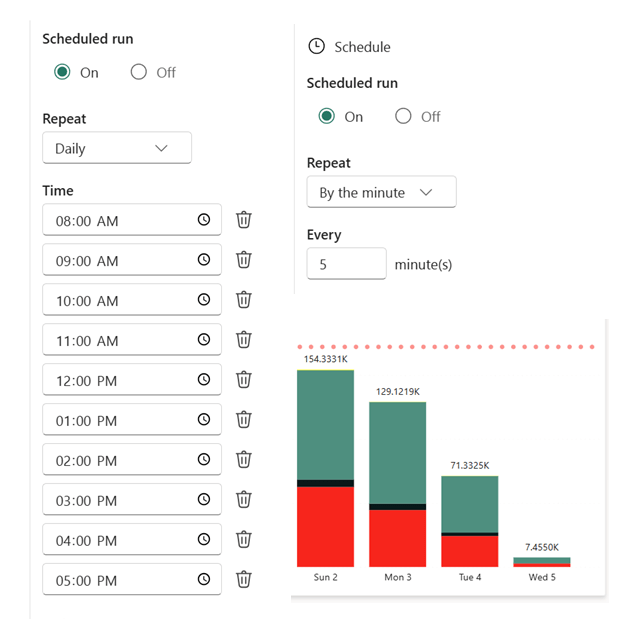
8000 CU(s) total usage for a whole solution is just a bargain !!! Python Notebook and Onelake are just too good !!! the red bar is the limit of F2
Choosing the Right Path
If your organization has a genuine requirement for frequent data refreshes, reducing freshness may not suffice. In such cases, you’ll need to weigh the benefits of optimization against the simplicity of upgrading your SKU.
 Small Data And self service