At last in the August 2021 update of PowerBI we finally can create custom Queries when connecting to BigQuery, this is a very big deal for two reasons.
- For users who can’t write views on the Database
- Passing complex parameter values to a SQL Query
To show an example, I am using the same Query from this previous blog, I am not going going to repeated here, have a look as it has more details about BigQuery GIS Clustering.
First issue I did not know how to pass multiple values, as it is a list, luckily Chris has written this excellent blog using Snowflake please read his blog first, and the code works the same
Here is the a pseudo M code, notice I copied Chris code verbatim, I had just to add Square Brackets “[]” to the parameter TagsList , so BigQuery understand it as an array.
For example when a user select fuel, cafe
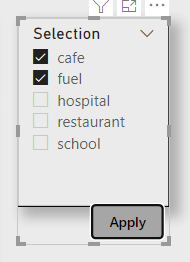
the SQL became
UNNEST( “& TagsList &” ) ——-> UNNEST( [‘cafe’,’fuel’] )
let
TagsList =
    if
    //check to see if the parameter is a list
      Type.Is(
        Value.Type(tag_selection),
        List.Type
      ) then
        //if it is a list
        let
          //add single quotes around each value in the list
          AddSingleQuotes = List.Transform(
              tag_selection,
              each "'" & _ & "'"
            ),
          //then turn it into a comma-delimited list
          DelimitedList = "[" & Text.Combine(
              AddSingleQuotes,
              ","
            ) &"]"

        in
          DelimitedList
    else
      //if the parameter isn't a list
      //just add single quotes around the parameter value
      "['" & tag_selection & "']",

Source = Value.NativeQuery(GoogleBigQuery.Database([BillingProject="xxxxxx"]){[Name="test-187010"]}[Data], "select  from xxx WHERE    value IN UNNEST( "& TagsList &"  ))
    Source
and here is the final report, using the Excellent icon Map custom Visual
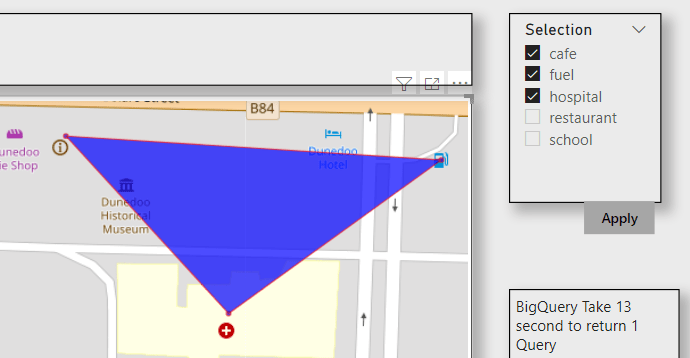
As the data is free, I made a publish to web report , the report is a bit slow as it take in average 12 second for BigQuery to return the results, either GIS Clustering is expensive or The SQL Query is not optimized.
I think it is an exciting new functionality, there are a lot of uses cases where you want to exactly control the SQL generated by PowerBI.
 Small Data And self service
3 thoughts on “Multi select parameter support in BigQuery when using PowerBI”